Akamai Bot Manager: How It Works and How ScrapeBadger Bypasses It
 Domas Sakavickas
AI Summary: This article explains how Akamai Bot Manager silently degrades scraper traffic by returning clean 200 responses with useless data, why every standard bypass eventually fails, and how ScrapeBadger's infrastructure defeats it without configuration.
Akamai Bot Manager is Akamai's bot-detection product for its CDN customers. It checks signals such as a client's TLS handshake, headers, IP, and what a half-megabyte JavaScript sensor reports. It stores session state in cookies, including _abck, ak_bmsc, and ones prefixed bm_.
When a scraper receives an empty HTTP 200 from an Akamai host, Akamai looks like the cause. In two rounds on 8 hosts, our HTTP client, curl_cffi, got 11 such responses, and Akamai sent 5.
This guide shows how to distinguish them, what the sensor reads, and which tools got the page, from headless Chrome to our API.
TL;DR
Not every empty 200 is Akamai's. Of our 11, 5 were Akamai's challenge page and 6 were JavaScript bootstraps or a country page, so check your data first.
Our headless fix, tuned on 7 homepages, got all 7, as headed Chrome did, from one IP on a Mac: User-Agent fixed browser-wide, real client hints, and
navigator.webdriveroff.None of our 12
_abcksamples contained~0~, the "cleared" flag, and refusals also had long cookies.The ScrapeBadger API reached a US storefront that our test IP in India could not, getting 4 of those 7 in one untuned run.
Confirm it is Bot Manager, and check what else is on the host
Before you start, check robots.txt and the terms for the exact paths you plan to fetch. Fetch robots.txt with a Chrome-impersonating client such as curl_cffi (pip install curl_cffi). Plain curl was refused on 4 of the 5 robots files we tried, and curl_cffi fetched all 5. The robots files of all 8 hosts allowed a generic crawler on every URL we fetched.
We tested our own API as a customer would, with a free-tier key and no internal access. All our traffic was low volume, from one residential IP in India, on a Mac, against homepages and 10 deeper public pages, on September, 2026. We did not test volume, request rate, IP reputation, or datacenter ranges, any of which can break a working scraper.
We fetched 40 manually chosen candidate hosts once each with curl_cffi and read the Set-Cookie headers. Of those, 28 set at least one Bot Manager cookie, a high share, because of how we picked them. Eight of the 28 are our main test hosts, picked because together they show every response type we saw: loopnet.com, aa.com, marriott.com, kohls.com, bestbuy.com, delta.com, united.com, and macys.com. Four more, fidelity.com, schwab.com, sephora.com, and net-a-porter.com, appear where a cookie or response type needs more examples.
Across those 28, six cookie names identified Bot Manager: bm_sz on 20, bm_mi on 18, _abck and ak_bmsc on 15, bm_so on 14, and bm_sv on 3. _abck shows the host runs the sensor and expects a payload back, and bm_so appeared with a second sensor script, which loopnet.com ran without the first. bm_s, bm_sc, and bm_lso appeared in later captures, and only alongside the cookies above. Check for all of these names, since _abck alone found 15 of the 28.
Cookie presence does not mean you have been blocked. macys.com set four of these on a response that contained 1.5 MB of HTML, 34,775 characters of visible text, and 1,856 links.
A single homepage fetch showed a second vendor's markers on 3 of the 28: PerimeterX / HUMAN on homedepot.com and walmart.com, and Kasada on sephora.com. If Kasada or DataDome is the layer refusing you, start with our guide to that vendor, since the fixes here were tested on Akamai.
Our detection endpoint checks for these markers in one call. Its docs list current costs, and repeat lookups on a domain are cached. Get a key from the dashboard's API Keys page on a free account:
curl -X POST "https://scrapebadger.com/v1/web/detect" \
  -H "x-api-key: YOUR_API_KEY" \
  -H "Content-Type: application/json" \
  -d '{"url": "https://www.bestbuy.com/"}'
The response lists each anti-bot and CAPTCHA system it detects on that URL, with a confidence score.
When a 200 arrives empty, check who sent it
An empty response from an Akamai host can come from Akamai or from the site itself, and the fix depends on which one sent it. Six of our client's 11 empty 200s were false positives, responses that look like refusals and are not. Sizes are character counts, which match bytes on these mostly ASCII pages.
The JavaScript bootstrap looks like a block to a size check. delta.com sent our HTTP client 8,670 bytes of HTML with 57 characters of visible text, and united.com sent 88,763 bytes with no visible text. Two days later, a new curl_cffi fetch of delta.com and the first document headed Chrome received, before any script ran, were the same 8,635 bytes, apart from a request id, a client port, and a timestamp. So render the bootstrap in a browser that Akamai accepts: stock headless Chrome was refused on both hosts.
The country selector was bestbuy.com's response to every browser we ran from India, headed Chrome included, so fingerprint changes did not help. Our API got the US storefront from the same URL.
The behavioural interstitial is Akamai's own empty 200, the challenge page: 2,503 to 2,627 bytes on 4 hosts, 32 characters of visible text, 1 link, no title, and a body of the sensor script plus a hidden <div id="sec-if-cpt-container">. An inline script reloads the document once the sensor's response arrives, so the status your driver reports for the first navigation may not be the final status. A client that stops at the first page load sees the interstitial, and one that waits for the reload can get the page or a deny page. We count it as a refusal, because it is one for any client that cannot run the sensor.
Akamai's other refusals were error pages, or no page at all.
The edge deny, an Access Denied page from Akamai's edge server, arrived in three templates. Of our 20 saved deny bodies, all 10 plain ones went to a browser, and all 7 entity-encoded ones went to an HTTP client. These three lines come from a 518-byte entity-encoded deny that kohls.com sent curl_cffi:
<TITLE>Access Denied</TITLE>
Reference #18.169d4c17.1790081149.1d163b2
<P>https://errors.edgesuite.net/18.169d4c17.1790081149.1d163b2</P>The dots in that link are written as HTML entities, so a substring test for errors.edgesuite.net misses it until you unescape the HTML. The third template is 189 bytes, with no errors.edgesuite.net line and no # before its reference number. delta.com sent it to both HTTP clients and headless browsers, with HTTP 444, a status normally used for a closed connection. The split was 10 plain, 7 entity-encoded, and 3 short, and two checks detected all 20: Access Denied in the title, and a reference number read after unescaping.
Two of the reference number's four fields decode to something you can use. The fields appear to be a leading code, the refusing edge server's IPv4 address in byte-reversed hex, a Unix timestamp, and an identifier. In 18.169d4c17.1790081149.1d163b2, 169d4c17 decodes to 23.76.157.22, an akamaitechnologies.com host, and 1790081149 matched the Unix time of that refused request. Match the timestamp against your own logs to find the refused request.
The host's own error page came in two sizes on macys.com. requests and headless Chromium got a branded Access Denied - Macy's page of about 10 KB with none of the edge markers, only a JavaScript variable, window.AKAMAI_ERROR_PAGE_NAME = "ACCESS_DENIAL_PAGE_BVM".
The other size was the hardest refusal to detect. Headless Chrome with a rewritten User-Agent got a 200 first, then a later page load ended on a 403: a Macy's-branded denial page, inside the site's full navigation. It was 322,530 characters long, 12,387 of them visible text, with 676 links, five prices from the navigation promotions, and the same variable set to ACCESS_DENIAL_PAGE_CPR. A size check, a link check, and a check for any price in the page all treat it as a real page.
Two refusals produced no page. united.com reset headless Chromium's HTTP/2 stream and let plain requests time out, then responded to both once we fixed their identity. On an Akamai host a reset or a timeout can be the refusal itself.
The whole set follows, one capture per host and response type, 9 refusals and 3 false positives in all:
Response | Sent by | HTTP | HTML | Text | Links |
delta, JavaScript bootstrap | the site | 200 | 8,670 | 57 | 0 |
united, JavaScript bootstrap | the site | 200 | 88,763 | 0 | 0 |
bestbuy, country selector | the site | 200 | 7,043 | 760 | 9 |
loopnet, behavioural interstitial | Akamai | 200 | 2,614 | 32 | 1 |
aa, behavioural interstitial | Akamai | 200 | 2,503 | 32 | 1 |
marriott, behavioural interstitial | Akamai | 200 | 2,627 | 32 | 1 |
net-a-porter, behavioural interstitial | Akamai | 200 | 2,616 | 32 | 1 |
kohls, entity-encoded edge deny | Akamai | 403 | 518 | 285 | 0 |
loopnet, plain edge deny | Akamai | 403 | 291 | 207 | 0 |
delta, short edge deny | Akamai | 444 | 189 | 117 | 0 |
macys, branded 403 | Akamai, on the host's page | 403 | 10,125 | 251 | 0 |
macys, branded 403 in full site navigation | Akamai, on the host's page | 200, then 403 | 322,530 | 12,387 | 676 |
All 3 false positives and 4 of the 9 refusals returned 200, and a fifth refusal looked like a 200 to a browser driver that checked only the first page load. For comparison, we used 7 served pages: macys.com and schwab.com through an HTTP client, kohls, loopnet, delta, and aa in headed Chrome, and united through our API. They contained 3,174 to 34,775 characters of text and 66 to 1,856 links.
Arranged by who sends each one, the responses form two groups:
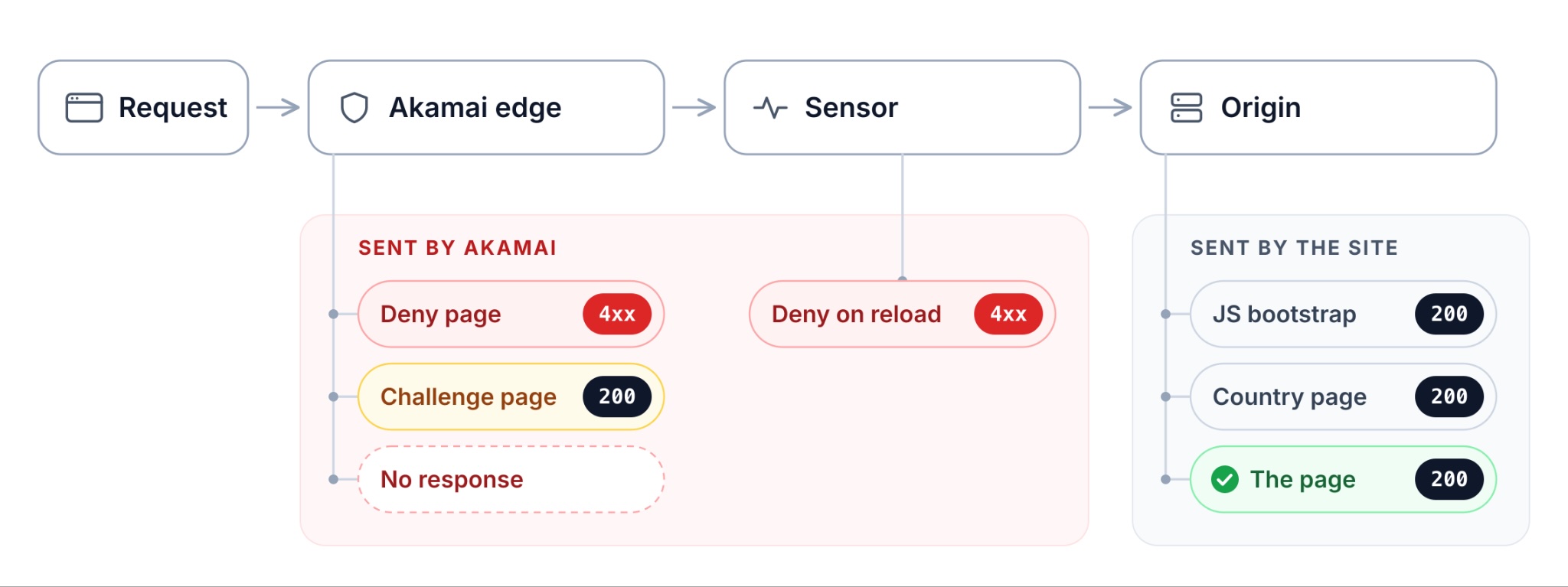
A status check cannot distinguish these: four of them arrive as HTTP 200, and only one is the page.
What the common block checks detect, and what they miss
We ran the block checks from scraping guides, and three thresholds of our own, against the 9 refusals, the 3 false positives, and the 7 served pages. We set our thresholds on these same pages, so our size checks' zeros on served pages mean little:
Check | Refusals detected, of 9 | Fires on a false positive, of 3 | Fires on a served page, of 7 |
status of the first response | 4 | 0 | 0 |
status of the last document | 5 | 0 | 0 |
| 5 | 0 | 0 |
| 1 | 0 | 0 |
| 4 | 0 | 0 |
ours: fewer than 20 links | 8 | 3 | 0 |
ours: under 2,000 characters of visible text | 8 | 3 | 0 |
ours: no | 8 | 3 | 3 |
The text and link checks detected 8 of the 9 and missed macys.com's large denial page. Two checks detected it: the status of the last document, which page.goto() does not report, and Access Denied in the title. The price check missed that denial and flagged 3 airline homepages that show no fares. No marker check fired on a false positive, so a size check tells you a page is empty, and a marker check tells you whether Akamai sent it.
Check for the field you need, in the element that contains it. In a scraper built on requests and BeautifulSoup (pip install requests beautifulsoup4), the before version records a refusal as a blank row. Here parse() represents your existing extraction, returning a dict of fields:
import requests
from bs4 import BeautifulSoup

r = requests.get(url)
if r.status_code == 200:
    rows.append(parse(BeautifulSoup(r.text, "html.parser")))
The after version counts a row only when it contains the field you need:
rows, refused = [], []          # once, before the loop
r = requests.get(url)
row = parse(BeautifulSoup(r.text, "html.parser"))
if row.get("price"):
    rows.append(row)
else:
    refused.append(url)      # a 200 with no field is not a row: a refusal,
                             # a bootstrap, a country page, or an empty pageMake that change first: it is cheap and changes silent data loss into a list of failed URLs you can count.
The field check tells you that a page failed, not why. This script sorts one response by who sent it, checking Akamai's markers and the page title before any size threshold. The script labels macys.com's large denial page akamai refusal on the host's own error page, whatever status it was saved with.
Run it on a URL, or better, on a body your production client saved, since the response depends on your client and IP. With requests, save it with open("saved.html", "w").write(r.text). From a browser, save page.content() and pass the status of the last main-frame document, not the first, as in python triage.py saved.html 403:
import os, re, sys
from curl_cffi import requests
# Other vendors, so a host that also runs one of them is not reported as Akamai alone.
STACKED = {
"DataDome": r"captcha-delivery\.com|datadome\.co\b",
"Cloudflare": r"cf_chl_opt|challenges\.cloudflare\.com",
"PerimeterX / HUMAN": r"perimeterx\.net|px-cloud\.net",
"Imperva": r"_Incapsula_Resource",
"Kasada": r"kpsdk",
}
BM_COOKIES = re.compile(r"^(_abck|ak_bmsc|bm_sz|bm_so|bm_sv|bm_mi|bm_s|bm_sc|bm_lso)$")
# All three edge deny templates carry this; the third field is a Unix timestamp.
REFERENCE = re.compile(r"Reference #?\d+\.[0-9a-f]+\.(\d{9,11})\.")
# A page under both of these is empty. Tune them on your own target's pages.
MIN_TEXT, MIN_LINKS = 2000, 20
def visible_text(html):
t = re.sub(r"<script.*?</script>|<style.*?</style>|<noscript.*?</noscript>", " ",
html, flags=re.S | re.I)
return re.sub(r"\s+", " ", re.sub(r"<[^>]+>", " ", t)).strip()
def verdict(status, html, text, links, title):
# Unescape before matching: one deny template writes every dot as .,
# and the "#" and the space in "Reference #" as entities too.
flat = html
for ent, ch in ((".", "."), (":", ":"), ("/", "/"),
("#", "#"), (" ", " ")):
flat = flat.replace(ent, ch)
ref = REFERENCE.search(flat)
if "sec-if-cpt-container" in html:
return "akamai interstitial: the edge wants the sensor script to run in a browser"
if "AKAMAI_ERROR_PAGE_NAME" in html:
return "akamai refusal on the host's own error page"
if ref or "errors.edgesuite.net" in flat:
return "akamai edge deny at unix time %s" % (ref.group(1) if ref else "unknown")
if "access denied" in title.lower():
return "a page titled Access Denied with no Akamai marker: treat it as a refusal"
if status >= 400:
return "http %d, not an Akamai template" % status
if len(text) >= MIN_TEXT or links >= MIN_LINKS:
return "not empty: now check for the field you need"
if links == 0 and len(re.findall(r"<script", html, re.I)) >= 5:
return "javascript bootstrap: not a refusal, render it in a browser Akamai accepts"
return "empty, no akamai marker: read the title (a country page, a consent page, or a small page)"
def triage(target, status=200):
headers, cookies = {}, None
if os.path.exists(target): # a body your own client saved
html = open(target, errors="replace").read()
else:
try:
r = requests.Session(impersonate="chrome").get(target, timeout=40)
except Exception as e:
print("no response from %s: %s, which on an Akamai host can be the "
"refusal itself" % (target, type(e).__name__))
return
html, status = r.text or "", r.status_code
headers = {k.lower(): v for k, v in r.headers.items()}
cookies = sorted(n for n in r.cookies.keys() if BM_COOKIES.match(n))
text = visible_text(html)
links = len(re.findall(r"<a\s[^>]*href=", html, re.I))
m = re.search(r"<title[^>]*>(.*?)</title>", html, re.S | re.I)
title = re.sub(r"\s+", " ", m.group(1)).strip() if m else ""
if cookies is None:
akamai = bm = "unknown for a saved body"
else:
akamai = bool(cookies) or "akamai" in headers.get("server", "").lower() \
or "x-akamai-transformed" in headers or "akamai-grn" in headers
bm = ", ".join(cookies) or "no Bot Manager cookies set"
print("status %d" % status)
print("akamai present %s" % akamai)
print("bot manager %s" % bm)
print("also on the host %s" % (", ".join(
n for n, p in STACKED.items() if re.search(p, html, re.I)) or "nothing else detected"))
print("title %s" % (title[:70] or "none"))
print("verdict %s" % verdict(status, html, text, links, title))
print("body %d bytes html, %d bytes text, %d links" % (len(html), len(text), links))
if __name__ == "__main__":
# A URL to fetch now, or a saved response body plus the status it arrived with.
target = sys.argv[1] if len(sys.argv) > 1 else "https://www.delta.com/"
triage(target, int(sys.argv[2]) if len(sys.argv) > 2 else 200)Run on delta.com, it identifies a response that a status check reports as a success:
status           200
akamai present   True
bot manager      _abck, bm_mi, bm_s, bm_so, bm_sz
also on the host nothing else detected
title            Delta Air Lines | Flights & Plane Tickets + Hotels & Cars
verdict          javascript bootstrap: not a refusal, render it in a browser Akamai accepts
body             8635 bytes html, 57 bytes text, 0 links
It also identified aa.com's interstitial and loopnet.com's edge deny, and printed bestbuy.com's country-page title. The bootstrap check is a heuristic: zero links and five or more scripts. A bootstrap with a single skip link is labelled empty, no akamai marker, and its title may tell you what it is. The main results and their next steps:
Result | What it means | What to do next |
akamai interstitial | the edge wants the sensor script to run first | use a browser Akamai accepts, or route the host to a scraping API |
akamai edge deny | refused at the edge, on arrival or after the sensor ran | fix an HTTP client's headers and TLS handshake or a browser's identity, or route the host to a scraping API |
host's own error page | refused on the site's branded page | treat it as a deny, and check the last document's status |
a page titled Access Denied | a denial page with no Akamai marker | treat it as a refusal |
javascript bootstrap | not a refusal | render it in a browser Akamai accepts |
empty, no akamai marker | a country page, a consent page, or a small page | read the title, and use an IP in the right country if the title mentions a country |
not empty | no marker, and full-sized | check the field |
no response | a reset or a timeout | treat it as a possible refusal, and retry from a browser with the identity fix |
If your scraper worked last week, the result also suggests what changed. A bootstrap suggests the site moved its rendering into the browser, and a country page suggests the country of your IP changed. An interstitial or a deny suggests Akamai now judges your traffic differently, which is the part we did not test.
Tune the two thresholds on your own saved pages, using the script's visible_text() and link count: set each above your largest empty response and well under your smallest served page. Our empty responses had 0 to 760 characters and 0 to 9 links, and served pages had 3,174 to 34,775 characters and 66 to 1,856 links. The script's defaults, 2,000 characters and 20 links, are between our two ranges. If no threshold separates your empty and served pages, use the field check.
How headless Chrome differs from headed Chrome, and the fix
On Google Chrome, these hosts did not refuse headless mode itself. The fix replaced the headless User-Agent browser-wide, even where a page-level rewrite does not apply, kept the client hints real, and disabled navigator.webdriver.
We tested 13 arms, or configurations, on the same machine and IP, each changing one thing except arm D. Unless noted, they ran on Google Chrome 153 with Patchright, a Playwright fork that hides common signs of automation. Client hints are the sec-ch-ua headers and navigator.userAgentData, and CDP is the Chrome DevTools Protocol, which Playwright exposes through new_cdp_session(). Six arms are in the table:
Arm | What changed from stock headless | Served, of 7 | Still refused by |
A | nothing: the User-Agent contains | 0 | all 7, united.com with an HTTP/2 reset |
B | User-Agent rewritten with Playwright's | 3 | loopnet, aa, marriott, macys |
C | User-Agent and client hints rewritten over CDP | 3 | the same 4 |
D | C, plus color depth 30 and a window frame | 3 | the same 4 |
E | C, plus Chrome's own | 7 | none |
Headed | headed mode instead | 7 | none |
The result was the same every time we repeated it. The 4 hosts in the last column refused the page-level fixes in 20 of 20 runs across five variants: B, C, D, D plus a matched monospace font, and C on bundled Chromium. The full fix got the page in 30 of 30 runs across the 7 hosts, 18 of them on plain Playwright, 7 of those with the exact code below. A headed control after each second-round set of arms got all 7.
Playwright's user_agent option alone got the page on 3 hosts. Traced on loopnet.com in the first round, arm B's configuration got the interstitial, posted a 4,595-byte sensor payload, and was denied at the edge on the reload, after 2.3 seconds. On macys.com it got the large denial page.
We compared headless and headed Chrome property by property: plugins, permissions, the WebGL renderer, the canvas hash, audio, media queries, and speech voices all matched. Color depth, the window frame, and the default monospace font differed, and matching all three, in arm D and one more arm, did not change which 4 hosts refused.
On Chrome 153, a page-level override misses two kinds of worker. It applies to the page and its dedicated workers, not service or shared workers:
Headless Chrome 153, User-Agent set by | Page | Service worker | Shared worker |
nothing |
|
|
|
Playwright's | fixed |
|
|
CDP | fixed |
|
|
the | fixed | fixed | fixed |
Chrome's own --user-agent flag applies to all three, both in what workers report and in their request headers. We did not isolate which of the two the 4 hosts check, or whether they use workers at all: the flag is the change that fixed them, not a proven mechanism. On its own the flag empties the high-entropy client hints, and aa.com refused that setup in the only run we did, so arm E adds the real hints back over CDP.
Plain Playwright needed one more flag. It leaves navigator.webdriver true, and with arm E's fix the same 4 hosts still refused it. Patchright sets it false, and so does Chrome's --disable-blink-features=AutomationControlled, with which plain Playwright got all 7. On bundled Chromium, loopnet.com refused the same full fix at the edge.
Our fix is two launch flags and one CDP call, on Google Chrome rather than bundled Chromium. Install with pip install playwright, plus playwright install chrome if Chrome is missing. With only the URL changed, this code got the full page from all 7 hosts:
from playwright.sync_api import sync_playwright

URL = "https://www.aa.com/"
HINTS = ["architecture", "bitness", "fullVersionList", "model",
         "platformVersion", "uaFullVersion", "wow64"]

with sync_playwright() as p:
    # Headless Chrome reports this machine's real client hints, and only its
    # User-Agent string says HeadlessChrome. Read both once from any HTTPS page,
    # because client hints need a secure context.
    probe = p.chromium.launch(headless=True, channel="chrome")
    page = probe.new_page()
    page.goto("https://example.com/")
    ua = page.evaluate("navigator.userAgent").replace("HeadlessChrome", "Chrome")
    h = page.evaluate("names => navigator.userAgentData.getHighEntropyValues(names)", HINTS)
    probe.close()
    meta = {"brands": h["brands"], "fullVersionList": h["fullVersionList"],
            "fullVersion": h["uaFullVersion"], "platform": h["platform"],
            "platformVersion": h["platformVersion"], "architecture": h["architecture"],
            "model": h["model"], "mobile": h["mobile"], "bitness": h["bitness"],
            "wow64": h["wow64"]}

    browser = p.chromium.launch(headless=True, channel="chrome", args=[
        "--user-agent=" + ua,                             # reaches service and shared workers
        "--disable-blink-features=AutomationControlled",  # navigator.webdriver becomes false
    ])
    ctx = browser.new_context(viewport={"width": 1440, "height": 900})
    page = ctx.new_page()
    # The flag empties the high-entropy client hints. Put the real ones back.
    ctx.new_cdp_session(page).send("Emulation.setUserAgentOverride",
                                   {"userAgent": ua, "userAgentMetadata": meta})
    # The challenge reloads itself, so log every main-frame document, not only the first.
    page.on("response", lambda r: r.request.resource_type == "document"
            and r.frame == page.main_frame and print(r.status, r.url))
    page.goto(URL, wait_until="domcontentloaded", timeout=60000)
    page.wait_for_timeout(15000)
    html = page.content()
    print(page.title(), "|", len(html), "bytes")
    browser.close()
On aa.com it printed the challenge's 200, three redirects from the reload, and the final page: 251,570 bytes from the Indian site that aa.com redirected our IP to.
All our runs were on one Mac with a GPU. The code reads its values from the machine it runs on, but a GPU-less Linux server may report a software WebGL renderer, which we did not test. Check that h["brands"] contains no Headless entry on your machine, as it contained none on ours. The CDP call applies only to the page it is sent to, so a crawler that opens more pages needs to send it on each.
To see whether a browser answered the challenge, log its POSTs with page.on("request", lambda q: q.method == "POST" and print(q.url)). Ignore the analytics POSTs and look for ones to a random path with no file extension on the site's own host. A browser that never posts there has likely not answered, and one that posts and then gets a deny page likely answered and was still refused.
Which scraping stacks got the page from these hosts
Six stacks fetched the same 8 hosts in both rounds, and we checked each response for a string its real page shows, such as Find flights on aa.com and united.com. Akamai's deny templates are excluded first, since a denial page can contain the site's menu, and with it that string. bestbuy.com is excluded, because every stack that passed the edge got its country page:
Stack | Served, of 7, first round | Served, of 7, second round |
Google Chrome 153, headed | 6 | 7 |
| 1 | 2 |
Playwright 1.62 headless, bundled Chromium | 0 | 0 |
Patchright 1.63 headless, bundled Chromium | 0 | 0 |
Patchright 1.63 headless, Chrome 153 | 0 | 0 |
| 0 | 0 |
A browser costs more to run than an HTTP client: one Chrome instance ran 7 to 37 processes per page load. The headless fix also waits 15 seconds per page, a safety margin we did not shorten. We have no memory figure we trust, because summing per-process memory counts shared memory many times.
curl_cffi was refused by loopnet, aa, and marriott in the second round and got bootstraps from delta and united. Yet kohls.com and macys.com served it the full page, while every stock headless browser we ran got a 403 on both. Five hours later macys.com sent it the challenge page instead, so re-test a working client before you depend on it.
What the TLS fingerprint explains, and what it does not
A familiar claim is that Python's default TLS stack identifies your scraper, and a Chrome-impersonating client fixes it. We tested the HTTP headers separately from the TLS and HTTP/2 layer, reading each client's fingerprint from a TLS fingerprinting service. In JA4's first field, 1516 means 15 ciphers and 16 extensions, and Chrome's 1517 means one extension more:
Client | JA4 | HTTP/2 fingerprint |
|
|
|
Playwright 1.62 and Patchright 1.63, headless bundled Chromium | the same | the same |
Google Chrome 153, headed |
| the same |
|
| none, HTTP/1.1 |
In the second round, Chrome's headers let our client pass the edge on 3 hosts, and Chromium's TLS and HTTP/2 let it reach the full page on 2 more. Plain requests was refused on 7 of our 8 hosts and timed out on the eighth, in both rounds. With curl_cffi's Chrome headers it passed the edge on bestbuy.com, delta.com, and united.com, reaching the country page and the two bootstraps. curl_cffi, adding Chromium's TLS and HTTP/2, also got the full page from kohls.com and macys.com, and a challenge instead of a deny from aa.com and marriott.com.
A matching handshake was not enough. curl_cffi and headless Chromium present the same JA4 and HTTP/2 fingerprint, yet headless Chromium with its stock identity was refused on 4 of the 5 hosts where curl_cffi passed the edge.
No impersonation profile we tested matched Chrome 153. Chrome 153 sends one extension the others do not, 0xca34 or trust_anchors, which Chrome's feature tracker listed as proposed. curl_cffi's chrome, chrome146, and chrome150 profiles and Chrome137, the newest in rnet 2.4.2, all omit it, so check a profile's extension list on the fingerprinting service before trusting its label. Whether it matters is unclear: with the full fix, bundled Chromium 151, which also omits it, got the page on aa.com, marriott.com, and macys.com and was refused at the edge on loopnet.com.
A client that imitates Chrome can get a new JA3 on each connection. curl_cffi randomizes its extension order the way Chrome does, so 10 handshakes from one session produced 10 JA3 hashes and 2 JA4 values, the second coming from resumed connections. Compare your client's first and resumed handshakes with Chrome's.
What the Bot Manager script reads
On our hosts, the sensor was the <script src> on the host's own origin whose path had several random segments and no file extension. From loopnet.com it was 514,343 to 548,129 bytes across three fetches, always on one line, and none of canvas, webdriver, WebGL, plugins, userAgent, or sensor_data appeared in it as plain text. The list of properties it checks was not readable in the source.
So we logged what it read instead. A Playwright init script wrapped 25 Navigator getters, 7 on Screen, and 4 on Document, plus the canvas, WebGL, and OfflineAudioContext methods, atob, btoa, matchMedia, performance.now, and Function.prototype.toString. Each wrapper counted the call and recorded which script file made it, and a control page, loaded first, confirmed that every wrapped API was triggered.
On delta.com, the one host we instrumented, 3 of the 18 source files that read a wrapped property were Bot Manager's. They made 475 reads across 43 properties in the first run, and 475 to 482 across four runs. Totals depend on which properties you wrap, so compare the APIs and the most-read properties, not totals:
API | Reads | Highest counts |
| 194 |
|
| 144 |
|
| 49 |
|
canvas, WebGL, and audio | 42 |
|
| 23 |
|
| 21 |
|
| 2 |
|
The wrappers are themselves JavaScript, which a script can detect, and they do not run in workers, so the counts come from an instrumented page. delta.com served even plain Playwright with webdriver set to true, and we did not instrument the 4 hosts that needed the fix. The counts show what the script can check, not what made those 4 hosts refuse.
Three of the counts still matter for what you build. webdriver was read 12 times in all four runs and userAgentData 5 to 8 times, the two things the headless fix sets besides the User-Agent. Function.prototype.toString, which can detect a patched native function, was called 21 times, and a launch flag leaves no patched function for it to find, since a flag patches no JavaScript. Canvas-noise patches target only a small part of what this script reads: canvas, WebGL, and audio made 42 of its 475 reads.
On delta.com, the script's path was also the sensor endpoint: a POST to the same path submitted the payload. On a load that was served, the page posted there 4 times in the first 4 seconds. Match on the path when you log, because its v= and t= query values change between responses.
The _abck cookie, and what its value shows
Scraping guides say that a ~0~ segment in _abck means cleared and ~-1~ means rejected. ~0~ appeared in none of our 12 samples: 9 on first contact from aa, bestbuy, delta, fidelity, kohls, macys, schwab, sephora, and united, and 3 from sessions that had run the sensor and been served. The second field was -1 in all of them. We found no published layout for _abck, so this is an observed pattern, not a documented format.
The length does change, but it tells you less than it seems to. First-contact cookies were 511 to 547 characters, with every trailing field at -1, including macys.com's, which arrived with the full page. Cookies from sessions that ran the sensor were longer, whether or not they passed: 765 to 845 characters on aa.com and macys.com runs refused after the sensor, and 801 to 895 on runs that were served. A long cookie meant the sensor had run, and the page, not the cookie, showed whether you passed.
What the ScrapeBadger API returned, and how to use it well
In the second round we ran the same 8 hosts through five configurations of our scrape endpoint, once each, and checked every response for the same strings. The configurations were the default, render_js, render_js on the residential proxy_tier: premium, escalate with anti_bot added to render_js, and the same plus wait_for specifying each host's string:
Host | default |
| premium | escalate | plus |
loopnet | interstitial | served | 422, no page | served | no page |
aa | interstitial | blank render | blank render | blank render | served |
marriott | edge deny | edge deny | interstitial | interstitial | served |
kohls | edge deny | served | served | served | served |
bestbuy | US storefront | US storefront | US storefront | US storefront | US storefront |
delta | bootstrap | served | served | served | served |
united | bootstrap | served | blank render | served | served |
macys | host's 403 | interstitial | interstitial | host's 403 | host's 403 |
served, of the 7 hosts other than bestbuy | 0 | 4 | 2 | 4 | 5 |
A blank render is a rendered page with no body text, at most a title. When our API recognises a refusal, it returns a 422 at no charge, so the refusal costs you a retry rather than credits.
All five configurations reached bestbuy.com's US storefront, which no stack on our test IP in India could. Our API's country parameter routes a request through a proxy in the country you set. With render_js, and again with escalate and anti_bot added, the API got the page from 4 of the 7 other hosts. We recommend the default proxy tier unless a target blocks datacenter IPs.
wait_for got the page on the two hosts every other configuration missed. It also reports a missing page: a response without the specified element arrives as a 422, not as a blank page. We re-ran both, and later calls did not reliably repeat the result. On the hardest targets, retry and check every response, and use one session_id per host to keep cookies and browser state across calls.
We tuned headless Chrome across 13 arms and ran our API in five stock configurations, so read the API's results as an untuned baseline.
After pip install requests, this call waits for the booking form's submit button on united.com, so the response contains the form or, on a miss, arrives as a 422. It keeps escalate and anti_bot, the configuration we tested with wait_for:
import requests

# An element only the real page has: the booking form's submit button. A
# navigation string would also match a denial page that contains the site's menu.
FIELD = "//button[@type='submit'][contains(., 'Find flights')]"

r = requests.post(
    "https://scrapebadger.com/v1/web/scrape",
    headers={"x-api-key": "YOUR_API_KEY"},
    json={
        "url": "https://www.united.com/",
        "render_js": True,
        "escalate": True,     # retry on a stronger engine if the first is refused
        "anti_bot": True,     # call a solver only when blocking is detected
        "wait_for": FIELD,    # no match in time: a 422, which is not charged
        "wait_timeout": 30000,  # milliseconds, set explicitly so a new default cannot change it
        "format": "html",
    },
    timeout=240,
)
if not r.headers.get("content-type", "").startswith("application/json"):
    raise SystemExit("%d with no JSON body: retry" % r.status_code)
body = r.json()
# A 422 nests the payload under "data" with the reason in "error", and a 401
# has "detail" instead. Unwrap first, then read the fields.
d = body.get("data") if isinstance(body.get("data"), dict) else body
html = d.get("content") or ""
print(r.status_code, body.get("error") or body.get("detail"), d.get("success"),
      d.get("wait_for_found"), r.headers.get("x-credits-used"), len(html))
if r.status_code == 429:
    print("rate limited, retry after", r.headers.get("retry-after"), "s")
Run as shown, it returned the rendered homepage with wait_for_found set to true, which is your field check.
Track spend from the header and the balance. Responses report their cost in the X-Credits-Used header, GET /v1/account/me returns the balance, and max_cost in the request body sets a credit budget that each call stays within. On a long run, check the balance between batches.
Set your call rate from the headers. The API returns x-ratelimit-limit, and a 429 includes retry-after, so read your plan's limit from the header and wait as long as retry-after says. The rate limits page lists each plan's limit.
Name an element that only the real page has, since a selector that also appears in a denial page's menu matches there too. That makes wait_for_found your field check, and success: false marks a recognised refusal.
How far these results generalise
Five main limits apply here, the last three to the API's results as well.
The IP. One residential IP in India held reputation and location constant for every stack except the API, and that location likely explains bestbuy.com's country page.
The machine. Every browser run used Chrome 153, or bundled Chromium where noted, on one Mac.
The sample. The fix was found and tested on the same 7 homepages, so its 7 of 7 may not repeat on other pages. These are large public sites open to search engines. Sites behind logins or serving pricing APIs may be stricter, and we tested none.
Change over time. In the first round loopnet.com refused headed Chrome 8 minutes after serving it, and marriott.com went from refusing every stack to serving headed Chrome two days later. Hosts changed their responses in both directions, and we did not test whether our own traffic caused it.
Page depth. Every stack result is from a homepage. In a 15-fetch test in the first round, through an HTTP client, the outcome on two deep paths per host matched the root's on 4 of 5 hosts. kohls.com served its root and challenged both deep paths, and delta.com only looks like a second exception, because its root is a bootstrap and its deep pages were server-rendered. Tune your checks on the paths you intend to fetch.
Deciding which hosts to route to an API
Compliance comes first: robots.txt, the terms for the exact URLs, and whether you would collect personal data.
Then, does anything you run get the page? On our 7 homepages, stock headless Playwright got 0, curl_cffi got 2, and headless Chrome with the fix got all 7, like headed Chrome.
Then, what will it cost at your volume? We did not measure that for either option. Our 7 of 7 came from one residential IP at low volume, on the homepages the fix was tuned on. At high volume, a self-run fleet of browsers needs machines, residential IPs that stay unflagged, and a re-test when Chrome, the target, or Akamai changes.
Our API runs the browsers and proxies for you, sends requests from the country you set, and returns recognised refusals at no charge. A headless setup you run yourself can get the page on hosts you have tuned it for, as ours did on the 4 hosts that refused the page-level fixes, if you keep running and re-testing it.
Route a host to our API when you want the fleet managed for you, when you need an IP address in another country, or when the API gets the page where your own stack does not. Test the API on your own hosts first. Where your client already works, keep it, and re-test it often.
ScrapeBadger's Akamai bypass is the same scrape API we tested above, and our pricing page lists the free tier and current per-request costs. Run it on your own failing URLs with wait_for specifying an element that exists only on the page you want. A response without that element then arrives as a 422, which is not charged. Then compare its responses with what your current stack returns.
Final thoughts
Start with a field check, because on our hosts the sites sent more of the empty 200s than Akamai did. Run the triage script on a response your production client saved, and remember that the one refusal no text or link check detected was a full page of site navigation with prices in it. If you run headless Chrome, fix the User-Agent browser-wide, keep the client hints real, and disable navigator.webdriver. Treat how Akamai works as the part likely to last, and every result here as a snapshot, because one host changed its response within minutes. Test any fix on your own hosts, from your own IPs, before you use it in production.
FAQ
What is the _abck cookie?
_abck is the cookie Akamai Bot Manager sets on first contact and rewrites after the sensor posts its payload. First-contact cookies were 511 to 547 characters, and cookies rewritten after the sensor were 765 to 895, served or not. Guides say a ~0~ segment means cleared, and none of our 12 samples contained one.
How do I know if a site uses Akamai Bot Manager?
Look in Set-Cookie for any of bm_sz, bm_mi, _abck, ak_bmsc, bm_so, bm_sv, bm_s, bm_sc, or bm_lso. Of 40 manually chosen hosts we scanned, 28 set at least one. An akamai-grn or x-akamai-transformed header shows Akamai's CDN, not Bot Manager, and a cookie alone does not mean you were blocked.
Does curl_cffi bypass Akamai?
Sometimes, but it can stop working within hours. From one residential IP it got the full page on 1 of 7 homepages in one round and 2 in the next, and macys.com challenged it 5 hours later. Its handshake worked on hosts that refused requests with Chrome's headers, but it cannot run the sensor a challenge page needs.
Why does Akamai return 200 instead of 403?
Because its behavioural challenge is a page, sent with HTTP 200 while the sensor runs. Four of the 9 refusals we captured were 200s, and so were the bootstraps and country pages, which passed Akamai. A check on the first response's status detected only 4 of the 9 refusals.
Can Playwright bypass Akamai Bot Manager?
Not with its stock identity, which got 0 of our 7 homepages from one IP on a Mac. With Chrome's --user-agent flag, the real client hints set over CDP, and navigator.webdriver off, Playwright got all 7, the pages the fix was tuned on. With Patchright, a page-level User-Agent rewrite alone got 3.

Written by
Domas Sakavickas
Dom Sakavickas is Co-founder of ScrapeBadger, building web scraping infrastructure for developers and data teams. He writes about the web data market, tool comparisons, and business use cases for scraping. ScrapeBadger is a web scraping API platform specialising in Twitter/X, Reddit and Google data, with dedicated scrapers also covering TikTok, YouTube, LinkedIn, Amazon, eBay, Zillow and 40+ more: with built-in anti-bot bypass and an MCP server for AI agents.
Ready to get started?
Join thousands of developers using ScrapeBadger for their data needs.