Best YouTube Scraper APIs in 2026: Compared and Ranked
 Domas Sakavickas
AI Summary: Because YouTube's official Data API v3 quota exhausts after about 100 searches a day, this guide ranks the YouTube scraper APIs teams actually use in 2026 with real pricing and coverage, including ScrapeBadger's 39-endpoint API and where competitors fit better.
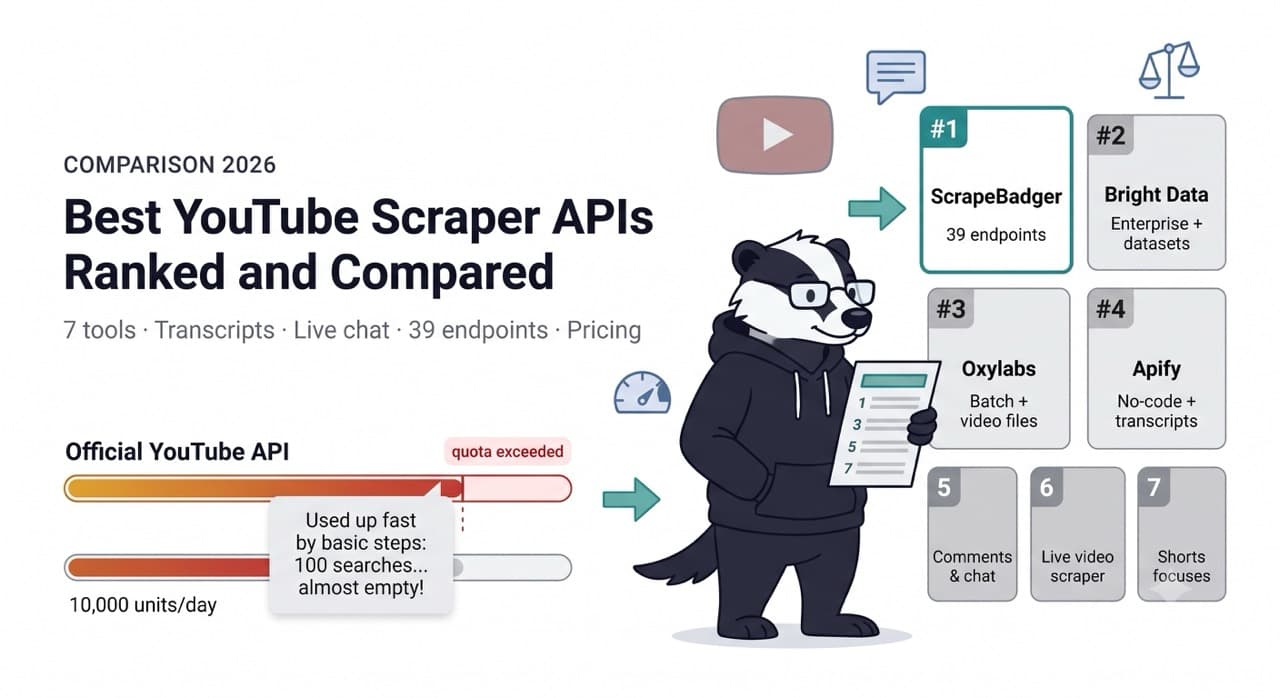
One search request on YouTube's official API costs 100 quota units. Your daily budget is 10,000 units. That means your entire day's allocation disappears after 100 keyword searches — roughly four searches per hour if you spread them evenly through the day.
That single number explains most of this comparison. The YouTube Data API v3 is not a commercial intelligence tool. It is a developer API built for displaying YouTube content in third-party applications. Teams that want to monitor competitor channels, track video performance at scale, collect transcripts for AI training, or analyse trending content bump into the quota ceiling almost immediately and start looking for alternatives.
This guide covers the tools those teams actually use in 2026 — with real pricing, real data on what each tool covers, and honest assessments of where each one fits. ScrapeBadger has a 39-endpoint YouTube scraper and it is on this list. We will explain what makes it the right choice for some teams and what makes competitors genuinely better for others.
The YouTube Data API v3: What It Gives You and Where It Stops
The official API is free. No credit card, no billing meter, no per-request fee. In 2026, the YouTube Data API v3 still uses the same quota-unit system with 10,000 units per day by default.
The unit cost table is where the reality hits:
search.list— 100 units per callvideos.list— 1 unit per callcommentThreads.list— 1 unit per callchannels.list— 1 unit per callplaylistItems.list— 1 unit per call
A pipeline that runs 10 searches, fetches metadata for the results, then pulls comment threads consumes roughly 1,700 units per cycle — leaving room for about five or six cycles before the wall hits. Paginating a search result 5 pages deep costs 500 units alone.
Google updated the quota system in December 2025 — the quota cost of video uploads dropped significantly, which matters for publishers. It changed nothing for research and intelligence use cases. Search still costs 100 units per call.
There is no self-service option to buy more quota. This is not a free tier with a paid upgrade. If you need more than 10,000 units per day, you must submit the YouTube API Services Audit and Quota Extension Form and wait for Google to manually review your application. Developer community reports describe wait times ranging from a few weeks to multiple months. Use cases involving competitive analytics are frequently rejected.
What the official API genuinely covers well: fetching video metadata for known video IDs (1 unit per call), listing a channel's own videos via the uploads playlist (1 unit per page instead of 100 for search), and any workflow built around a small set of known YouTube resources that fits within the daily quota.
What it does not cover: transcripts for arbitrary public videos (the official API only provides captions for videos you own), competitor channel analytics over time, large-scale search-based discovery, live chat history, and any volume-based intelligence workflow.
The official API is the right tool if your pipeline runs within 100 searches per day and ToS compliance with Google's terms is a hard requirement. For every commercial intelligence use case that exceeds that threshold, you need something from the list below.
What Makes YouTube Specifically Hard to Scrape
YouTube's data delivery mechanism is different from most major websites. The content is not primarily served as static HTML — it comes from YouTube's internal /youtubei/v1/ API endpoints, which the browser calls via XHR as the page loads. These endpoints require specific request headers and payload structures that change periodically as YouTube updates its frontend.
Transcripts are the hardest data type to access reliably. They are served as signed caption files from URLs that require valid session context to generate. A scraper that gets a video page successfully may still fail to extract transcript data because the caption URL signature has a short validity window.
YouTube also implements TLS fingerprinting and behavioral analysis at the connection level. This means that beyond the frontend complexity, you face the same infrastructure challenge as any heavily protected site: datacenter IPs trigger immediate blocks, request timing needs to look human, and browser fingerprints need to pass inspection. The combination of frontend complexity and active bot detection means YouTube scraping at production scale requires either maintaining significant infrastructure or paying for a service that does.
The third challenge is scale. YouTube has 800 million videos. Trends change daily. Monitoring competitor channels, tracking keyword performance, or building any systematic intelligence workflow generates request volumes that individual scraping setups cannot sustain without significant infrastructure investment.
The Providers
ScrapeBadger — Best for Comprehensive YouTube Intelligence
ScrapeBadger's YouTube scraper has 39 dedicated endpoints. This is the largest YouTube endpoint suite of any provider in this comparison and covers substantially more of the YouTube data model than competitors who focus on video metadata and search.
The full endpoint coverage: video detail, related videos, comments, comment replies, transcripts, captions, streams, live chat, and batch video processing. Channel intelligence: channel detail, channel videos, Shorts, streams, playlists, community posts, the About page, subscriber count, in-channel search, and channel resolution. Playlist detail and items, YouTube mixes, trending videos, hashtag feeds, and the YouTube home feed. Plus a dedicated Shorts endpoint.
Three capabilities that stand out specifically:
Live chat. No other provider in this comparison offers historical YouTube live chat data as a dedicated endpoint. For creators analysing their own live streams, brands monitoring competitor live events, and AI teams building conversational training datasets, live chat is a data type that simply does not exist elsewhere at this level of accessibility.
39-endpoint breadth. A competitor that covers video metadata, channel basics, and search handles the most common YouTube intelligence use cases. ScrapeBadger covers those plus the entire long tail: playlists, mixes, Shorts-specific endpoints, community posts, in-channel search, subscriber count as a standalone endpoint, stream data, and captions separate from transcripts. For teams building comprehensive YouTube monitoring infrastructure, this means one API covers the full data model rather than requiring separate tools for edge cases.
Google Video as a complement. ScrapeBadger also has a Google Video search API — a separate endpoint that scrapes Google's video search tab, which surfaces videos from YouTube alongside Vimeo, news broadcasters, and other platforms. This gives teams both the YouTube-native data (through the YouTube endpoints) and the Google search perspective on video content (through Google Video search) in the same integration. No other provider in this comparison offers both.
The MCP integration is the fourth differentiator. An AI agent with access to ScrapeBadger's MCP server can run a complete YouTube research workflow — channel analysis, video transcript collection, comment sentiment, trending data — as native tool calls in a single reasoning session. Teams building content research agents, competitive intelligence workflows, or AI-driven video analysis pipelines get this without building a custom integration layer.
The multi-product platform argument applies here exactly as it does for the eBay scraper comparison and the TikTok comparison: YouTube data is most valuable when combined with complementary signals. YouTube view count trends plus Google Trends search interest for the same topics, YouTube competitor channel data plus Reddit community sentiment about the same creators — all of this under one API key.
Zero credits for failed requests. Credits never expire. Free trial: 1,000 credits, no credit card.
Where ScrapeBadger has limitations: No pre-collected YouTube datasets for teams that need bulk historical data without running a collection pipeline. No no-code UI for non-technical users — this is API-first.
Best for: Commercial teams building YouTube intelligence pipelines; AI training data collection including transcripts and live chat; multi-source monitoring combining YouTube with Google Trends, Reddit, and other platforms; AI agent workflows via MCP.
Bright Data — Best for Scale and Pre-Collected Datasets
Bright Data's YouTube coverage sits within their broader Web Scraper infrastructure. The pre-built scraper templates cover video profiles, comments, and video posts with structured JSON output. Bright Data also maintains a YouTube video collection of more than four million videos in 720p, with higher resolutions available on request — a ready-made dataset option that eliminates the need to run a collection pipeline for teams that need bulk historical data rather than real-time monitoring.
The headline figure remains the same across all Bright Data coverage: a 98.44% average success rate in independent benchmark testing of 11 providers. On YouTube specifically, where bot detection is active, this translates to reliable data at high volume. Bright Data handles all major anti-bot systems deployed on YouTube's infrastructure.
The no-code interface — through their Web Scraper IDE — makes Bright Data the most accessible option for non-technical teams that need large-scale YouTube data without developer involvement. Dataset products can be set up for delivery on a schedule without any pipeline code.
The pricing is the primary constraint. Web Scraper IDE starts at $499/month. Pre-collected dataset purchases are priced separately from the scraper API. For teams that need exactly what Bright Data's pre-built templates cover — video metadata, comments, channel posts — the question is whether the cost is justified by the scale and compliance requirements.
Bright Data holds GDPR, CCPA, ISO 27001, and SOC 2 certifications, making it the only YouTube data provider in this comparison with enterprise compliance certification. For regulated industries or enterprise procurement requirements, this is a genuine differentiator.
Best for: Enterprise teams with formal compliance requirements; non-technical teams who need large-scale YouTube data via a no-code interface; teams that want pre-collected YouTube datasets for bulk historical access rather than real-time collection.
Oxylabs — Best for Batch Processing and Video Files
Oxylabs has a dedicated Video Data API that covers YouTube alongside other video platforms. The specific capability that distinguishes Oxylabs from other providers is their batch processing: up to 5,000 video IDs per batch submission, with scheduled delivery and optional cloud storage output. Oxylabs also maintains a YouTube video collection of more than four million videos in 720p, with higher resolutions available on request — effectively the same dataset scale as Bright Data.
In AIMultiple's benchmark of 1,700 URLs across major retail domains, Oxylabs achieved a 98.50% success rate. Their Proxyway 2025 benchmark result is 95.40% — both strong numbers for a provider operating at this scale.
The OxyCopilot AI code generation assistant reduces integration time for teams new to Oxylabs. Pricing is based on successful requests or traffic for video downloads — the bandwidth-based pricing model that runs at approximately $9.40/GB for the Web Unblocker applies here, which benefits teams processing large numbers of videos but can become unpredictable for variable workloads.
Oxylabs pricing starts at $49/month on the Micro plan for basic access, but production YouTube monitoring at meaningful scale typically requires higher tiers.
Best for: Teams needing large-scale batch YouTube processing; workflows where video file access (not just metadata) is a requirement; teams already on Oxylabs for other data sources who want YouTube added to the same account.
Apify — Best for Non-Technical Teams and Transcript Pipelines
Apify's YouTube coverage comes through multiple community-maintained Actors in their marketplace, rather than a single unified endpoint suite. The leading YouTube Actor on the platform is highly efficient and designed for high-volume extraction of video titles, view counts, upload dates, and descriptions from search results or specific URLs. Separate Actors cover YouTube Shorts specifically, comment extraction, and transcript collection.
The YouTube Data API has strict daily quota limits (10,000 units) that are quickly exhausted with large-scale data collection. Apify's scrapers have no such limits — you pay only for compute usage. For teams migrating from the official API who have hit the quota wall, Apify is the most direct transition path: familiar workflow, no quota ceiling, community-maintained Actors for specific use cases.
For RAG pipelines and AI training, Apify's YouTube Transcript Scraper extracts full subtitles (auto-generated or manual) from any video. Combined with their Website Content Crawler, you can build RAG pipelines that make video content searchable by AI.
The tradeoffs are the same as with any Apify usage: compute unit billing is less predictable than per-request billing, and community-maintained Actors depend on individual contributors for maintenance when YouTube updates its frontend structure. The Shorts Scraper, for example, is maintained by a different contributor than the main YouTube Scraper — quality and update cadence are not guaranteed to be consistent across Actors.
Starter plan at $29/month. Free plan gives $5/month in credits for evaluation.
Best for: Teams migrating off the YouTube Data API quota; marketing analysts and non-technical users who want a no-code Actor interface; developers building RAG pipelines who want pre-built transcript extraction; teams that need YouTube plus a large library of other scraping targets from a single platform.
ScrapingBee — Best Simple Developer API for YouTube
ScrapingBee positions their YouTube coverage as dedicated endpoints for Search, Metadata, and Subtitles — returning structured JSON rather than raw HTML. The value proposition for developers is exactly the same as it is for other target sites: send a URL or search query, receive clean JSON, without managing proxies or headless browsers.
The credit economics for YouTube are the most important thing to understand before using ScrapingBee at scale. JavaScript rendering costs 5 credits per request versus 1 for basic requests. YouTube's dynamic content — comments, view counts, some metadata fields — requires JavaScript rendering, making the effective cost 5x the headline rate for most YouTube data types. At $49/month for 250,000 credits, that translates to 50,000 JavaScript-rendered YouTube requests per month at this tier.
ScrapingBee offers dedicated subtitle extraction — useful for teams building transcript-based pipelines who want a simpler integration than building their own caption URL handling.
Best for: Small developer teams who want a simple API for YouTube metadata and subtitles without proxy configuration; teams at moderate volume where the 5x JS rendering cost is acceptable; developers who want fine-grained headless browser control rather than a black-box scraper.
SerpApi — Best for YouTube Search Results Specifically
SerpApi is built specifically around search engine result pages. Their YouTube coverage focuses on what happens when you search YouTube — the results, the featured videos, the suggested queries — rather than the full YouTube data model.
What SerpApi covers: YouTube search results with filters for upload date, quality (4K), and region; pagination via next page tokens; Video Transcript API for extracting video transcripts; Channel Results API for channel page data; Video Ad Results API for YouTube advertising intelligence.
SerpApi's pricing model is per-search: $50/month for 5,000 searches is the entry point. The JSON output is clean and well-documented, with results localised by language and country for geo-targeted analysis.
The positioning is different from the other providers. SerpApi is not trying to be a general YouTube data tool — it is the right tool if YouTube search result monitoring is your specific use case and you want the cleanest possible JSON for that specific data type. For teams who also need channel data, comment collection, and transcript extraction, SerpApi requires supplementing with another tool.
Best for: Teams where YouTube search result monitoring is the primary use case; competitive SEO research around YouTube content; advertising intelligence via the YouTube Video Ad API; teams that already use SerpApi for Google SERP and want YouTube added to the same account.
Decodo — Best Budget Entry Point
Decodo offers YouTube access through their Site Unblocker and Web Scraping API. Entry pricing is genuinely the lowest in this comparison: Site Unblocker at $29 for 23,000 requests ($1.25/1K requests), Web Scraping API at $0.50 for 2,000 requests on the Standard plan.
Decodo does not have dedicated YouTube-specific parsers. You receive the page content and handle extraction yourself. For teams with existing parsing infrastructure or developers who need raw access without a structured data layer, this is the right trade-off. For teams who want clean JSON without building parsers, one of the purpose-built YouTube scrapers is more appropriate.
Decodo's 24/7 customer support is consistently cited as a differentiator — notably strong compared to the variable support quality at similar price points.
Best for: Budget-conscious teams or solo developers who have parsing infrastructure and need affordable proxy access for YouTube; validation runs and prototyping before committing to higher-cost platforms; teams where YouTube scraping is occasional rather than continuous.
The Comparison Table
ScrapeBadger | Bright Data | Oxylabs | Apify | ScrapingBee | SerpApi | Decodo | |
|---|---|---|---|---|---|---|---|
Dedicated YouTube endpoints | 39 | Templates | Video Data API | Multiple Actors | 3 endpoints | Search + Transcript | ❌ |
Video transcripts | ✅ | ❌ | ❌ | ✅ Actor | ✅ Subtitles | ✅ Transcript API | ❌ |
Live chat | ✅ | ❌ | ❌ | ❌ | ❌ | ❌ | ❌ |
Channel intelligence | ✅ 12 channel endpoints | ✅ | ✅ | ✅ | ✅ | ✅ | ❌ |
YouTube Shorts | ✅ Dedicated endpoint | ✅ | ✅ | ✅ Actor | ❌ | ❌ | ❌ |
Batch processing | ✅ | ✅ | ✅ Up to 5K IDs | ✅ | ❌ | ❌ | ❌ |
Pre-collected datasets | ❌ | ✅ 4M+ videos | ✅ 4M+ videos | ❌ | ❌ | ❌ | ❌ |
No-code UI | ❌ | ✅ | ❌ | ✅ | ❌ | ❌ | ❌ |
Google Video search | ✅ | ❌ | ❌ | ❌ | ❌ | ❌ | ❌ |
MCP integration | ✅ | ❌ | ❌ | ✅ | ❌ | ❌ | ❌ |
Multi-product (Google, Reddit, etc.) | ✅ | ✅ | ✅ | ✅ 31K+ actors | ❌ | ❌ | ❌ |
Enterprise compliance | ❌ | ✅ SOC 2, ISO 27001 | ✅ ISO 27001 | ❌ | ❌ | ❌ | ❌ |
0 credits on failure | ✅ | ✅ | ✅ | ✅ | ✅ | ✅ | ✅ |
Credits never expire | ✅ | ❌ | ❌ | ❌ | ❌ | ❌ | ❌ |
Entry pricing | Pay-as-you-go from $10 | $499/month | $49/month | $29/month | $49/month | $50/month | $29/month |
Free trial | ✅ 1,000 credits | ✅ | ✅ 7 days | ✅ $5/month | ✅ 1,000 credits | ✅ 100 searches | ✅ 2,000 requests |
Best for | Full YouTube intelligence | Enterprise compliance | Batch + video files | No-code + transcripts | Simple developer API | Search result monitoring | Budget entry |
The Data Types That Drive the Tool Decision
Different YouTube intelligence use cases need different data types. Matching your use case to the data type tells you which tools actually qualify.
Video metadata (title, view count, like count, upload date, duration, description, tags): every provider covers this. The differentiator is pricing and how cleanly it returns as structured JSON versus raw HTML you parse yourself.
Comments: most providers cover basic comment collection. ScrapeBadger, Bright Data, Oxylabs, and Apify all have comment endpoints. Volume and depth (nested replies at multiple levels) vary. ScrapeBadger's comment and reply endpoints cover the full threading structure; some tools return only top-level comments.
Transcripts and captions: this is where the field narrows sharply. ScrapeBadger offers both transcript and captions as separate endpoints, with captions covering timestamped subtitle data in all available languages. Apify has a YouTube Transcript Scraper Actor. ScrapingBee covers subtitles. SerpApi has a Transcript API. Bright Data and Oxylabs do not have dedicated transcript endpoints. For AI training data at scale, transcript availability is often the deciding factor — and the gap between dedicated transcript endpoints and general scrapers that require custom extraction is significant.
Live chat: this is ScrapeBadger only. If live chat data matters for your use case — creator audience analysis, brand safety monitoring of live events, AI training on conversational data — there is no alternative in this comparison.
Channel-level intelligence (subscriber count, video history, community posts, about page): ScrapeBadger covers this with 12 dedicated channel endpoints including subscriber count as a standalone call and community posts as a separate endpoint. Other providers cover channel data to varying depths, but none with this granularity.
Pre-collected historical datasets: Bright Data and Oxylabs both maintain large YouTube video collections (4M+ videos in 720p). For teams that need historical data going back years without running a collection pipeline, datasets are the right approach. ScrapeBadger does not offer pre-collected datasets.
YouTube search result intelligence: SerpApi is the most purpose-built tool for this specific use case, with the cleanest structured output for search results across multiple filters. ScrapeBadger's YouTube search endpoint covers this but SerpApi's search focus gives them more filter depth for pure search monitoring use cases.
The Scenarios That Determine Your Choice
"I'm building a YouTube content intelligence tool for brands and agencies"
ScrapeBadger. The 39-endpoint suite covers the full YouTube data model that content intelligence tools need — channel analytics, video performance, comment sentiment, transcript analysis, trending data, and Shorts. The multi-product platform means you can add Google Trends correlation and Reddit community monitoring to the same pipeline. The MCP integration supports AI-driven analysis workflows.
"I need historical YouTube video data without running a pipeline"
Bright Data or Oxylabs. Both maintain 4M+ video collections updated on a schedule. If you need a bulk YouTube dataset rather than real-time monitoring, dataset purchase is faster and cheaper than building and running a collection pipeline. Choose Bright Data if compliance certification is required; Oxylabs if batch processing of specific video ID lists is more relevant.
"I hit the YouTube Data API quota wall and need a drop-in replacement"
Apify. The YouTube Actor covers the same use cases as the official API — search, video metadata, channel data — with no quota ceiling. The workflow is familiar for teams used to the official API's model. Starter plan at $29/month.
"I'm collecting YouTube transcripts for AI training data at scale"
ScrapeBadger for production pipelines at scale with structured endpoints for transcripts, captions in multiple languages, and batch video processing. Apify's YouTube Transcript Scraper as a simpler setup for smaller volumes. The combination of transcript, captions, and live chat data that ScrapeBadger offers is the most comprehensive source for YouTube-native training data.
"My compliance team requires SOC 2 certification from data vendors"
Bright Data only. No other provider in this comparison holds both SOC 2 and ISO 27001.
"I want YouTube search monitoring without building data infrastructure"
SerpApi. Clean YouTube search result JSON with geographic and temporal filters, Transcript API, and Channel Results API — built specifically for search-based YouTube intelligence. Start at $50/month for 5,000 searches.
"I'm a solo developer who needs YouTube data occasionally"
ScrapingBee for simple integration with clean JSON for video metadata and subtitles. Decodo for the lowest cost if you have your own parsing logic. Both offer meaningful free trials for validation.
FAQ
Why can't I just use the YouTube Data API for free?
You can — for up to 100 searches per day or proportionally more of the cheaper methods like video detail fetches. The ceiling is 10,000 quota units per day per Google Cloud project. A search.list call costs 100 units, so 100 searches exhausts the daily budget. There is no self-service paid tier that removes this ceiling. Requesting a quota increase requires submitting an audit form and waiting weeks to months for manual review; use cases involving competitive analytics are frequently rejected. For any commercial intelligence workflow that needs more than 100 searches per day, a scraping API is the practical path.
Does scraping YouTube violate their Terms of Service?
YouTube's Terms of Service prohibit automated access to their services. The hiQ v. LinkedIn Ninth Circuit ruling established that scraping publicly visible data does not violate the Computer Fraud and Abuse Act. YouTube ToS violations are a contractual matter, not a criminal one. Commercial use of publicly visible YouTube data for business intelligence purposes is widely practised. Consult legal counsel for specific use cases, particularly those involving content downloading or personal data collection.
Which provider returns the best transcript data?
ScrapeBadger offers both dedicated transcript and captions endpoints with timestamped subtitle data in all available languages. Apify's YouTube Transcript Scraper covers auto-generated and manual subtitles for any public video. SerpApi has a Video Transcript API. ScrapingBee covers subtitles as part of their YouTube endpoint suite. Bright Data and Oxylabs do not have dedicated transcript endpoints. For AI training data use cases at production scale, ScrapeBadger's structured transcript and caption endpoints with batch processing are the most complete solution.
What data is impossible to get through any of these tools?
YouTube Analytics time-series data for channels you do not own — view trends over time for a competitor's channel are not available through any official or scraping path. The YouTube Analytics API requires OAuth from the channel owner. Private videos, age-restricted content requiring sign-in, and any data that requires being logged in to a YouTube account are also not accessible through standard scraping APIs.
How do these tools handle YouTube Shorts?
YouTube Shorts is a distinct content surface from standard YouTube videos. ScrapeBadger has a dedicated Shorts endpoint. Apify has a separate YouTube Shorts Scraper Actor maintained by a different contributor than the main YouTube Scraper. Bright Data's scraper templates cover Shorts. Oxylabs covers Shorts through their Video Data API. ScrapingBee does not have a dedicated Shorts endpoint. SerpApi covers Shorts results in search. For comprehensive Shorts intelligence — Shorts-specific metrics, vertical video performance data — ScrapeBadger's dedicated endpoint is the most structured approach.

Written by
Domas Sakavickas
Dom Sakavickas is Co-founder of ScrapeBadger, building web scraping infrastructure for developers and data teams. He writes about the web data market, tool comparisons, and business use cases for scraping. ScrapeBadger is a web scraping API platform specialising in Twitter/X, Reddit and Google data, with dedicated scrapers also covering TikTok, YouTube, LinkedIn, Amazon, eBay, Zillow and 40+ more: with built-in anti-bot bypass and an MCP server for AI agents.
Ready to get started?
Join thousands of developers using ScrapeBadger for their data needs.