How to Build a RAG Pipeline With Live Web Data: ScrapeBadger + LangChain
 Thomas Shultz
AI Summary: Using ScrapeBadger for collection and LangChain for orchestration, this guide builds a production RAG pipeline fed by live web data, solving the freshness, anti-bot, JavaScript rendering, and incremental-update problems that static PDF-based RAG demos never have to handle.
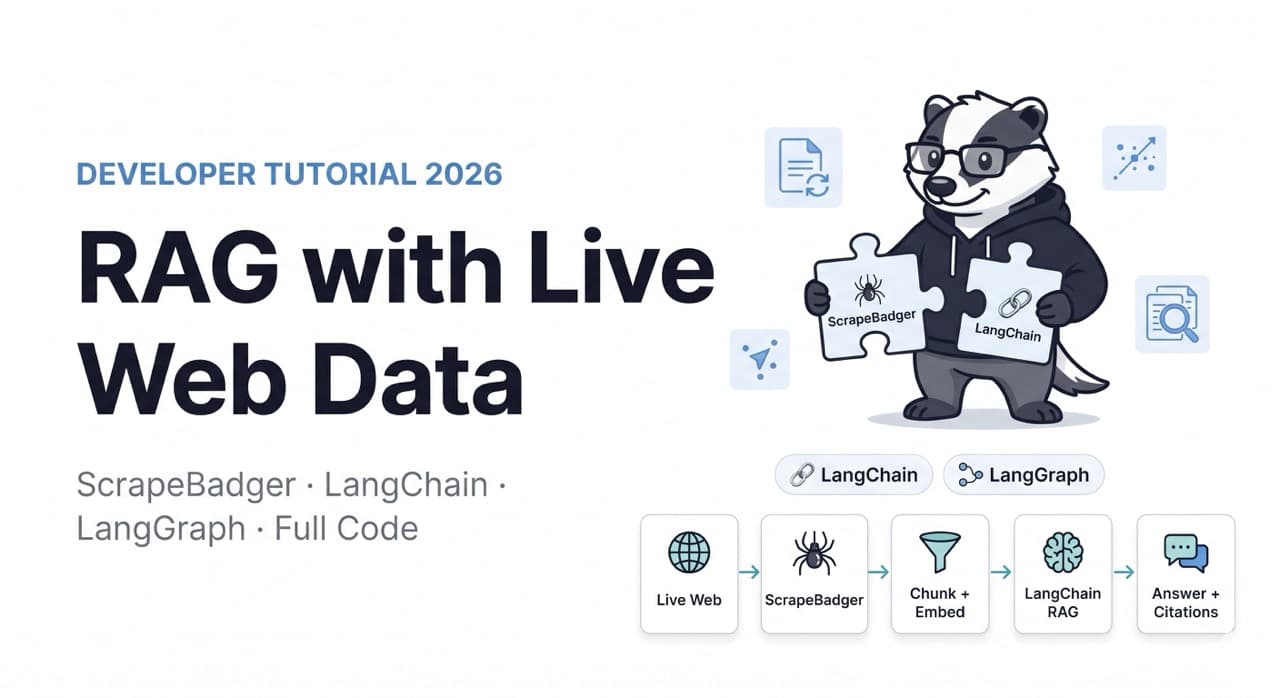
Every RAG tutorial ends the same way: load a PDF, split it into chunks, embed it, ask questions. It works great for demos. It fails the moment your knowledge base needs to reflect what's happening on the web today rather than what was in a document three months ago.
Web scraping for RAG adds three things you don't get from standard document upload workflows: freshness — you can ingest real-time data and keep it refreshed on a schedule; coverage — you can expand your knowledge base beyond whatever internal docs you happen to have; and reach — you can draw from primary sources, live pricing, current documentation, and real-time news rather than static files.
The challenge is that live web data introduces a layer of complexity that PDF loaders don't have to deal with: anti-bot protection, JavaScript rendering, content freshness management, and incremental updates versus full re-ingestion. This guide builds a production-ready RAG pipeline that handles all of it — using ScrapeBadger as the collection layer and LangChain as the orchestration framework.
Architecture Overview
Before code, establish what we're building:
[Web Sources]
    ↓ ScrapeBadger (anti-bot bypass, JS rendering, structured HTML)
[Scrape & Extract]
    ↓ HTML → Markdown → Chunks with metadata
[Document Processing]
    ↓ OpenAI Embeddings / local embedder
[Vector Store] ← Chroma (dev) / Pinecone (prod)
    ↓
[Retriever] ← Multi-query expansion + reranking
    ↓
[LangChain LCEL Chain]
    ↓
[LLM with sourced context]
    ↓
[Answer + Citations]
The pipeline has two modes that run separately:
Ingestion mode — scrapes URLs, converts to clean text, chunks, embeds, stores. Runs on a schedule.
Retrieval mode — takes a user query, retrieves relevant chunks, generates a grounded answer with citations. Runs at query time.
Install Dependencies
bash
pip install langchain langchain-openai langchain-chroma langchain-community
pip install chromadb tiktoken httpx markdownify beautifulsoup4 lxml
pip install langchain-cohere  # For reranking (optional but recommended)
Step 1: The Web Scraping Layer
LangChain's WebBaseLoader is a good baseline for simple pages — it loads web pages and extracts text via BeautifulSoup under the hood, and it's often enough for documentation sites and static content. The right stack depends on site complexity. Content is missing unless JavaScript runs for most modern sites.
WebBaseLoader fails on any site with meaningful bot protection or JavaScript rendering. ScrapeBadger replaces it as the collection layer, returning clean HTML that you then process through LangChain's document pipeline.
python
import asyncio
import httpx
import os
import re
from typing import Optional
from bs4 import BeautifulSoup
import markdownify
from langchain_core.documents import Document
from datetime import datetime


SCRAPEBADGER_API_KEY = os.environ["SCRAPEBADGER_API_KEY"]


def html_to_markdown(html: str) -> str:
    """Convert HTML to clean Markdown for LLM consumption."""
    soup = BeautifulSoup(html, "lxml")

    # Remove boilerplate before conversion
    for selector in ["nav", "header", "footer", "aside",
                     "script", "style", "noscript",
                     ".cookie-banner", ".ad", "[aria-hidden='true']"]:
        for el in soup.select(selector):
            el.decompose()

    # Prefer article/main content over full body
    content = (
        soup.find("article") or
        soup.find("main") or
        soup.find(id="content") or
        soup.find(role="main") or
        soup.body
    )

    if not content:
        return ""

    md = markdownify.markdownify(
        str(content),
        heading_style="ATX",
        bullets="-",
    )

    # Clean up excess whitespace
    md = re.sub(r"\n{3,}", "\n\n", md)
    return md.strip()


async def scrape_url(
    client: httpx.AsyncClient,
    url: str,
    render_js: bool = True,
) -> Optional[Document]:
    """
    Fetch a URL via ScrapeBadger and return a LangChain Document.
    Returns None if the fetch fails or content is too short.
    """
    try:
        response = await client.get(
            "https://api.scrapebadger.com/v1/scrape",
            params={
                "url": url,
                "render_js": render_js,
                "wait_for": "networkidle",
            },
            timeout=30.0,
        )
        response.raise_for_status()
        data = response.json()
        html = data.get("html", "")

        if not html:
            return None

        # Extract title
        soup = BeautifulSoup(html, "lxml")
        title_el = soup.find("h1") or soup.find("title")
        title = title_el.get_text(strip=True) if title_el else url

        # Convert to Markdown
        text = html_to_markdown(html)

        if len(text.split()) < 50:  # Too short to be useful
            return None

        return Document(
            page_content=text,
            metadata={
                "source": url,
                "title": title,
                "scraped_at": datetime.utcnow().isoformat(),
                "word_count": len(text.split()),
            },
        )

    except Exception as e:
        print(f"Failed to scrape {url}: {e}")
        return None


async def scrape_urls(
    urls: list[str],
    max_concurrent: int = 10,
) -> list[Document]:
    """Scrape multiple URLs concurrently via ScrapeBadger."""
    semaphore = asyncio.Semaphore(max_concurrent)
    headers = {"X-API-Key": SCRAPEBADGER_API_KEY}

    async with httpx.AsyncClient(headers=headers) as client:
        async def bounded_scrape(url: str) -> Optional[Document]:
            async with semaphore:
                return await scrape_url(client, url)

        results = await asyncio.gather(
            *[bounded_scrape(url) for url in urls]
        )

    documents = [doc for doc in results if doc is not None]
    print(f"Scraped {len(documents)}/{len(urls)} documents successfully")
    return documents
Step 2: Chunking With Metadata Preservation
The chunking strategy determines retrieval quality more than almost any other decision. The key insight: chunks should preserve enough context to be interpretable without the surrounding text, and they should carry metadata that allows citation back to the source.
python
from langchain_text_splitters import RecursiveCharacterTextSplitter, MarkdownTextSplitter


def create_chunks(
    documents: list[Document],
    chunk_size: int = 1000,
    chunk_overlap: int = 200,
) -> list[Document]:
    """
    Split documents into chunks suitable for embedding.
    Markdown-aware splitter respects heading boundaries.
    chunk_size of 1000 chars ≈ 200-250 tokens — good for most embedding models.
    """
    # Use Markdown splitter for Markdown-formatted content
    # It splits at headers first, then paragraphs, then sentences
    splitter = RecursiveCharacterTextSplitter(
        chunk_size=chunk_size,
        chunk_overlap=chunk_overlap,
        separators=[
            "\n## ",   # H2 headers — strongest boundary
            "\n### ",  # H3 headers
            "\n#### ", # H4 headers
            "\n\n",    # Paragraph breaks
            "\n",      # Line breaks
            ". ",      # Sentence breaks
            " ",       # Word breaks (last resort)
        ],
        keep_separator=True,  # Keep the header in the chunk for context
    )

    chunks = splitter.split_documents(documents)

    # Add chunk index to metadata for ordering
    # Group by source and add sequential indices
    source_counters: dict[str, int] = {}
    for chunk in chunks:
        source = chunk.metadata.get("source", "unknown")
        source_counters[source] = source_counters.get(source, 0) + 1
        chunk.metadata["chunk_index"] = source_counters[source]
        chunk.metadata["chunk_size"] = len(chunk.page_content)

    print(f"Created {len(chunks)} chunks from {len(documents)} documents")
    return chunks
Step 3: Building the Vector Store
For development, Chroma runs locally with no external service required. For production, swap to Pinecone or Weaviate with the same interface.
python
import os
from langchain_openai import OpenAIEmbeddings
from langchain_chroma import Chroma
from langchain_core.documents import Document


OPENAI_API_KEY = os.environ["OPENAI_API_KEY"]
VECTOR_STORE_PATH = "./chroma_db"


def build_vector_store(
    chunks: list[Document],
    collection_name: str = "web_rag",
    persist_directory: str = VECTOR_STORE_PATH,
) -> Chroma:
    """
    Create and populate a Chroma vector store from document chunks.
    Uses OpenAI text-embedding-3-small — best cost/performance ratio in 2026.
    """
    embeddings = OpenAIEmbeddings(
        model="text-embedding-3-small",
        openai_api_key=OPENAI_API_KEY,
    )

    # Build IDs from source + chunk index for deduplication
    ids = [
        f"{chunk.metadata['source']}_{chunk.metadata.get('chunk_index', i)}"
        for i, chunk in enumerate(chunks)
    ]

    vector_store = Chroma.from_documents(
        documents=chunks,
        embedding=embeddings,
        collection_name=collection_name,
        persist_directory=persist_directory,
        ids=ids,
    )

    print(f"Vector store built: {vector_store._collection.count()} vectors")
    return vector_store


def load_vector_store(
    collection_name: str = "web_rag",
    persist_directory: str = VECTOR_STORE_PATH,
) -> Chroma:
    """Load an existing vector store from disk."""
    embeddings = OpenAIEmbeddings(
        model="text-embedding-3-small",
        openai_api_key=OPENAI_API_KEY,
    )
    return Chroma(
        collection_name=collection_name,
        embedding_function=embeddings,
        persist_directory=persist_directory,
    )
Step 4: The Retrieval Chain With LCEL
LCEL chains are more composable and streaming-friendly than older LangChain patterns, with production deployments showing 15–25% better performance in complex orchestration scenarios.
The modern LangChain pattern uses LCEL (LangChain Expression Language) — pipe operators (|) that compose retrievers, prompts, and models declaratively:
python
from langchain_openai import ChatOpenAI
from langchain_core.prompts import ChatPromptTemplate
from langchain_core.output_parsers import StrOutputParser
from langchain_core.runnables import RunnablePassthrough, RunnableParallel
from langchain_chroma import Chroma
from operator import itemgetter


def format_docs_with_citations(docs: list[Document]) -> str:
    """
    Format retrieved documents with source citations.
    The LLM receives both content and source URLs.
    """
    formatted = []
    for i, doc in enumerate(docs, 1):
        source = doc.metadata.get("source", "Unknown")
        title = doc.metadata.get("title", "Untitled")
        scraped_at = doc.metadata.get("scraped_at", "")[:10]  # Date only

        formatted.append(
            f"[Source {i}] {title}\n"
            f"URL: {source}\n"
            f"Scraped: {scraped_at}\n\n"
            f"{doc.page_content}"
        )

    return "\n\n---\n\n".join(formatted)


def build_rag_chain(vector_store: Chroma):
    """
    Build a production RAG chain using LCEL.
    Returns answers with inline citations.
    """
    # Retriever — MMR (Maximum Marginal Relevance) reduces redundancy
    retriever = vector_store.as_retriever(
        search_type="mmr",
        search_kwargs={
            "k": 6,              # Retrieve 6 chunks
            "fetch_k": 20,       # Consider top 20 before MMR selection
            "lambda_mult": 0.7,  # Balance relevance vs diversity (0=diverse, 1=relevant)
        },
    )

    # System prompt — instructs the model to use retrieved context
    prompt = ChatPromptTemplate.from_messages([
        ("system", """You are a helpful assistant that answers questions based on
retrieved web content. Use ONLY the provided sources to answer.

If the sources don't contain enough information to answer, say so clearly.
Always cite which source(s) you're drawing from using [Source N] notation.
Include the URLs of cited sources at the end of your response.

Retrieved context:
{context}"""),
        ("human", "{question}"),
    ])

    llm = ChatOpenAI(
        model="gpt-4o-mini",  # Cost-efficient for RAG; upgrade to gpt-4o for complex reasoning
        temperature=0,         # Deterministic — no creativity needed for factual retrieval
        openai_api_key=OPENAI_API_KEY,
    )

    # Full LCEL chain: retrieve → format → prompt → generate → parse
    rag_chain = (
        RunnableParallel({
            "context": retriever | format_docs_with_citations,
            "question": RunnablePassthrough(),
        })
        | prompt
        | llm
        | StrOutputParser()
    )

    return rag_chain, retriever


# Usage
vector_store = load_vector_store()
rag_chain, retriever = build_rag_chain(vector_store)

# Query
answer = rag_chain.invoke("What is ScrapeBadger's pricing model?")
print(answer)
Step 5: Multi-Query Retrieval — The Highest-ROI Enhancement
Single-query retrieval misses documents because of vocabulary mismatch: a question about "web scraping cost" doesn't retrieve a document that talks about "data extraction pricing" even though it's highly relevant.
Multi-query expansion generates multiple phrasings of the same question and merges the retrieved documents, significantly improving recall:
python
from langchain.retrievers.multi_query import MultiQueryRetriever
from langchain_openai import ChatOpenAI
import logging

# Optional: log the generated queries for debugging
logging.basicConfig()
logging.getLogger("langchain.retrievers.multi_query").setLevel(logging.INFO)


def build_multi_query_retriever(vector_store: Chroma) -> MultiQueryRetriever:
    """
    Multi-query retriever generates 3-5 rephrasing of the user query,
    retrieves from each, and returns the deduplicated union.

    Example: "how much does scraping cost" might generate:
      - "web scraping pricing"
      - "cost of data extraction API"
      - "scraping tool fees and plans"
    """
    base_retriever = vector_store.as_retriever(
        search_type="mmr",
        search_kwargs={"k": 4, "fetch_k": 15},
    )

    llm = ChatOpenAI(
        model="gpt-4o-mini",
        temperature=0.3,  # Slight temperature for query variation
        openai_api_key=OPENAI_API_KEY,
    )

    return MultiQueryRetriever.from_llm(
        retriever=base_retriever,
        llm=llm,
        include_original=True,  # Include original query alongside variations
    )


def build_rag_chain_with_multiquery(vector_store: Chroma):
    """RAG chain with multi-query retrieval."""
    retriever = build_multi_query_retriever(vector_store)

    prompt = ChatPromptTemplate.from_messages([
        ("system", """Answer based on the retrieved web content below.
Cite sources using [Source N] notation. Include source URLs at the end.

Context:
{context}"""),
        ("human", "{question}"),
    ])

    llm = ChatOpenAI(model="gpt-4o-mini", temperature=0)

    chain = (
        RunnableParallel({
            "context": retriever | format_docs_with_citations,
            "question": RunnablePassthrough(),
        })
        | prompt
        | llm
        | StrOutputParser()
    )

    return chain
Step 6: Reranking — The Biggest Single Quality Improvement
Reranking is the highest-ROI knob in a RAG pipeline. The thing nobody mentions is how brutal the latency tax can be when you stack cross-encoder rerankers — a two-stage approach with a tiny rerank model first, then the big one only on top-k, cuts P99 latency in half for a small recall hit.
Semantic search retrieves by embedding similarity, which misses nuanced relevance. A cross-encoder reranker reads the query and each retrieved document together, producing a much more accurate relevance score:
python
from langchain.retrievers import ContextualCompressionRetriever
from langchain_cohere import CohereRerank
from langchain_core.documents import Document


def build_reranking_retriever(vector_store: Chroma) -> ContextualCompressionRetriever:
    """
    Two-stage retrieval: broad semantic search → cross-encoder reranking.
    Retrieve more candidates, rerank to top-k.
    """
    # Stage 1: Retrieve broader set (20 candidates)
    base_retriever = vector_store.as_retriever(
        search_type="similarity",
        search_kwargs={"k": 20},
    )

    # Stage 2: Rerank with Cohere — returns top 6 by true relevance
    # Cohere's rerank-v3 model is faster and cheaper than cross-encoder local models
    reranker = CohereRerank(
        cohere_api_key=os.environ["COHERE_API_KEY"],
        model="rerank-v3.5",
        top_n=6,
    )

    return ContextualCompressionRetriever(
        base_compressor=reranker,
        base_retriever=base_retriever,
    )


# Alternatively, use a local cross-encoder (no API cost, higher latency)
from langchain.retrievers.document_compressors import CrossEncoderReranker
from langchain_community.cross_encoders import HuggingFaceCrossEncoder


def build_local_reranking_retriever(vector_store: Chroma) -> ContextualCompressionRetriever:
    """Local reranking — no external API, slightly higher latency."""
    base_retriever = vector_store.as_retriever(
        search_kwargs={"k": 20}
    )

    model = HuggingFaceCrossEncoder(
        model_name="BAAI/bge-reranker-v2-m3"  # Strong multilingual reranker
    )
    reranker = CrossEncoderReranker(model=model, top_n=6)

    return ContextualCompressionRetriever(
        base_compressor=reranker,
        base_retriever=base_retriever,
    )
Step 7: Freshness Management
Static document RAG breaks when sources go stale. Live web RAG needs a refresh strategy that updates only what's changed rather than re-ingesting everything:
python
import json
import hashlib
from datetime import datetime, timedelta
from pathlib import Path


class FreshnessManager:
    """
    Tracks document freshness and triggers re-ingestion when content
    is stale or has changed.
    """

    def __init__(
        self,
        state_path: str = "rag_freshness_state.json",
        ttl_hours: int = 24,
    ):
        self.state_path = Path(state_path)
        self.ttl_hours = ttl_hours
        self.state = self._load_state()

    def _load_state(self) -> dict:
        if self.state_path.exists():
            return json.loads(self.state_path.read_text())
        return {}

    def _save_state(self):
        self.state_path.write_text(
            json.dumps(self.state, indent=2)
        )

    def _content_hash(self, text: str) -> str:
        return hashlib.sha256(text.encode()).hexdigest()[:16]

    def needs_refresh(self, url: str, current_content: str = None) -> bool:
        """Check if a URL needs re-ingestion."""
        record = self.state.get(url)

        if not record:
            return True  # Never ingested

        # Check TTL
        last_scraped = datetime.fromisoformat(record["last_scraped"])
        if datetime.utcnow() - last_scraped > timedelta(hours=self.ttl_hours):
            return True  # Expired

        # Check content change if current content provided
        if current_content:
            current_hash = self._content_hash(current_content)
            if current_hash != record.get("content_hash"):
                return True  # Content changed

        return False

    def mark_ingested(self, url: str, content: str):
        """Record successful ingestion."""
        self.state[url] = {
            "last_scraped": datetime.utcnow().isoformat(),
            "content_hash": self._content_hash(content),
        }
        self._save_state()

    def get_urls_needing_refresh(self, urls: list[str]) -> list[str]:
        """Filter URL list to only those needing re-ingestion."""
        return [url for url in urls if self.needs_refresh(url)]


async def incremental_update(
    urls: list[str],
    vector_store: Chroma,
    freshness_manager: FreshnessManager,
    max_concurrent: int = 10,
):
    """
    Update vector store with only stale or new URLs.
    Avoids re-embedding unchanged content.
    """
    urls_to_refresh = freshness_manager.get_urls_needing_refresh(urls)

    if not urls_to_refresh:
        print("All documents are fresh — no update needed")
        return 0

    print(f"Refreshing {len(urls_to_refresh)}/{len(urls)} URLs")

    # Scrape only stale URLs
    fresh_docs = await scrape_urls(urls_to_refresh, max_concurrent)

    if not fresh_docs:
        return 0

    # Delete old versions from vector store
    for url in urls_to_refresh:
        try:
            # Delete documents with matching source metadata
            existing_ids = vector_store._collection.get(
                where={"source": url}
            )["ids"]
            if existing_ids:
                vector_store._collection.delete(ids=existing_ids)
        except Exception:
            pass

    # Add fresh versions
    chunks = create_chunks(fresh_docs)
    vector_store.add_documents(chunks)

    # Update freshness state
    for doc in fresh_docs:
        freshness_manager.mark_ingested(
            doc.metadata["source"],
            doc.page_content
        )

    print(f"Updated {len(fresh_docs)} documents, {len(chunks)} chunks added")
    return len(fresh_docs)
Step 8: Agentic RAG With LangGraph
Instead of a fixed retrieval → generation flow, agentic RAG uses an agent that can decide whether retrieval is needed based on query analysis. A LangGraph retrieval agent might include nodes for query analysis, retrieval, grading retrieved docs (relevant or not), web fallback, and generation. Analysis of LangSmith production traces from 150 enterprises shows agentic approaches improve complex query handling by 35–50% but increase latency by 200–400ms. Apify
For production systems where query complexity varies significantly — some questions need retrieval, some don't, some need live web search when the corpus doesn't have the answer — agentic RAG is the correct architecture:
python
from langgraph.graph import StateGraph, END
from langgraph.prebuilt import ToolNode
from langchain_core.tools import tool
from langchain_openai import ChatOpenAI
from typing import TypedDict, Annotated
import operator


class RAGState(TypedDict):
    question: str
    retrieved_docs: list[Document]
    answer: str
    needs_web_search: bool
    relevance_score: float


def build_agentic_rag(
    vector_store: Chroma,
    api_key: str,
) -> StateGraph:
    """
    LangGraph-based agentic RAG pipeline.

    Flow:
    1. Analyze query — does it need retrieval?
    2. Retrieve from vector store
    3. Grade retrieved docs for relevance
    4. If low relevance → fallback to live web search via ScrapeBadger
    5. Generate answer with citations
    """
    llm = ChatOpenAI(
        model="gpt-4o-mini",
        temperature=0,
        openai_api_key=api_key,
    )

    retriever = vector_store.as_retriever(search_kwargs={"k": 6})

    # --- Node: Retrieve ---
    def retrieve_node(state: RAGState) -> RAGState:
        docs = retriever.invoke(state["question"])
        return {**state, "retrieved_docs": docs}

    # --- Node: Grade Relevance ---
    def grade_relevance(state: RAGState) -> RAGState:
        """Grade whether retrieved docs actually answer the question."""
        if not state["retrieved_docs"]:
            return {**state, "relevance_score": 0.0, "needs_web_search": True}

        grader_prompt = ChatPromptTemplate.from_messages([
            ("system", """Rate how well the retrieved documents answer the question.
Return only a number between 0.0 and 1.0.
0.0 = completely irrelevant
1.0 = completely answers the question"""),
            ("human", "Question: {question}\n\nDocuments:\n{docs}"),
        ])

        docs_text = "\n\n".join(d.page_content[:500] for d in state["retrieved_docs"][:3])
        score_str = (grader_prompt | llm | StrOutputParser()).invoke({
            "question": state["question"],
            "docs": docs_text,
        })

        try:
            score = float(score_str.strip())
        except ValueError:
            score = 0.5

        needs_search = score < 0.6

        return {
            **state,
            "relevance_score": score,
            "needs_web_search": needs_search,
        }

    # --- Node: Live Web Search Fallback ---
    async def web_search_fallback(state: RAGState) -> RAGState:
        """When corpus doesn't have the answer, search live web via ScrapeBadger."""
        # Use Google SERP to find relevant URLs
        import httpx

        async with httpx.AsyncClient(headers={"X-API-Key": api_key}) as client:
            serp = await client.get(
                "https://api.scrapebadger.com/v1/google/search",
                params={"q": state["question"], "num": "3"},
            )
            serp_data = serp.json()

        urls = [
            r["link"] for r in serp_data.get("organic_results", [])[:3]
        ]

        if not urls:
            return state

        # Scrape top results
        fresh_docs = await scrape_urls(urls, max_concurrent=3)
        return {**state, "retrieved_docs": fresh_docs}

    # --- Node: Generate Answer ---
    def generate_node(state: RAGState) -> RAGState:
        prompt = ChatPromptTemplate.from_messages([
            ("system", """Answer the question using the provided context.
Cite sources with [Source N] notation. Include URLs at the end.

Context:
{context}"""),
            ("human", "{question}"),
        ])

        context = format_docs_with_citations(state["retrieved_docs"])
        answer = (prompt | llm | StrOutputParser()).invoke({
            "context": context,
            "question": state["question"],
        })

        return {**state, "answer": answer}

    # --- Build Graph ---
    graph = StateGraph(RAGState)

    graph.add_node("retrieve", retrieve_node)
    graph.add_node("grade", grade_relevance)
    graph.add_node("web_search", web_search_fallback)
    graph.add_node("generate", generate_node)

    graph.set_entry_point("retrieve")
    graph.add_edge("retrieve", "grade")

    # Conditional routing based on relevance score
    graph.add_conditional_edges(
        "grade",
        lambda state: "web_search" if state["needs_web_search"] else "generate",
        {
            "web_search": "web_search",
            "generate": "generate",
        }
    )

    graph.add_edge("web_search", "generate")
    graph.add_edge("generate", END)

    return graph.compile()
Step 9: The Complete Ingestion Pipeline
Putting all the ingestion components together into a single runnable pipeline:
python
import asyncio


async def build_knowledge_base(
    urls: list[str],
    collection_name: str = "web_rag",
    chunk_size: int = 1000,
    chunk_overlap: int = 200,
    max_concurrent: int = 10,
    ttl_hours: int = 24,
) -> Chroma:
    """
    Full ingestion pipeline:
    1. Scrape URLs via ScrapeBadger
    2. Convert to clean Markdown
    3. Chunk with overlap
    4. Embed and store in Chroma
    5. Track freshness state
    """
    freshness_manager = FreshnessManager(ttl_hours=ttl_hours)

    # Only scrape what needs refreshing
    urls_to_scrape = freshness_manager.get_urls_needing_refresh(urls)

    if not urls_to_scrape:
        print("Knowledge base is fresh — loading existing store")
        return load_vector_store(collection_name)

    # Scrape
    documents = await scrape_urls(urls_to_scrape, max_concurrent)

    if not documents:
        raise ValueError("No documents successfully scraped")

    # Chunk
    chunks = create_chunks(documents, chunk_size, chunk_overlap)

    # Build or update vector store
    try:
        vector_store = load_vector_store(collection_name)
        vector_store.add_documents(chunks)
        print(f"Updated existing store with {len(chunks)} new chunks")
    except Exception:
        vector_store = build_vector_store(chunks, collection_name)
        print(f"Built new store with {len(chunks)} chunks")

    # Update freshness tracking
    for doc in documents:
        freshness_manager.mark_ingested(
            doc.metadata["source"],
            doc.page_content
        )

    return vector_store


# --- Full example: build and query ---
async def main():
    # URLs to include in the knowledge base
    knowledge_urls = [
        "https://scrapebadger.com/blog",
        "https://scrapebadger.com/cloudflare-bypass",
        "https://scrapebadger.com/google-scraper-api",
        "https://docs.scrapebadger.com/",
        # Add your own domain documentation, product pages, etc.
    ]

    # Build knowledge base
    vector_store = await build_knowledge_base(
        urls=knowledge_urls,
        collection_name="scrapebadger_kb",
        ttl_hours=24,
    )

    # Build RAG chain
    rag_chain, _ = build_rag_chain(vector_store)

    # Query
    questions = [
        "How does ScrapeBadger bypass Cloudflare?",
        "What is the pricing model for ScrapeBadger?",
        "Which anti-bot systems does ScrapeBadger handle?",
    ]

    for question in questions:
        print(f"\n{'='*60}")
        print(f"Q: {question}")
        print(f"{'='*60}")
        answer = rag_chain.invoke(question)
        print(f"A: {answer}")


if __name__ == "__main__":
    asyncio.run(main())
Production Checklist
Before shipping a RAG pipeline to production:
Retrieval quality
Use MMR or reranking over basic similarity search — the quality improvement is significant and the cost is low
Set
kbased on your LLM's context window, not a default —gpt-4owith 128K context can handle 20+ chunks; smaller models need fewerLog which sources were retrieved for each query — LangSmith or a simple JSONL log; you need this for debugging
Freshness
Every RAG system needs a TTL and refresh strategy — static document RAG becomes outdated knowledge base RAG within weeks
Use content hashing to detect changes — don't re-embed unchanged documents
ScrapeBadger's no-charge-for-failed-requests policy means failed refresh cycles don't inflate costs — as covered in the data quality article, only successful retrievals are billed
Evaluation
Use RAGAS to measure faithfulness (does the answer follow from the retrieved context?), context precision (was the retrieved context relevant?), and answer relevancy — run this on a test set before any major change
Monitor answer length distribution — very short answers often indicate retrieval failure; very long answers often indicate the model is hallucinating beyond retrieved context
Full documentation for the ScrapeBadger API endpoints used throughout — general scraping, Google SERP for web fallback, and all other data sources — at docs.scrapebadger.com. Free trial at scrapebadger.com — 1,000 credits, no credit card.

Written by
Thomas Shultz
Thomas Shultz is the Head of Data at ScrapeBadger, working on public web data, scraping infrastructure, and data reliability. He writes about real-world scraping, data pipelines, and turning unstructured web data into usable signals. ScrapeBadger is a web scraping API platform specialising in Twitter/X, Reddit and Google data, with dedicated scrapers also covering TikTok, YouTube, LinkedIn, Amazon, eBay, Zillow and 40+ more: with built-in anti-bot bypass and an MCP server for AI agents.
Ready to get started?
Join thousands of developers using ScrapeBadger for their data needs.