How to Bypass Cloudflare Anti-Bot Protection (2026)
 Domas Sakavickas
AI Summary: To bypass Cloudflare, fix the TLS handshake before anything else — curl_cffi's impersonate="chrome" cleared 403 "cf-mitigated: challenge" blocks that browser-header copying couldn't. But first classify the block: read the response body, not the server header, since DataDome and PerimeterX sit behind Cloudflare's CDN and need different fixes. Proxies fix rate limits (429s), not admission (403s). Always assert on the data you came for — challenge pages return 200 with no content.
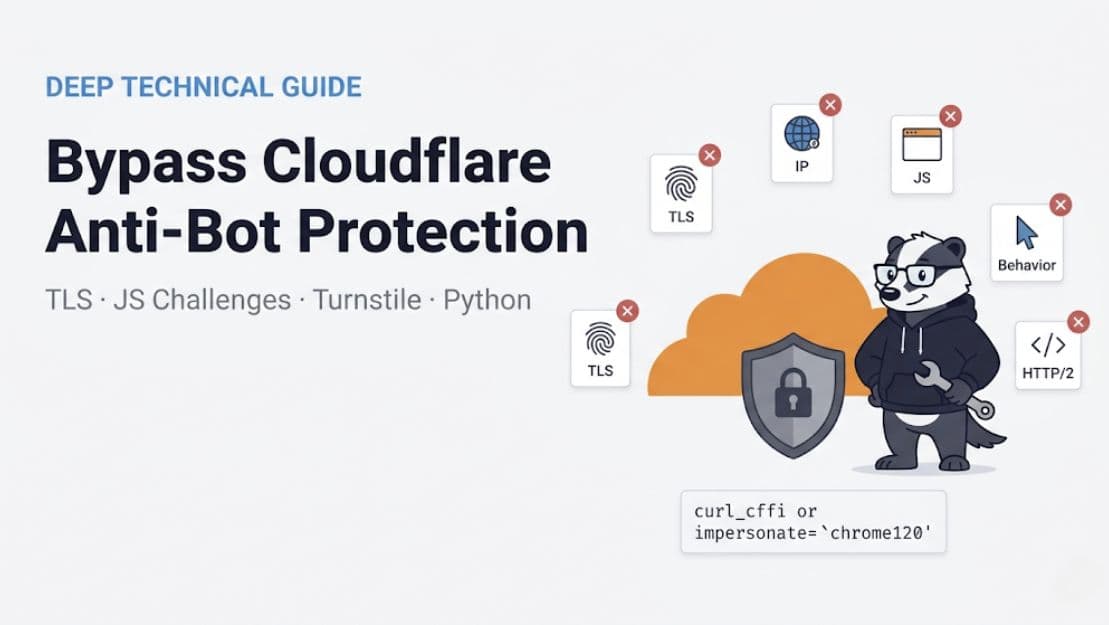
Cloudflare's anti-bot protection sits between a scraper and the origin. It scores each request and can refuse what it classifies as automated. That decision comes from 5 mechanisms, and each answers with the same server: cloudflare header.
The header doesn't say which mechanism acted. A 403 from g2.com carried that header, a cf-ray, and a body that named geo.captcha-delivery.com. Cloudflare was the CDN and scored the request. DataDome refused it. An engineer files a "Cloudflare is blocking us" ticket and applies Cloudflare fixes to a DataDome block. This guide starts by telling them apart, because the fix is different for each.
TL;DR
Read the body, not the
serverheader.cf-mitigated: challengemeans Cloudflare, but 2 of the 4 403s here came from DataDome or PerimeterX.Fix the TLS handshake. Headers changed nothing.
curl_cffi's impersonate="chrome"cleared both challenged sites, while identical headers over the default stack failed all 6 runs.Check the handshake before you buy proxies. Exits in 5 countries returned the same 403. Separately, 11 requests produced a 15-minute lockout on crunchbase.com.
Assert on content. All 12 Reddit runs returned 200 with zero rows of data. Size and content-type checks both let them through.
Cloudflare runs 5 mechanisms behind a single header
The server: cloudflare header means only that a request passed through Cloudflare's network. The response carries a different marker for 4 of the 5 mechanisms, though Cloudflare can rename those markers.
Managed challenge is the interstitial usually meant by "Cloudflare blocked me". The response is a 403 or 503 that carries cf-mitigated: challenge, a <title>Just a moment...</title>, several cf_chl_opt references, and a call to /cdn-cgi/challenge-platform/h/g/orchestrate/chl_page/v1?ray=.... The page runs a browser check, then issues a cf_clearance cookie once the check passes. An unchallenged request gets __cf_bm instead, which is the bot-management cookie and carries no clearance.
A refusal with no challenge attached returns a 403 or 503, and the body carries no challenge orchestration at all. Nothing runs and nothing clears, so there's no check to pass. A firewall rule is the usual cause, but the response alone can't prove that a rule matched. On indeed.com, one client got this refusal, and a Chrome handshake got the full page minutes later.
JavaScript Detections (JS Detections from here on) is the case that looks like success. The page returns 200 with real content and injects __CF$cv$params plus /cdn-cgi/challenge-platform/scripts/jsd/main.js. Every request that I sent got through.
Cloudflare's bot-score documentation says that the JSD engine blocks, challenges, or passes requests to other engines, and that scores run from 1 to 99. A score of 1 is automated, 2 to 29 is likely automated, and 30 or above is likely human.
An embedded Turnstile widget loads challenges.cloudflare.com inside a normal 200 page, where it can gate one form and leave the rest open.
AI-crawler controls started sorting by behavior in 2026. Cloudflare's changelog says that the new options sort AI traffic by what a crawler does on the site (Search, Agent, or Training), replacing the single block toggle that shipped in 2024. A challenge would have passed a client with the right handshake. These controls can still block it.
Use a headless browser only after you know which mechanism you're facing. The classifier below separates 4 of the 5. AI-crawler controls leave no response marker to match on.
Step 1: classify the block
The sites that I name throughout are technical specimens, chosen because they return different response types. Their terms restricted automated access when I checked, and the requests that I describe were low-volume and one-off. Check a target's terms and robots.txt before you send it automated traffic, and keep personal data and anything behind a login out of scope.
The classifier looks only at the markers that separate one mechanism from another:
import re


def classify(status, headers, body):
    h = {k.lower(): v for k, v in headers.items()}
    b = body or ""
    cf_cdn = "cf-ray" in h or h.get("server", "").lower() == "cloudflare"

    # Vendors that commonly sit behind Cloudflare's CDN. Check these first,
    # because they inherit Cloudflare's server header and cf-ray. Their cookie
    # means that the vendor is deployed, not that it refused you: both set
    # one on traffic they allow. Only the interstitial is a decision. These
    # hostnames and body markers are vendor-owned and get renamed, so re-check
    # them when a verdict starts looking wrong, and trust the payload
    # assertion over any of them.
    sc = h.get("set-cookie", "").lower()
    if "captcha-delivery.com" in b:
        return "datadome blocked (not Cloudflare)"
    if "px-captcha" in b:
        return "perimeterx blocked (not Cloudflare)"
    if "datadome" in sc or "_px" in sc:
        vendor = "datadome" if "datadome" in sc else "perimeterx"
        return vendor + (
            " present, served"
            if status == 200
            else " present, %d (not Cloudflare)" % status
        )
    if not cf_cdn:
        return "not behind Cloudflare"

    interstitial = "cf_chl_opt" in b or "/cdn-cgi/challenge-platform/h/" in b
    if h.get("cf-mitigated") == "challenge" or interstitial:
        # The challenge page names its own type. Read it instead of guessing.
        ctype = re.search(r"cType:\s*'([^']+)'", b)
        return "cloudflare challenge, cType=" + (ctype.group(1) if ctype else "unknown")
    if status == 429:
        # Not a bot decision. Retry-After gives the wait in seconds.
        return "cloudflare rate limit, retry-after=" + h.get("retry-after", "?")
    if status in (403, 503):
        return "cloudflare refused, no challenge attached"
    widget = "challenges.cloudflare.com" in b
    if "/cdn-cgi/challenge-platform/scripts/jsd/" in b:
        # A page can carry both. AI-crawler controls leave no marker to match.
        return "cloudflare served + JS Detections (passive scoring)" + (
            " + Turnstile widget" if widget else ""
        )
    if widget:
        return "cloudflare served + Turnstile widget"
    return "cloudflare served, no visible challenge"
The challenge page carries a parameter block that names its own type. The Cloudflare interstitials that I captured defined window._cf_chl_opt before loading anything. The udemy.com challenge page carried 16 fields, and these 8 carry the diagnosis:
cType:    managed          <- the challenge variant
cRay:     a2ac2a8a1872a7e0 <- matches the cf-ray header
cZone:    www.udemy.com    <- the zone that served it
cITimeS:  1786670731       <- issue time, Unix seconds
cvId:     3                <- challenge platform version
cFPWv:    g
cTplB:    0
cN:       j3P1Iiz4IFfsoJZVIRNxrI
The rendered page looks almost the same for managed and interactive, but the 2 types need different responses.
I ran the classifier with a plain HTTP client against 6 live sites. The classifier separated 4 Cloudflare mechanisms, and 2 of the 6 sites weren't Cloudflare at all. I name DataDome and PerimeterX where they appear, because Cloudflare fixes have no effect on them.
Target | Status | Classifier verdict |
|---|---|---|
indeed.com | 403 | cloudflare refused, no challenge attached |
udemy.com | 403 | cloudflare challenge, cType=managed |
crunchbase.com | 200 | cloudflare served + JS Detections (passive scoring) |
nowsecure.nl | 200 | cloudflare served + JS Detections (passive scoring) + Turnstile widget |
g2.com | 403 | datadome blocked (not Cloudflare) |
zoominfo.com | 403 | perimeterx present, 403 (not Cloudflare) |
The indeed.com verdict changed during testing. Earlier in the session, the same client got cType=managed from that domain. By the time of this run, that client was getting a plain block with no challenge attached.
Those verdicts describe how each site responded to one machine on one residential connection in India.
I re-ran the same function against 4 of them. It reproduced 3 of those verdicts and contradicted the fourth:

udemy.com moved from a managed challenge to a plain 200 with passive scoring. The function didn't change, but the sites did.
The order inside the function controls the verdict more than any individual marker does. The classifier checks DataDome and PerimeterX before Cloudflare, because both vendors inherit server: cloudflare and cf-ray when they run behind that CDN. A Cloudflare-first check would mislabel them every time.
The verdict decides what to do next:
Verdict | What to do |
|---|---|
| Not a Cloudflare fix. Sweep profiles first |
| Through, and being scored by a third party |
| Match the TLS handshake |
| Try the handshake anyway, then stop |
| Slow down or change exit |
| Through, and being scored |
A bare 403 can mean that a rule matched. But the one site that produced this verdict still cleared on a Chrome handshake, so try the handshake before you attribute it to a firewall rule.
The first 2 rows split because both vendors set their cookie on traffic that they allow, so keying a monitor on cookie presence alone reports a block every time you succeed. My earlier version did exactly that: PerimeterX had served a 428 KB page, and my classifier called it a PerimeterX block. On the last row, a 200 means that the request went through and the scoring continued.
zoominfo.com has since changed rows. On re-test, its 403 to a plain client carried px-captcha in the body. The same function returns perimeterx blocked where the 6-site table records perimeterx present, 403.
A protection scan answers part of the same question without maintenance. Our /v1/web/detect endpoint returns the detected systems with confidence scores for 1 credit:
curl -X POST "https://scrapebadger.com/v1/web/detect" \
  -H "x-api-key: $SCRAPEBADGER_KEY" \
  -H "Content-Type: application/json" \
  -d '{"url": "https://www.g2.com/", "country": "US"}'
That call returned datadome at 0.6 confidence and cloudflare_interstitial at 0.25, with blocking_type: "datadome". The scan cost 1 credit, took 34 ms, and matched the verdict that my classifier reached.
The scan caches per domain for 5 minutes, so a repeat inside that window isn't billed again. Across the 6 targets in that run, scan time ranged from 21 ms to 928 ms.
Read blocking_type for the vendor name.
Any scan, ours included, reports what one request from one exit saw. Use it to name the vendor, then classify what your own client gets back.
Step 2: match the TLS and HTTP/2 fingerprint
A cloudflare challenge verdict from step 1 points here.
The TLS ClientHello describes your client before a single byte of your HTTP request is parsed. JA3 hashes the TLS version, cipher suites, extensions, curves, and point formats. JA4 replaces JA3 with a sorted, structured identifier that survives the extension permutation that browsers now apply.
Python's requests produces a handshake that no browser produces, Go's default transport does the same, and the edge can act on that mismatch in the first round trip. I measured requests below, but not Go.
HTTP/2 adds a second fingerprint on top. The SETTINGS frame carries values that a client picks at connection setup, and browsers pick distinctive ones. Pseudo-header ordering and WINDOW_UPDATE behavior add more signals, so a Chrome user-agent string on a mismatched frame profile is a contradiction that the edge can see without extra work.
Both layers are directly observable, so you can measure them yourself. A reflection endpoint such as tls.peet.ws/api/all returns the fingerprints that the server computes for each client:
Client | JA4 | Ciphers/Ext | HTTP/2 SETTINGS and pseudo-header order |
|---|---|---|---|
|
| 18 / 12 | none, negotiated HTTP/1.1 |
|
| 27 / 12 | 1:65536;2:0;4:6291456;6:262144|15663105|0|m,a,s,p |
|
| 15 / 16 | 1:65536;2:0;4:6291456;6:262144|15663105|0|m,a,s,p |
|
| 17 / 17 | 1:65536;2:0;4:131072;5:16384|12517377|0|m,p,a,s |
|
| 20 / 13 | 2:0;3:100;4:2097152;9:1|10420225|0|m,s,a,p |
Counts come from the JA4 string itself, which excludes GREASE values. Those are the reserved dummy values that browsers insert to stop parsers from assuming a fixed list, so a raw packet dump will show a few more of each.
requests doesn't reach HTTP/2 at all, so it fails on a layer that it never negotiates. The chrome row and the default curl_cffirow share a byte-identical HTTP/2 fingerprint while their JA4 values differ, which rules out HTTP/2 as the difference.
In 0.16.0, chrome resolves to chrome146, and both names produce one identical JA4, t13d1516h2_8daaf6152771_d8a2da3f94cd. JA3 hashes the extension list in the order that the client sent it, and that order isn't fixed. Across 3 calls, the chrome profile returned the JA3 hashes a2d8ba60…, 28955474…, and 8d8f8c63… against that same JA4. Pinning a detector to JA3 means tracking a value that changes on its own.
curl_cffi fixes both layers at once by binding to curl-impersonate, which replays a real browser's handshake and frame settings. The change is one keyword argument:
# pip install curl_cffi
from curl_cffi import requests

r = requests.get("https://www.indeed.com/", impersonate="chrome")
print(r.status_code, len(r.content))
That request returned 200 and about 439 KB, with the title Job Search India | Indeed. The same IP address had just received a 403 with cf-mitigated: challenge.
I ran each cell with a 3-second gap and compared page titles, so a challenge page returning 200 would be visible.
Target |
|
| Repeats |
|---|---|---|---|
403, challenge | 200, site title | 3 of 3 | |
403, challenge | 200, site title | 3 of 3 | |
403, PerimeterX | 403, PerimeterX | 3 of 3 | |
403, DataDome | 403, DataDome | 3 of 3 |
"No impersonation" isn't one fingerprint. System curl with a Chrome user-agent had earlier received 200 from zoominfo.com, while curl_cffi without impersonation received 403, so treat the plain-client column as just one baseline.
A fingerprint change alone cleared both Cloudflare managed challenges in my sample, with no browser, no proxy change, and no CAPTCHA work. Much published advice recommends a headless browser at this point, and a browser costs roughly 3x per request at our rates. One keyword argument produced the same result.
Which layer decided it
Enabling impersonation changes the TLS handshake and the request headers together, so the table above can't separate them.
Passing headers={} to curl_cffi 0.16.0 merges your headers into the profile's set rather than replacing that set, so the call doesn't strip the headers that an impersonation profile supplies. Both arms sent the identical 13 headers, so the headers-off arm was a duplicate of the headers-on arm, and any conclusion from the pair would have been unearned.
The library exposes default_headers=False to suppress the profile's set. I used capture-and-replay instead, because it shows what was actually sent on the wire.
I captured the 13 real headers that an impersonated request sends, including their values and order, and replayed them over the default TLS stack:
Signal | Chrome TLS | Default TLS |
|---|---|---|
JA4 |
|
|
HTTP/2 fingerprint |
|
|
Headers sent | 13, identical | 13, identical |
The handshake decided both targets:
Target | Chrome TLS | Default TLS |
|---|---|---|
udemy.com | 200, 200, 200 | 403 challenge, 3 of 3 |
indeed.com | 200, 200, 200 | 403 challenge, 3 of 3 |
That result inverts the most commonly published Cloudflare advice. Many guides recommend copying a header set out of DevTools. Here, a complete, correctly ordered Chrome header set was refused 6 times out of 6, because the handshake underneath it was wrong. Realistic headers can't repair a handshake that the edge already read one round trip earlier.
Sending a lone user-agent header changes nothing either. curl_cffi merges that header into the profile's set, so the user-agent is replaced while the other 12 headers survive.
The challenge became a hard block mid-session
Late in the same testing session, indeed.com stopped returning a managed challenge to the default TLS stack and started returning a hard block. The earlier response carried cf-mitigated: challenge, a cf_chl_opt block, and the title Security Check - Indeed.com. A client can still answer that response.
The later response carried no cf-mitigated header, no challenge orchestration, and the title Blocked - Indeed.com. That response offers nothing to answer.
Nothing in the client changed between those 2 responses, except that more requests had failed before the second. Time passed too, and a configuration change at the site is an equally good explanation. I re-ran the impersonating profiles immediately afterwards, in the same minute. All 3 returned the full page, 9 times out of 9 across chrome, firefox, and safari.
Client on indeed.com | Early in session | Late in session |
|---|---|---|
Default TLS stack | 403, | 403, hard block, no challenge |
Chrome, Firefox or Safari TLS | 200 | 200, 9 of 9 runs |
If the retries caused the change, 2 things follow. The penalty escalated: after repeated failures on one fingerprint, the challenge became a hard block. The escalation also stayed with the fingerprint rather than the IP, because a well-formed handshake from that same address kept getting the full page throughout.
Stop retrying the moment a fingerprint starts failing. If the retries did drive that escalation, each one gave the detector another example of the fingerprint that you want it to forget.
A harvested cookie didn't survive a changed handshake
The obvious way to economize is to pay for one expensive browser request, keep the cookie that it earns, and run everything else as cheap HTTP calls.
A passing Chrome-impersonated request to udemy.com returned __cf_bm, which is Cloudflare's bot-management cookie. The same request returned no cf_clearance, since nothing was challenged. Replaying that harvested cookie on the default TLS stack changed nothing:
Arm | Cookie | Result |
|---|---|---|
Default TLS | none | 403 challenge, 3 of 3 |
Default TLS | harvested | 403 challenge, 3 of 3 |
Chrome TLS | none | 200, 2 of 3 |
Chrome TLS | harvested | 200, 3 of 3 |
The cookie carried no transferable trust. A valid bot-management cookie over the wrong handshake was refused every time, exactly like sending no cookie at all.
The Chrome-TLS arm was challenged once: udemy.com challenges a correct handshake occasionally, so treat these rows as dominant outcomes rather than deterministic ones.
That result is limited to __cf_bm harvested from a request that was never challenged. A cf_clearance token from actually solving an interactive challenge may behave differently, and I didn't obtain one to test. The conclusion still holds for the common case: budget as if every request needs a matching handshake, not as if one expensive request can be spread across many cheap ones.
Sweep the profiles. The choice is a variable in its own right. On zoominfo.com, the firefox profile returned the full 428 KB page in 3 of 3 runs, while chrome returned a 403 titled "Access to this page has been denied" in 3 of 3. The chrome146 and safari profiles returned the same 403 on a single run each. Nothing about the site suggests that Firefox should be the one to pass.
Impersonation is the first thing to try and the cheapest thing to maintain, so try every profile before you assume that you need a browser.
Where fingerprint matching stops
Impersonation failed in 3 distinct ways across my target set, and which one you see decides what to buy next.
The page needs JavaScript. This case looks like a block, but nothing blocked the request. The scraping sandbox at quotes.toscrape.com publishes the same content twice, one copy server-rendered and one assembled client-side:
URL | Status | HTML | Visible text | Quote blocks |
|---|---|---|---|---|
| 200 | 11,064 B | 1,702 chars | 10 |
| 200 | 5,808 B | 96 chars | 0 |
The client and the fingerprint were the same in both rows, and nothing blocked either request. The /js/ page returns a valid 200 without the data, and no impersonation profile changes that. Running the same URL through our browser engine returned 1,512 characters and all 10 quotes, for 6 credits against 2 at our HTTP tier. The browser tier buys exactly the rendering that this page requires.
The vendor isn't Cloudflare. g2.com returned a DataDome device-check interstitial, and no HTTP-only profile cleared it. That proves little, because none of those profiles execute the check. On the one DataDome target here, tuning a client against Cloudflare's checks didn't help.
The exit itself is disqualified. A flagged address can fail even when a genuine browser drives the request, and no client-side work changes that. IP reputation and a wrong fingerprint produce the same 403, and the check that separates them costs nothing: fetch the target with stock Chrome over the same exit first, and stop tuning the client if that fails.
Run that test, because my own measurements disagreed.
Step 3: escalate deliberately
When impersonation isn't enough, the next steps form a ladder, and each rung costs more and buys a specific capability. Current prices are in our API docs. We ship that ladder as 3 engine tiers with automatic promotion, and the structure is worth copying whether you use our tiers or build your own:
Tier | What it adds | Engine cost |
|---|---|---|
| Browser TLS and HTTP/2 | 1 credit |
| JavaScript and a DOM | 5 credits |
| Desktop-Chrome surface | 10 credits |
| Challenge solving | +5 credits |
Each call also carries a 1-credit base request charge on top of the engine cost, so an HTTP-tier call comes to 2 credits and a browser-tier call to 6.
Escalation is opt-in through a flag. The tiers aren't cumulative, so a request that succeeds at the browser tier is billed for that tier alone:
import os, requests

r = requests.post(
    "https://scrapebadger.com/v1/web/scrape",
    headers={"x-api-key": os.environ["SCRAPEBADGER_KEY"]},
    json={
        "url": "https://www.udemy.com/",
        "format": "text",
        "escalate": True,
        "max_cost": 20,
    },
)
# A blocked scrape answers 422 with the same fields nested under "data".
d = r.json().get("data", r.json())
ok = d["status_code"] == 200 and "course" in (d["content"] or "").lower()
print(d["engine_used"], d["credits_used"], d["status_code"], ok)
That call resolved at the HTTP tier for 2 credits and returned 296,245 characters of the real Udemy homepage, so the call cleared a live managed challenge without reaching a browser.
The latency we return is processing time, and excludes queuing and network transit. Plan capacity from the wall clock.
Set the engine explicitly. The escalation path runs from curl_cffi to browser to windows_chrome, and escalation is opt-in. Setting render_js: true or engine: "browser" reaches the browser engine, cloakbrowser, directly. Deciding the tier yourself from a protection scan is more predictable than leaving it to a flag.
Set max_cost on every call. Escalation and the solver add-on move a request from 1 credit to 15, so set the ceiling where you want it. max_cost is a budget ceiling that refuses the expensive call instead of billing you for it, and setting it once in your client wrapper applies it to every call.
The ceiling compares against the engine cost, so include the base credit when you set yours. A refused call costs nothing: it returns x-credits-used: 0.
Inside the JS Detections script
A Cloudflare response can block nothing and still measure you. A 200 that carries /cdn-cgi/challenge-platform/scripts/jsd/main.jsis the hardest case to catch, because the data arrives and the pipeline looks healthy. The script's design determines which stealth approaches keep working.
Each fetch returned a different script. I fetched the same URL on crunchbase.com 4 times and got 4 different files, 21,154 then 20,943 then 21,944 then 22,250 bytes, each with its own SHA-256. The script is a single line, wrapped in the string-array-rotation obfuscator pattern: a shuffled table of literals, an index-offset decoder, and a self-checking loop that rotates the table until a checksum of parseInt divisions matches.
Only the obfuscation varies. The same 4 values are hard-coded in all 3 scripts that I captured, one per domain: the identifier aae2b9a1c261, a token that the script later posts back, the timestamp 1786669221, and a float consistent with a Math.random() output. That identifier wasn't per-zone: it was byte-identical in the scripts served by crunchbase.com, udemy.com, and nowsecure.nl. Keeping the constants fixed while re-randomizing the wrapper raises the cost of static signatures and cached analyses, and leaves the 4 constants findable in every fetch.
The script touches almost nothing. I ran it under Node, replacing every global with a recording proxy and stubbing all network functions. It touched 10 distinct property paths, 7 of which are shown below, and fired 1 request:
document.location, document.location.href, document.readyState,
document.createElement("iframe"), document.body.appendChild,
crypto.randomUUID, XMLHttpRequest

POST /cdn-cgi/challenge-platform/h/g/jsd/oneshot/aae2b9a1c261
     /0.6373879625818034:1786669221:2fsma-MtEGv44xy2rzALnm3ixI3gvJRLc.../<ray>
body: TIHezkhjcw9-8FMsdcQszUfai-9L5e3LMQ0y09p-vyOpaUNkSSbkd5S1n$Fzku1m...
The word oneshot in that path matches the observed behavior: a single POST, with no read of the response.
The script is also time-bound. I re-ran the same saved copy a day later: the POST never fired, and only one property was touched. A freshly fetched script with fresh page parameters reproduced the 10-property path exactly. Changing the injected cf-ray altered 5 characters of the 121-character payload and left the rest byte-identical, so the ray sits in one small field inside a fixed-width encoded structure.
The iframe is a second JavaScript realm, not a rendering surface. The script creates one, appends it, and writes nothing into it in any run that I observed. A fresh iframe gives a second, untouched JavaScript realm. Any override applied to the main window shows up when a function's toString() is compared against the same function from that realm. The 3 plaintext strings that survived obfuscation are consistent with that use: toString, hasOwnProperty, and native code.
If the iframe serves that purpose, it explains why stealth tools moved away from JavaScript patches. A patch that redefines navigator.webdriver from JavaScript has to survive comparison against a copy of the runtime that it never touched, and a patch that touches only the main window fails that comparison.
That would also account for stealth browsers that compile their patches into the browser binary and inject no JavaScript at all, as Camoufox's patched Firefox build does.
Treat 10 property reads as a lower bound. A mocked environment can be detected, and a script that detects one may take an early exit, so the count is what ran under the mock rather than what runs in a real browser.
I also enriched the mock so that canvas and WebGL returned plausible values, and the payload stayed byte-identical. That is evidence that this particular payload carries no canvas hash, but it isn't proof.
Choosing a browser tool
That realm comparison is also a test that you can run yourself. Most comparisons ask whether a tool hides navigator.webdriver , and cover Camoufox, Patchright, nodriver with its zendriver fork, pydoll, SeleniumBase UC mode, Botasaurus, and Scrapling. That question stopped separating them.
The probe below borrows the same technique, and also checks for the well-known ChromeDriver artifacts:
const f = document.createElement('iframe');
f.style.display = 'none';
document.body.appendChild(f);
const W = f.contentWindow;
const native = fn => /\{\s*\[native code\]\s*\}/.test(String(fn));
const read = d => d ? (d.get ? (native(d.get) ? 'native' : 'PATCHED') : 'value')
                    : 'absent';

({ webdriver: navigator.webdriver,
   // ChromeDriver leaves these in the global scope
   globals: Object.keys(window).filter(k => /cdc_|\$cdc|__webdriver|__selenium/i.test(k)),
   // a JS-level patch fails these, a launch-flag change does not. Report the
   // two realms separately: comparing them as booleans returns "agree" when
   // both are patched, which is the case you are trying to catch.
   wdGetter:    read(Object.getOwnPropertyDescriptor(Navigator.prototype, 'webdriver')),
   wdGetterIfr: read(Object.getOwnPropertyDescriptor(W.Navigator.prototype, 'webdriver')),
   toStringNative: native(Function.prototype.toString.toString()) })
I ran the probe headful against the versions in the table below. I pinned zendriver, pydoll, and patchright to the same local Chrome 151, while SeleniumBase and Botasaurus resolved their own browser. Every row except the control came back byte-identical:
Tool |
| Driver globals |
|---|---|---|
zendriver 0.15.5 | false | 0 |
pydoll 2.24.0 | false | 0 |
patchright 1.61.2 | false | 0 |
SeleniumBase 4.51.8, UC mode | false | 0 |
Botasaurus 4.0.97 | false | 0 |
Camoufox 0.5.4 (Firefox 152) | false | 0 |
plain ChromeDriver, as a control (SeleniumBase with | true | 7 |
The getter read as native in both realms in every row, including the last. The 7 globals in the bottom row are the cdc_adoQpoasnfa76pfcZLmcfl_* set that ChromeDriver injects, and any script on the page can read them from Object.keys(window).
Everything above that row passed, though not for the same reason: Camoufox ships a patched Firefox build, patchright patches the driver rather than the page, and the others change launch flags. This probe can't separate those 3 routes, and it can't distinguish a tool that applies no JavaScript override from one whose override it failed to catch. Ranking these tools on this axis ranks identical results.
Camoufox reports a machine it isn't running on, and no other tool did. I asked for os="windows" on an Apple Silicon Mac, and it returned Win32, an ANGLE renderer, a desktop resolution, and a plausible core count, with no trace of the host's Metal renderer. The macOS and Linux profiles were internally consistent in the same way. The specific values are redrawn each launch, so every run gets a different machine from the one printed here.
One field didn't follow the operating system: timezone tracked the host in all 3 profiles, since locale inference is opt-in. I ran without a proxy, so I didn't test whether enabling that inference resolves the mismatch that a foreign exit would create. Test locale inference together with a foreign exit before you rely on either.
TLS fingerprint: the axis that does separate them
The tools still differ in how far down the stack the imitation goes. I sent real Chrome 151 and curl_cffi's Chrome profile to the same reflection endpoint, and the fingerprints came back one field apart:
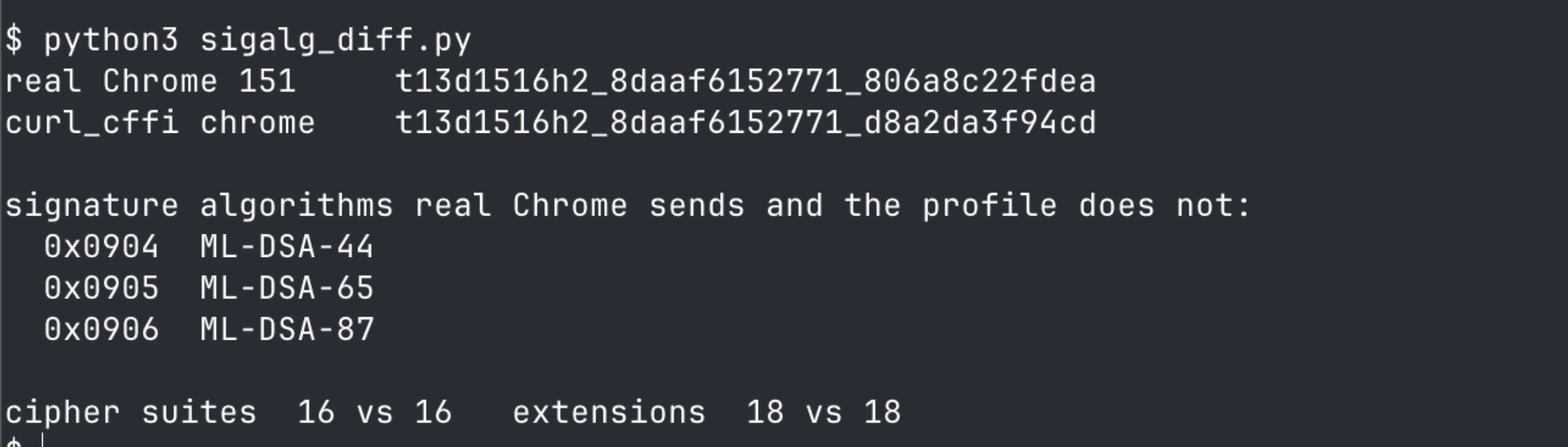
One script, one run, both arms.
The full field list behind that one difference:
Handshake field | Real Chrome 151 |
|
|---|---|---|
JA4 tail |
|
|
Cipher suites | identical | identical |
Extensions | identical | identical |
Signature algorithms |
|
|
Real Chrome sends 3 values that the impersonation doesn't: 0x0904, 0x0905, and 0x0906. Those are ML-DSA-44, ML-DSA-65, and ML-DSA-87, the post-quantum signature schemes from FIPS 204, registered by IANA and specified in draft-ietf-tls-mldsa.
Chrome advertises them and the profile doesn't, because the highest Chrome profile that curl_cffi 0.16.0 ships is chrome146while the browser on this machine is 151. That is version skew, not a defect in the library. Everything else matched byte for byte, so the profile is faithful to the Chrome that it targets, and the gap is the 5 releases in between. Version 0.16.0 was the current release on PyPI when I checked, so upgrading wouldn't have closed the gap.
Sending every tool to the same endpoint sorts them into 3 fingerprints, and the engine that ships the bytes decides which one:
Engine launched | JA4 | Post-quantum sigalgs |
|---|---|---|
installed Chrome 151 | …_806a8c22fdea | yes |
bundled Chromium 149 | …_d8a2da3f94cd | no |
no browser at all | …_d8a2da3f94cd | no |
Firefox 152 (Camoufox) | t13d1617h2_86a278… | Firefox list |
Row 1 is patchright with channel="chrome". Any tool that points at that same installed binary should appear in that row, but I retained a handshake only for patchright, so the other tools are inferred.
Row 2 is patchright on its default engine and Scrapling 0.4.14's StealthyFetcher, which launches Chromium here rather than the Firefox base commonly assumed. Row 3 is Scrapling's Fetcher and a plain curl_cffi call, both on a Chrome 146 profile. On this axis, Scrapling's 2 entry points appear in different rows but on the same fingerprint.
A bundled Chromium and a pure HTTP client produce the same JA4, so running a real browser adds nothing at this layer when the browser is the one that your automation library downloaded. The bundled build leaks in a second way too. Its navigator.userAgentData.brands read Chromium 149 | Not)A;Brand 24 while its user-agent claimed Chrome/149.0.0.0, and real Chrome returned Google Chrome 151 | Chromium 151. Passing channel="chrome" fixes both problems with one keyword.
The 3 missing sigalgs are why an impersonation profile needs maintenance. Everything that an impersonation library imitates is correct until the browser adds something, and then the copy stays where it is while the browser keeps changing. Tracking Chrome releases and re-measuring is continuous work, so doing it yourself means a re-test schedule rather than a one-time fix.
Our HTTP engine runs curl_cffi, so I sent 3 calls through it to the same reflection endpoint. All 3 returned t13d1516h2_8daaf6152771_806a8c22fdea, the real-Chrome-151 JA4 from the table above, with 0x0904, 0x0905, and 0x0906 present. On this endpoint and this date, our profile ran ahead of the public 0.16.0 release, and the same tls.peet.ws call re-checks that for 2 credits whenever you need it.
Pick a browser tool by the engine that it launches, not by whether it hides navigator.webdriver. Impersonation is still the right first move: one line of it cleared both Cloudflare challenges here, and you escalate only when the profile stops matching the browser.
The measured comparison
I put the Cloudflare targets through both arms: curl_cffi from my laptop, and our API at its HTTP tier.
Target | System at test time |
| Our API |
|---|---|---|---|
udemy.com | CF challenge | 200 (chrome) | 200, 2cr, 1.4s reported / 2.0s wall |
nowsecure.nl | CF served 200 to all | 200 (any) | 200, 2cr, 1.8s reported / 3.6s wall |
crunchbase.com | CF + JSD | 200 (any) | not retested |
Our API cleared udemy.com without reaching a browser. nowsecure.nl was serving 200s to everything, so it tested the path rather than the bypass.
g2.com and zoominfo.com sit outside this table. They ran DataDome and PerimeterX rather than Cloudflare, which is a different problem with a different fix.
Assert on the content that you actually needed. Any success flag, in any client or API, reports whether a fetch completed and not whether the response carried your data.
Every Reddit failure mode I tested returned 200
Our success flag has the same problem your own client does. I ran each of 4 configurations 3 times against reddit.com/r/webscraping/, and they produced 12 HTTP 200 responses and zero rows of data.
Configuration | Status | Body | What the body was |
|---|---|---|---|
Chrome TLS, HTTP/2 | 200 | 167 KB |
|
Chrome TLS, forced HTTP/1.1 | 200 | 8 KB | auto-submitting interstitial form |
Chrome UA only, HTTP/2 | 200 | 8 KB | auto-submitting interstitial form |
Chrome UA only, HTTP/1.1 | 200 | 8 KB | auto-submitting interstitial form |
Counting post markers in each body returned zero every time. A scraper that checks status_code == 200 will record 12 successes and a 100% success rate while collecting nothing.
The 167 KB row is the one a size check misses. A size threshold looks like a reasonable guard until a challenge page arrives 20 times larger than the 8 KB form in the other rows. Any check that looks like len(body) > 5000 lets that humanity page through, and a check on content type does the same: the page came back text/html at 167 KB with a 200.
I re-ran 3 of those configurations and evaluated the size check:

A re-run returned 166,963 and 8,407 bytes, matching the table's rounded figures.
One guard caught all 4 rows. Assert on the data that you came for:
import re

# Not: status == 200, or len(body) > N, or "error" not in body.
# The data you need is present, or the request failed.
posts = re.findall(r"/r/\w+/comments/", body)
ok = len(posts) >= expected_minimum
The Chrome-UA-plus-HTTP/2 claim didn't survive this test. Guides and forum threads report that Reddit rejects the combination of a Chrome user-agent and HTTP/2, and that switching to HTTP/1.1 resolves it. My runs didn't reproduce that. Forcing HTTP/1.1 replaced a 167 KB humanity check with an 8 KB interstitial, and no configuration returned real content.
That claim may hold on a different network at a different time, so treat the mismatch as a finding that didn't survive re-testing here rather than as a correction.
If you write the assertion for the data, a protocol tweak that stops working becomes a loud failure rather than a silent one.
What proxies actually fix
Residential proxies are the standard recommendation, and how residential, datacenter, and mobile exits compare is a question of its own. I ran 2 tests to separate what proxies fix from what they don't.
Changing the exit country changed nothing. I held the engine constant and routed the same request to indeed.com through residential exits in 5 countries:
Exit country | Result |
|---|---|
US, GB, DE, IN, BR | 403, |
Meanwhile, a Chrome-impersonated request from my own laptop was returning the full page from that same domain, over one ordinary Indian residential connection. The 5 residential exits failed while my own consumer connection, with a better handshake, succeeded, so on this target the address wasn't the constraint.
The second test found the limit that the address does control. I ran 100 requests against crunchbase.com at one request every 1.2 seconds, using a Chrome fingerprint that had passed every check:
Requests 1 to 11 | Request 12 onward |
|---|---|
200, median 48 ms | 429, 89 of 100 |
No challenge appeared at any point in the run. The 429 came from Cloudflare, carrying cf-ray and no cf-mitigated header at all. Fewer than 15 seconds of traffic at that rate produced a 15-minute lockout, with retry-after at 900 seconds. Requesting again inside that window returned the time remaining rather than a fresh 900, so a second reading looks like a shorter limit than the first.
I ran the script twice a few minutes apart, one run locked out and one fresh. This time, the 429 appeared on request 11 rather than request 12:
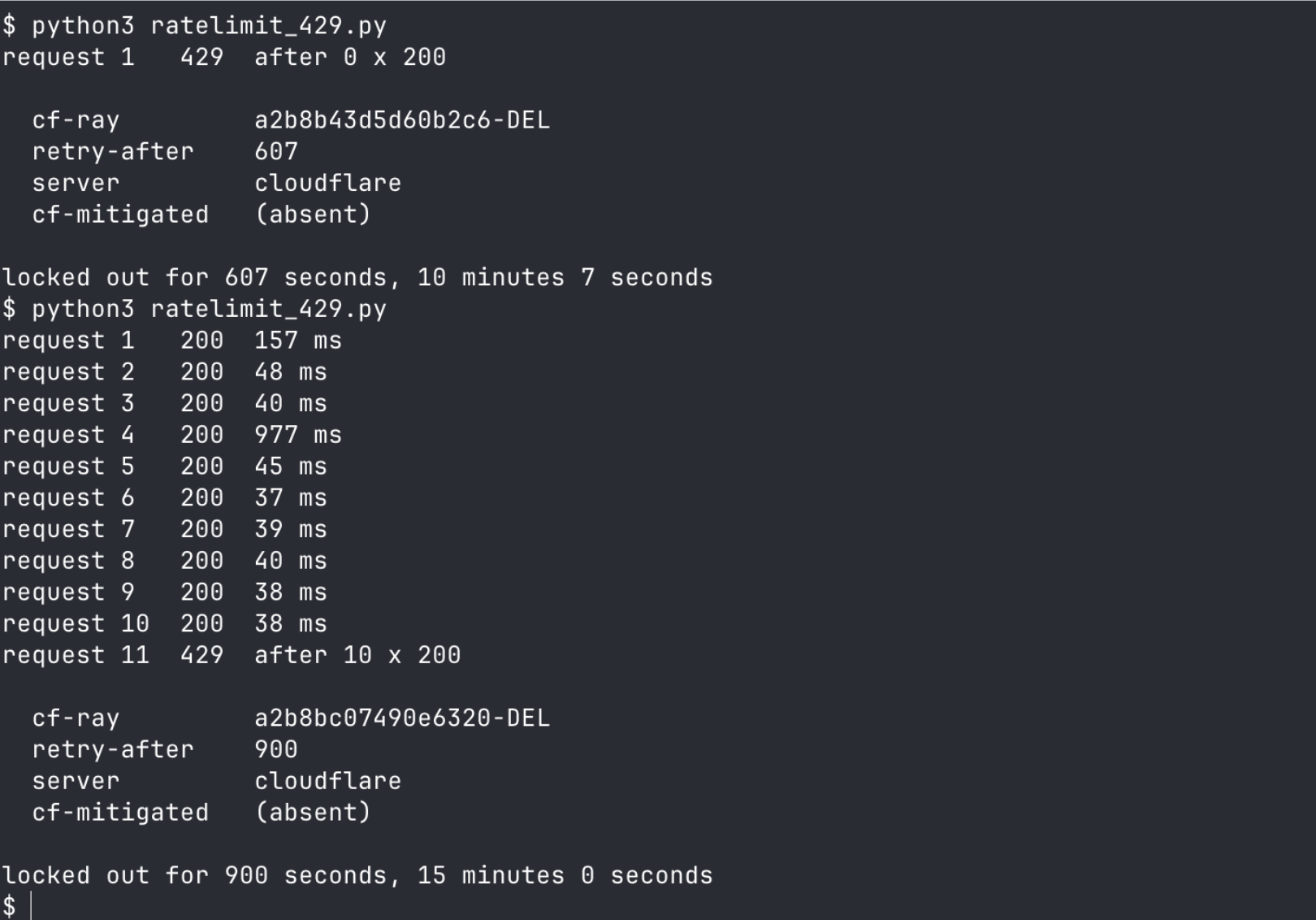
The 607 is the remainder of an existing window, not a shorter limit. Neither 429 carries cf-mitigated, so a challenge handler never sees either one.
The limit is keyed to the address, not the socket. Requests kept returning 429 for the rest of the window regardless of how they were connected, so connection pooling and session handling are irrelevant to it. Waiting clears it. A different exit should too, though I didn't test that.
Rotation buys throughput, because the rate limit is counted per address. It doesn't buy admission, because on these targets the handshake decided admission and a new address didn't change it. Budgeting proxies to fix a 403 usually spends money on the wrong layer, and budgeting them to fix a 429 spends it on the right one.
Sourcing and rotating a pool of exits is the second recurring cost after profile maintenance. We bundle it into the per-request price, so it isn't a separate line item. Bundling removes the sourcing cost and leaves the admission decision untouched: I routed through 5 of our exits, all 5 returned the same 403 here, and the handshake decided it. A block page tells you nothing about whether the exit was residential, so confirm the countries that you need before you count on them.
Reputation does gate some targets, and a datacenter range can fail on an aggressive site while a residential exit passes. That is why we route through residential pools by default. The measurements say when to check the address, not whether reputation is real: when a 403 arrives, it isn't the first place to look.
Pools also degrade in ways that look like your bug. Operators of large residential pools reported through 2026 that good exits had become noticeably harder to find, that whole ranges went bad together rather than one address at a time, and that no mechanism was confirmed. I didn't measure it. Design for it regardless: if success rate drops across every target at once while nothing in your client changed, suspect the exit before you suspect the code.
Hold identity together. Cookies, fingerprint, and exit IP should rotate as one unit, because a session that changes its IP while keeping its cookies describes a single device in 2 places.
Wiring the diagnosis into monitoring
Most monitoring watches for exceptions and non-200 responses, and that check misses every failure documented above. A challenge arrives as a 200 on Reddit. A rate limit arrives as a 429 with no cf-mitigated header for a challenge handler to catch, and a vendor switch arrives as a 403 that looks like Cloudflare's. The dashboard stays green while the pipeline collects nothing.
The classifier from step 1 already separates those states, so the check is a thin wrapper over it plus one payload assertion:
from classify import classify  # save the step-1 function as classify.py

def health(status, headers, body, must_contain):
    verdict = classify(status, headers, body)
    if verdict.startswith("cloudflare rate limit"):
        return "backoff", verdict          # throughput ceiling, not an identity problem
    if verdict.startswith(("cloudflare challenge", "cloudflare refused")) or "not Cloudflare" in verdict:
        return "page", verdict             # stop; retrying escalates the penalty
    if must_contain not in (body or ""):
        # 200 with no data
        return "page", "200 with no data: " + verdict
    return "ok", verdict
I re-ran the check against live responses, and it routed each state correctly: crunchbase.com returned ok, udemy.com without a profile returned page as cType=managed, g2.com returned page as datadome, and Reddit's humanity page returned page as a content-free 200. The rate-limit state, replayed from its recorded headers, returned backoff carrying retry-after=900.
Split backoff from page, because confusing them blocks a setup that was working. A 429 means that you're at the throughput ceiling, and the fix is to slow down or change exit, so handle it without alerting, and count it. A challenge means that your identity failed, and the indeed.com sequence suggests that retrying into a challenge produces a harder block than the challenge itself.
The must_contain argument is the part that can't be skipped. Reddit shows why: the classifier correctly reported not behind Cloudflare, which was true in these runs, so only the payload assertion caught the failure. Reddit's humanity page arrived as a 200, text/html, and 167 KB, so a status check, a content-type check, and a size check would each have let it through.
Alert on the verdict mix, not only on the failure count. A target can return served + JS Detections last week and cloudflare challenge this week. That shift has 2 likely causes: your fingerprint drifted because the browser shipped a change that the library hasn't copied, or the site changed configuration. Either way it shows up before the success rate does, which makes it the earliest warning that the cheap fix has stopped being enough.
What changed in 2026
A working scraper has to account for 3 changes, and none of them are fingerprinting improvements.
Cloudflare introduced Precursor in 2026 as part of Enterprise Bot Management. On zones running it, Cloudflare injects Precursor into HTML responses automatically. According to that post, Precursor continuously scores pointer movement, keyboard activity, focus changes, and visibility across a session rather than at checkpoints. I couldn't test it against an Enterprise zone, but that design means that a client can pass every static check, then behave like a script, and stay detectable.
Web Bot Auth signs requests with Ed25519 keys carried in Signature-Input, Signature, and Signature-Agent headers. I probed the documented /.well-known/http-message-signatures-directory path on 6 domains in August 2026, and 2 of them served keys: chatgpt.com and browserbase.com. The other 4 returned nothing at that path. For a declared, user-directed agent, Web Bot Auth is a supported way in, rather than a bypass.
From September 15, 2026, new domains that onboard to Cloudflare are scheduled to get defaults that block Training and Agent traffic on pages that show ads. Search stays allowed, and the Training block catches multi-purpose crawlers that combine Search and Training. That default sorts by behavior, so a client that would clear a challenge can still be refused.
Buy or build
The right choice depends on your target set, and mine gave both answers.
Build it yourself when the target set is small and stable. If curl_cffi clears your sites on a sweep, the ongoing cost is another sweep when something breaks. On indeed.com, curl_cffi kept working after the site had started hard-blocking the default stack.
Buy our managed Cloudflare bypass when the target set is wide, or when you need throughput. The maintenance surface is everything around the fingerprint: profile sweeps per target, a browser tier for JS-rendered pages, per-vendor handling for the DataDome and PerimeterX pages that sit behind Cloudflare's CDN, and a re-test every time a vendor ships. Throughput is the clearer trigger: 11 requests produced a 15-minute lockout on crunchbase.com, the limit is counted per address, and getting past it means a pool that somebody has to source and rotate.
Diagnose in both cases. Our scan costs 1 credit and answers the first question that changes what you build. Our free tier is 1,000 credits with no card. At the per-call cost above, that buys 1,000 protection scans, 500 HTTP-tier calls, or about 160 browser-tier calls.
Those are calls rather than pages, and a hard target set costs more per page than an easy one.
Rate limits vary by plan, so size your loop from the x-ratelimit-limit header on your own key and check our rate-limit tiers for what yours allows. The free tier is enough to run the comparison above against your own targets, but pace it.
Run your own table before you commit to either path, because only your sample predicts your success rate.
Final thoughts
On these targets, 3 gates decided whether a scraper worked, and they failed independently: the handshake settled admission, the exit address settled throughput, and the returned bytes settled validity. None of the 3 shows up in the server header, so the order is fixed: name the vendor, then the gate, then the component that owns it.
The specifics will age fastest where they're cheapest to re-check: credit prices, free-tier limits, library profile versions, and which mechanism blocks each of these 6 sites, 3 of which changed during my testing. Those gates won't merge into one, and a team that rotates proxies against a handshake problem works on the wrong layer.
Our free tier needs no card, so start with a protection scan on the failing URL.
Frequently asked questions
How can I stop Cloudflare from blocking me?
Match the TLS handshake before anything else. On indeed.com and udemy.com, curl_cffi's impersonate="chrome" replaced a 403 carrying cf-mitigated: challenge with a full page from the same IP address, 3 of 3 runs each. Copying browser headers over the default TLS stack changed nothing: Cloudflare challenged those requests 6 times out of 6.
Why can't I bypass Cloudflare?
Check whether Cloudflare blocked you at all. The server header only names the CDN. A body naming captcha-delivery.com is a DataDome refusal, while a _px cookie only means that PerimeterX is deployed, since it sets that cookie on allowed traffic too. In a 6-site test in August 2026, those vendors accounted for 2 of the 4 403s.
How to fix 403 forbidden Cloudflare error?
Classify it before you fix it. A 403 carrying cf-mitigated: challenge or cf_chl_opt is a challenge, and a handshake change cleared the 2 that I tested. A 403 with no challenge markers offers nothing to answer, though the one site that showed it still cleared on a Chrome handshake. A 429 is a rate limit, not a bot decision.
What is Cloudflare and why is it blocking me?
Cloudflare sits in front of the origin, and it scores each request before the origin answers. One server: cloudflare header covers 5 mechanisms: a refusal with no challenge attached, a managed challenge, a Turnstile widget, JS Detections, and 2026's AI-crawler controls. Reading the response body separates 4 of those 5.
Is web scraping legal or illegal?
Legality depends on what you collect, from where, and under whose authorization. No article substitutes for counsel. In Amazon v. Perplexity, the Ninth Circuit vacated a preliminary injunction on August 4, 2026, holding that a user directing an agent is the party accessing the site under the CFAA. The court called that holding narrow and left terms-of-service claims intact.
Why is curl_cffi still returning 403?
Sweep the profiles rather than assuming Chrome. On zoominfo.com, firefox cleared the page in every run while chrome was refused in every run. If all of them fail, check the vendor: no HTTP-only profile cleared the DataDome target, because none of them execute its check.
Can I reuse a cf_clearance cookie instead of solving again?
A harvested cookie didn't replace the handshake. A __cf_bm cookie taken from a passing request to udemy.com did nothing when replayed on a mismatched TLS stack: challenged in 3 of 3 runs, exactly like no cookie. A cf_clearance token may differ, and I didn't obtain one, so budget as if every request needs a matching handshake.
Do I need a CAPTCHA solver for Cloudflare Turnstile?
No solver was needed for anything measured here. Both Cloudflare-challenged sites cleared with a TLS handshake change, so no CAPTCHA was ever served and there was nothing to answer. Turnstile appeared once in the sample, on nowsecure.nl, and the goal there is to avoid triggering it rather than to solve it.

Written by
Domas Sakavickas
Dom Sakavickas is Co-founder of ScrapeBadger, building web scraping infrastructure for developers and data teams. He writes about the web data market, tool comparisons, and business use cases for scraping. ScrapeBadger is a web scraping API platform specialising in Twitter/X, Reddit and Google data, with dedicated scrapers also covering TikTok, YouTube, LinkedIn, Amazon, eBay, Zillow and 40+ more: with built-in anti-bot bypass and an MCP server for AI agents.
Ready to get started?
Join thousands of developers using ScrapeBadger for their data needs.