How to Bypass DataDome Anti-Bot Protection in 2026
 Domas Sakavickas
AI Summary: This guide explains why DataDome is uniquely hard, starting from behavioral profiling against per-customer ML models rather than passive signals, and details the techniques needed to bypass it, including where Cloudflare-proven methods fail and ScrapeBadger handles it instead.
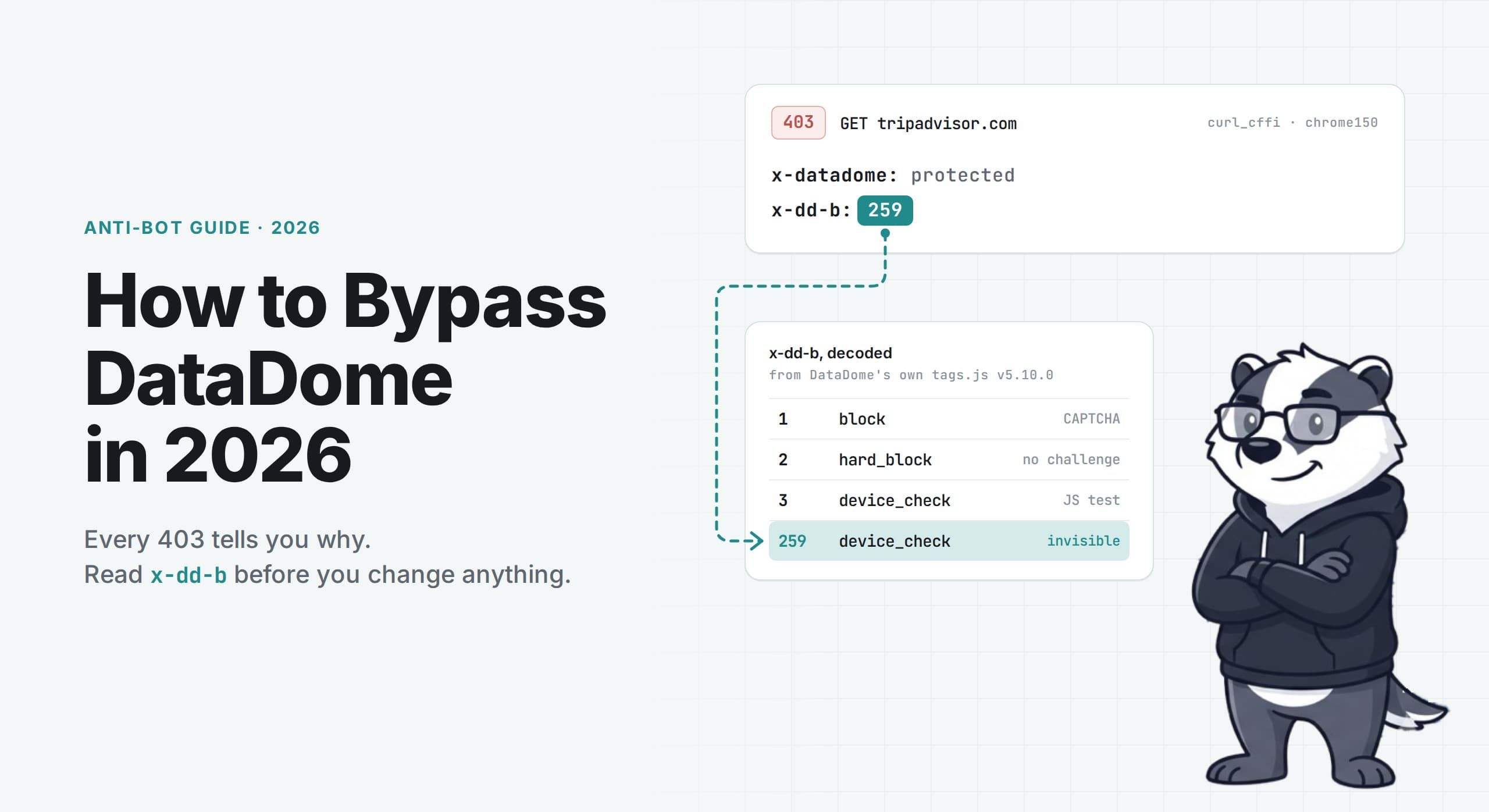
DataDome is a bot management service that runs as a module in a site's CDN or server. The module asks DataDome's API about incoming requests, then allows, challenges, or refuses them. DataDome claims 75,000 customer websites.
A refusal is usually a 403 with a few hundred bytes of script. Because it seems to explain nothing, many teams guess. They add a residential proxy, try a stealth browser, randomise delays, and re-run. Something works for an unclear reason, and it often breaks later.
This guide shows how to read the decisions DataDome already sends, and the options for responding to each.
TL;DR
Every DataDome refusal we saw included an
x-dd-bheader, and DataDome's own tag decodes the value: 1 block, 2 hard_block, 3 device_check, 259 device_check_invisible_mode.Try client changes first: the
User-Agentversion alone turned 403s into 200s on 2 sites, and one site served Firefox but no Chrome client.m_fmi, 1 of 71 behavioural signals, can detect headless mode from window position. On macOS, headful mode avoided it. Patchright's stealth patches did not.When device checks or hard blocks stop a local script, ScrapeBadger's DataDome handling supplies the browser and residential proxies, and failed requests cost nothing.
Read DataDome's decision before you change anything
Every DataDome refusal we saw included a header called x-dd-b. DataDome's Android SDK documentation mentions it, telling developers to "identify a challenge response with the presence of an X-DD-B header". That page does not say what the values mean.
The client-side tag decodes them, in a part of its code that is minified but not obfuscated.
The function is called getDataDomeChallengeType. Version 5.10.0 of the tag handles the header value like this:
// from tags.js v5.10.0, reformatted from the minified source
switch (255 & n) {
  case 1: return this.ChallengeType.BLOCK;
  case 2: return this.ChallengeType.HARD_BLOCK;
  case 3: return Boolean(n >> 8 & 1)
            ? this.ChallengeType.DEVICE_CHECK_INVISIBLE_MODE
            : this.ChallengeType.DEVICE_CHECK;
  default: return this.ChallengeType.UNKNOWN;
}
The low byte holds the challenge type and bit 8 holds an invisible-mode flag. That is why 259 is a device check in invisible mode: 256 sets bit 8, and 3 is the low byte.
That gives you a lookup table for a header you were already receiving:
| Type | What it means for you |
1 |
| Refused, with a CAPTCHA page to solve |
2 |
| Refused, with no challenge offered |
3 |
| Refused, with a JavaScript check to pass |
259 |
| Same check, no visible interstitial |
anything else |
| Not in this version's table |
In practice, value 2 is different from all the others. A hard block is not a challenge you failed, so retrying the same client more slowly is unlikely to help. A device check is a test you can try to pass by running its JavaScript in a real browser. It loads DataDome's script in an iframe, and a browser that passes gets a new datadome cookie.
The header comes from the first of two main places where DataDome checks a visit:
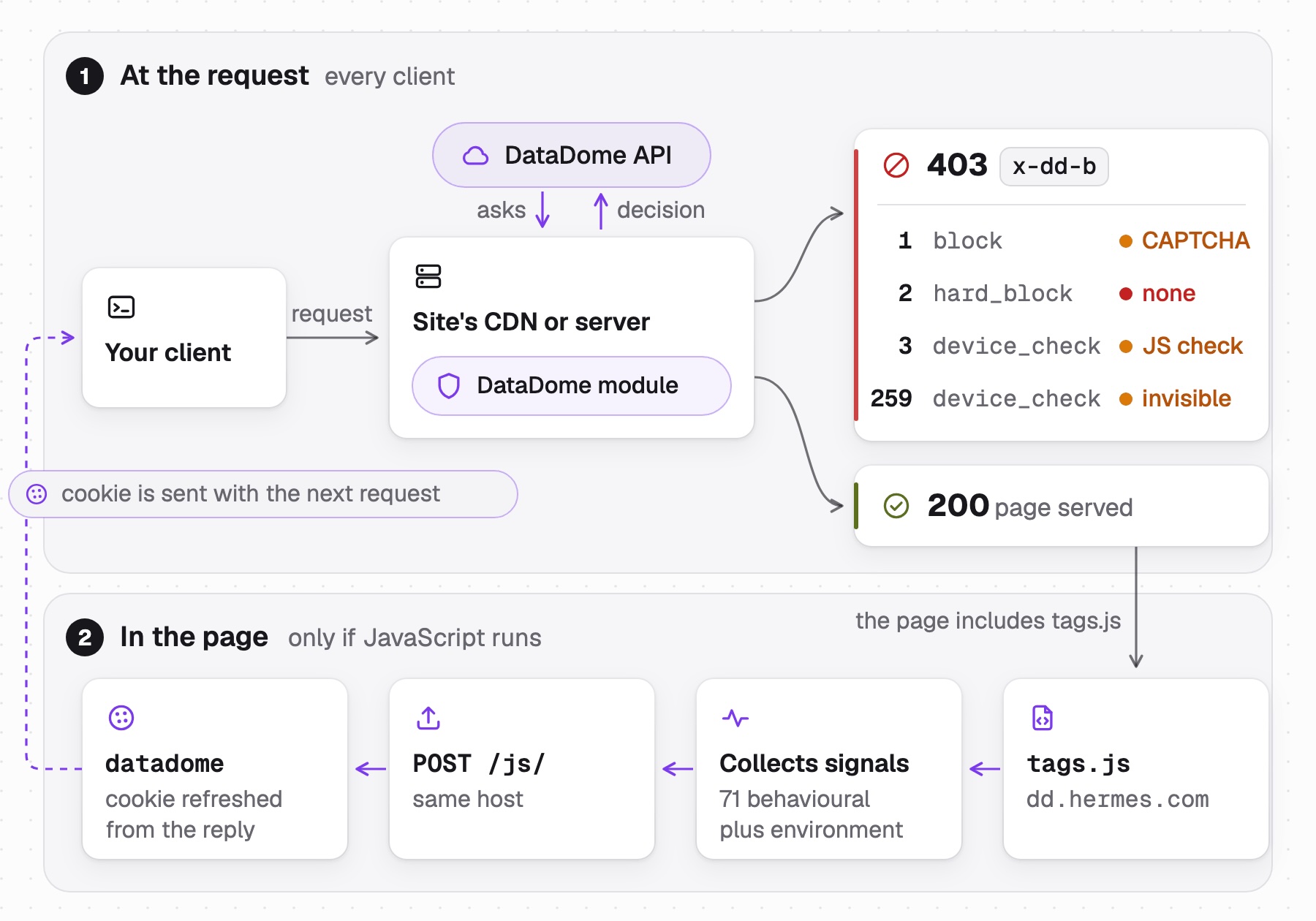
An HTTP client is checked on its request alone. A browser also reports the page's signals, and the cookie it gets back is sent with its next request.
If you want to see DataDome's decision for your own scraper first, the triage script that prints it is below.
Four sites, one vendor, six clients
We sent one request from each of 6 clients to 4 DataDome-protected sites, all in one run from a residential broadband IP outside France. The first was Python requests with library defaults. The second sent the same request with 6 headers copied from Chrome, 3 of them client hints that requests does not send by default.
The other 4 used curl_cffi, a Python client that impersonates a named browser's TLS and HTTP/2 fingerprint. We used 4 of its profiles: Chrome, Firefox, desktop Safari and Safari on iOS.
Client, one run | leboncoin.fr | seloger.com | tripadvisor.com | hermes.com |
| 403 hard_block | 403 hard_block | 403 hard_block | 200 served |
| 403 block | 200 served | 403 hard_block | 200 served |
| 403 block | 200 served | 403 device_check_invisible_mode | 200 served |
| 403 block | 200 served | 200 served | 200 served |
| 403 block | 200 served | 200 served | 200 served |
| 403 block | 403 device_check | 403 device_check_invisible_mode | 200 served |
The table shows one run, and any single result can change if you request the page again. The day before, the same request with Chrome headers was served by Leboncoin, refused 52 minutes later, then served 11 minutes again after that. Our request did not change, so the change was on DataDome's side or in our network. A reputation score for our IP address is the first thing to suspect, and we could not confirm it from outside.
Measure a target more than once before you conclude anything about it.
All 4 sites returned x-datadome: protected in at least one response, so the vendor is the same in every column. But each site's policy is different.
Hermes served all 6 clients, even a plain requests.get with the library's own User-Agent, which got the full 579 KB page. Seloger refused the library default and served 4 of the other 5.
Tripadvisor is the most useful column. It refused every Chrome client we sent, including the one impersonating Chrome's TLS fingerprint, and served Firefox 147 and desktop Safari. We repeated the Chrome and Firefox requests 3 times each, and every repeat got the same result.
Safari on iOS behaved differently from desktop Safari. It was refused by Tripadvisor and by Seloger, while desktop Safari was served by both. So the two Safari profiles got opposite decisions on 2 of the 4 sites. The profile can matter more than the family name.
Leboncoin refused all 6 in this run. Note that 5 of those refusals were block rather than hard_block, so a CAPTCHA was offered. No HTTP client can solve one on its own, and a browser alone can only display it.
What changes the decision, and what does not
A common piece of advice is to switch HTTP libraries when a site refuses you. We checked what that actually changes by sending requests from two of them to tls.peet.ws/api/all, which returns the fingerprint it saw.
rnet is a Rust client built on BoringSSL, the TLS stack Chrome itself uses. curl_cffi wraps a patched libcurl.
JA4 is a widely used fingerprint format for a TLS handshake. Its first part is readable: it includes the TLS version, the number of ciphers and extensions, and ALPN, the first protocol the client offers. The second and third parts hash the cipher list and the extensions. Here is what each library sent:
library    profile     JA4 (TLS handshake fingerprint)
rnet       Chrome137   t13d1516h2_8daaf6152771_d8a2da3f94cd
curl_cffi  chrome136   t13d1516h2_8daaf6152771_d8a2da3f94cd
curl_cffi  chrome150   t13d1516h2_8daaf6152771_806a8c22fdea
rnet       Firefox139  t13d1717h2_5b57614c22b0_3cbfd9057e0d
curl_cffi  firefox135  t13d1717h2_5b57614c22b0_3cbfd9057e0d
curl_cffi  firefox147  t13d1717h2_5b57614c22b0_3cbfd9057e0d
For the TLS fingerprint, switching between these two libraries made no difference. Two unrelated libraries impersonating Chrome 136 and 137 produced a byte-identical JA4. Every Firefox profile we tested from both libraries produced the same JA4 and the same HTTP/2 fingerprint. Chrome 150 differs from 136 and 137 only in the third part, and switching from Chrome to Firefox changes all three parts.
So on Tripadvisor, the browser being impersonated decided the result, not the library. rnet reproduced it: its Firefox profile was served 3 times out of 3, while its Chrome profile was refused 3 times out of 3.
Within Firefox, one header changed the decision. Across the curl_cffi Firefox profiles we checked, the TLS handshake, the HTTP/2 fingerprint and the header order were identical, yet the decisions were not. So we kept the profile the same and changed only the version number in the User-Agent header:
curl_cffi profile   User-Agent claims    tripadvisor.com               seloger.com
firefox135          135 (its own)        hard_block                    device_check
firefox144          144 (its own)        device_check_invisible_mode   device_check
firefox144          147                  served                        served
firefox147          147 (its own)        served                        served
firefox147          144                  device_check_invisible_mode   -
firefox135          147                  served                        -
firefox147          139                  served                        -
Each cell is 2 requests, and both agreed every time. The claimed version decided the result, not the Firefox profile: firefox144 was served when it claimed 147, and firefox147 was refused when it claimed 144.
A newer version is not always accepted. On Tripadvisor, Firefox 139 and 147 were served, while 135 and 144 were refused. That explains the rnet result as well: 139 was an accepted version there, and curl_cffi was served too when it claimed 139. We tested all four versions only on Tripadvisor, so treat the list as one site's policy.
On Tripadvisor, Chrome was refused even at its own version. curl_cffi chrome150 was refused 2 times out of 2 with its default Chrome 150 headers. It was also refused when its User-Agent claimed 153 or 141. But its client hints still said 150, so those tests changed the version and also made the User-Agent disagree with the client hints.
So the browser family and the User-Agent version are two separate settings, and they can affect the decision differently. On Tripadvisor, Chrome's profile was refused as sent, while Firefox's profile was served or refused based on the version it claimed.
We could not test why from outside, but one pattern is consistent with the results. The 2 refused versions both match curl_cffi profiles older than 147. A User-Agent that scraping tools have used by default for longer may be linked to more bot traffic.
What the tag collects
On the sites we checked, the tag is served first-party, from the site's own domain. On Hermes it comes from dd.hermes.com/tags.js, configured by two globals the site sets inline:
<script>
  window.ddjskey = '2211F522B61E269B869FA6EAFFB5E1';
  window.ddoptions = {
      ajaxListenerPath: ['hermes.c'],
      endpoint: 'https://dd.hermes.com/js/'
  }
</script>
<script src="https://dd.hermes.com/tags.js" async></script>
Blocking *.datadome.co at the network layer does not stop the tag in a deployment like this. Here, the tag, the config, and the reporting endpoint are all hosted on the customer's own domain.
The file is 129 KB and identifies itself as version 5.10.0. It posts its results to the endpoint above, using navigator.sendBeacon when it does not need a reply. The signal payload in that post, jspl, is encoded using the session cookie, so it is tied to that session. That is a property of the code, not a test we ran: we did not try to replay a payload across sessions.
71 named behavioural signals, and what they are
The tag attaches 10 event listeners to the document: mousemove, pointermove, click, scroll, touchstart, touchend, touchcancel, touchmove, keydown and keyup. Five analysers (mouse, touch, keyboard, scroll and pointer) read these events and produce named signals. Counters and first-interaction timings add the remaining signals. We counted all 71 directly from their return objects.
Group | Signals | What they measure |
Mouse | 18 | Speed mean and deviation per axis, path straightness, per-stroke timing deviation, distance per direction |
Touch | 22 | The same, plus touch force, touch radius, inter-stroke gaps, maximum concurrent contacts |
Keyboard | 10 | Key hold time, press-to-press, release-to-press, inter-key interval, each as mean and deviation |
Scroll | 6 | Velocity mean and deviation, up and down counts, smoothness, burst count |
Pointer | 6 | Coalesced and predicted event counts per frame, limited to 100 frames |
Counters | 6 | Raw counts, 2 ratios, and a hash of the interaction pattern |
First interaction | 3 | Time to first mouse and touch event, plus |
Two of the counters use a sentinel value. m_cm_r is the click-to-mousemove ratio and reports -1 when there were no mouse moves. m_ms_r is the mousemove-to-scroll ratio and reports -1 when there were no scrolls. A scripted click with no mouse movement and no scrolling sends -1 for both.
The sentinels only reach DataDome if the payload is sent. The payload is sent only after one of those 10 events has fired. It is then sent 10 seconds after that event, or earlier if the user leaves the page (pagehide).
A page that loads and gets no mouse, touch, keyboard or scroll input therefore sends no behavioural post at all. DataDome then receives no behavioural data that could make the client look human, and the missing data may itself be a signal. A client that sends no events is never checked on mouse paths, so a scraper that only loads pages may not need to simulate them.
The signal that can detect headless mode from window position
Of those 71, one is a boolean computed once, on the first mousemove after the tag attaches its listeners:
// tags.js, in the mousemove branch of handleEvent
d = (t.pageY == t.screenY && t.pageX == t.screenX)
// later, sent as the signal m_fmi
Page coordinates are relative to the document. Screen coordinates are relative to the whole screen. If the page has not been scrolled, they match only when the viewport's top-left corner is at the screen's top-left corner.
We tested what that means with Playwright 1.63.0 driving Chromium 153.0.8010.12 on macOS. Both setups, headless and headful, received the same scripted move to page position 100, 100. Playwright sends it through the Chrome DevTools Protocol (CDP), which it uses to control the browser. Your screen values may differ, so compare the last column:
                page       screen     m_fmi
headless        100, 100   100, 100   true
headful         100, 100   122, 220   false
headful @ 0,0   100, 100   100, 220   false
The same CDP-dispatched input produced opposite values, and the window's position explains the difference. Moving the window to the screen origin made the x values match, but not the y values. That is because the menu bar and the browser's toolbars are still above the page. Drawn to scale, the first two rows look like this:
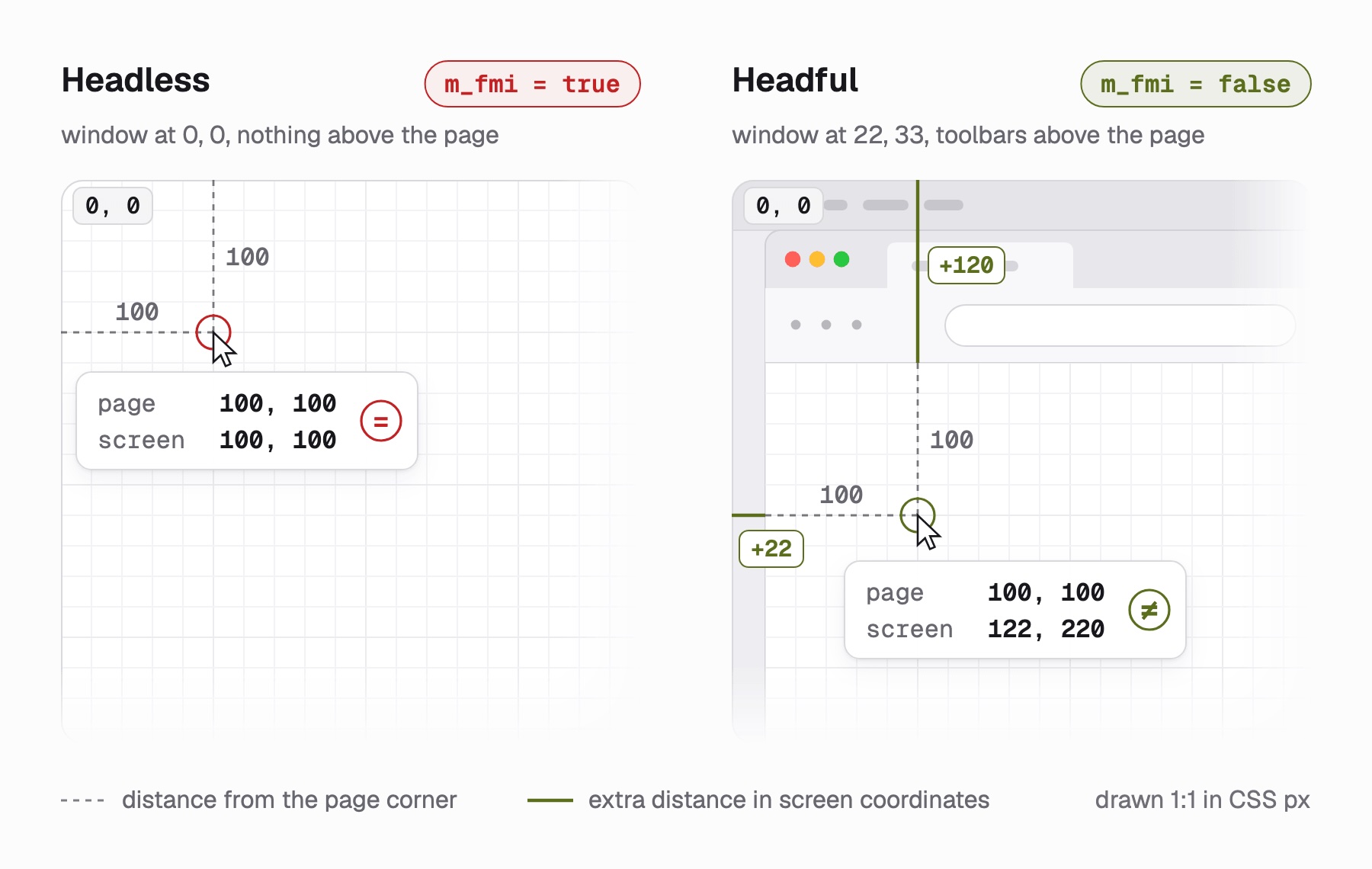
Drawn from the measured values in the table above, on macOS with Playwright 1.63.
This check used to detect something else. CDP-Patches, a library that injects input at the operating-system level instead of through CDP, was built to bypass this same check. A Chromium bug used to give CDP input identical page and screen coordinates, wherever the window was. The library's README now says that bug is fixed and there is no reason to use the package any more.
So the CDP bug is fixed, but the signal is still collected. What it detects now is a window with no toolbars at the screen origin, which is what headless Chromium showed in our run. Adding curved mouse paths does not change a boolean about window position. The boolean only exists once something moves the mouse, so in headless Chromium, moving the mouse to look human is what sets it to true.
The same run showed two smaller things. In headless mode, the User-Agent still said HeadlessChrome/153.0.8010.12, and navigator.webdriver was true in both setups with standard Playwright.
The next question is whether a stealth browser fixes any of this, so we ran the same probe with Patchright:
                             m_fmi   navigator.webdriver   UA says Headless
patchright headless          true    false                 yes
patchright headful           false   false                 no
standard playwright headless true    true                  yes
Patchright fixed navigator.webdriver. It did not fix m_fmi or the User-Agent.
Its README does not claim to fix either, and window position is not among its patches.
In our tests, the fix for this signal was running headful, because headless Chromium ignored --window-position and stayed at 0, 0. We did not measure how much this signal affects DataDome's decision, only that the tag sends it.
What the detection code checks, by name
If you plan to drive a browser yourself, this section shows what the tag checks in your browser.
Most of the tag is ordinary minified JavaScript. One block is not. The code scheduled under the task id INIT_DETECTION uses flattened control flow and reads most of its strings through two decoder functions. It computes its constants through mixed boolean-arithmetic expressions, long identities such as this one, which equals t + n:
function E(t, n) {
  return -6*(t&n) - 7*(t&~n) + 1*(t|~n) + 7*t - 1*~(t|n) + 1*~(t|~n);
}
Those identities make the constants harder to recover by static analysis. The strings themselves are recoverable. They are stored in two tables: one plain base64, the other base64 with a shuffled alphabet declared in the decoder. Across both tables, 920 entries decode to readable ASCII.
The decoded strings used in checks form four groups.
Legacy driver globals. This group has 37 decoded strings, including both ChromeDriver cdc_ variants, the Selenium and Watir sets, domAutomationController, callPhantom and __nightmare. They are cheap to check, and the tag still includes them.
Current driver internals. Five Playwright-specific names appear directly: __playwright_builtins__, pwInitScripts, playwright__binding__, pwWebSocketDispatch and playwright__binding__controller__. The same group also has stack-trace patterns, matched against a forced Error stack through prepareStackTrace: pptr:|ElementHandle|evaluateHandle, eval\sat\sexecuteScript and eval\sat\sevaluate.
Overlay elements from automation and AI agent tools. These look like the markers each product adds to the page. Most belong to AI agents. Arc, a consumer browser, is on the list too, so it is not limited to automation tools:
Decoded string | Belongs to | Checked against its source |
| Claude's browser agent | yes |
| browser-use | yes |
| OpenAI's Codex agent | no |
| Perplexity's agent | no |
| Stagehand | yes |
| BrowserFlow | no |
| A scraping extension | no |
| The Fellou browser | no |
| Arc | no |
We checked 3 of these against the projects themselves before publishing them. data-browser-use-highlight appears in browser-use's own session.py, __stagehandV3__ in Stagehand v3's DOM scripts, and claude-agent-animation-styles in published agent extension code. All 3 are the overlay each product adds to the page so a person can watch it work. That suggests the rest of the table is the same kind of string, though we did not verify the other 6.
Environment checks that main-world patches may not reach. The tag runs a second copy of its checks inside a Worker created from a blob URL, and a third inside an iframe. A patch applied to the main world with Object.defineProperty exists in neither. A stealth layer that only rewrites the top-level window affects only 1 of the 3 places where the check runs.
A separate check tests the browser instead of the page. The tag writes a dd_testcookie, reads it, deletes it, and reports whether the write worked.
Other checks read the wider environment, including client hints, the timezone, storage quota, keyboard layout, canvas and WebGL, and 19 navigation-timing values. One of them tests whether interfaces such as EyeDropper and ShadowRealm exist. The interfaces that exist show roughly which browser version is running, and DataDome can compare that with the User-Agent, client hints and TLS fingerprint. We did not test which comparison DataDome runs, or whether it receives the TLS fingerprint on every site.
A stealth browser is not always the solution
One widely used open-source tool against these checks is Patchright, a patched Playwright under an Apache-2.0 licence. It was still being updated in September 2026, and its README documents what it does and what it costs.
Its main patch avoids Runtime.enable, a CDP call that scripts on the page can detect. It does this by running JavaScript in isolated execution contexts. A second patch disables the Console API completely to avoid Console.enable, so console.log stops working in your own code. It patches Chromium only, and for Firefox there is Camoufox, a separate stealth browser.
Patchright delivers init scripts through network routes instead of CDP injection, and the maintainers state plainly that this method can be detected by timing attacks. They add that no anti-bot product currently checks this.
Those are reasonable trade-offs, but they are still costs. A browser needs more memory and CPU than an HTTP client, and it takes seconds per page. Patchright also needs maintenance, since its patches follow upstream Playwright.
A browser is also not always the better option. We ran Tripadvisor through ScrapeBadger web scraping API, which can escalate from its HTTP engine to a Patchright browser engine.
These requests come from ScrapeBadger's infrastructure, not our machine. All 3 setups used the same default proxy tier, though we did not choose a fixed exit IP, and each ran once. The HTTP engine was enough:
tripadvisor.com, default (auto engine, datacenter proxy)
  200  engine=http     2 credits   3.1 s   378 KB   title: "Tripadvisor: Over a billion reviews..."

tripadvisor.com, render_js
  200  engine=browser  6 credits   9.5 s   382 KB   same page

tripadvisor.com, render_js + anti_bot + escalate
  200  engine=browser  6 credits  16.7 s   382 KB   same page (solver did not run)
The HTTP engine returned the page in 3.1 seconds for 2 credits. The browser runs cost 3 times as much and took at least 3 times as long for the same page.
On Leboncoin the HTTP engine was enough too. In 3 alternating repeats, the HTTP engine was served 3 times out of 3 and the browser engine 2 times out of 3. That is too few requests to compare rates, but in these runs the cheaper engine got every page.
What ScrapeBadger's API did and did not do
We used one free-tier key to run detection on 5 targets: the 4 sites plus Vinted. We scraped 4 targets: Tripadvisor, Seloger, Leboncoin, and DataDome's own product page.
The detect endpoint (1 credit) found DataDome on Vinted and the 3 sites that refused our clients, with the reason datadome cookie in Set-Cookie. On Hermes, where DataDome runs first-party behind Cloudflare, it reported only Cloudflare and missed DataDome. Its is_blocked flag was true on Leboncoin while our requests client with Chrome headers was being served there, the day before the six-client run. In our runs it meant "a challenge cookie was issued", not "you were refused".
All 4 targets returned their page with at least one setup, but not every setup worked. A refusal here is usually returned as ScrapeBadger's own 422 blocking_page_detected, not as the target's 403:
Target and setup, through ScrapeBadger | Result |
Seloger, default settings, first attempt |
|
Seloger, default settings, 11 minutes later | 200, 3 times out of 3, 2 credits each |
Seloger, browser plus premium proxy, FR | 200, 3 times out of 3, 8 credits each |
Leboncoin, HTTP engine | 200, 3 times out of 3, 4 credits each |
Leboncoin, browser engine | 422 on the first run, then 2 times out of 3, 8 credits each |
datadome.co product page, HTTP engine |
|
datadome.co product page, browser engine | 200, 6 credits |
datadome.co product page, browser plus ultra proxy, FR | 200, 13 credits |
datadome.co product page, browser plus premium proxy, US | HTTP 200 with |
The table shows two things. Failed requests are not charged, which makes measuring each target affordable. And a 200 status is not always a success, so check the success field.
A triage script to run before you build
We ran this script once for each site to produce the six-client table. It needs two libraries:
pip install requests "curl_cffi>=0.16.3"Neither one downloads a browser, and every profile below exists in 0.16.3, the version we ran. The script sends one request from each of the 6 clients, decodes each decision, and reports which clients were served:
"""Report what DataDome does to one target across clients and browser families."""
import sys
import requests
from curl_cffi import requests as impersonated

UA = ("Mozilla/5.0 (Macintosh; Intel Mac OS X 10_15_7) AppleWebKit/537.36 "
      "(KHTML, like Gecko) Chrome/146.0.0.0 Safari/537.36")
BROWSER_HEADERS = {
    "User-Agent": UA,
    "Accept": "text/html,application/xhtml+xml,application/xml;q=0.9,"
              "image/avif,image/webp,*/*;q=0.8",
    "Accept-Language": "en-US,en;q=0.9",
    "sec-ch-ua": '"Chromium";v="146", "Google Chrome";v="146", "Not?A_Brand";v="24"',
    "sec-ch-ua-mobile": "?0",
    "sec-ch-ua-platform": '"macOS"',
}
# Four TLS identities from three browser families.
PROFILES = ["chrome150", "firefox147", "safari260", "safari184_ios"]
# The low byte of x-dd-b, as DataDome's own tag decodes it.
DECISIONS = {1: "block", 2: "hard_block", 3: "device_check"}

def decode(header_value):
    if header_value is None:
        return ""
    value = int(header_value)
    name = DECISIONS.get(value & 255, "unknown")
    if name == "device_check" and (value >> 8) & 1:
        name = "device_check_invisible_mode"
    return name

def report(name, send):
    try:
        response = send()
    except Exception as error:
        return {"client": name, "error": f"{type(error).__name__}: {error}"}
    return {
        "client": name,
        "status": response.status_code,
        "decision": decode(response.headers.get("x-dd-b")),
        "protected": response.headers.get("x-datadome") == "protected",
        "kb": len(response.content) // 1024,
    }

def triage(url):
    rows = [
        report("requests, library defaults",
               lambda: requests.get(url, timeout=25)),
        report("requests, browser headers",
               lambda: requests.get(url, headers=BROWSER_HEADERS, timeout=25)),
    ]
    rows += [
        report(f"curl_cffi, {profile}",
               lambda p=profile: impersonated.get(url, impersonate=p, timeout=25))
        for profile in PROFILES
    ]
    width = max(len(row["client"]) for row in rows)
    for row in rows:
        if "error" in row:
            print(f"{row['client']:<{width}}  {row['error']}")
            continue
        print(f"{row['client']:<{width}}  {row['status']}  "
              f"{row['kb']:>4} KB  {row['decision']}")
    served = [r["client"] for r in rows if r.get("status") == 200]
    print(f"\nDataDome present: {any(r.get('protected') for r in rows)}")
    print(f"Served {len(served)} of {len(rows)}: {served or 'none'}")
    return rows

if __name__ == "__main__":
    triage(sys.argv[1] if len(sys.argv) > 1 else "https://www.tripadvisor.com/")
Against tripadvisor.com it printed this for us:
requests, library defaults  403     0 KB  hard_block
requests, browser headers   403     0 KB  hard_block
curl_cffi, chrome150        403     0 KB  device_check_invisible_mode
curl_cffi, firefox147       200   383 KB
curl_cffi, safari260        200   292 KB
curl_cffi, safari184_ios    403     0 KB  device_check_invisible_mode

DataDome present: True
Served 2 of 6: ['curl_cffi, firefox147', 'curl_cffi, safari260']
The byte counts will probably not match on your run, because page size changes between fetches. Compare the decision column instead, though your IP address can also affect the decisions. Run the script 3 times over an hour before you trust any single line.
What you do next depends on what it prints:
What the script printed | What it means | What to do |
At least 1 client served | Probably a fingerprint problem, not the IP address | Use a served profile or change the |
Every client refused, mostly with | A JavaScript check that no HTTP client can run | Run a real browser, yourself or through ScrapeBadger |
Every client refused, mostly with | A CAPTCHA, which a browser can only display | Change the IP address first. Solving it takes a person or a service |
Every client | Probably the IP address, not the client | Change the IP address you send requests from |
The first row's fix costs nothing but an edit. On Tripadvisor, the only difference between a 403 and a page was the value of one parameter, impersonate. Claiming a different version takes one extra header, added to the profile:
from curl_cffi import requests as impersonated

FIREFOX_UA = ("Mozilla/5.0 (Macintosh; Intel Mac OS X 10.15; rv:{v}.0) "
              "Gecko/20100101 Firefox/{v}.0")
url = "https://www.example.com/"  # your failing URL
response = impersonated.get(url, impersonate="firefox144", timeout=25,
                            headers={"User-Agent": FIREFOX_UA.format(v=147)})
print(response.status_code, response.headers.get("x-dd-b"))
The TLS handshake is still the one from Firefox 144. Firefox sends no client hints, so the User-Agent is its only explicit version claim. A Chrome profile also sends sec-ch-ua, and this override does not change it, so it still shows the profile's own version.
Device checks, CAPTCHAs and hard blocks are where a local script is no longer enough. We did not run a browser of our own against these sites, so every browser result against them here comes from ScrapeBadger's Patchright browser engine.
Patchright is one place to start for Chromium, and it installs on a desktop with pip install patchright && patchright install chromium. A Linux server also needs a virtual display, such as Xvfb, to run it headful. Camoufox, which is built on Firefox, is worth comparing with it, since Firefox profiles did better than Chrome on Tripadvisor.
Changing the IP address is harder. One machine cannot get a residential IP address in another country on its own. You can buy access to residential IP addresses from a proxy service, usually billed by the gigabyte. A browser also downloads the page's images and scripts by default, which typically uses much more of that gigabyte than fetching the HTML alone.
When to buy instead of build
ScrapeBadger's web scraping API targets device checks, CAPTCHAs and hard blocks. The settings in this request body, documented in its API reference, match findings from earlier:
{
  "url": "https://www.leboncoin.fr/",
  "engine": "auto",
  "escalate": true,
  "retry_count": 3,
  "proxy_tier": "premium",
  "country": "FR",
  "session_id": "leboncoin-run-1",
  "max_cost": 13
}
engine: auto uses the HTTP engine for static pages and a Patchright browser for JavaScript-heavy ones. escalate moves a request to the browser when the HTTP engine is blocked. You pay for the engine that succeeds, and retries are free, which matters on a target whose decision changes within the hour. proxy_tier: premium routes through residential IP addresses, and country sets which country they are in.
session_id keeps cookies, fingerprint and browser storage together across requests, on ScrapeBadger's side. ScrapeBadger's documentation notes that anti-bot session cookies are bound to the IP and TLS fingerprint that created them. So it is best to keep each session on that same IP and fingerprint. max_cost refuses any request whose estimated cost is above your limit, including an escalation.
At ScrapeBadger's pay-as-you-go rate of $0.15 per 1,000 credits, our HTTP-engine charges were $0.30 to $0.60 per 1,000 pages. Our browser-engine charges on the default and premium proxy tiers were $0.90 to $1.20 per 1,000 pages. The most we were billed for one page was 13 credits on the ultra proxy tier, or $1.95 per 1,000 pages at that rate. Each response's X-Credits-Used header shows the exact charge.
For Leboncoin and Vinted there is another option. ScrapeBadger has dedicated endpoints for both that return structured JSON instead of HTML. Leboncoin is the site that refused all 6 of our clients in the six-client run:
import requests

response = requests.get(
    "https://scrapebadger.com/v1/leboncoin/search",
    headers={"x-api-key": "YOUR_API_KEY"},
    params={"text": "velo", "page": 1},
    timeout=180,
)
data = response.json()
print(data["total"], len(data["ads"]), response.headers["x-credits-used"])
It printed 1397667 35 5: 1,397,667 matching ads, the first 35 of them, for 5 credits. The total will probably differ on your run, because the listings are live. Each ad arrives already parsed, with fields for title, price, category, location, images and URL. The Vinted search returned 20 items for 5 credits in 1.1 seconds.
You get an API key from a free ScrapeBadger account, which includes 1,000 credits and needs no credit card. All our tests used 636 of those credits, and the runs printed here used 106. The same habit of reading the decision first applies to sites behind Cloudflare.
Where this stops working
We tested nothing behind a login, and everything here ran at a few requests per client. We did not test sustained volume, which is where a client that passes once can start failing.
The behavioural analysers only produce values once a session generates events. A scraper that fetches and parses generates none, so it is checked on other signals, not on behaviour. That works on sites that accept clients with no behaviour data, as Hermes, Seloger and Tripadvisor did in our run. Once the site checks behaviour, a client that sends no events has no way to pass that check.
Nothing here solves the CAPTCHA that a block offers. A browser will display it, and passing it takes a person or a solving service, which is a different problem with a different cost.
The x-dd-b values are also DataDome's internal interface, which it can change without notice. The x-dd-b lookup table comes from version 5.10.0 of the tag. If a value stops matching the table, search the site's current tag for getDataDomeChallengeType and read the switch statement again.
To find the tag, search the page source for tags.js, or for a dd. subdomain on the site's own host. Hermes serves dd.hermes.com/tags.js, Seloger serves dd.seloger.com/tags.js, and Leboncoin serves its reporting endpoint at dd.leboncoin.fr/js/. The ddjskey that identifies the customer is inline next to the tag on some sites and inside a bundle on others.
There is also an official way for bots to identify themselves, and nothing tested here uses it. DataDome says that since January 2026 it has verified Web Bot Auth signatures for all of its customers. That helps an AI agent that wants to be recognised and given its own policy, not a scraper that wants to stay hidden.
Final thoughts
DataDome runs a separate policy for each customer, and 4 sites gave 4 different results for the same 6 clients. Both a hard block and a device check arrive as a 403, but only the device check offers a test you can try to pass. The cheapest fix can be one header: on 2 sites, the User-Agent version alone changed the decision. Run the triage script on your failing URL more than once, because the decision can change within the hour. ScrapeBadger's DataDome handling charges nothing for failures, so once building stops being worth it, try it on that URL.
FAQ
What is the DataDome cookie?
The datadome cookie is a session identifier set on the protected domain, with a max-age of about a year. It links your requests to a server-side record, which can include network, transport and browser signals. Moving it to a different IP or TLS fingerprint may stop it from working, but we did not test it.
What is DataDome Device Check?
Device Check is the decision DataDome returns when it wants your browser to run its JavaScript first. It arrives as a 403 with x-dd-b: 3, or 259 in invisible mode. The page loads an iframe from captcha-delivery.com that runs the checks and, if the browser passes, returns a new cookie.
Is it possible to bypass DataDome?
Sometimes, depending on the site. Of 4 protected sites tested in one run, one served all 6 clients, and another served 4 of 6. A third served only the Firefox 147 and desktop Safari profiles, and the fourth refused everything. Read the x-dd-b header, then vary the User-Agent version and the browser family.
What sites use DataDome?
DataDome's own site claims 75,000 customer websites and shows Etsy, Tripadvisor, The New York Times and SoundCloud among its logos. Our test sites were in classifieds, property, travel and retail. A direct test is a request: protected sites usually return an x-datadome header and set a datadome cookie.
What is a DataDome ban?
What people call a ban is usually x-dd-b: 2, a hard block, which refuses the request and offers no challenge page. Slower retries are unlikely to help, since no challenge was offered. Python's requests got a hard block on 3 of our 4 sites with default headers, and adding browser headers changed that on 2 of them.
How much does DataDome cost?
We could not find a price on DataDome's site. If you scrape, your own costs matter more: proxy traffic, browser time and retries. Through ScrapeBadger, a detection call cost 1 credit, and a successful page cost between 2 and 13 credits.

Written by
Domas Sakavickas
Dom Sakavickas is Co-founder of ScrapeBadger, building web scraping infrastructure for developers and data teams. He writes about the web data market, tool comparisons, and business use cases for scraping. ScrapeBadger is a web scraping API platform specialising in Twitter/X, Reddit and Google data, with dedicated scrapers also covering TikTok, YouTube, LinkedIn, Amazon, eBay, Zillow and 40+ more: with built-in anti-bot bypass and an MCP server for AI agents.
Ready to get started?
Join thousands of developers using ScrapeBadger for their data needs.