How to Bypass Imperva (Incapsula) Anti-Bot Protection: Complete 2026 Guide
 Domas Sakavickas
AI Summary: This guide covers bypassing Imperva's 700-plus detection dimensions and warns that its blocks often return 200 OK block pages rather than 403s, so scrapers checking only status codes silently collect block pages instead of data.
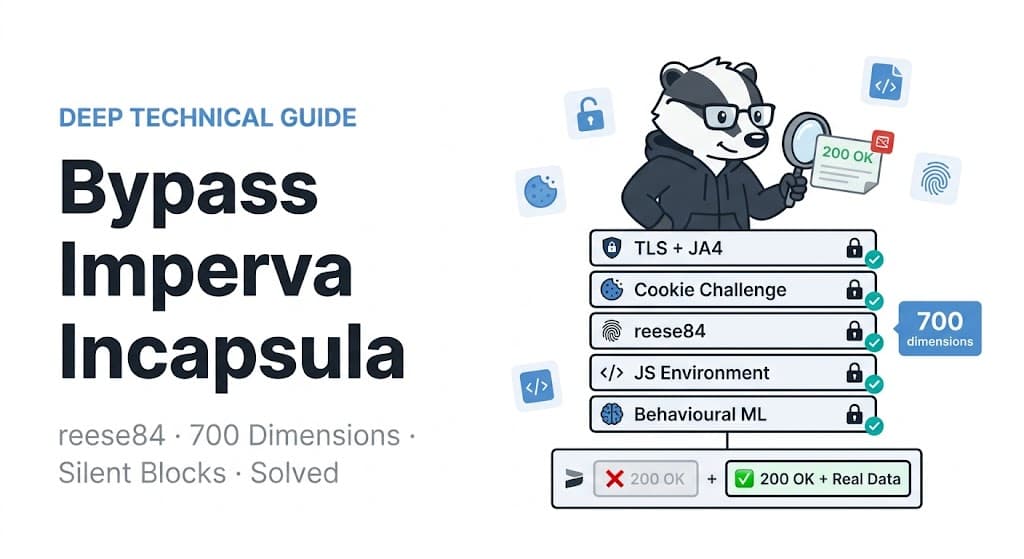
An Imperva refusal can arrive as HTTP 200. So can a page that never rendered. Three of the four shapes carry nothing you can extract. A pipeline that checks only the status code will record all three as successes and store an empty page.
Imperva, still widely called Incapsula, is a web application firewall and bot-management layer sitting in front of a site as a reverse proxy. Its Advanced Bot Protection add-on introduces a JavaScript challenge, a token called reese84, and a set of session cookies. Each of the three has to be handled differently.
Nearly everything we read while preparing this was about getting in. We think that is the smaller half of the problem. Most of what follows is still about getting in, because that is the part that takes up the space. We also scored every run twice: once for whether a stack cleared, and once for whether you would have known when it didn't clear. The fix for the larger half is 7 lines of Python, which is exactly why it gets skipped.
So this guide is built around the question your pipeline cannot answer on its own: was that a page, or a refusal wearing one? The answer differs by shape, and so does the fix.
TL;DR
Validate on the field you need. Of 7 refusals, status codes caught only the non-Imperva one. Text volume or links, paired with the block string
Pardon Our Interruption, caught all 7.Check what else is on the host. A browser session found a second vendor's cookies on 5 of 8.
Four stacks cleared the same 6 of the 7 homepages in every round. The retailer is why no stack cleared all 7.
Refresh
reese84on the server's published interval. The cookie states 30 days; the server asked for a fresh token after 12 to 15 minutes.
Confirm it's Imperva, and check what else is on the host
Check robots.txt and the terms for the paths you intend to fetch before you start, because the compliance answer determines whether the rest is worth doing. Getting the vendor wrong wastes the work that follows: a fix for one vendor does not automatically transfer to another. We scanned 229 candidate hosts across retail, travel, banking, and real estate. Of those, 8 returned the x-iinfo response header that Imperva sets. Two hosts we had on our own list as Imperva targets, Glassdoor and GameStop, answered from Cloudflare instead. Lists go stale quietly. Confirm the vendor per host.
The 8 hosts are hertz.com (car rental), saudia.com (Saudi airline), copaair.com (Panamanian airline), menards.com (retailer), regions.com (US regional bank), anz.com.au (Australian bank), metrobankonline.co.uk (UK bank), and experian.com (credit bureau). The Panamanian airline also runs DataDome. It stays in every run below and drops out of the Imperva-only totals, which is why some counts are out of 7 and some out of 8.
Four markers identify Imperva in front of a host, and none of them means you've been blocked:
Marker | Where it appears |
| response header, present on served pages and block pages alike |
| response header, not always set |
|
|
| injected into the body, even when the page carries real content |
_Incapsula_Resource is not a block marker. The Australian bank served 28,115 bytes of visible text (the body with tags, scripts and styles stripped) and 291 <a href> links in a response that carried that string, so branching on that marker can discard pages that were served to you.
The second question, what else sits on the host, is more important and more often skipped. A single HTTP fetch of the homepage exposed a second vendor on 2 of the 8 hosts. A full browser session, which lets every layer set its cookies, exposed one on 5 of the 8 hosts:
Host type | What the browser session collected alongside the Imperva cookies |
car rental | Cloudflare |
airline (Panama) | a literal |
airline (Saudi) | Cloudflare |
bank (US regional) | Cloudflare |
retailer | Cloudflare |
The 8 sessions collected 122 distinct cookie names, 34 of them Imperva's own. If you had judged the car rental host from its Imperva cookies alone, you'd have tuned one of the 3 layers. That count records which names a session collected, not which domains set them, so a name here means it was present in that session rather than served by that host itself.
The detection endpoint answers both questions in one call and costs 1 credit, or 0 credits on a repeat of the same domain within 5 minutes. It returns each system it finds, with a confidence score, so you have a candidate answer to check before you spend time tuning the wrong layer. One call sees what one fetch sees, and on our 8 hosts it named a vendor that was not there twice:
curl -X POST "https://scrapebadger.com/v1/web/detect" \
  -H "x-api-key: YOUR_API_KEY" \
  -H "Content-Type: application/json" \
  -d '{"url": "https://www.copaair.com/"}'
On the Panamanian airline, the endpoint names both layers, and the second layer changes the recommendation:
{
    "url": "https://www.copaair.com/",
    "antibot_systems": [
        {
            "system": "incapsula",
            "confidence": 0.95,
            "details": "Incapsula cookie in Set-Cookie; _Incapsula_Resource script reference; Imperva/Incapsula reference in headers",
        },
        {
            "system": "datadome",
            "confidence": 0.6,
            "details": "datadome cookie in Set-Cookie",
        },
    ],
    "captcha_systems": [],
    "is_blocked": true,
    "blocking_type": "incapsula",
    "recommendation": "use browser engine with DataDome solver (Phase 3)",
    "credits_used": 1,
    "duration_ms": 70,
}
Read the details field rather than the system name, because the detail is the part you can check. Phase 3 is the endpoint's own escalation tier and carries no meaning outside it; what matters in that response is datadome in the list. Our own run of that endpoint gave us a false positive worth showing. On the retailer it reported perimeterx at 0.6 confidence, and the detail named a script path in Imperva's own randomised style, which is exactly what fooled it. Fetching the host returned no _px cookie, no px-cloud.net, and no perimeterx.net. We dropped it from the second-vendor table above. It named perimeterx on a second host as well, the Australian bank, which is not in that table either.
Answer both questions before anything else, then work only on the layer that is actually refusing you. If it is Cloudflare, DataDome, Akamai, or PerimeterX, the rest of the work is different.
The four shapes an Imperva response arrives in
Each of the 4 shapes we captured across the 8 hosts needs a different fix in your code, and a status-code check tells you nothing about which one you got.
The terminal block measured 995 to 1,199 bytes. The name means the end of the line, not the command line: there is no challenge here to complete. Its whole body is one iframe, and the error string is the iframe's fallback text:
<iframe id="main-iframe"
src="/_Incapsula_Resource?SWUDNSAI=31\&xinfo=...\&incident_id=2700000090241123394-30715055067366002\&edet=12\&cip=YOUR-PUBLIC-IP\&mth=GET"
frameborder="0" width="100%" height="100%">Request unsuccessful. Incapsula incident ID: 2700000090241123394-30715055067366002</iframe>Because that text is iframe fallback content, a browser never renders it. In our headless runs, document.body.innerText and page.title() both came back empty on this shape.
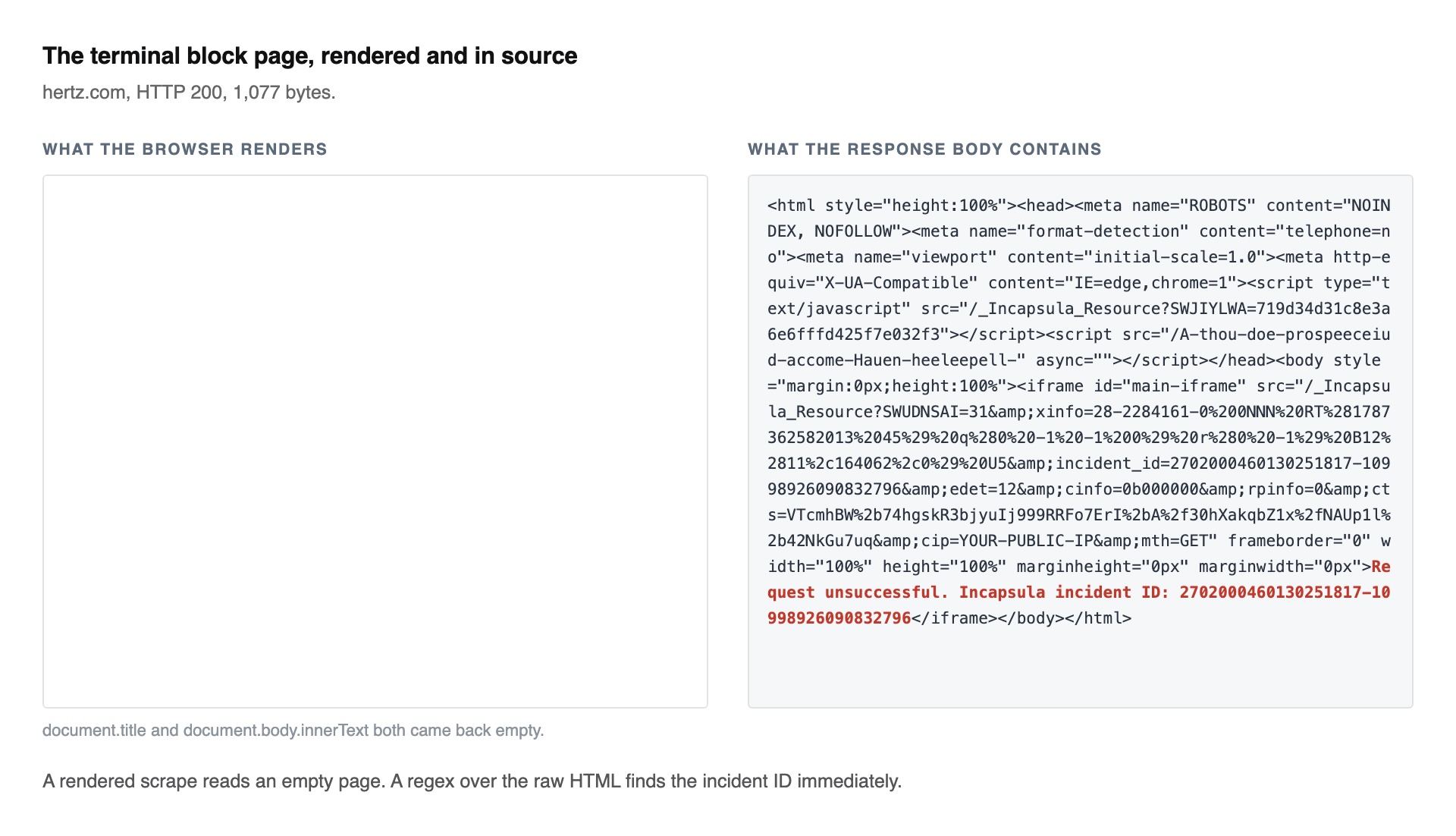
That capture is one client's view of the car rental host. The same host returned the thin page to our HTTP clients and the full site to a browser that cleared it, so the shape depends on the client as well as the host.
The Advanced Bot Protection (ABP) interstitial, the challenge page served in place of the content, ran from 5,913 to 12,599 bytes across our captures and carried the "Pardon Our Interruption" text and an interstitial-inprogress marker in the body. Two details in its source change how you handle it. The block title is wrapped in <noscript>, and the block message is hidden for 10 seconds:
<noscript>
    <title>Pardon Our Interruption</title>
</noscript>
The visible part is on a timer:
window.interstitialTimeout = setTimeout(showBlockPage, 10000);showBlockPage sets document.title, so a rendered scrape that reads the title returns nothing during those 10 seconds. The source contains a "Please stand by" panel for those 10 seconds, and no run of ours rendered it. On all 3 hosts that served an interstitial, our HTTP clients received it, and the browsers received the terminal block instead. The likely reason is that the browser ran the challenge and failed it, which earns the harder refusal, while a client that never runs it stays at the challenge stage. We did not test that. In 10 fresh browser loads across 2 of those hosts, the panel was not in the DOM. The client that is served the interstitial has no JavaScript engine to run it, and the client that can render it is served the terminal block, which carries no title either. A scraper that runs a regex over the raw HTML matches the block title immediately, because a regex ignores <noscript>.
The thin page is the most expensive of the four. Fetched without rendering JavaScript, the car rental host returned a body carrying its real title, Car Rental: Save More on Rental Cars, Vans & Trucks | Hertz, with 50 links and 85 bytes of visible text. That is the site rendering its content in the browser, and any client that doesn't run the JavaScript receives it.
Nothing in that response says "blocked", and nothing downstream flags it.
The served page, when we received one, carried 8,043 to 28,115 bytes of visible text and 117 to 304 links.
"Served, but no text" has two causes: a block, or a single-page app that never rendered. The Panamanian airline returned 210,137 bytes carrying its real title, 136 mentions of its own brand, and 52 bytes of text. At that size, the response fits an unrendered single-page app rather than a block.
Size separates those two here, 210,137 bytes against the 995 to 1,199 bytes of a terminal block, but size only stands in for what you actually need to know. Confirming which one you have needs a render rather than another marker string.
The next move is different for each:
What came back | What it means | Next move |
|---|---|---|
terminal block | the request was refused outright | try a browser stack, and if the ones you already have fail, stop tuning and route the host, meaning hand it to a managed API rather than keep tuning your own |
ABP interstitial | the challenge was served and not completed | run the challenge in a browser, then refresh on the interval the server publishes. On all 3 of our interstitial hosts the browser was handed the terminal block instead, so expect to land on the row above and treat it the same way |
thin | served, with nothing in it to extract | render it, then re-check text volume before you trust what you extracted |
served | you have the page | set a threshold on text volume so you find out when that stops being true |
The served and thin shapes mean the host answered, so a render is what you try on the thin ones, and a threshold tells you when the served ones stop arriving. The terminal block and the interstitial mean the host refused, and nothing downstream is worth checking until the client changes.
Why a status-code check misses three of the four
We ran every commonly published Imperva block check we found against 10 captures, 7 of them refusals and 3 of them real pages. The 7 are 2 terminal blocks, 3 interstitials, the DataDome block from the Panamanian airline, and one thin body that a refused scrape returned, thin in shape but a refusal by where it came from. Each cell below is computed from a saved file, not from what we remembered:
Published check | Refusals caught, of 7 | False positives on real pages |
|---|---|---|
| 1 | 0 |
| 2 | 0 |
| 3 | 0 |
page title looks like a block | 3 | 0 |
HTML under 10 KB | 5 | 0 |
zero <a href> | 4 | 0 |
under 500 bytes of visible text | 4 | 0 |
No single check caught more than 5 of 7. The status code caught 1, because every Imperva refusal we captured came back HTTP 200, and the one non-200 in the set was the DataDome block on the Panamanian airline. The last two rows looked like different checks and behaved as one here, catching the same 4 refusals and missing all 3 interstitials. If you add the "Pardon Our Interruption" string to either of them, that combination covers 7 of 7. The false-positive column is bounded by its negative set: all 3 real pages here are large, so that column shows only that a large page doesn't trigger them. A genuinely small page would trigger the size and link rows.
Validate on the field you need, not on the shape of the response. If a product page yields 0 prices, that is a failure whether the status was 200, the title was correct, or the body was 200 KB.
In a requests and BeautifulSoup scraper, that turns 3 lines into 7:
The before version records a refusal as a blank row:
r = requests.get(url)
if r.status_code == 200:
    rows.append(parse(BeautifulSoup(r.text, "html.parser")))
The after version counts a row only if it carries the field you need:
rows, refused = [], []          # once, before the loop
r = requests.get(url)
row = parse(BeautifulSoup(r.text, "html.parser"))
if row.get("price"):
    rows.append(row)
else:
    refused.append(url)      # a 200 with no field is not a row: a refusal, a later
                             # XHR, or a page that genuinely has no priceMake that change first. It costs nothing and works whether or not you get past the block, and it turns silent data loss into a retry list you can count.
Make that change first. It costs nothing and works whether or not you get past the block, and it turns silent data loss into a retry list you can count.
A page can pass every text check and still be missing the field you need. On a category page of the retailer in our set, outside the runs reported here, a rendered fetch returned 380 KB of HTML with a real title, enough text to clear any volume threshold, and 0 price strings. That fits a site loading its prices in a request after the one we rendered. The same host's homepage, which is in those runs, carries prices.
This triage script runs the whole check in one pass, so you can point it at a failing URL and see which shape that client was handed. It narrows the answer rather than settling it: the thin branch covers a block, an unrendered app and a genuinely small page alike. It needs only pip install curl_cffi, a client with the same API as requests that reproduces a real browser's TLS handshake:
import re, sys
from curl_cffi import requests

STACKED_BODY = {
    "DataDome": r"captcha-delivery\.com",
    "Cloudflare": r"cf_chl_opt|challenges\.cloudflare\.com",
    "hCaptcha": r"hcaptcha\.com",
    "PerimeterX / HUMAN": r"perimeterx\.net|px-cloud\.net",
}
# matched against cookie NAMES, which never contain "=", so the body patterns
# above cannot do this job
STACKED_COOKIES = {
    "DataDome": r"^datadome$",
    "Cloudflare": r"^__cf_bm$",
    "PerimeterX / HUMAN": r"^_px",
    "Akamai": r"^(_abck|bm_sz|ak_bmsc)",
}

# Tune these to the target. A small but complete page triggers the defaults.
MIN_TEXT, MIN_LINKS = 500, 10


def visible_text(html):
    t = re.sub(r"<script.*?</script>|<style.*?</style>", " ", html, flags=re.S | re.I)
    return re.sub(r"\s+", " ", re.sub(r"<[^>]+>", " ", t)).strip()


def triage(url):
    try:
        r = requests.Session(impersonate="chrome").get(url, timeout=30)
    except Exception as e:
        print("could not reach %s: %s" % (url, type(e).__name__))
        return
    html, headers = r.text or "", {k.lower(): v for k, v in r.headers.items()}
    text = visible_text(html)
    links = len(re.findall(r"<a\s[^>]*href=", html, re.I))
    imperva = "x-iinfo" in headers or "_Incapsula_Resource" in html
    names = list(r.cookies.keys())
    stacked = sorted(
        {n for n, p in STACKED_BODY.items() if re.search(p, html, re.I)}
        | {
            n
            for n, p in STACKED_COOKIES.items()
            if any(re.search(p, c, re.I) for c in names)
        }
    )

    # match on visible text, not raw html: a served page can carry the block
    # string inside its own scripts, and matching raw html calls that page a block
    if "Incapsula incident ID" in text:
        shape = "terminal block"
    elif "Pardon Our Interruption" in text or "interstitial-inprogress" in html:
        shape = "ABP interstitial"
    elif r.status_code >= 400:
        shape = "http %d" % r.status_code
    elif len(text) < MIN_TEXT or links < MIN_LINKS:
        shape = "thin: blocked, an unrendered SPA, or a genuinely small page"
    else:
        shape = "served"

    print("status           %d" % r.status_code)
    print("imperva present  %s" % imperva)
    print("also on the host %s" % (", ".join(stacked) or "nothing else detected"))
    print("shape            %s" % shape)
    print(
        "body             %d bytes html, %d bytes text, %d links"
        % (len(html), len(text), links)
    )


if __name__ == "__main__":
    triage(sys.argv[1] if len(sys.argv) > 1 else "https://www.hertz.com/")
Pointed at the car rental host, it names the thin page that every string-based check misses, and it prints the status code first so you can see the 200 on a refusal:
status           200
imperva present  True
also on the host nothing else detected
shape            thin: blocked, an unrendered SPA, or a genuinely small page
body             170692 bytes html, 85 bytes text, 50 links
The browser stacks cost more to set up: patchright install chromium took 62 seconds and 554 MB here, in addition to the pip install.
The thresholds at the top of that script are what you tune, and 500 bytes is a placeholder rather than a recommendation. At that setting, example.com reads as thin, because a complete page can carry 142 bytes of text and 1 link. That default is also too low to use, and the published-checks table above shows what it costs: refused responses carried at most 842 bytes of text and served ones carried at least 8,043, so any threshold between those 2 numbers separates that set completely. At 500 the text row caught 4 of 7. At 900 it would have caught 7 of 7 with no false positives, which is the single check the combination above was assembled to beat. Do not read that as a recommendation to run 900 in production: it is fitted to 7 saved captures, and the string check is the half that generalises to a sample you have not seen.
Calibrate instead of guessing. Fetch 5 or 6 pages from your target that you have opened in a browser and confirmed carry the field you need, measure that field and the text and link counts on each, and put each threshold at half the smallest figure you saw, but never below the largest refusal you have captured. On the Australian bank we sampled that way, the 6 known-good pages ran from 8,583 to 47,163 bytes of text, so a default of 500 is one seventeenth of the smallest page we sampled there and would not have fired on any of the 6. Halving the median instead of the minimum would have put the threshold above the smallest of those 6 pages, so that page would have read as blocked.
The signature to watch for is the ratio, a normal link count against almost no text. Here that was 50 links against 85 bytes. The HTML byte count moves by a few dozen bytes between runs, so read the text figure, not the size.
The triage output above reports nothing stacked, because a single HTTP fetch of this host exposes no other vendor's markers. The browser session on the same host collected Cloudflare cookies. That difference is what a full session buys you over a single fetch.
What the Imperva challenge script actually reads
The challenge script determines what your browser has to survive. On one host, the script arrived as 817,567 bytes on a single line, beginning with a base64 blob of 652,656 characters that decodes to 244,746 UTF-16 code units. That blob is a program for an interpreter defined in the rest of the file, so the probe list is not in the source. The strings canvas, webdriver, WebGL, AudioContext, navigator, and plugins appear 0 times each in the whole file.
The interpreter is not hidden, which means we can measure how it works. An array literal near the top of that code holds 69 entries, each a curried function (a => b => ...) whose body is the operation it performs, so the array can be read as an opcode table. Its variable name was not stable across our 2 captures, Q in one and B in the next, so find the array by structure rather than by name.
We did not decode the program that blob carries, so we can't report what mix of operations it runs. Given that and the 0 string hits above, we recovered the probe list by running the interpreter rather than reading it. The script will not tell you what it inspects, for the same reason a 200 will not tell you whether you got the page.
So we watched it run. We loaded that host's page in headless Chromium with logging getters on the fingerprintable properties of Navigator, Screen, and Document. We installed wrappers on canvas, WebGL, OfflineAudioContext, Intl, and the network methods. The harness was validated first against a control page that hashes a canvas, reads the unmasked WebGL renderer, and renders an audio oscillator. It recorded all three.
Against the live challenge, on a run that this host later refused, the harness recorded 25 distinct probes. These are the 15 with the highest counts:
Property or method | Reads or calls |
| 354 |
| 12 |
| 5 |
| 4 |
| 3 |
| 2 each |
| 1 each |
The 354 calls to atob, the browser's base64 decoder, are most of what the harness logged, and the file opens with that 652,656-character blob. Those two figures point to an interpreter decoding itself rather than probing.
Canvas, WebGL, and AudioContext were never touched. We had written those wrappers specifically to catch them, on a harness that had just proved it could, and they logged nothing. The harness watched the top-level document only, so that is where the absence holds.
That contradicts the explanation we saw most often, which lists canvas hashing, WebGL renderer strings, and audio fingerprinting as the core of this challenge. Those descriptions match published reverse-engineering write-ups of the older ___utmvc script, the challenge Imperva ran before this one. Across all 8 hosts, we never saw a ___utmvc cookie or that string in any body. That fits the older script having been replaced, not the explanation being wrong when it was written.
The 12 Function.prototype.toString calls matter most here. Two of them targeted Window and eval, which is what a native-code integrity check looks like. Checks of that kind catch a native method whose source no longer reads as native.
We also ran the instrumented and uninstrumented browsers side by side, 3 rounds each, because hooks that are visible to toString could change the outcome. All 6 ended the same way, on the terminal block, because both ran on plain Playwright, which this host refused. Both browsers still minted a token, so the hooks didn't stop the script running to completion. We did not repeat that control on a host and stack that do clear, which is what testing whether the hooks turn a success into a failure would take.
The reese84 token, and its two lifetimes
Watching the raw token traffic settles how the token is refreshed and how long it lasts. The browser posted a sensor payload of roughly 36 KB to a randomised path, as text/plain, with most of the bytes in a base64 field we didn't decode. The name is the standard one for the encoded blob an anti-bot challenge posts back. The response was 12 bytes and carried no token. In a second post, 724 bytes to a different randomised path, the browser sent a token and received the same token in reply, with renewInSec alongside it:
{
  "token": "3:<24 chars>:<152 chars>:<44 chars>:<516 chars>:",
  "renewInSec": 793,
  "cookieDomain": "saudia.com"
}
The token value is omitted from the listing above, and the segment lengths are exact. That token becomes the reese84 cookie, and the 24-character and 44-character segments are exactly the sizes a base64 initialisation vector and a 32-byte authentication tag take. Those lengths point to a server-side key, and we didn't attempt to mint a token offline.
Now compare two numbers the same server reports. We sampled 3 hosts twice each. Every run reported a reese84 cookie with a 30-day expiry, and a renewInSec between 733 and 894 seconds:
Cookie | Length (characters) | httpOnly | Lifetime it states |
| 64 | yes | 365 days |
| 610 to 742 | no | 30 days |
| 48 | yes | 1 hour |
| 56 | no | session |
| 48 | yes | session |
Advice to mint the cookies once and reuse them follows the 30-day expiry rather than the renewInSec value. A cookie jar that works on one run and fails on the next fits that gap, though we did not hold a token past its published interval to confirm it.
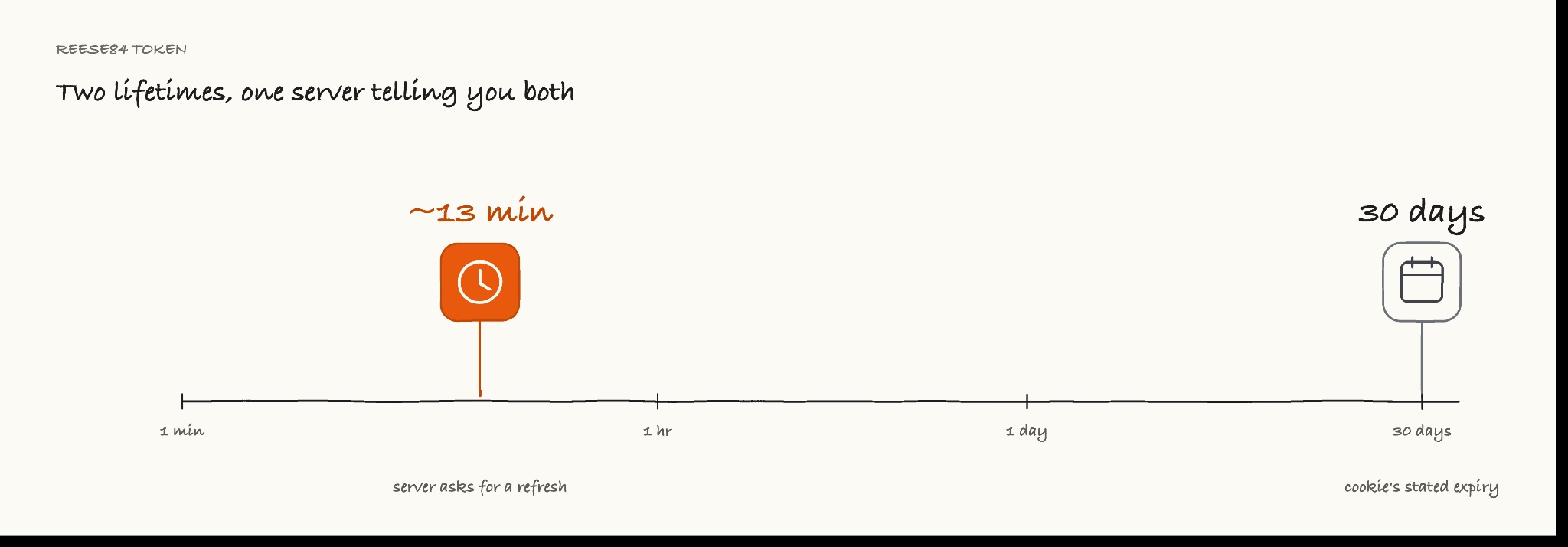
Refresh the token on the interval the server publishes, not on the cookie expiry.
One more detail affects how many browser sessions a job needs. In 6 of 6 runs against the Saudi airline, headless Chromium posted the sensor payload and received a reese84 token of 730 to 750 characters, which sits at the top of the table's 610-to-742 range and just past it, because the value length moves between mints. Every one of those runs still ended on a terminal block page that loaded hCaptcha. On some deployments, getting the token is not enough.
The presence of the token does not predict a refusal on its own. Seven of our 8 hosts issued a reese84 cookie. Three hosts were cleared by every stack we tested in every round, and 2 of those 3 issued one.
The eighth host, a UK bank, issued no reese84 on any fetch we made, and answered every stack with the page. In our set, every host that all 9 stacks cleared answered with the page, and every host that served an interstitial refused at least one stack. The reverse does not hold: the car rental host refused several stacks and answered with the thin page, which is why the interstitial is a positive signal and its absence is not a negative one.
What TLS impersonation matches against Imperva, and what it doesn't separate
The most repeated advice we found about this system is that Python's default TLS exposes you, and a Chrome-impersonating client fixes it. We measured what each client actually presents against a service that echoes back 2 TLS fingerprint hashes, JA3 and JA4, 6 handshakes each except nodriver, where we captured 4. The last column counts how many distinct JA3 hashes those handshakes produced:
Client | JA4 | Distinct JA3 hashes seen |
|
| 6, all different |
Playwright headless Chromium 141 |
| 6, all different |
Patchright headless Chromium 141 |
| 6, all different |
|
| 4, all different |
|
| 1, stable |
|
| 1, stable |
Two results follow. The first confirms the advice, then shows that it was not what separated our stacks. The impersonating client, headless Chromium itself, and Patchright produce a JA4 that matches character for character, and all 4 Chrome-shaped clients share one HTTP/2 fingerprint, 1:65536;2:0;4:6291456;6:262144|15663105|0|m,a,s,p. That string is the SETTINGS frame's id:value pairs, then the window-update increment, then the priority field, then the order the pseudo-headers were sent in. Wherever those stacks behaved differently against Imperva, the TLS and HTTP/2 fingerprints didn't separate them. A JA4 that matches Chromium's says what the handshake looked like, not what came back.
A JA4 is 3 underscore-separated fields: the first records the transport, the TLS version, whether SNI was sent, and the cipher and extension counts; the second hashes the cipher list; the third hashes the extensions and signature algorithms. The nodriver row shows what that identifies. Its first 2 fields match the others exactly across a 10-version gap, and only the third moves, because Chrome 151 ships a different extension set from Chromium 141. JA4 identifies a browser family and version range. It says nothing about how the browser is driven.
This handshake capture predates the browser upgrade documented below; Playwright and Patchright ran the 9-stack matrix below on Chromium 151, not the 141 build quoted in the table above. The conclusion held on both builds when we checked: the impersonating client still matches whichever Chromium build it targets.
The second result is that JA3 is not stable for anything Chrome-shaped. Chrome shuffles its TLS extension order per connection. JA3 hashes that order and JA4 sorts it first, so 6 handshakes gave 6 JA3 hashes and 1 JA4. A JA3 blocklist can't identify a Chrome client, which is the problem JA4's sorting step solves.
Varying Client Hints changed nothing we could measure
We also tested the claim that Client Hints, the sec-ch-* headers Chrome sends in place of parsing the User-Agent, became mandatory, and that a missing or contradictory sec-ch-ua makes Imperva serve a harder challenge. Holding the TLS and HTTP/2 fingerprints constant, we ran 4 header variants across 8 hosts, 3 rounds each, for 96 requests. One variant kept the impersonation defaults and one stripped the 3 sec-ch-ua* headers Chrome sends by default. A third claimed Chrome 99 while the User-Agent said 142, and a fourth claimed Windows while the User-Agent said macOS.
Every host returned the same outcome under all 4 variants, with a single exception on the retailer, where one of the deliberately broken variants performed marginally better. That is a narrow result rather than a strong one: 95 of the 96 requests matched their host's baseline outcome, so a real header effect would have had little room to show. On these 8 hosts, at the root URL and over that same TLS stack, Client Hints were not the reason we were refused. The claim came with no measurement. These 96 requests are the measurement.
What nine stacks returned over 252 scored requests
We ran 9 stacks against the same 8 hosts, every package on the version in the table below apart from requests, which was 2 minor versions behind. The schedule was 3 rounds, then a fourth hours later, rerun without looking at the first 3. A request counts as content only if the body carries 500 or more bytes of visible text. That is the text half of the triage script's test and not the link half, so a page with 600 bytes of text and 3 links scores as content here and as thin there. Text volume is an indirect measure, and it is the right one here: across 8 hosts with no data field in common, it is the only thing scoreable the same way on all of them. It is a fair way to compare stacks and a bad way to validate your own rows. The Panamanian airline, which also runs DataDome, is excluded from these totals, because every stack failed on it for a reason unrelated to Imperva:
Stack | Engine | Content (of 28) | Hosts cleared in all 4 rounds | Median latency |
|---|---|---|---|---|
| patched Chromium 146 | 27 | 6 of 7 | 15.8 s |
| system Chrome 151 | 26 | 6 of 7 | 16.7 s |
Patchright 1.62.1 | Chromium 151 | 24 | 6 of 7 | 13.2 s |
Camoufox 0.5.5 | patched Firefox 152 | 24 | 6 of 7 | 14.8 s |
Playwright 1.62.0 | Chromium 151 | 18 | 4 of 7 | 13.4 s |
| Chromium 151 | 18 | 4 of 7 | 13.2 s |
| system Chrome 151 | 16 | 4 of 7 | 13.1 s |
| none | 12 | 3 of 7 | 0.7 s |
| none | 12 | 3 of 7 | 0.6 s |
How to read the table
The 9 stacks fall into score bands rather than a clean ranking. Four engine-level tools, which patch the browser binary or the driver protocol rather than injecting a shim at runtime, sit at 24 to 27. Playwright with or without a JavaScript stealth library sits at 18, nodriver sits at 16, and the 2 HTTP clients sit at 12. Don't compare the latency column across stacks: they don't share a wait strategy, so a longer figure partly reflects a longer wait rather than a slower tool.
Nothing in that table is a recommendation to pick the top row, and the top band isn't separable at this sample size. Any of the 4 is a reasonable starting point. The one that scored highest takes 8 lines and returns a Playwright browser, so the rest of the API is Playwright's:
# pip install cloakbrowser -- ships its own Chromium 146, so no separate browser install.
# It ran here without a license key; see "What the engine field does and doesn"t tell you" below.
import cloakbrowser

browser = cloakbrowser.launch(headless=True)
page = browser.new_page()
page.goto("https://www.hertz.com/", wait_until="domcontentloaded")
page.wait_for_timeout(8000)
html = page.content()
browser.close()
print(len(html), "bytes")
On the car rental host, which returned 85 bytes of text to an HTTP client, that print statement showed a byte count in the hundreds of thousands instead of the roughly 1,000 bytes a block produces. Measured by text and links, the same way as the triage script, it is 7,805 bytes and 181 links. nodriver was refused on that same host, at 1,066 to 1,079 bytes of HTML and no links. A browser alone is not enough. The wait is necessary, because the challenge runs after domcontentloaded. The session wrapper below waits 13 seconds rather than 8, because it also has to see the token POST go out. Neither number is a measured minimum.
At 2.0.3 under Playwright 1.62.0, the stealth library scored 18 of 28, the same as plain Playwright. The HTTP clients' score is not a TLS problem either, because curl_cffi presents a JA4 identical to Chromium's. Note that the table above pins impersonate="chrome136" while the code samples use the floating impersonate="chrome", which resolves to whatever build your installed version impersonates. The bands separate on 2 different things. The bottom band is the 2 HTTP clients, which cannot run the challenge script at all.
Everything above it runs the script, so whatever separates 18 from 24 is something else, and we did not measure it. The numbers above allow one interpretation, and it is an interpretation rather than a result: the challenge makes 12 Function.prototype.toString calls, checks of that kind catch a native method whose source no longer reads as native, and a runtime JavaScript shim rewrites exactly that kind of method while a patched browser binary does not. A shim scoring the same as no shim fits that. It does not demonstrate it, and the control run that would have is the one we could not run.
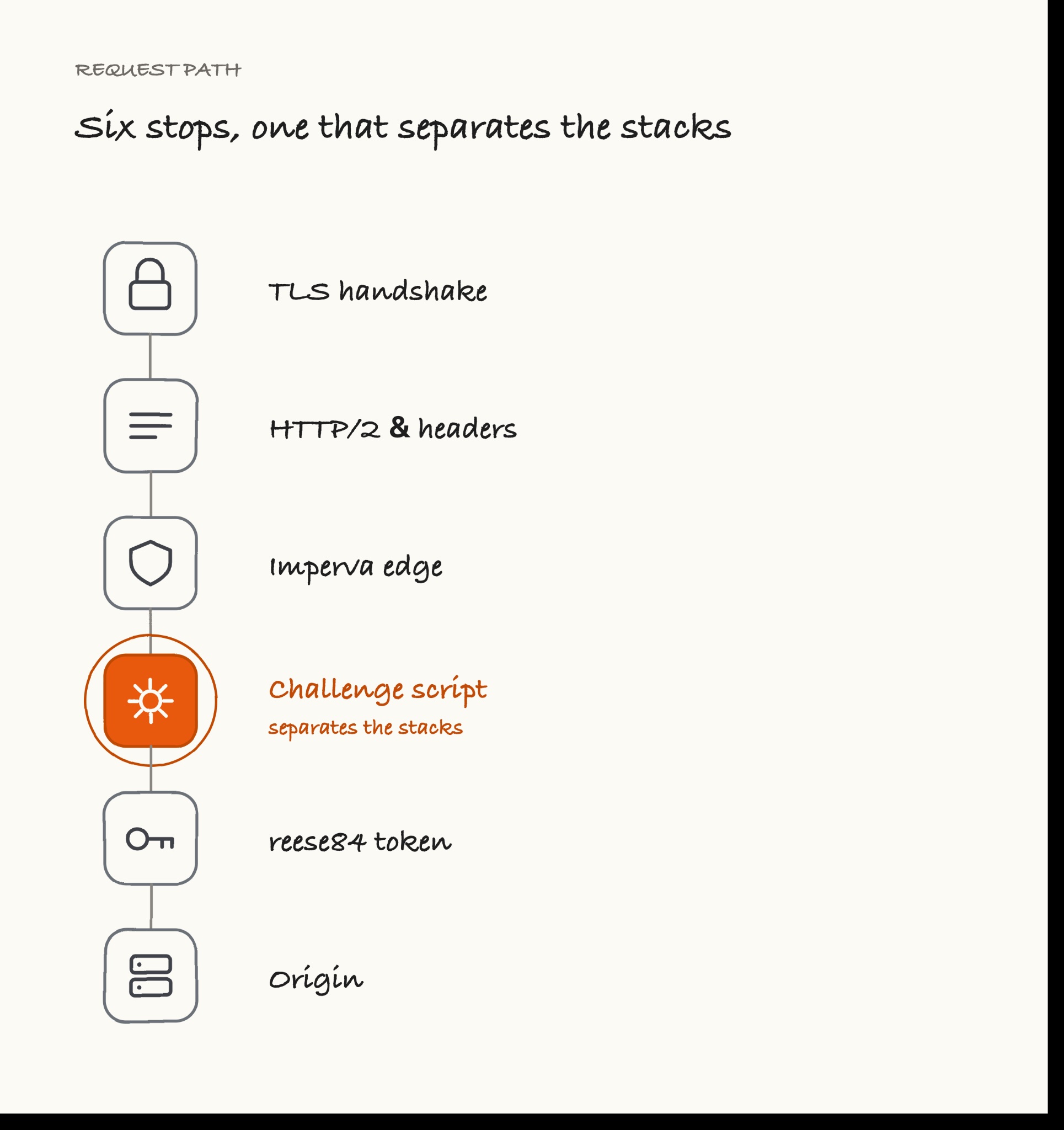
The retailer is the only host no stack cleared in all 4 rounds, and it is the only reason no stack cleared every host. If you drop it, 4 stacks clear every remaining host in every round.
Two things limit what that table can support. Only 4 of the 7 hosts separate the stacks: the car rental host, the Saudi airline, the US bank, and the retailer. The other 3, the Australian bank, the credit bureau and the UK bank, returned content to every stack in every round.
The second is that those 28 requests are 7 hosts by 4 rounds, and the rounds are not independent: 59 of the 63 stack-and-host cells came back identical in all 4. The effective sample is nearer 7 than 28, too small for a meaningful confidence interval. The split that holds is a plain count: on those 4 hosts, the 2 HTTP clients each returned content 0 of 16, and cloakbrowser returned it 15 of 16. Read the bands, and treat the order inside the top band as noise.
nodriver scored 16. Its maintained fork, zendriver, scored 26 on the same system Chrome. Whatever separates them sits in the library, not the engine.
That nodriver result is worth checking against an independent 2026 benchmark whose own title says 31 Cloudflare targets, though its matrix mixes fingerprint test pages with sites from several vendors. It put nodriver first with zero blocked cells. That author makes no claim about Imperva, so the difference is a scope boundary rather than a contradiction. A stealth ranking measured on one vendor's bot protection doesn't automatically transfer to another's.
Whether you would have known it failed
The 9-stack table scores whether a stack cleared. Score the same 252 requests by the other question, whether you would have known when it didn't, and the stacks separate a second time along a different line.
Across the 75 failures in that matrix, a status-code check would have caught 0. A text threshold at 500 bytes would have caught 52. Every one of the 23 it missed came from an HTTP client, and every one carried between 760 and 842 bytes of text and a single link.
That is the interstitial, and it explains the split. The 2 HTTP clients failed 32 times and 9 of those failures were visible to a text threshold. The 7 browser stacks failed 43 times, and every one was visible. An HTTP client is handed the interstitial on the hosts that serve one, and an interstitial carries enough text to stay above a simple text threshold. A browser is handed the terminal block instead, and a terminal block carries 82 bytes of text.
So the stacks that fail most often are also the stacks whose failures hide best. What catches the hidden half is a link threshold rather than the zero-link row in the published-checks table above: those 23 bodies each carried exactly 1 link, so a zero-link test would have passed all of them.
Whether it reproduces
Nearly all of these results reproduce. The fourth round was rerun without reference to the first 3, and 59 of 63 stack-and-host cells agreed, which is 94%. That number flatters us. Of those cells, 27 sit on the 3 hosts that return content to everything, so they could not disagree; on the 4 hosts that separate the stacks, agreement is 32 of 36. All 4 disagreements fell on the same 2 hosts, the retailer and the US bank, and every one went from content to blocked.
cloakbrowser had scored 21 of 21 across the first 3 rounds. On the fourth it missed the retailer. That is why the table above reports 27 of 28 rather than a perfect score.
Version drift in the ranking
A library upgrade moved playwright-stealth from 12 to 18, and a Playwright upgrade that included Chromium 151 moved it back to 14, on the same targets in one afternoon. We measured it 3 times as we updated to newer releases, from the same IP. Those runs predate the fourth round, so they are scored out of 21 rather than 28:
| Playwright under it | Chromium | Content, of 21 |
|---|---|---|---|
1.0.6 | 1.56.0 | 141 | 12 |
2.0.3 | 1.56.0 | 141 | 18 |
2.0.3 | 1.62.0 | 151 | 14 |
Any ranking you find is one interpretation of one dependency set against live sites on one day. Including this one.
Some of these findings age faster than others. The mechanism ages more slowly: the 4 response shapes, the block title inside <noscript>, the 10-second timer, the token's 2 lifetimes, and JA3 being unstable for anything Chrome-shaped. The snapshot ages fast: the stack ranking, the version numbers, and every fingerprint hash above. The ___utmvc write-ups are the warning against reading the first list as permanent, because they described a real mechanism right up until Imperva replaced the script. Take that snapshot again against your own targets before you rely on it, and treat the mechanism as the part to learn.
Three more stacks, and three that are not stealth tools
We tested these 3 on the 4 hosts that separate the stacks rather than the full 8, because the other 4, the 3 that serve every stack and the Panamanian airline that refuses every stack, return the same answer each time and cost time without producing information.
obscura 0.2.0, a Rust-based anti-detect browser, cleared 2 of 4, including the retailer, in 3.8 seconds on that host. SeleniumBase's UC (undetected-Chromedriver) mode cleared 3 of 4, and pydoll 2.24.0, a webdriver-free Python automation library, cleared 1 of 4. None added coverage the full-matrix stacks didn't already have, so none was added to the full matrix.
After these runs we tried a ninth host, a UK price-comparison site. It returned the terminal block to Patchright, Camoufox, and nodriver, at 999, 999, and 995 bytes. Two of those 3 are top-band stacks, and nodriver isn't. All 3 failed identically. That suggests a target can be harder than any host in the matrix, not that band position stops predicting. The 2 that scored highest weren't run against it.
Three tools are worth naming for what they are not. katana is a crawler, puppeteer-cluster is a worker pool, and puppeteer-sharp is a .NET port. All 3 do what they are built for, and none of them carries a stealth library, so putting them in this table would measure nothing.
How far these results generalise
All 3 bounds hold across every result here. The first bound is IP reputation. Every request came from one residential IP in one country, so it's held constant and isn't a variable we tested. A datacenter range, or a residential pool with scraping history on it, can move these numbers in either direction, and that is the first thing to re-test against your own targets.
The second bound is page depth, and the root URL isn't a reliable predictor of the rest of the site. Every request in the matrix was a homepage fetch, so we measured what that costs: 7 hosts, the root plus 2 deep paths taken from each, 21 fetches through an HTTP client.
Host | Root | Deep paths |
|---|---|---|
car rental | thin | thin, served |
Saudi airline | interstitial | interstitial, interstitial |
US bank | interstitial | served, interstitial |
retailer | served | thin, interstitial |
Australian bank | served | served, served |
credit bureau | served | served, served |
UK bank | served | served, served |
On 4 hosts the root predicted what the deep paths returned. On 3 it did not, and it failed in both directions. Two hosts served a deep path but not the root. One host served the root and neither deep path. Calibrate on the paths you actually intend to fetch, because nothing here shows the root is representative of them.
The third bound is the sample itself. All 8 hosts are large consumer brands whose public sites depend on search traffic, which is the permissive end of the range. A site behind a login wall, one serving a pricing API, or one with no reason to be indexed can be tuned harder than anything measured here, so read these numbers as the minimum difficulty you will meet rather than a typical case.
The cookie handoff helps on some hosts and hurts on others
The efficiency advice we found most often is to mint cookies once in a browser, then replay them over a fast HTTP client. We ran that as a controlled test on 4 hosts, 17 trials in all, with the no-cookie control first, then the browser mint run, then the replay. The cookie jar is the intended variable and it is not the only one: the replay is sent from the same IP after a browser session the control never had. The order was also fixed, so any drift in the host over a trial lands on the replay. Cells read blocked where the client was refused, thin where it got a thin page, and content where the body cleared the text threshold:
Host | Clean HTTP client | Browser that minted the cookies | HTTP client replaying those cookies |
|---|---|---|---|
US bank | blocked, 5 of 5 | blocked, 5 of 5 | content, 5 of 5 |
Saudi airline | blocked, 4 of 4 | content, 4 of 4 | content, 4 of 4 |
retailer | content in 2 of 4 | blocked, 4 of 4 | blocked, 4 of 4 |
car rental | thin, 4 of 4 | blocked, 4 of 4 | blocked, 4 of 4 |
Across the 17 trials, the handoff moved 9 from a failure to content and moved 2 from content to a failure. It is not a free win.
On the bank, the browser was refused in all 5 rounds, and the HTTP client carrying that same browser's cookies was served in all 5. A cookie jar can stay usable while the browser that minted it is refused.
On the retailer, the clean client returned content in 2 of 4 rounds, and the cookie-carrying client returned it in none. Here the jar came from a browser the host had just refused 4 times, so the replay was sent from a session that already had a history the clean client did not. Inheriting a bad session can be worse than arriving with no cookies.
A blocked mint run usually means a jar you should not carry: on 2 of the 3 hosts whose mint run came back blocked, the replay stayed blocked too. The third was the US bank above, where the replay carrying a refused browser's jar was served 5 of 5. The wrapper below follows the majority: it discards any jar whose mint run came back under the text threshold, which covers a blocked run and a thin one alike and would have thrown that jar away, so on a host that behaves like the bank, try the replay before you discard. Re-check text volume on the HTTP client, because on the Saudi airline it returned 2,497 bytes of text where the browser returned 7,191.
Refreshing may matter as much as minting, and this wrapper assumes it does: it uses the interval the server publishes rather than the expiry the cookie states:
# pip install curl_cffi patchright && patchright install chromium
import json, re, threading, time
from curl_cffi import requests as cc
from patchright.sync_api import sync_playwright


class ImpervaSession:
    def __init__(self, host, min_text, fallback=600, max_failed_mints=2):
        # min_text has no safe default: calibrate it against your own target as
        # described above. Every refusal we captured carried 842 bytes of text or
        # fewer, so a threshold below that sorts refusals as content. fallback is the
        # refresh interval in seconds to use when no renewInSec has been seen.
        self.host, self.fallback, self.min_text = host, fallback, min_text
        self.cookies, self.deadline = {}, 0.0
        self.failed_mints, self.max_failed_mints = 0, max_failed_mints
        self.renew_in, self.mints = None, 0
        self._lock = threading.Lock()

    def _mint(self):
        renew, html = {}, ""
        self.mints += 1
        try:
            with sync_playwright() as p:
                b = p.chromium.launch(headless=True)
                ctx = b.new_context(viewport={"width": 1440, "height": 900})
                page = ctx.new_page()

                def on_res(r):
                    if r.request.method == "POST" and self.host in r.url:
                        try:
                            j = json.loads(r.text())
                            if "renewInSec" in j:
                                renew["v"] = j["renewInSec"]
                        except Exception:
                            pass

                page.on("response", on_res)
                page.goto(
                    "https://%s/" % self.host,
                    wait_until="domcontentloaded",
                    timeout=60000,
                )
                page.wait_for_timeout(13000)
                html = page.content()
                self.cookies = {c["name"]: c["value"] for c in ctx.cookies()}
                b.close()
        except Exception:
            # A goto timeout is the ordinary failure on a challenge host. The success
            # path sets deadline and failed_mints after the `with` block, so without
            # this the exception skips both: deadline stays 0.0 and failed_mints stays 0, and
            # every later get() launches another browser. That is the runaway the
            # counter exists to stop, reached by the one path that bypasses it.
            self.cookies, self.failed_mints = {}, self.failed_mints + 1
            self.deadline = time.time() + self.fallback
            raise

        # Measure the mint exactly as get() measures the replay. A browser's inner_text
        # and a stripped HTML body are different rulers -- 7,191 against 2,497 on the
        # Saudi airline -- so using one here and the other there makes min_text mean two
        # things. Volume alone, because a block, an interstitial and a thin page all
        # come back under the threshold while the marker strings catch only the first 2.
        t = re.sub(
            r"<script.*?</script>|<style.*?</style>", " ", html, flags=re.S | re.I
        )
        mint_text = re.sub(r"\s+", " ", re.sub(r"<[^>]+>", " ", t)).strip()
        if len(mint_text) < self.min_text:
            self.cookies = {}
            self.failed_mints += 1
        else:
            self.failed_mints = 0
        self.renew_in = renew.get("v")
        self.deadline = time.time() + (self.renew_in or self.fallback)

    def get(self, path="/"):
        # One mint per refresh deadline, however many threads arrive at once. The failure
        # counter is critical: the guard above empties the jar on a blocked
        # mint, and an empty jar re-triggers the mint, so without it a refusing
        # host launches a fresh browser on every call and never stops.
        stale = time.time() >= self.deadline or not self.cookies
        if stale and self.failed_mints < self.max_failed_mints:
            with self._lock:
                if (
                    time.time() >= self.deadline or not self.cookies
                ) and self.failed_mints < self.max_failed_mints:
                    self._mint()
        if self.failed_mints >= self.max_failed_mints:
            raise RuntimeError(
                "%s refused %d mints, so route this host instead "
                "of retrying" % (self.host, self.failed_mints)
            )
        r = cc.get(
            "https://%s%s" % (self.host, path),
            impersonate="chrome",
            cookies=self.cookies,
            timeout=30,
        )
        # A 200 is not a page. Return what the body actually held, measured the
        # same way as the triage script, so the caller sets a threshold on the
        # field they need instead of trusting the status code.
        t = re.sub(
            r"<script.*?</script>|<style.*?</style>", " ", r.text, flags=re.S | re.I
        )
        text = re.sub(r"\s+", " ", re.sub(r"<[^>]+>", " ", t)).strip()
        return r, len(text), len(re.findall(r"<a\s[^>]*href=", r.text, re.I))


if __name__ == "__main__":
    s = ImpervaSession("www.saudia.com", min_text=1000)
    r, text, links = s.get("/")
    print("renewInSec reported:", s.renew_in)
    print("refresh deadline in %d s" % (s.deadline - time.time()))
    print(
        "reuse over HTTP: status %d, %d bytes html, %d bytes text, mints=%d"
        % (r.status_code, len(r.text), text, s.mints)
    )
It mints with Patchright rather than plain Playwright, which didn't clear the Saudi airline. Note what the refresh rule costs: at a renewInSec of 793 seconds this launches a browser and waits 13 more every 13 minutes, per origin, for as long as the job runs. get() returns the response together with the text and link counts it measured, because a 200 from this session is not evidence the page arrived. Against that host, one run reported the interval that host published and then reused that jar over the HTTP client:
renewInSec reported: 847
refresh deadline in 847 s
reuse over HTTP: status 200, 1115484 bytes html, 2497 bytes text, mints=1
The len(mint_text) < self.min_text check in _mint() is where a jar from a refused mint gets thrown away, and it exists for the retailer case, where a session the host had already refused was worse than no session.
Without the lock, 4 threads arriving together each launched their own browser and paid the full 13-second wait. That is the opposite of the point.
What ScrapeBadger's three configurations returned, and what they cost
We ran the same 8 hosts through 3 ScrapeBadger scrape configurations, 2 rounds each, judged by that same text threshold. The 3 are the default, render_js: true, and escalate with anti_bot added on top of render_js: true. escalate lets the API retry a blocked request on a stronger engine and bills only the engine that succeeds; anti_bot calls a solver when blocking is detected, at 5 credits when it fires. That third configuration was never run without rendering, so nothing here separates what escalate does from what rendering does. Excluding the Panamanian airline again, that's 14 requests per configuration.
These runs are a separate batch from the matrix, about 4 hours earlier, and the retailer changed behaviour in between. In that batch it served some HTTP clients, including plain requests. In the later batch it served 5 of 36 requests, all of them to cloakbrowser and zendriver. Read the 2 tables as 2 measurements rather than as a head-to-head. The engine column names which one served the request: httpcloak is the non-rendering engine, cloakbrowser the browser one. That engine name also belongs to a package in the 9-stack table, and nothing here shows they are the same build.
Configuration | Content, of 14 | Engine reported | Credits | Median API latency |
|---|---|---|---|---|
default | 6 |
| 2 | 1.4 s |
| 14 |
| 6 | 10.2 s |
| 13 |
| 6 | 9.3 s |
Rendering is what clears these hosts.
Where the three configurations differ
render_js: true returned content from all 7 Imperva hosts in both rounds. The escalate and anti_bot configuration came within 1 request of it across the 14, a gap this sample can't call significant on its own. The default configuration, which does not render, returned 6 of 14. Rendering versus not rendering is a gap of 8 requests. Between the two rendering configurations it is 1:
import re, requests

r = requests.post(
    "https://scrapebadger.com/v1/web/scrape",
    headers={"x-api-key": "YOUR_API_KEY"},
    json={
        "url": "https://www.saudia.com/",
        "render_js": True,  # add "escalate": True, "anti_bot": True for the third row
        "format": "html",
    },
    timeout=180,
)
body = r.json()
# The envelope moves. On a 200 the fields sit at the top level; on a 422 refusal they
# are nested under "data", with the reason at the top level as "error". Unwrap first or
# every field reads None, which is indistinguishable from an empty success.
d = body.get("data") if isinstance(body.get("data"), dict) else body
html = d.get("content") or ""
stripped = re.sub(
    r"<script.*?</script>|<style.*?</style>", " ", html, flags=re.S | re.I
)
text = re.sub(r"\s+", " ", re.sub(r"<[^>]+>", " ", stripped)).strip()
print(
    r.status_code,
    body.get("error"),
    d.get("success"),
    d.get("engine_used"),
    d.get("credits_used"),
    len(text),
)
if r.status_code == 429:  # the article's own advice, in code
    print("rate limited, retry after", r.headers.get("retry-after"), "s")
On the Saudi airline, which refused every clean HTTP client we tried, that call came back with the page:
200 None True cloakbrowser 6 7136The last field is visible text, not response size. Across the 4 rendered runs of that host the visible text ranged from 2,635 to 7,225 bytes, and the 2 render_js runs alone returned 7,136 and 2,635. A single-page app does not always render to the same point, so a low reading can mean incomplete rendering rather than a refusal. Set your threshold well under the target's typical value, and re-check it rather than assuming one good run generalises.
How a refusal arrives, and what it bills
A refused scrape usually arrives as HTTP 422. Eleven of those 48 calls were refused this way, with the error body naming the reason blocking_page_detected and the payload nested under data. Read credits_used on every response. Of the 12 refusals here, 8 billed 2 credits, 3 billed 6, and 1 billed nothing: 34 credits of the 218 went to calls that returned no page. The twelfth refusal did not arrive as 422 at all, and it is the one below.
success: false caught all 12 refusals. success: true did not mean a page. That one arrived as HTTP 200 carrying success: false, an empty body, and 0 credits charged, so the flag caught what the status code missed. It does not hold in the other direction: 2 responses came back success: true at HTTP 200, 2 credits billed, carrying 210,137 bytes of HTML and 52 bytes of text. Branch on success to catch refusals, then measure the text anyway.
Take the price from the response, not the table. The credits_used field is the billed figure. Pricing pages change on the vendor's schedule, not the reader's, so check the live figures before you plan a production budget around any number in this section, including ours.
Getting from a page to a field is a separate call. The scrape returns HTML, and ai_extract with an ai_prompt asks for parsed values instead, which is the step between a cleared block and a usable row. What it can return is bounded by what the render fetched: no extractor recovers a price that was never in the body. We did not retain a capture of that call, so nothing here measures what it returns or what it bills.
Read its credits_used rather than pricing it from the table.
What the engine field does and doesn't tell you
The engine name is not a build identity. cloakbrowser is a third-party package with no connection to ScrapeBadger, and the version in the 9-stack table ships Chromium 146. The package exposes a license_key parameter, so read its terms before you depend on running many sessions at once.
Nothing shows the API's engine and the package we ran are the same build: the response reports an engine name, not a version.
A second layer is the hardest case in this set. All 9 stacks failed on the Panamanian airline, the one host in the set that also runs DataDome, in every round, and render_js: true was refused in both. The escalate and anti_bot configuration cleared it once of two, returning 2,742 bytes of text and 53 links, which nothing else here managed. The same order applies when DataDome is the layer refusing you: identify it before you tune anything.
Cost and rate limits
The 48 scrape calls behind these tables, 16 per configuration across all 8 hosts, cost 218 credits. Detection scans and several search-results queries took the total for this work to about 397. The pricing page puts pay-as-you-go at a $10 minimum top-up and $0.15 per 1,000 credits. New accounts get 1,000 credits without a card, which at 6 credits a call is about 166 rendered calls to test with, calls rather than pages, because a refusal bills too: 34 of our 218 credits went to calls that returned no page.
At that rate 50,000 rendered pages cost about $45. That figure prices HTML, not rows. A job that adds ai_extract for the extraction step costs more per page.
The documented rate limits run from 60 requests a minute on the free tier to 5,000 at the top. Read x-ratelimit-remaining from each response, x-ratelimit-reset for when the window resets, and retry-after once a 429 has arrived, rather than hard-coding a delay.
On the free tier the credits run out long before you reach that cap: those 166 pages are the whole allowance, which makes it a place to test rather than to run. On a paid tier the cap is what limits a large job, so size the tier to the page count first.
Deciding which hosts to route
Three of the 8 hosts we tested returned content to plain requests in every round, so find out which group your targets are in before you tune anything.
The decision has three gates, in this order.
Compliance comes first, and it is not a technical question. It is per site and per path: robots.txt and the terms covering the exact URLs you mean to fetch, plus whether what you would be collecting is personal data. That check is yours to run.
The second gate is whether any stack you already run clears the target. Answering that question needs the shapes, because a stack that hands back a thin page and a stack that hands back the site look identical to a status check, and only one of them cleared. The ninth host shows the other half of that question: no amount of host counting would have predicted that both top-band stacks it was run against would be refused. Once a host serves the ABP interstitial to your HTTP client, that client can't proceed, and you need something that runs the script and refreshes the token on the interval the server publishes.
The third gate is what it costs to keep working, and this is where our data runs out. Build-vs-buy arguments usually assume you need a different tool tuned to each target. Our table doesn't show that: 4 separate tools each cleared 6 of the 7 hosts in every round, so one stack covers most of a target list rather than one stack per host, at least across hosts as permissive as these. What keeps moving is the dependency set under that stack, and two upgrades shifted a single stack in opposite directions inside one afternoon.
We measured no engineer-hours, so we can't name the host count that settles build against buy. The rule the data supports is narrower: route a host when no stack you already run clears it, and budget for re-testing the whole target list every time a dependency moves. Price that re-test against the alternative, which is what the Imperva bypass API is for: render_js: true returned content on 14 of 14, in a separate batch from the matrix, at 6 credits a call and with no dependency set of your own to maintain. Those 14 exclude the Panamanian airline, where that configuration was refused in both rounds. Read that as its own number rather than as a score against those stacks, and put both against your own hourly cost.
Final thoughts
Across the 8 hosts we tested, an Imperva response arrives in four shapes, and three of them come back as HTTP 200 with nothing to extract: two refusals, and a page that may never have rendered. Your pipeline will record each of them as a success, and then store an empty page. Validate on the field you need, not on status codes or markers. The thin page needs its own branch, because a refusal and a page that was served but never rendered can both come back with no text. Run the challenge script, which some hosts refuse anyway, and refresh the token on the interval the server publishes rather than the 30 days the cookie states. Point the triage script at one failing URL and read its text-byte count before you change any code.
An Imperva refusal arrives wearing a page. Measure what you extracted, because nothing else in the response reliably told us it wasn't one.
FAQ
What is the Incapsula incident ID error?
It is an iframe's fallback text on an Imperva terminal block page, the final refusal rather than a challenge you can complete, and the whole page is about 1,000 bytes. Browsers never render fallback text. So a rendered scrape reads an empty page while the raw HTML still carries the string.
What is the reese84 cookie?
It's the token Imperva Advanced Bot Protection issues after a browser runs the JavaScript challenge and posts a sensor payload, the encoded blob of what that challenge measured, of roughly 36 KB. The value is a version marker, the 3: prefix, plus 4 base64 segments, and the segment lengths point to a server-side key rather than to something you can mint offline.
How long does a reese84 token last?
Refresh it every 12 to 15 minutes, the renewInSec value the token response reports. The cookie's own 30-day expiry is longer by a factor of about 3,000, and all 3 hosts we sampled showed the same gap between the two. We did not hold a token past its published interval, so treat the refresh as a cheap precaution rather than a measured expiry.
Does curl_cffi bypass Imperva?
Sometimes, and the split matters more than the total: a clean curl_cffi returned content, meaning at least 500 bytes of visible text, on 12 of 28 requests, and every one came from the 3 hosts that serve every client. On the 4 hosts that separate the stacks, it returned content on 0 of 16. Its transport isn't the limit; it can't run the challenge script those hosts require.
Is Imperva the same as Incapsula?
Same layer, two names. Incapsula was the original product name; Imperva is the company, part of Thales, the French aerospace and defence group that acquired it in 2023. The cookies and resource paths still carry the older name, so visid_incap_, incap_ses_, nlbi_, and _Incapsula_Resource identify the layer on a host. None of them means you've been blocked.

Written by
Domas Sakavickas
Dom Sakavickas is Co-founder of ScrapeBadger, building web scraping infrastructure for developers and data teams. He writes about the web data market, tool comparisons, and business use cases for scraping. ScrapeBadger is a web scraping API platform specialising in Twitter/X, Reddit and Google data, with dedicated scrapers also covering TikTok, YouTube, LinkedIn, Amazon, eBay, Zillow and 40+ more: with built-in anti-bot bypass and an MCP server for AI agents.
Ready to get started?
Join thousands of developers using ScrapeBadger for their data needs.