How to Collect Twitter Data for AI Training Datasets With ScrapeBadger
 Thomas Shultz
AI Summary: Using ScrapeBadger's Twitter Scraper to handle Cloudflare and rate limiting, this guide focuses on what makes Twitter uniquely valuable for AI training, its natural instruction-response reply chains and engagement quality signals, and how to filter and format it into training-ready datasets.
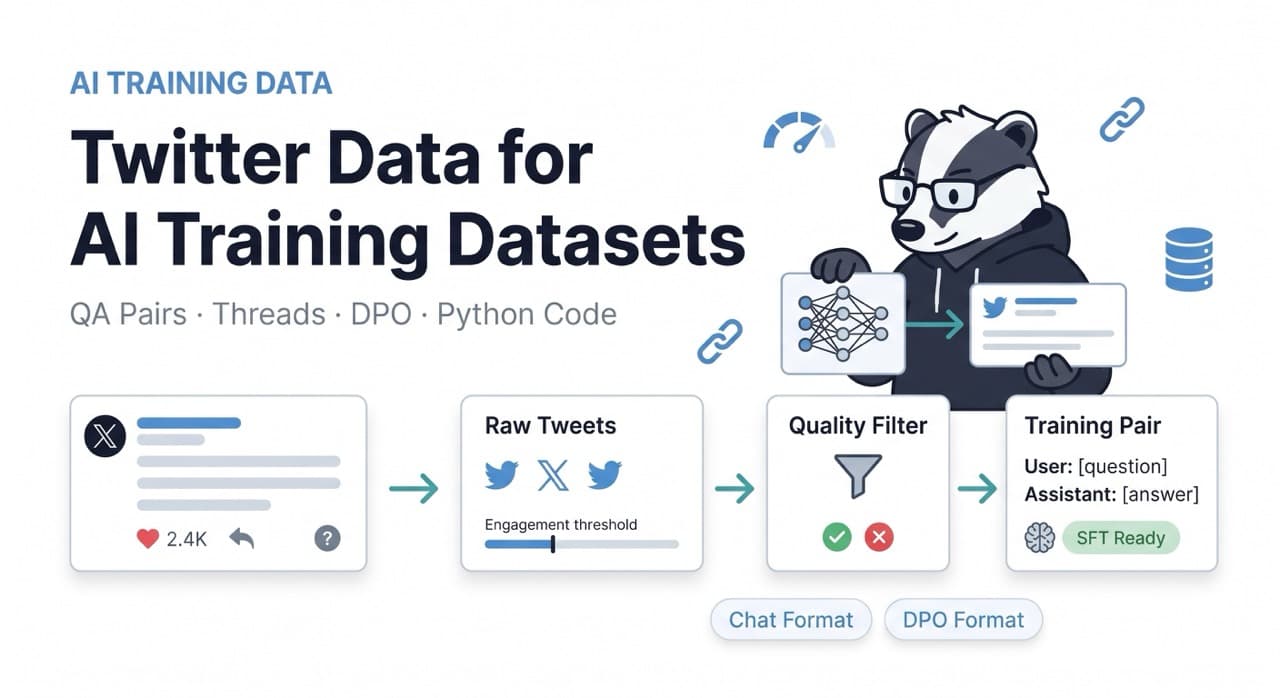
Twitter data has properties that almost no other source replicates at scale. Real-time language evolution, short-form dense text, natural instruction-response structure in reply chains, built-in quality signals through engagement metrics, and domain communities that self-organise around specific topics — all of these make Twitter a uniquely valuable source for AI training data.
The general AI training datasets guide covers the full pipeline across web sources. This guide focuses specifically on what makes Twitter different and how to extract it properly — the data structures, quality filtering patterns, and format conversion steps that turn raw tweet collections into training-ready datasets.
ScrapeBadger's Twitter Scraper handles X.com's Cloudflare protection, session management, and rate limiting automatically. This guide assumes you're using ScrapeBadger as the collection layer and focuses on what to do with the data once you have it.
Why Twitter Data Is Different From Other Training Sources
Four structural properties make Twitter data distinct:
Natural instruction-response pairs. When someone asks a question on Twitter and a knowledgeable account answers it, you have a naturally occurring instruction-response pair with community quality validation — the response has likes and retweets indicating the community found it valuable. Reply chains are a more authentic source of instruction-response data than synthetic generation.
Engagement as weak supervision. A tweet with 2,000 likes and 400 retweets is community-validated content. A tweet with 0 engagement might be wrong, off-topic, or low quality. Unlike most web scraping targets where you have to build quality signals from scratch, Twitter's engagement data provides a ready-made quality signal for every piece of content you collect.
Domain Twitter communities. #FinTwit, #BuildInPublic, #MedTwitter, ML Twitter, policy Twitter — these are self-organised communities of domain experts producing dense, technical, conversational text in their field. A model fine-tuned on ML Twitter replies is exposed to expert-level technical discussion in a conversational format that textbooks and papers don't replicate.
Quote tweet disagreement pairs. A quote tweet that disagrees with the original creates a natural preference pair — original claim plus critique or correction. These are valuable for RLHF and DPO preference datasets where you need chosen/rejected pairs showing which response the community prefers.
The Four Data Collection Strategies
Strategy 1: Question-Answer Pairs From Reply Chains
The highest-value structure for supervised fine-tuning. A tweet that asks a clear question, receives a high-engagement reply from a credible account, creates a direct instruction-response pair that requires minimal post-processing.
python
# twitter_qa_collector.py
import httpx
import asyncio
import os
import json
from datetime import datetime
from typing import Optional

API_KEY = os.environ["SCRAPEBADGER_API_KEY"]
BASE_URL = "https://api.scrapebadger.com/v1"
HEADERS = {"X-API-Key": API_KEY}

# Question patterns — tweets that are clearly asking for information
QUESTION_INDICATORS = [
    "?", "how do", "how to", "what is", "what are",
    "why does", "why is", "can someone", "anyone know",
    "help with", "best way to", "difference between",
    "should i", "what would", "how would",
]

# Quality thresholds for keeping a pair
MIN_ANSWER_LIKES = 10      # Answer must have at least 10 likes
MIN_ANSWER_LENGTH = 50     # Answer must be at least 50 characters
MAX_ANSWER_LENGTH = 2000   # Avoid thread-length responses for SFT
MIN_QUESTION_LENGTH = 20   # Avoid trivial questions


def is_question(text: str) -> bool:
    """Detect if a tweet is asking a genuine question."""
    text_lower = text.lower().strip()
    return any(indicator in text_lower for indicator in QUESTION_INDICATORS)


def clean_tweet_text(text: str) -> str:
    """
    Clean tweet text for training use.
    - Remove @mentions at start (reply indicators)
    - Remove URLs unless they're the subject
    - Normalise whitespace
    - Preserve hashtags as topic signals
    """
    import re

    # Remove leading @mentions (reply prefixes)
    text = re.sub(r"^(@\w+\s*)+", "", text).strip()

    # Remove t.co URLs (tracking links — not the content)
    text = re.sub(r"https://t\.co/\S+", "", text)

    # Remove other URLs unless they're the only content
    remaining = re.sub(r"https?://\S+", "", text).strip()
    if len(remaining) > 20:
        text = remaining

    # Normalise whitespace
    text = " ".join(text.split())

    return text.strip()


async def collect_qa_pairs_from_search(
    client: httpx.AsyncClient,
    query: str,
    min_likes: int = 5,
    max_pairs: int = 500,
) -> list[dict]:
    """
    Search for question tweets and collect high-quality reply pairs.
    """
    qa_pairs = []

    try:
        # Search for question tweets on this topic
        response = await client.get(
            f"{BASE_URL}/twitter/search",
            params={
                "query": f"{query} ?",
                "sort": "top",  # Top engagement first
                "limit": 100,
            },
            timeout=30.0,
        )
        response.raise_for_status()
        data = response.json()

        question_tweets = [
            t for t in data.get("tweets", [])
            if is_question(t.get("text", ""))
            and len(clean_tweet_text(t.get("text", ""))) >= MIN_QUESTION_LENGTH
            and t.get("reply_count", 0) > 0
        ]

        print(f"Found {len(question_tweets)} question tweets for '{query}'")

        # For each question tweet, fetch replies
        for tweet in question_tweets[:50]:  # Limit to 50 to control credits
            tweet_id = tweet.get("id")
            if not tweet_id:
                continue

            # Fetch replies to this tweet
            replies_response = await client.get(
                f"{BASE_URL}/twitter/tweet/{tweet_id}/replies",
                params={"limit": 20},
                timeout=30.0,
            )
            replies_response.raise_for_status()
            replies_data = replies_response.json()

            replies = replies_data.get("replies", [])

            # Filter for quality replies
            quality_replies = [
                r for r in replies
                if r.get("like_count", 0) >= MIN_ANSWER_LIKES
                and len(clean_tweet_text(r.get("text", ""))) >= MIN_ANSWER_LENGTH
                and len(clean_tweet_text(r.get("text", ""))) <= MAX_ANSWER_LENGTH
                and not is_question(r.get("text", ""))  # Reply should answer, not ask
            ]

            for reply in quality_replies:
                question_clean = clean_tweet_text(tweet.get("text", ""))
                answer_clean = clean_tweet_text(reply.get("text", ""))

                if not question_clean or not answer_clean:
                    continue

                pair = {
                    "instruction": question_clean,
                    "response": answer_clean,
                    "metadata": {
                        "question_id": tweet_id,
                        "answer_id": reply.get("id"),
                        "question_likes": tweet.get("like_count", 0),
                        "answer_likes": reply.get("like_count", 0),
                        "answer_retweets": reply.get("retweet_count", 0),
                        "question_author_followers": tweet.get("author", {}).get("followers_count", 0),
                        "answer_author_followers": reply.get("author", {}).get("followers_count", 0),
                        "topic": query,
                        "source": "twitter_reply",
                        "collected_at": datetime.utcnow().isoformat(),
                    }
                }
                qa_pairs.append(pair)

                if len(qa_pairs) >= max_pairs:
                    return qa_pairs

            await asyncio.sleep(0.5)  # Polite pacing

    except Exception as e:
        print(f"Error collecting QA pairs for '{query}': {e}")

    return qa_pairs
Strategy 2: Domain Expert Thread Collection
Threads from high-follower domain expert accounts produce long-form explanatory content in conversational style — valuable for domain-specific pre-training and continued pre-training.
python
async def collect_expert_threads(
    client: httpx.AsyncClient,
    account_handles: list[str],
    min_thread_length: int = 3,
    min_likes_per_tweet: int = 50,
) -> list[dict]:
    """
    Collect threaded content from domain expert accounts.
    Reconstructs tweet threads into coherent long-form documents.
    High-follower domain accounts on technical topics produce
    dense, accurate explanatory content.
    """
    thread_documents = []

    for handle in account_handles:
        try:
            # Get account timeline
            response = await client.get(
                f"{BASE_URL}/twitter/user/{handle}/tweets",
                params={
                    "limit": 100,
                    "exclude_replies": False,
                },
                timeout=30.0,
            )
            response.raise_for_status()
            data = response.json()

            tweets = data.get("tweets", [])

            # Identify thread starters (tweets with high engagement that
            # have replies from the same author)
            thread_starters = [
                t for t in tweets
                if t.get("like_count", 0) >= min_likes_per_tweet
                and not t.get("in_reply_to_user_id")  # Original tweet, not reply
                and t.get("conversation_id") == t.get("id")  # Is conversation root
            ]

            for starter in thread_starters[:20]:
                # Collect the full thread
                thread_tweets = await collect_full_thread(
                    client,
                    conversation_id=starter.get("conversation_id"),
                    author_handle=handle,
                    min_likes=min_likes_per_tweet // 2,
                )

                if len(thread_tweets) < min_thread_length:
                    continue

                # Reconstruct thread as flowing text
                thread_text = reconstruct_thread(thread_tweets)

                if len(thread_text.split()) < 100:
                    continue

                thread_documents.append({
                    "text": thread_text,
                    "source": f"https://twitter.com/{handle}",
                    "author": handle,
                    "author_followers": data.get("user", {}).get("followers_count", 0),
                    "tweet_count": len(thread_tweets),
                    "total_likes": sum(t.get("like_count", 0) for t in thread_tweets),
                    "collected_at": datetime.utcnow().isoformat(),
                })

            await asyncio.sleep(1.0)

        except Exception as e:
            print(f"Error collecting threads for @{handle}: {e}")

    return thread_documents


async def collect_full_thread(
    client: httpx.AsyncClient,
    conversation_id: str,
    author_handle: str,
    min_likes: int = 10,
) -> list[dict]:
    """
    Collect all tweets in a thread from a specific author.
    Filters to only the author's own replies (not quote tweets from others).
    """
    try:
        response = await client.get(
            f"{BASE_URL}/twitter/conversation/{conversation_id}",
            timeout=30.0,
        )
        response.raise_for_status()
        data = response.json()

        # Keep only author's own tweets in correct order
        thread = [
            t for t in data.get("tweets", [])
            if t.get("author", {}).get("username", "").lower() == author_handle.lower()
            and t.get("like_count", 0) >= min_likes
        ]

        # Sort by creation time
        thread.sort(key=lambda x: x.get("created_at", ""))

        return thread

    except Exception as e:
        print(f"Error fetching thread {conversation_id}: {e}")
        return []


def reconstruct_thread(tweets: list[dict]) -> str:
    """
    Reconstruct a tweet thread into flowing prose.
    Removes numbering patterns (1/, 2/, etc.) and joining them naturally.
    """
    import re

    parts = []
    for tweet in tweets:
        text = clean_tweet_text(tweet.get("text", ""))

        # Remove common thread numbering patterns
        text = re.sub(r"^\d+[/\.]?\s*", "", text)
        text = re.sub(r"^\[\d+/\d+\]\s*", "", text)

        # Remove "thread" markers
        text = re.sub(r"\b(thread|🧵)\b", "", text, flags=re.IGNORECASE).strip()

        if text:
            parts.append(text)

    return "\n\n".join(parts)
Strategy 3: Engagement-Filtered Pre-Training Corpus
For domain-specific continued pre-training, collect high-engagement tweets from topic communities. The engagement filter eliminates low-quality content without manual labelling.
python
async def build_domain_corpus(
    client: httpx.AsyncClient,
    topic_queries: list[str],
    min_likes: int = 20,
    min_retweets: int = 5,
    max_tweets_per_topic: int = 5000,
) -> list[dict]:
    """
    Build a domain-specific pre-training corpus from high-engagement tweets.
    Engagement thresholds act as weak supervision for quality.
    """
    corpus = []
    seen_texts = set()

    for query in topic_queries:
        collected = 0

        try:
            response = await client.get(
                f"{BASE_URL}/twitter/search",
                params={
                    "query": query,
                    "sort": "top",
                    "limit": 100,
                },
                timeout=30.0,
            )
            response.raise_for_status()
            data = response.json()

            for tweet in data.get("tweets", []):
                likes = tweet.get("like_count", 0)
                retweets = tweet.get("retweet_count", 0)

                # Engagement gate
                if likes < min_likes or retweets < min_retweets:
                    continue

                text = clean_tweet_text(tweet.get("text", ""))

                if len(text) < 30:
                    continue

                # Deduplication
                text_normalized = " ".join(text.lower().split())
                if text_normalized in seen_texts:
                    continue
                seen_texts.add(text_normalized)

                corpus.append({
                    "text": text,
                    "like_count": likes,
                    "retweet_count": retweets,
                    "reply_count": tweet.get("reply_count", 0),
                    "author_followers": tweet.get("author", {}).get("followers_count", 0),
                    "is_verified": tweet.get("author", {}).get("verified", False),
                    "topic": query,
                    "created_at": tweet.get("created_at", ""),
                    "source": "twitter",
                    "collected_at": datetime.utcnow().isoformat(),
                })

                collected += 1
                if collected >= max_tweets_per_topic:
                    break

        except Exception as e:
            print(f"Error collecting corpus for '{query}': {e}")

        print(f"'{query}': {collected} tweets added")
        await asyncio.sleep(0.5)

    # Sort by engagement — highest quality first
    corpus.sort(key=lambda x: x["like_count"] + x["retweet_count"] * 3, reverse=True)
    return corpus
Strategy 4: Quote Tweet Preference Pairs for RLHF/DPO
Quote tweets that disagree with the original create natural chosen/rejected pairs. The original claim is the prompt, the correction or critique is the preferred response, and the original is the rejected response.
python
async def collect_preference_pairs(
    client: httpx.AsyncClient,
    query: str,
    min_quote_likes: int = 50,
    max_pairs: int = 200,
) -> list[dict]:
    """
    Collect quote tweet disagreement pairs for DPO/RLHF training.
    Pattern: original claim (rejected) vs correction/critique (chosen).
    High-engagement corrections are strong signal for preference.
    """
    CORRECTION_SIGNALS = [
        "actually", "this is wrong", "not quite", "incorrect",
        "to clarify", "correction:", "the evidence shows",
        "this isn't accurate", "misinformation", "thread on why",
        "this misses", "more nuanced", "counterpoint",
    ]

    pairs = []

    try:
        response = await client.get(
            f"{BASE_URL}/twitter/search",
            params={"query": query, "sort": "top", "limit": 100},
            timeout=30.0,
        )
        response.raise_for_status()
        tweets = response.json().get("tweets", [])

        for tweet in tweets:
            tweet_id = tweet.get("id")
            if not tweet_id or tweet.get("quote_count", 0) < 3:
                continue

            # Fetch quote tweets
            qt_response = await client.get(
                f"{BASE_URL}/twitter/tweet/{tweet_id}/quotes",
                params={"limit": 20},
                timeout=30.0,
            )
            qt_response.raise_for_status()
            quote_tweets = qt_response.json().get("quotes", [])

            original_text = clean_tweet_text(tweet.get("text", ""))
            if not original_text or len(original_text) < 30:
                continue

            for qt in quote_tweets:
                qt_text = clean_tweet_text(qt.get("text", ""))
                qt_likes = qt.get("like_count", 0)

                if qt_likes < min_quote_likes:
                    continue

                if len(qt_text) < 40:
                    continue

                # Check if this quote tweet is a correction/critique
                qt_lower = qt_text.lower()
                is_correction = any(
                    signal in qt_lower for signal in CORRECTION_SIGNALS
                )

                if not is_correction:
                    continue

                pairs.append({
                    "prompt": f"Is this statement accurate: '{original_text}'",
                    "chosen": qt_text,            # The correction (higher quality)
                    "rejected": original_text,     # The original claim
                    "metadata": {
                        "original_id": tweet_id,
                        "quote_id": qt.get("id"),
                        "original_likes": tweet.get("like_count", 0),
                        "correction_likes": qt_likes,
                        "topic": query,
                        "source": "twitter_quote_correction",
                        "collected_at": datetime.utcnow().isoformat(),
                    }
                })

                if len(pairs) >= max_pairs:
                    return pairs

    except Exception as e:
        print(f"Error collecting preference pairs for '{query}': {e}")

    return pairs
The Quality Filtering Pipeline
Raw Twitter data needs three quality passes before it enters a training pipeline.
python
# quality_filter.py
import re
import hashlib
from collections import Counter


class TwitterDataQualityFilter:
    """
    Multi-stage quality filter for Twitter training data.
    Combines Twitter-specific checks with general text quality.
    """

    def __init__(self):
        self._seen_hashes = set()

    def check_spam_patterns(self, text: str) -> tuple[bool, str]:
        """Detect common Twitter spam and low-quality patterns."""
        text_lower = text.lower()

        spam_signals = [
            r"follow (?:me|back|for follow)",
            r"dm (?:me|for|to) (?:buy|sell|earn)",
            r"click (?:here|link|bio)",
            r"\$\d+.*(?:guaranteed|daily|passive)",
            r"crypto.*(?:signal|pump|gem)",
            r"(?:like|rt|retweet) (?:this|for|if)",
        ]

        for pattern in spam_signals:
            if re.search(pattern, text_lower):
                return False, "spam_pattern"

        # Excessive hashtags (more than 4 = hashtag farming)
        hashtag_count = len(re.findall(r"#\w+", text))
        if hashtag_count > 4:
            return False, "hashtag_spam"

        # Excessive @mentions (more than 3 = mention spam)
        mention_count = len(re.findall(r"@\w+", text))
        if mention_count > 3:
            return False, "mention_spam"

        return True, "ok"

    def check_language_quality(self, text: str) -> tuple[bool, str]:
        """Check for minimum language quality signals."""
        if not text or len(text.strip()) < 20:
            return False, "too_short"

        words = text.split()

        # Must have enough real words
        alpha_words = [w for w in words if any(c.isalpha() for c in w)]
        if len(alpha_words) < 5:
            return False, "insufficient_words"

        # Check for excessive caps (SHOUTING = low quality in most contexts)
        upper_ratio = sum(1 for c in text if c.isupper()) / max(len(text), 1)
        if upper_ratio > 0.5 and len(text) > 30:
            return False, "excessive_caps"

        return True, "ok"

    def check_duplicate(self, text: str) -> tuple[bool, str]:
        """Exact and near-duplicate detection."""
        # Remove punctuation and normalise for comparison
        normalized = re.sub(r"[^\w\s]", "", text.lower())
        normalized = " ".join(normalized.split())
        content_hash = hashlib.sha256(normalized.encode()).hexdigest()

        if content_hash in self._seen_hashes:
            return False, "duplicate"
        self._seen_hashes.add(content_hash)
        return True, "ok"

    def filter(self, text: str) -> tuple[bool, str]:
        """Run all checks. Returns (passed, reason)."""
        for check in [
            self.check_spam_patterns,
            self.check_language_quality,
            self.check_duplicate,
        ]:
            passed, reason = check(text)
            if not passed:
                return False, reason
        return True, "passed"
Format Conversion for Training Frameworks
Different training objectives need different output formats.
python
# formatter.py
import json
from typing import Union


def to_chat_format(pairs: list[dict]) -> list[dict]:
    """
    Convert QA pairs to OpenAI chat format.
    Compatible with most fine-tuning frameworks (Axolotl, LLaMA-Factory, etc.)
    """
    return [
        {
            "messages": [
                {"role": "user", "content": pair["instruction"]},
                {"role": "assistant", "content": pair["response"]},
            ]
        }
        for pair in pairs
        if pair.get("instruction") and pair.get("response")
    ]


def to_alpaca_format(pairs: list[dict]) -> list[dict]:
    """Convert to Alpaca instruction format."""
    return [
        {
            "instruction": pair["instruction"],
            "input": "",
            "output": pair["response"],
        }
        for pair in pairs
        if pair.get("instruction") and pair.get("response")
    ]


def to_dpo_format(pairs: list[dict]) -> list[dict]:
    """
    Convert preference pairs to DPO training format.
    Used for fine-tuning with Direct Preference Optimization.
    """
    return [
        {
            "prompt": pair["prompt"],
            "chosen": pair["chosen"],
            "rejected": pair["rejected"],
        }
        for pair in pairs
        if pair.get("prompt") and pair.get("chosen") and pair.get("rejected")
    ]


def save_dataset(
    data: list[dict],
    output_path: str,
    format_type: str = "chat",
):
    """Save dataset in specified format as JSONL."""
    formatters = {
        "chat": to_chat_format,
        "alpaca": to_alpaca_format,
        "dpo": to_dpo_format,
        "raw": lambda x: x,
    }

    formatter = formatters.get(format_type, to_chat_format)
    formatted = formatter(data)

    with open(output_path, "w", encoding="utf-8") as f:
        for record in formatted:
            f.write(json.dumps(record, ensure_ascii=False) + "\n")

    print(f"Saved {len(formatted)} records to {output_path} ({format_type} format)")
    return len(formatted)
The Complete Collection Pipeline
python
# twitter_dataset_builder.py
import asyncio
import httpx
import os
import json
from datetime import datetime
from quality_filter import TwitterDataQualityFilter
from formatter import save_dataset

API_KEY = os.environ["SCRAPEBADGER_API_KEY"]
BASE_URL = "https://api.scrapebadger.com/v1"

# Domain configurations — customise for your target domain
DOMAIN_CONFIGS = {
    "machine_learning": {
        "topics": [
            "machine learning python",
            "deep learning tutorial",
            "LLM fine-tuning",
            "transformer architecture",
            "neural network training",
        ],
        "expert_accounts": [
            "karpathy",
            "ylecun",
            "goodfellow_ian",
        ],
        "min_likes": 30,
    },
    "finance": {
        "topics": [
            "stock analysis",
            "options trading strategy",
            "technical analysis",
            "earnings report",
            "market sentiment",
        ],
        "expert_accounts": [
            "CharlieMunger",
            "morganhousel",
        ],
        "min_likes": 50,
    },
}


async def build_domain_dataset(
    domain: str,
    output_dir: str = "datasets",
    max_qa_pairs: int = 2000,
    max_threads: int = 500,
    max_corpus_tweets: int = 10000,
) -> dict:
    """
    Build a complete domain-specific training dataset from Twitter.
    Collects QA pairs, expert threads, and pre-training corpus.
    """
    import os
    os.makedirs(output_dir, exist_ok=True)

    config = DOMAIN_CONFIGS.get(domain, {
        "topics": [domain],
        "expert_accounts": [],
        "min_likes": 20,
    })

    quality_filter = TwitterDataQualityFilter()
    headers = {"X-API-Key": API_KEY}
    semaphore = asyncio.Semaphore(5)
    stats = {}

    print(f"\nBuilding {domain} dataset from Twitter...")
    print(f"Topics: {len(config['topics'])} | "
          f"Expert accounts: {len(config['expert_accounts'])}")

    async with httpx.AsyncClient(headers=headers) as client:

        # --- PHASE 1: QA Pairs ---
        print("\nPhase 1: Collecting QA pairs from reply chains...")
        qa_pairs = []

        for topic in config["topics"]:
            pairs = await collect_qa_pairs_from_search(
                client, topic,
                min_likes=config["min_likes"] // 2,
                max_pairs=max_qa_pairs // len(config["topics"]),
            )
            # Apply quality filter to answers
            for pair in pairs:
                passed, reason = quality_filter.filter(pair["response"])
                if passed:
                    qa_pairs.append(pair)

        stats["qa_pairs"] = len(qa_pairs)
        print(f"  Collected {len(qa_pairs)} quality QA pairs")

        # Save QA pairs
        save_dataset(
            qa_pairs,
            f"{output_dir}/{domain}_qa_chat.jsonl",
            format_type="chat",
        )
        save_dataset(
            qa_pairs,
            f"{output_dir}/{domain}_qa_alpaca.jsonl",
            format_type="alpaca",
        )

        # --- PHASE 2: Expert Threads ---
        if config["expert_accounts"]:
            print("\nPhase 2: Collecting expert thread documents...")
            threads = await collect_expert_threads(
                client,
                config["expert_accounts"],
                min_thread_length=3,
                min_likes_per_tweet=config["min_likes"],
            )

            # Filter thread documents
            clean_threads = []
            for thread in threads:
                passed, reason = quality_filter.filter(thread["text"])
                if passed:
                    clean_threads.append(thread)

            stats["thread_documents"] = len(clean_threads)
            print(f"  Collected {len(clean_threads)} thread documents")

            # Save as pre-training corpus
            with open(f"{output_dir}/{domain}_threads.jsonl", "w") as f:
                for doc in clean_threads:
                    f.write(json.dumps(doc, ensure_ascii=False) + "\n")

        # --- PHASE 3: Pre-Training Corpus ---
        print("\nPhase 3: Building engagement-filtered pre-training corpus...")
        corpus = await build_domain_corpus(
            client,
            config["topics"],
            min_likes=config["min_likes"],
            max_tweets_per_topic=max_corpus_tweets // len(config["topics"]),
        )

        clean_corpus = []
        for tweet in corpus:
            passed, _ = quality_filter.filter(tweet["text"])
            if passed:
                clean_corpus.append(tweet)

        stats["corpus_tweets"] = len(clean_corpus)
        print(f"  Built corpus with {len(clean_corpus)} clean tweets")

        with open(f"{output_dir}/{domain}_corpus.jsonl", "w") as f:
            for tweet in clean_corpus:
                f.write(json.dumps(tweet, ensure_ascii=False) + "\n")

    # Print summary
    print(f"\n{'='*50}")
    print(f"Dataset build complete: {domain}")
    print(f"  QA pairs: {stats.get('qa_pairs', 0)}")
    print(f"  Thread documents: {stats.get('thread_documents', 0)}")
    print(f"  Corpus tweets: {stats.get('corpus_tweets', 0)}")
    print(f"  Output directory: {output_dir}/")
    print("="*50)

    return stats


if __name__ == "__main__":
    import sys
    domain = sys.argv[1] if len(sys.argv) > 1 else "machine_learning"
    asyncio.run(build_domain_dataset(domain))
Running it:
bash
# Build machine learning domain dataset
python twitter_dataset_builder.py machine_learning

# Build finance domain dataset
python twitter_dataset_builder.py finance
Output:
Building machine_learning dataset from Twitter...
Topics: 5 | Expert accounts: 3

Phase 1: Collecting QA pairs from reply chains...
  'machine learning python': 234 quality QA pairs
  'deep learning tutorial': 189 quality QA pairs
  ...
  Collected 847 quality QA pairs

Phase 2: Collecting expert thread documents...
  Collected 43 thread documents

Phase 3: Building engagement-filtered pre-training corpus...
  'machine learning python': 487 tweets added
  ...
  Built corpus with 2,341 clean tweets

==================================================
Dataset build complete: machine_learning
  QA pairs: 847
  Thread documents: 43
  Corpus tweets: 2,341
  Output directory: datasets/
==================================================
Legal and Ethical Considerations
As covered in the AI training datasets guide, using scraped content for AI training is an active legal question. For Twitter data specifically:
X's Terms of Service explicitly prohibit scraping for AI training purposes and data sublicensing. Commercial model training on scraped Twitter data carries contractual exposure. Review legal counsel before publishing a model trained on scraped Twitter content commercially.
Copyright on tweets — individual tweets may qualify for copyright protection in some jurisdictions despite their length. For training data that will be used in a commercial product, consult legal counsel on the specific use case.
Personal data — tweets contain personal information of identifiable users. Apply GDPR/CCPA data minimisation — store only what the training objective requires, pseudonymise author identifiers where they're not needed for quality scoring, and implement a deletion policy for any stored tweet data.
Engagement signals are still weak supervision, not ground truth — high likes on a tweet indicates community approval, not factual accuracy. Medical and legal domain datasets specifically need additional expert review beyond engagement filtering before use in safety-critical applications.
Full ScrapeBadger documentation at docs.scrapebadger.com. Free trial at scrapebadger.com — 1,000 credits, no credit card required.

Written by
Thomas Shultz
Thomas Shultz is the Head of Data at ScrapeBadger, working on public web data, scraping infrastructure, and data reliability. He writes about real-world scraping, data pipelines, and turning unstructured web data into usable signals. ScrapeBadger is a web scraping API platform specialising in Twitter/X, Reddit and Google data, with dedicated scrapers also covering TikTok, YouTube, LinkedIn, Amazon, eBay, Zillow and 40+ more: with built-in anti-bot bypass and an MCP server for AI agents.
Ready to get started?
Join thousands of developers using ScrapeBadger for their data needs.