How to scrape Twitter/X tweets by keyword with Python
 Thomas Shultz
AI Summary: Using ScrapeBadger and Python, this guide builds a reliable keyword-based tweet scraping pipeline rather than a throwaway script, handling pagination, deduplication, and stable output schemas to produce a production-ready tool that exports clean tweet data to CSV.
Key takeaways:
Keyword-based tweet collection is best treated as a data pipeline, not a one-off script.
You need pagination, deduplication, and predictable output schemas.
This guide shows how to scrape tweets by keyword using ScrapeBadger + Python.
The result is a production-ready script that exports tweets to CSV.
We’ll also cover failure modes and hardening tips.
What we’re building
In this guide, I’m building a small but reliable Twitter/X keyword scraping pipeline in Python. Not a throwaway script, but something I’d actually feel comfortable running more than once.
The goal isn’t just to “get some tweets.” It’s to end up with a clean, repeatable dataset that I can reuse for analysis, monitoring, or downstream automation without constantly fixing edge cases.
By the end, I’ll have a single Python script where I can:
pass in a keyword,
run the script,
and get a CSV file with consistently structured tweet data.
At a high level, the pipeline looks like this:
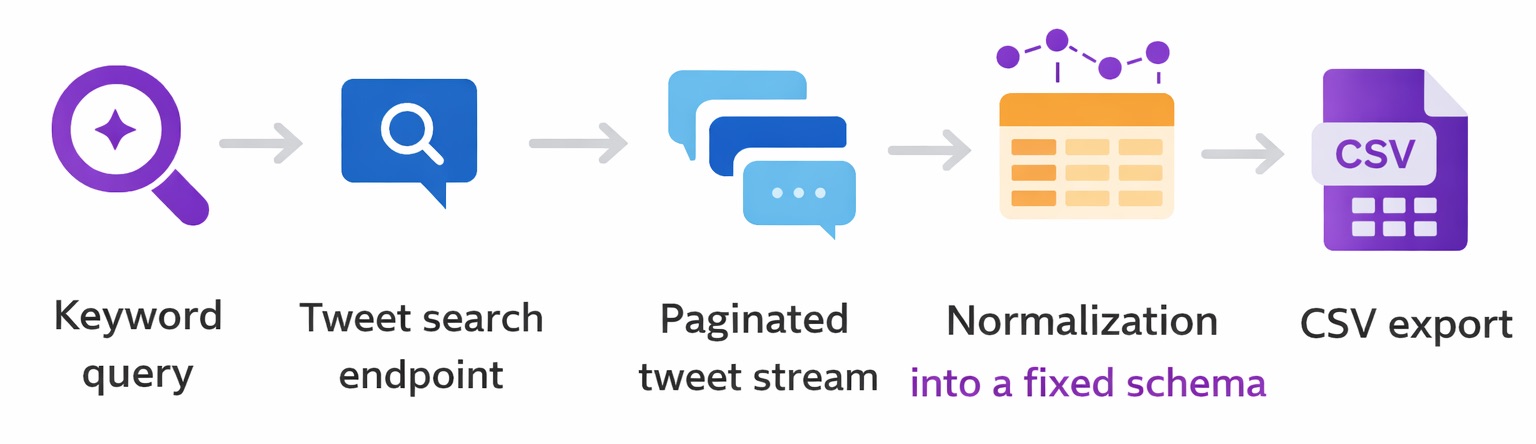
I’ll walk through each of these steps and explain why I structured it this way, based on what usually goes wrong when you try to scrape tweets at scale.
Why keyword tweet scraping is harder than it looks
When I first started scraping tweets by keyword, I thought it would be straightforward. Send a search query, collect the results and save them to a file. That approach works exactly once.
The problems don’t show up when the script runs the first time. They show up when you try to:
run it again tomorrow
change the keyword
increase the number of tweets
or automate it on a schedule
Most failures I’ve seen fall into one of these buckets:
Pagination gaps
Search results are almost never returned in a single response. If pagination isn’t handled carefully, you end up with datasets that look fine but are missing chunks of data.
This is especially dangerous because nothing crashes. The script completes successfully. It just quietly skips tweets.
Anti-bot friction and instability
DIY scraping scripts tend to work in testing and fail under real workloads. Rate limits, throttling, and intermittent failures usually don’t show up until you increase volume or run jobs back-to-back.
If your pipeline doesn’t expect these failures, you end up rerunning jobs and creating duplicates or partial exports.
Schema drift
Tweet objects are not guaranteed to be uniform. Fields can be missing, nested differently, or renamed over time.
If you assume a fixed structure without defensive parsing, your pipeline will eventually break. Or worse, silently write malformed rows.
Maintenance cost
A one-off script is cheap to write and expensive to maintain. Every small upstream change (pagination behavior, response shape, rate limits) becomes something you have to debug under time pressure if this script is part of a recurring workflow.
What I consider “production-ready” for this pipeline
When I say production-ready here, I don’t mean enterprise grade infrastructure. I mean something that can run repeatedly without me babysitting it. For me, that requires a few non-negotiables.
Deduplication
Tweets must be uniquely identified by tweet ID. If the script fetches overlapping pages or I rerun the job, duplicates should be dropped automatically.
Clean data beats “more” data everytime.
Explicit pagination rules
Tweets must be uniquely identified by tweet ID. If the script fetches overlapping pages or I rerun the job, duplicates should be dropped automatically.
Clean data beats “more” data every time.
Rate awareness
Even if the SDK handles pagination internally, I still treat the job as a bounded batch process. I decide ahead of time how much data I’m willing to fetch in a single run.
Stable output schema
The CSV format is a contract.
Every run should produce the same columns, in the same order, with safe defaults when fields are missing. That makes downstream analysis boring. Which is exactly what you want.
How I think about keyword scraping (mental model)
Before writing code, I find it helpful to be clear about the mental model. I’m not scraping tweets. I’m building a small data pipeline that converts a search query into a structured dataset.
The flow is simple (already mentioned above_:
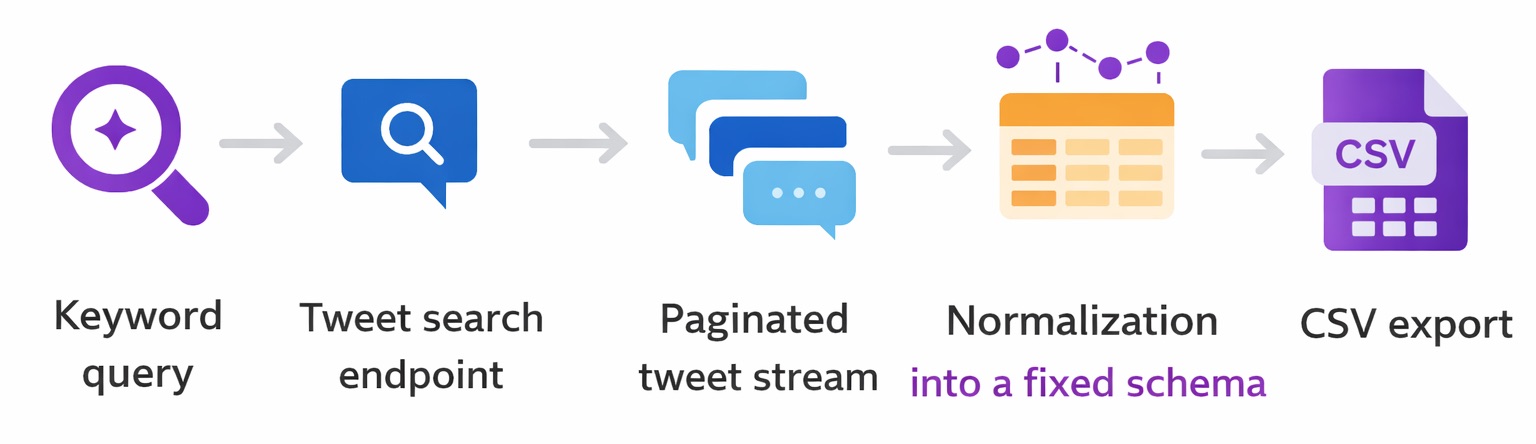
Each step has a single responsibility.
The search step finds relevant tweets
Pagination turns partial results into a complete stream
Normalization enforces a stable schema
Export writes durable output that I can trust
Thinking in terms of these stages makes the pipeline easier to debug, easier to extend, and much easier to reason about when something goes wrong.
Step 1: Setup my environment (so this is repeatable)
I like to keep scraping projects isolated because dependencies change and “works on my machine” becomes a real problem fast.
Install dependencies
I create a virtual environment:
python -m venv .venv
source .venv/bin/activate  # macOS/Linux
# .venv\Scripts\activate   # Windows
Then install the library:
pip install scrapebadger
If I’m going to run this again later (or deploy it), I freeze dependencies:
pip freeze > requirements.txtConfigure the API key
I set the API key as an environment variable so it never ends up hardcoded in the script:
export SCRAPEBADGER_API_KEY="YOUR_API_KEY"Windows (PowerShell):
$env:SCRAPEBADGER_API_KEY="YOUR_API_KEY"Quick sanity check:
python -c "import os; print('ok' if os.getenv('SCRAPEBADGER_API_KEY') else 'missing')"Project structure I actually use
I keep it minimal:
twitter-keyword-scrape/
  scrape_tweets.py
  output/
Create output folder:
mkdir -p outputStep 2: Search tweets by keyword (minimal working version)
Before I build “the real pipeline,” I always start with a tiny script that proves the request works and shows me what the response looks like.
Here’s the smallest version I’d run first:
import asyncio
import os
from scrapebadger import ScrapeBadger

async def search_tweets(keyword: str, limit: int = 10):
    api_key = os.getenv("SCRAPEBADGER_API_KEY")
    if not api_key:
        raise RuntimeError("Missing SCRAPEBADGER_API_KEY environment variable")

    async with ScrapeBadger(api_key=api_key) as client:
        stream = client.twitter.tweets.search_all(keyword, max_items=limit)
        async for tweet in stream:
            print({
                "id": tweet.get("id"),
                "author": (tweet.get("user") or {}).get("username"),
                "text": tweet.get("text"),
                "created_at": tweet.get("created_at"),
            })

if __name__ == "__main__":
    asyncio.run(search_tweets("python scraping", limit=10))
Run it:
python scrape_tweets.pyWhat I look for in the response
I’m basically sanity-checking:
Do I get an id I can use as a stable key?
Do timestamps look consistent?
Is the tweet text present (and not truncated unexpectedly)?
Are metrics present (and what shape are they in)?
This matters because it informs the schema I export later.
Step 3: Pagination (where most scripts quietly fail)
Most keyword searches return results in batches. If you don’t paginate (or you paginate badly), you get a CSV that looks fine, but is incomplete.
I treat pagination like a controlled stream and I always enforce hard stopping conditions, because infinite loops happen more often than people admit.
The stopping conditions I always set
At minimum, I pick two:
Max items (e.g., 1000 tweets)
Hard timeout (e.g., 10–15 minutes for the whole run)
Optional “safety brakes” that I add when things are flaky:
stop if I stop making progress (no new tweet IDs)
stop if empty pages repeat
stop if a cursor/token doesn’t change
Even if the SDK “handles pagination,” I still put limits around the job so it’s predictable.
Step 4: Normalize + export to CSV (my “boring on purpose” schema)
Raw tweet payloads are great for APIs and annoying for analysis. I flatten them into a consistent schema.
The schema I export
I keep it small at first, then expand later:
tweet_id (string)
created_at (string timestamp)
username
text
like_count
retweet_count
reply_count
If a field is missing, I fill it with a safe default instead of blowing up mid-run.
The export script I actually run
This version:
normalizes every tweet
deduplicates by tweet ID
writes atomically (no half-written CSVs)
import asyncio
import csv
import os
import time
from scrapebadger import ScrapeBadger

CSV_COLUMNS = [
    "tweet_id",
    "created_at",
    "username",
    "text",
    "like_count",
    "retweet_count",
    "reply_count",
]

def normalize(tweet: dict) -> dict:
    metrics = tweet.get("public_metrics") or {}
    user = tweet.get("user") or {}

    return {
        "tweet_id": str(tweet.get("id") or ""),
        "created_at": str(tweet.get("created_at") or ""),
        "username": str(user.get("username") or ""),
        "text": str(tweet.get("text") or ""),
        "like_count": int(metrics.get("like_count") or 0),
        "retweet_count": int(metrics.get("retweet_count") or 0),
        "reply_count": int(metrics.get("reply_count") or 0),
    }

async def export_keyword_to_csv(query: str, max_items: int, out_path: str, hard_timeout_seconds: int = 900):
    api_key = os.getenv("SCRAPEBADGER_API_KEY")
    if not api_key:
        raise RuntimeError("Missing SCRAPEBADGER_API_KEY environment variable")

    started = time.time()
    seen_ids: set[str] = set()

    async with ScrapeBadger(api_key=api_key) as client:
        stream = client.twitter.tweets.search_all(query, max_items=max_items)

        tmp_path = out_path + ".tmp"
        with open(tmp_path, "w", newline="", encoding="utf-8") as f:
            writer = csv.DictWriter(f, fieldnames=CSV_COLUMNS)
            writer.writeheader()

            async for tweet in stream:
                # Hard timeout for the whole job
                if time.time() - started > hard_timeout_seconds:
                    break

                if not isinstance(tweet, dict):
                    tweet = getattr(tweet, "model_dump", lambda: dict(tweet))()

                row = normalize(tweet)

                # Quality gates + dedupe
                if not row["tweet_id"]:
                    continue
                if row["tweet_id"] in seen_ids:
                    continue

                seen_ids.add(row["tweet_id"])
                writer.writerow(row)

        # Atomic replace to avoid partial files
        os.replace(tmp_path, out_path)

if __name__ == "__main__":
    asyncio.run(export_keyword_to_csv(
        query="python scraping",
        max_items=1000,
        out_path="output/tweets.csv",
        hard_timeout_seconds=900,
    ))
Run it:
python scrape_tweets.pyWhat “good output” looks like
I expect:
stable headers every run
no duplicate tweet_id
timestamps present (even if some are empty)
no weird CSV formatting issues
Common failure modes (and what I do about them)
Empty results
What it looks like: script runs, CSV has only headers
What I check first:
keyword too narrow
endpoint returns nothing for that time window
authentication/rate issue
Fix: simplify the query, test a broader keyword, reduce constraints.
Duplicate tweets
Cause: overlapping pages or reruns
Fix: dedupe by tweet ID (in-memory per run), and if you do incremental runs, persist IDs in a DB/checkpoint file.
Timeouts or partial exports
Cause: big unbounded job or flaky network
Fix: job-level timeout + smaller max_items + retry logic.
Malformed rows
Cause: missing fields or unexpected response shape
Fix: defensive normalize() with safe defaults + skip rows missing required fields.
Production hardening (how I make it run unattended)
If I’m scheduling this daily/hourly, I add three things.
1) Retries with backoff (bounded)
retry only on transient failures
exponential backoff + jitter
cap the number of attempts (I usually do 3–5)
2) Run small, run often
Instead of “scrape everything,” I cap each run and schedule it:
hourly for monitoring
daily for reporting
separate jobs per keyword cluster
3) Basic monitoring
I log these per run:
tweets exported
duplicates dropped
runtime
error count/retry count
And I alert on:
sudden drops to near-zero output
repeated empty runs
unusually high retries
This catches “silent failures” before they waste a week of data.
Practical use cases (why I scrape by keyword)
Here’s what I actually use keyword scraping for:
Brand monitoring: mentions of product names, issues, competitor comparisons
Trend tracking: watch a topic over weeks and correlate spikes with events
Dataset building: train classifiers, build labeled corpora, research
Competitor listening: what people complain about, what features get praised
FAQ
How do I scrape Twitter/X by keyword in Python?
I send a keyword query to a search endpoint, consume results via pagination/streaming, normalize each tweet into a stable schema, then export to CSV (or a database).
How do I avoid duplicate tweets?
I treat tweet_id as the primary key and dedupe on it. For repeated scheduled runs, I persist “seen IDs” in a store (DB or checkpoint file).
How many tweets should I scrape per run?
I always cap runs with max_items and a hard timeout. The “right” number depends on your rate limits and what you’re trying to monitor.
Is scraping Twitter/X legal?
It depends on your jurisdiction, the platform’s terms, and how you use/store/share the data. I always review ToS and applicable laws, and I recommend using official APIs when required.
Conclusion
This is the pipeline I rely on for keyword-based tweet collection: query → paginated stream → normalization → deduped CSV export.
If you want to extend it, the next upgrades I’d make are:
write to a database (upsert by tweet ID)
add incremental “since last run” checkpoints
add structured logging + alerts
build a small dashboard on top of the CSV/DB
Docs - https://github.com/scrape-badger/scrapebadger-python
Support - https://discord.com/invite/3WvwTyWVCx

Written by
Thomas Shultz
Thomas Shultz is the Head of Data at ScrapeBadger, working on public web data, scraping infrastructure, and data reliability. He writes about real-world scraping, data pipelines, and turning unstructured web data into usable signals. ScrapeBadger is a web scraping API platform specialising in Twitter/X, Reddit and Google data, with dedicated scrapers also covering TikTok, YouTube, LinkedIn, Amazon, eBay, Zillow and 40+ more: with built-in anti-bot bypass and an MCP server for AI agents.
Ready to get started?
Join thousands of developers using ScrapeBadger for their data needs.