Build a Twitter Research Agent With ScrapeBadger + Claude
 Thomas Shultz
AI Summary: This tutorial builds a full Twitter research agent by connecting Claude to ScrapeBadger's Twitter endpoints via the MCP server, so it can plan relevant data sources, execute many tool calls in parallel, and return a structured intelligence report in about ninety seconds.
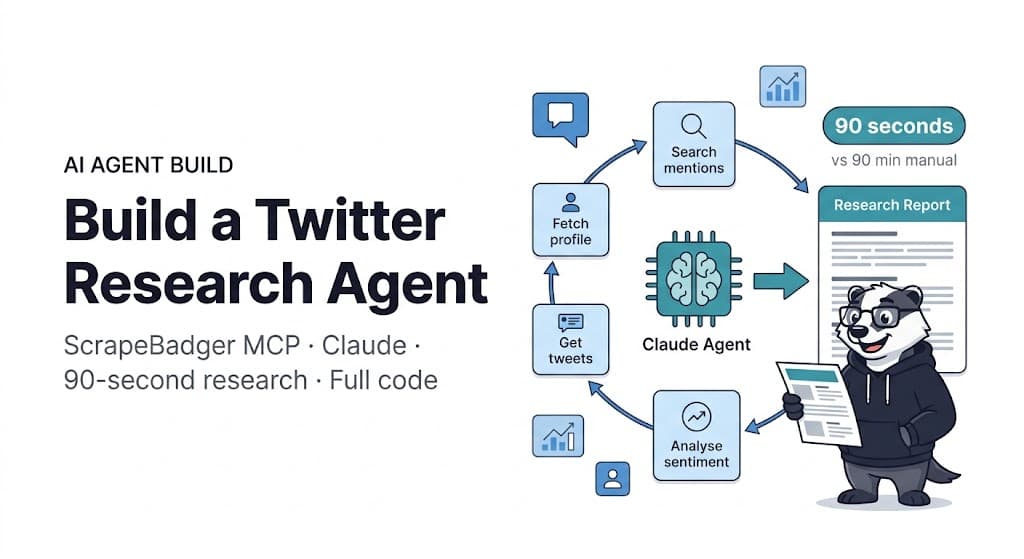
A Twitter research brief that takes a human analyst three hours to complete — searching multiple accounts, pulling recent activity, cross-referencing mentions, analysing engagement patterns, summarising narrative — takes an agent ninety seconds. The gap is not intelligence. It is data access speed and the ability to execute twenty tool calls in parallel while synthesising the results into a coherent analysis.
This is what happens when you connect Claude to ScrapeBadger's Twitter data endpoints via the MCP server: an agent that can receive a research brief, plan which Twitter data sources are relevant, call them in sequence, synthesise the output, and return a structured intelligence report — all in a single reasoning workflow.
The Amazon research agent covered elsewhere in this series does the same thing with product data. Twitter research is a different problem with a different data model. The social graph, engagement ratios, narrative trajectory, and the relationship between accounts require different tool call strategies and different synthesis prompts. This guide builds the full Twitter research agent from scratch.
What a Twitter Research Agent Can Actually Do
Before the code, set concrete expectations. A well-built Twitter research agent handles these workflows without human intervention:
Competitor social intelligence. Given a competitor's Twitter handle, the agent pulls their recent tweet activity, calculates engagement rates per tweet type, identifies their highest-performing content themes, and maps their follower-to-following ratio as a credibility signal. What normally takes an analyst an hour of manual scrolling and spreadsheet work completes in under two minutes.
Brand narrative monitoring. Given a brand name or product name, the agent searches recent mentions, identifies the dominant sentiment themes in the current conversation, surfaces any high-engagement negative mentions, and produces a narrative summary that would take a social listening analyst thirty minutes to write.
Influencer qualification. Given a list of potential influencer handles, the agent fetches profiles, calculates engagement rates, validates audience authenticity via follower ratio signals, checks recent tweet activity levels, and returns a scored ranking — eliminating the manual verification step that bottlenecks influencer sourcing.
Market conversation analysis. Given a keyword or hashtag, the agent pulls recent posts, identifies the most engaged accounts discussing the topic, extracts recurring themes and sentiment, and surfaces the specific language patterns that are resonating with the target audience.
Architecture
Research brief (natural language)
         ↓
Claude (planning + reasoning)
         ↓
[ScrapeBadger MCP Tools]
  twitter_user_by_username    — profile + metrics
  twitter_get_user_tweets     — recent activity
  twitter_advanced_search     — keyword/brand search
  twitter_get_tweet_replies   — conversation threads
  twitter_get_user_followers  — audience sampling
         ↓
Claude (synthesis + report generation)
         ↓
Structured research report
The agent does not follow a hardcoded sequence. Claude plans which tool calls are necessary based on the research brief, executes them, and adapts its plan based on what the data returns. A brief asking about competitor strategy might start with profile fetch, proceed to tweet history analysis, and then branch into follower sampling if the profile data suggests unusual follower dynamics. The reasoning loop is dynamic.
Setup and Configuration
bash
pip install httpx python-dotenv asyncioenv
ANTHROPIC_API_KEY=your_anthropic_key
SCRAPEBADGER_API_KEY=your_scrapebadger_key
For Claude Desktop, add ScrapeBadger's MCP server to your configuration. Full setup at docs.scrapebadger.com/mcp/overview:
json
{
  "mcpServers": {
    "scrapebadger": {
      "command": "npx",
      "args": ["-y", "scrapebadger-mcp"],
      "env": {
        "SCRAPEBADGER_API_KEY": "your_api_key_here"
      }
    }
  }
}
The Research Agent Core
The system prompt is where most of the quality difference between a mediocre agent and a useful one lives. A vague instruction to "research Twitter" produces a vague report. A structured prompt that specifies exactly what data to collect, what calculations to perform, and what format to report in produces consistent, actionable output.
python
# twitter_research_agent.py
import httpx
import json
import os
import asyncio
from datetime import datetime
from typing import Optional

ANTHROPIC_API_KEY = os.environ["ANTHROPIC_API_KEY"]
SCRAPEBADGER_API_KEY = os.environ["SCRAPEBADGER_API_KEY"]


TWITTER_RESEARCH_SYSTEM_PROMPT = """You are a social intelligence analyst specialising in Twitter/X research.
You have access to ScrapeBadger's Twitter data tools.

When given a research brief, you will:

1. IDENTIFY which Twitter data sources are relevant to the brief
2. COLLECT the necessary data using available tools
3. CALCULATE key metrics where relevant:
   - Engagement rate = (likes + retweets + replies) / followers × 100
   - Follower ratio = followers / following (>5 = healthy, <0.5 = suspicious)
   - Activity rate = tweets per day over the account's lifetime
4. IDENTIFY patterns in content, timing, themes, and audience response
5. SYNTHESISE findings into a structured report

Your output must follow this structure:

## Subject Overview
- Account/topic summary
- Key metrics at a glance (followers, engagement rate, activity)
- One-sentence characterisation of their Twitter presence

## Content Analysis
- Most active content themes (based on recent tweet analysis)
- Tweet types performing best (threads, single tweets, replies, media)
- Posting cadence and timing patterns
- Tone and language style observations

## Audience and Engagement
- Follower profile summary (if sampled)
- Average engagement rate vs category benchmarks
- Which content types drive the most interaction
- Engagement trend (improving, stable, declining)

## Narrative Intelligence
- Current dominant narrative around the subject
- Sentiment summary (positive / neutral / negative ratio)
- Any high-engagement negative signals worth flagging
- Key talking points appearing in the conversation

## Strategic Observations
- 3-5 actionable intelligence points
- Specific opportunities or risks identified
- Comparison to stated competitors if provided

Use only data from your tool calls. Calculate metrics explicitly.
State which tool calls you made and what they returned.
"""

COMPETITOR_RESEARCH_PROMPT = """
Research Twitter intelligence on: {subject}

Research type: {research_type}

Specific questions to answer:
{questions}

Tool calls to prioritise:
1. Fetch profile and metrics for all relevant handles
2. Pull last 50-100 tweets for activity analysis
3. Search for brand/product mentions in the last 7 days
4. Sample top followers if audience intelligence is requested
5. Pull replies on 2-3 high-engagement tweets for conversation context

Produce the full structured report when done.
"""


async def run_twitter_research_agent(
    subject: str,
    research_type: str = "competitor_intelligence",
    questions: list[str] = None,
    max_tokens: int = 4096,
) -> dict:
    """
    Run a Twitter research agent using Claude + ScrapeBadger MCP.

    research_type options:
      - competitor_intelligence: Analyse a competitor's Twitter strategy
      - brand_monitoring: Assess current narrative around a brand/keyword
      - influencer_research: Qualify influencer accounts for partnerships
      - market_sentiment: Analyse conversation around a topic or keyword
    """

    if questions is None:
        questions = _default_questions(research_type)

    user_message = COMPETITOR_RESEARCH_PROMPT.format(
        subject=subject,
        research_type=research_type,
        questions="\n".join(f"- {q}" for q in questions),
    )

    async with httpx.AsyncClient() as client:
        response = await client.post(
            "https://api.anthropic.com/v1/messages",
            headers={
                "x-api-key": ANTHROPIC_API_KEY,
                "anthropic-version": "2023-06-01",
                "anthropic-beta": "mcp-client-2025-04-04",
                "content-type": "application/json",
            },
            json={
                "model": "claude-sonnet-4-20250514",
                "max_tokens": max_tokens,
                "system": TWITTER_RESEARCH_SYSTEM_PROMPT,
                "messages": [{"role": "user", "content": user_message}],
                "mcp_servers": [
                    {
                        "type": "url",
                        "url": "https://mcp.scrapebadger.com/sse",
                        "name": "scrapebadger",
                        "authorization_token": SCRAPEBADGER_API_KEY,
                    }
                ],
            },
            timeout=180.0,
        )
        response.raise_for_status()
        data = response.json()

    # Parse response content
    report_text = ""
    tool_calls = []

    for block in data.get("content", []):
        block_type = block.get("type", "")
        if block_type == "text":
            report_text += block.get("text", "")
        elif block_type in ("tool_use", "mcp_tool_use"):
            tool_calls.append({
                "tool": block.get("name", ""),
                "input_summary": _summarise_input(block.get("input", {})),
            })

    return {
        "subject": subject,
        "research_type": research_type,
        "report": report_text,
        "tool_calls_made": len(tool_calls),
        "tools_used": [tc["tool"] for tc in tool_calls],
        "tool_call_log": tool_calls,
        "generated_at": datetime.utcnow().isoformat(),
        "model": data.get("model", ""),
        "usage": data.get("usage", {}),
    }


def _default_questions(research_type: str) -> list[str]:
    """Return default research questions by type."""
    questions = {
        "competitor_intelligence": [
            "What content themes are performing best for them?",
            "What is their typical engagement rate?",
            "How does their audience profile look?",
            "What narrative are they building around their product?",
            "Are there any engagement anomalies or credibility signals to flag?",
        ],
        "brand_monitoring": [
            "What is the current dominant sentiment about this brand?",
            "Are there any high-engagement negative mentions to flag?",
            "What specific aspects are people praising or criticising?",
            "What language is the community using to describe this brand?",
            "Has sentiment changed noticeably in the last 7 days?",
        ],
        "influencer_research": [
            "What is their authentic engagement rate (excluding outliers)?",
            "Is their follower-to-following ratio consistent with organic growth?",
            "What content themes dominate their output?",
            "How frequently do they post and how consistent is the cadence?",
            "Do their followers appear to be genuine and engaged?",
        ],
        "market_sentiment": [
            "What are the dominant themes in this conversation?",
            "What is the overall sentiment distribution?",
            "Who are the most influential accounts in this conversation?",
            "What specific language and phrases are resonating?",
            "Are there any emerging narratives to monitor?",
        ],
    }
    return questions.get(research_type, questions["competitor_intelligence"])


def _summarise_input(input_data: dict) -> str:
    """Create a brief summary of tool call inputs for the log."""
    if not input_data:
        return ""
    key_fields = ["username", "query", "user_id", "tweet_id", "q"]
    for field in key_fields:
        if field in input_data:
            return f"{field}={input_data[field]}"
    return str(list(input_data.keys()))
Running Multi-Subject Research Batches
For teams researching multiple competitors or tracking several brand narratives simultaneously:
python
async def research_batch(
    research_briefs: list[dict],
    max_concurrent: int = 3,
) -> list[dict]:
    """
    Run multiple research briefs concurrently.

    Each brief: {
        "subject": "handle or keyword",
        "research_type": "competitor_intelligence",
        "questions": ["optional", "custom", "questions"]
    }
    """
    semaphore = asyncio.Semaphore(max_concurrent)

    async def bounded_research(brief: dict) -> dict:
        async with semaphore:
            print(f"Starting: {brief['subject']} ({brief.get('research_type', 'general')})")
            result = await run_twitter_research_agent(
                subject=brief["subject"],
                research_type=brief.get("research_type", "competitor_intelligence"),
                questions=brief.get("questions"),
            )
            print(f"Complete: {brief['subject']} — "
                  f"{result['tool_calls_made']} tool calls, "
                  f"{len(result['report'])} chars")
            return result

    results = await asyncio.gather(
        *[bounded_research(brief) for brief in research_briefs]
    )
    return list(results)


async def run_competitive_landscape_analysis(
    your_brand: str,
    competitor_handles: list[str],
    output_path: str = "competitive_landscape.json",
) -> dict:
    """
    Full competitive landscape: your brand + all competitors in one pass.
    """
    briefs = [
        {
            "subject": your_brand,
            "research_type": "brand_monitoring",
            "questions": [
                "What is the current sentiment around our brand?",
                "Are there any high-engagement negative signals to address?",
                "How does our content engagement compare to category norms?",
            ]
        }
    ] + [
        {
            "subject": handle,
            "research_type": "competitor_intelligence",
        }
        for handle in competitor_handles
    ]

    results = await research_batch(briefs, max_concurrent=2)

    landscape = {
        "your_brand": results[0],
        "competitors": {
            handle: result
            for handle, result in zip(competitor_handles, results[1:])
        },
        "generated_at": datetime.utcnow().isoformat(),
    }

    with open(output_path, "w") as f:
        json.dump(landscape, f, indent=2)

    print(f"\nCompetitive landscape saved to {output_path}")
    _print_landscape_summary(landscape)

    return landscape


def _print_landscape_summary(landscape: dict) -> None:
    """Print executive summary of competitive landscape."""
    print("\n" + "="*60)
    print("TWITTER COMPETITIVE LANDSCAPE SUMMARY")
    print("="*60)

    your_brand = landscape["your_brand"]
    print(f"\nYOUR BRAND: {your_brand['subject']}")
    print(f"  Tool calls: {your_brand['tool_calls_made']}")
    print(f"  Report length: {len(your_brand['report'])} chars")

    print("\nCOMPETITORS ANALYSED:")
    for handle, result in landscape["competitors"].items():
        print(f"  @{handle}: {result['tool_calls_made']} tool calls")

    print("\nFull reports in JSON output file.")
Targeted Research Patterns
Beyond the general research agent, specific workflows call for targeted tool sequences. These functions call the API directly rather than through the agent loop — useful when you need a specific data output without the overhead of full agent reasoning.
python
async def profile_engagement_audit(
    handles: list[str],
    tweet_sample_size: int = 50,
) -> list[dict]:
    """
    Audit engagement quality across a list of Twitter handles.
    Useful for influencer vetting or competitive benchmarking.
    Returns scored, ranked list.
    """

    async with httpx.AsyncClient() as client:
        results = []

        for handle in handles:
            try:
                # 1. Fetch profile
                profile_resp = await client.post(
                    "https://api.anthropic.com/v1/messages",
                    headers={
                        "x-api-key": ANTHROPIC_API_KEY,
                        "anthropic-version": "2023-06-01",
                        "anthropic-beta": "mcp-client-2025-04-04",
                        "content-type": "application/json",
                    },
                    json={
                        "model": "claude-sonnet-4-20250514",
                        "max_tokens": 1000,
                        "messages": [{
                            "role": "user",
                            "content": (
                                f"Fetch the Twitter profile for @{handle} and return "
                                f"only a JSON object with: username, followers_count, "
                                f"following_count, tweet_count, verified, description. "
                                f"Return JSON only, no other text."
                            )
                        }],
                        "mcp_servers": [{
                            "type": "url",
                            "url": "https://mcp.scrapebadger.com/sse",
                            "name": "scrapebadger",
                            "authorization_token": SCRAPEBADGER_API_KEY,
                        }],
                    },
                    timeout=60.0,
                )
                profile_resp.raise_for_status()
                profile_data = profile_resp.json()

                # Extract text response and parse JSON
                text = ""
                for block in profile_data.get("content", []):
                    if block.get("type") == "text":
                        text += block.get("text", "")

                try:
                    import re
                    json_match = re.search(r'\{.*\}', text, re.DOTALL)
                    profile = json.loads(json_match.group()) if json_match else {}
                except Exception:
                    profile = {}

                followers = profile.get("followers_count", 0)
                following = profile.get("following_count", 1)

                audit = {
                    "handle": handle,
                    "followers": followers,
                    "following": following,
                    "follower_ratio": round(followers / max(following, 1), 2),
                    "tweet_count": profile.get("tweet_count", 0),
                    "verified": profile.get("verified", False),
                    "bio": profile.get("description", ""),
                    "credibility_signals": [],
                }

                # Add credibility signals
                if audit["follower_ratio"] > 10:
                    audit["credibility_signals"].append("strong_organic_growth")
                elif audit["follower_ratio"] < 0.5:
                    audit["credibility_signals"].append("possible_follow_farming")

                if audit["verified"]:
                    audit["credibility_signals"].append("verified_account")

                results.append(audit)
                await asyncio.sleep(0.5)

            except Exception as e:
                results.append({
                    "handle": handle,
                    "error": str(e),
                    "credibility_signals": [],
                })

    # Sort by follower ratio (organic growth signal)
    results.sort(
        key=lambda x: x.get("follower_ratio", 0),
        reverse=True
    )

    return results


async def brand_mention_sentiment_snapshot(
    brand_name: str,
    days_back: int = 7,
) -> dict:
    """
    Quick brand mention sentiment snapshot — no full agent loop,
    just direct search + LLM synthesis for fast turnaround.
    """

    async with httpx.AsyncClient() as client:
        response = await client.post(
            "https://api.anthropic.com/v1/messages",
            headers={
                "x-api-key": ANTHROPIC_API_KEY,
                "anthropic-version": "2023-06-01",
                "anthropic-beta": "mcp-client-2025-04-04",
                "content-type": "application/json",
            },
            json={
                "model": "claude-sonnet-4-20250514",
                "max_tokens": 2000,
                "messages": [{
                    "role": "user",
                    "content": (
                        f"Search Twitter for recent mentions of '{brand_name}' "
                        f"from the last {days_back} days. Collect at least 20 posts. "
                        f"Then return a JSON object with these fields: "
                        f"total_mentions_found, positive_count, neutral_count, negative_count, "
                        f"dominant_themes (list of 3-5 themes), "
                        f"top_positive_example (tweet text), "
                        f"top_negative_example (tweet text if any), "
                        f"sentiment_summary (1-2 sentences). "
                        f"Return JSON only."
                    )
                }],
                "mcp_servers": [{
                    "type": "url",
                    "url": "https://mcp.scrapebadger.com/sse",
                    "name": "scrapebadger",
                    "authorization_token": SCRAPEBADGER_API_KEY,
                }],
            },
            timeout=90.0,
        )
        response.raise_for_status()
        data = response.json()

    text = ""
    for block in data.get("content", []):
        if block.get("type") == "text":
            text += block.get("text", "")

    try:
        import re
        json_match = re.search(r'\{.*\}', text, re.DOTALL)
        result = json.loads(json_match.group()) if json_match else {}
    except Exception:
        result = {"raw": text}

    result["brand"] = brand_name
    result["days_back"] = days_back
    result["generated_at"] = datetime.utcnow().isoformat()

    return result
Complete Entry Point
python
# main_twitter_agent.py
import asyncio
import json
import sys
from twitter_research_agent import (
    run_twitter_research_agent,
    run_competitive_landscape_analysis,
    profile_engagement_audit,
    brand_mention_sentiment_snapshot,
)


async def main():
    command = sys.argv[1] if len(sys.argv) > 1 else "demo"

    if command == "competitor":
        # Full competitor research
        handle = sys.argv[2] if len(sys.argv) > 2 else "competitor_handle"
        print(f"Running competitor intelligence on @{handle}...")
        result = await run_twitter_research_agent(
            subject=handle,
            research_type="competitor_intelligence",
        )
        print("\n" + "="*60)
        print(result["report"])
        print(f"\n— {result['tool_calls_made']} tool calls made")

    elif command == "landscape":
        # Full competitive landscape
        your_brand = sys.argv[2] if len(sys.argv) > 2 else "your_brand"
        competitors = sys.argv[3:] if len(sys.argv) > 3 else []
        print(f"Analysing competitive landscape: {your_brand} vs {competitors}")
        await run_competitive_landscape_analysis(
            your_brand=your_brand,
            competitor_handles=competitors,
        )

    elif command == "audit":
        # Engagement audit
        handles = sys.argv[2:] if len(sys.argv) > 2 else []
        print(f"Auditing {len(handles)} accounts...")
        results = await profile_engagement_audit(handles)
        print("\nEngagement Audit Results:")
        for r in results:
            ratio = r.get("follower_ratio", 0)
            followers = r.get("followers", 0)
            signals = ", ".join(r.get("credibility_signals", []))
            print(f"  @{r['handle']}: {followers:,} followers | ratio {ratio} | {signals}")

    elif command == "sentiment":
        # Brand sentiment snapshot
        brand = sys.argv[2] if len(sys.argv) > 2 else "brand_name"
        days = int(sys.argv[3]) if len(sys.argv) > 3 else 7
        print(f"Sentiment snapshot for '{brand}' (last {days} days)...")
        result = await brand_mention_sentiment_snapshot(brand, days)
        print(json.dumps(result, indent=2))

    else:
        # Demo mode
        print("Twitter Research Agent — Demo Mode")
        print("Commands: competitor <handle>, landscape <brand> <comp1> <comp2>, "
              "audit <handle1> <handle2>, sentiment <brand> [days]")


if __name__ == "__main__":
    asyncio.run(main())
Running it:
bash
# Full competitor intelligence report
python main_twitter_agent.py competitor rivalcompany

# Competitive landscape: your brand vs two competitors
python main_twitter_agent.py landscape yourbrand comp1 comp2

# Engagement audit on potential influencer partners
python main_twitter_agent.py audit influencer1 influencer2 influencer3

# Brand sentiment snapshot for the last 14 days
python main_twitter_agent.py sentiment "Your Brand Name" 14
What the Agent Produces vs. Manual Research
The practical difference between agent-driven Twitter research and manual research becomes most visible at scale.
A single competitor analysis takes a human analyst 45–90 minutes: navigate to the profile, scroll through recent tweets, note engagement manually, check follower count, search mentions separately, tally sentiment, write up findings. The agent does the same in 60–120 seconds, producing a more comprehensive analysis because it is not limited by the patience of scrolling.
At five competitors, the manual approach takes a full day. The agent runs them in parallel and produces five complete reports in under ten minutes.
The limiting factor is not speed — it is prompt quality and what you do with the output. An agent producing detailed Twitter intelligence that no one reads or acts on is a less valuable investment than a simple monitoring system that surfaces actionable signals efficiently. The agent's output should feed directly into decision workflows: competitive intelligence to the product team, sentiment reports to communications, influencer audits to the partnerships team.
The ScrapeBadger MCP documentation covers the full list of available tools — the Twitter research agent above uses only a subset. The same MCP connection also exposes Amazon, Reddit, Google, and general web scraping tools, enabling cross-platform research workflows in a single agent session. Free trial at scrapebadger.com — 1,000 credits, no credit card.

Written by
Thomas Shultz
Thomas Shultz is the Head of Data at ScrapeBadger, working on public web data, scraping infrastructure, and data reliability. He writes about real-world scraping, data pipelines, and turning unstructured web data into usable signals. ScrapeBadger is a web scraping API platform specialising in Twitter/X, Reddit and Google data, with dedicated scrapers also covering TikTok, YouTube, LinkedIn, Amazon, eBay, Zillow and 40+ more: with built-in anti-bot bypass and an MCP server for AI agents.
Ready to get started?
Join thousands of developers using ScrapeBadger for their data needs.