How to Bypass DataDome in Python: A 2026 Field Guide
 Thomas Shultz
AI Summary: DataDome blocks at two layers, so diagnose before escalating. A 403 on request one means TLS fingerprinting: replace requests with curl_cffi using impersonate="chrome". A 200 containing js.datadome.co means a Device Check that requires JavaScript, so you need a stealth browser such as nodriver, Camoufox or SeleniumBase UC Mode. Its Picasso challenge hashes GPU canvas output to verify device class, so a spoofed User-Agent alone always fails. Never trust status codes; check content.
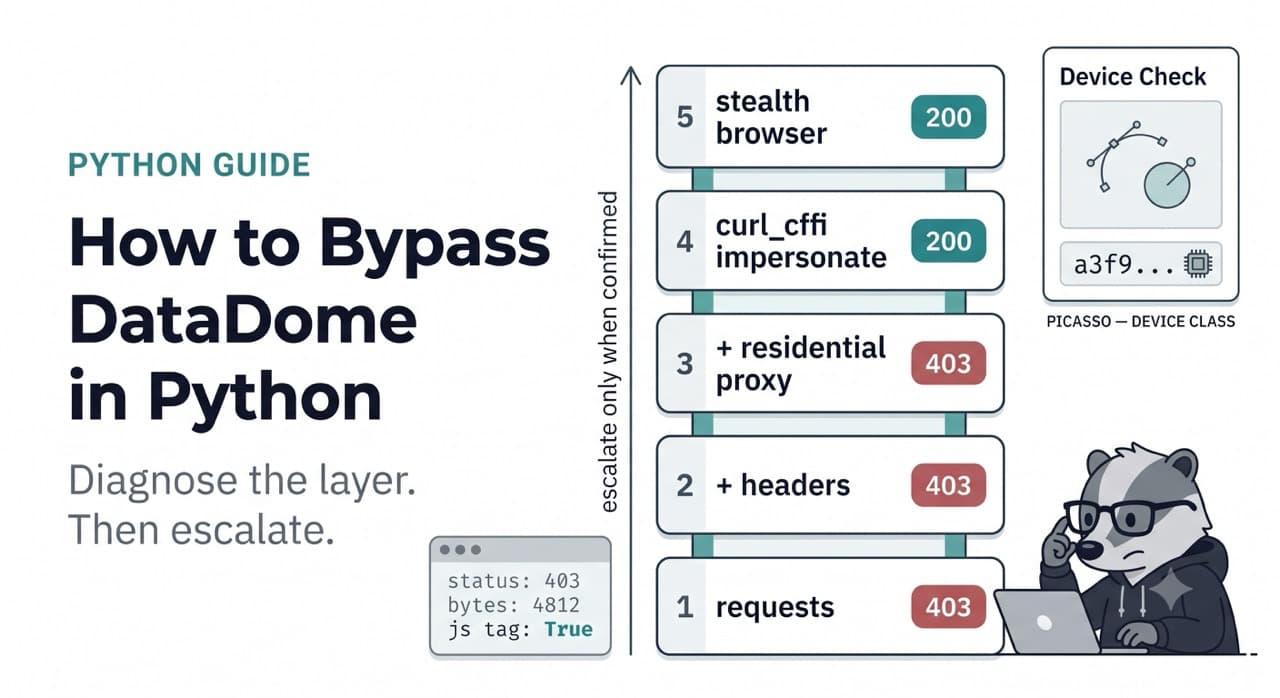
Your script worked yesterday. Today every request returns this:
HTTP/2 403
content-type: text/html
set-cookie: datadome=v1oO8Zt4...; Max-Age=31536000; Domain=.target.com; Path=/; Secure; SameSite=Lax
The body is a small HTML page with a <script src="https://js.datadome.co/tags.js"> in it and not much else. No product data. No listings. Nothing you wanted.
Or worse — you get a 200. Status looks fine, len(response.text) is 4,812 bytes, and your parser returns an empty list because the DOM you expected was never rendered. You spend an hour debugging your selectors before you realise the selectors are fine and the page is a challenge shell.
That is DataDome. This guide is about what actually gets you past it in Python, what only looks like it does, and where the honest ceiling is.
Scope: publicly accessible, pre-login pages only. Everything below assumes you are reading pages a logged-out visitor can see. Check the target's robots.txt and terms before you run anything at volume — that is a real consideration, not a formality, and it is the last time I will mention it.
Read the block before you fix it
The single biggest time-waster in anti-bot work is escalating blindly. People jump straight from requests to a full stealth browser stack, it still fails, and now they have five variables and no idea which one matters.
DataDome fails you at different layers, and the layer tells you what to fix. Diagnose first.
python
import requests

def diagnose(url: str) -> None:
    """Figure out WHICH layer is blocking before changing anything."""
    r = requests.get(url, timeout=20)

    print(f"status:      {r.status_code}")
    print(f"body bytes:  {len(r.content)}")
    print(f"dd cookie:   {'datadome' in r.cookies}")
    print(f"dd headers:  {[k for k in r.headers if 'datadome' in k.lower()]}")

    body = r.text.lower()
    print(f"js tag:      {'js.datadome.co' in body}")
    print(f"captcha ref: {'captcha-delivery.com' in body}")

diagnose("https://target.example.com/listings")
Four outcomes, four different problems:
403 on request one, tiny body, datadome cookie set. You never got near the application. This is the server-side layer — your TLS fingerprint and headers gave you away before a single byte of page logic ran. Fixing your user agent will not help. Go to rung 4.
200, small body, contains js.datadome.co. You got a challenge page. DataDome wants JavaScript executed and a device signal returned. No HTTP client will solve this. You need a browser. Go to rung 5.
Body references captcha-delivery.com. You have been escalated to an interactive challenge. Your trust score is bad enough that DataDome no longer wants a silent device check — it wants a puzzle. Something upstream (usually IP reputation or request cadence) is badly wrong.
First 20 requests fine, then 403s. Nothing about your fingerprint is inherently broken. This is behavioural or IP-based — rate, cadence, or the subnet you are coming from. Adding stealth tooling will not fix a rate problem.
Write this down before you touch anything. It saves days.
How DataDome actually decides
DataDome does not run a checklist. It computes a trust score per request from a large pile of signals, then decides: allow silently, issue a device check, show a CAPTCHA, or block. DataDome says it processes trillions of signals per day and runs per-customer models, which is why the same technique passes on one site and dies on another. There is no universal "DataDome bypass" because there is no single DataDome configuration.
The signals split into two groups.
Server-side: evaluated before your code runs
These are properties of the connection itself. They are checked on the very first packet, which is why a 403 can arrive before any page logic executes.
TLS fingerprint (JA3/JA4). When your client opens a TLS connection it advertises a specific ordered list of cipher suites, extensions, elliptic curves, and signature algorithms. That ordering is a fingerprint. Python's requests sits on OpenSSL and produces an OpenSSL-shaped handshake. Chrome sits on BoringSSL and produces a completely different one. Claiming to be Chrome in your User-Agent while handshaking like Python is an instant, unambiguous contradiction.
HTTP/2 fingerprint. Beyond TLS, the HTTP/2 layer has its own tells: SETTINGS frame values and order, window update size, header priority, and pseudo-header order. Real Chrome sends a specific combination. Most HTTP libraries do not.
IP reputation. AWS, GCP, Hetzner, DigitalOcean and every other cloud range is known, catalogued, and scored accordingly. Residential and mobile addresses score higher. ASN, subnet history, and how many requests recently came from neighbouring addresses all feed in.
Header composition. Not just which headers, but their order, casing, and mutual consistency. Chrome sends sec-ch-ua client hints in a specific form alongside a matching User-Agent. Send a Chrome 131 UA with client hints that say Chrome 120 and you have contradicted yourself.
Client-side: the JS tag
Every protected page loads DataDome's tag. It runs in the background, collects a large fingerprint, and posts it back. It gathers CPU core count, device memory, GPU vendor and renderer, screen and viewport geometry, timezone, language, installed fonts and plugins, and the presence or absence of dozens of automation artefacts.
It also probes for the specific side effects that automation frameworks leave behind: navigator.webdriver, CDP-related timing anomalies, injected properties, prototype chains that do not match a stock browser, and the subtle differences between headless and headful Chrome.
And it watches behaviour — mouse movement and jitter, scroll velocity, click timing, keystroke cadence. A session with zero mouse events that navigates instantly between pages does not look like a person.
Device Check and Picasso — the part nobody explains properly
This is where most guides stop at "it runs a JS challenge." Worth understanding properly, because it explains why an otherwise perfect stealth setup still fails.
Device Check is DataDome's risk-based challenge. It is not shown to everyone. Traffic the model already considers clean passes silently; Device Check is reserved for requests the model has flagged as risky. That is an important design detail: if you are seeing Device Check at all, you have already lost points somewhere upstream. The challenge is not the first line of defence, it is the second.
Inside Device Check (and inside DataDome's CAPTCHA) sits Picasso.
Picasso is a device class fingerprinting protocol. DataDome published how it works, and the technique originates from a Google research method of the same name. The distinction that matters: Picasso is not trying to identify you. It is trying to verify that you are the class of device you claim to be — Chrome-on-Windows, Safari-on-iOS, Firefox-on-Linux.
The mechanism:
The server sends a challenge containing a random seed and a set of N iterations of graphics instructions — quadratic curves, bezier curves, circles, text at defined positions.
Your browser executes them against the HTML canvas API, which routes through the GPU.
The rendered pixel output is hashed client-side.
The hash goes back to the server, which compares it against known-good hashes for the device class you claimed.
Why this works is the interesting bit. Canvas output for an identical instruction set is not identical across devices. It varies with GPU hardware, GPU driver version, OS-level rendering, and the browser's graphics library. Sub-pixel anti-aliasing, floating-point rounding in shader math, and gamma handling all differ. Those differences are incidental but stable — stable enough that the output hash is a reliable class signature.
The consequence for you:
A spoofed
User-Agentis worth nothing here. You can claim Chrome-on-macOS all day. If your canvas hash is Chrome-on-Linux-in-a-container-with-software-rendering, Picasso sees the contradiction directly. This is exactly the "lying about your environment" case it was built to catch.Headless rendering is a tell. Software rasterisation without a real GPU produces output that does not match the hardware profile it claims.
Naive canvas noise injection fails. Randomising canvas output is the obvious counter and it is a known one. The seed is server-chosen and the challenge can run multiple rounds, so the server can compare rounds and look for injected noise rather than hardware entropy. Randomising also breaks stability — a device whose graphics stack produces different output on every render is not a device that exists.
The practical takeaway: passing Picasso is not about spoofing a value. It is about actually rendering like the device class you claim. That is a hardware-and-driver problem, not a JavaScript problem. It is the single strongest argument for running a real browser on a real GPU rather than trying to fake your way through a canvas challenge.
The escalation ladder
Now the code. Four rungs. Start at the bottom, only escalate when you have confirmed the current rung fails.
Rung 1: plain requests — fails immediately
python
import requests

r = requests.get("https://target.example.com/listings", timeout=20)
print(r.status_code, len(r.content))
403 4812Dead on request one. The TLS handshake gave you away before anything else. requests uses urllib3 on OpenSSL; the JA3 fingerprint is unmistakably not a browser. Nothing you do inside the HTTP layer changes the TLS layer.
Rung 2: realistic headers — still fails
The standard next move, and it does not work:
python
import requests

headers = {
    "User-Agent": (
        "Mozilla/5.0 (Windows NT 10.0; Win64; x64) AppleWebKit/537.36 "
        "(KHTML, like Gecko) Chrome/131.0.0.0 Safari/537.36"
    ),
    "Accept": "text/html,application/xhtml+xml,application/xml;q=0.9,image/avif,image/webp,*/*;q=0.8",
    "Accept-Language": "en-US,en;q=0.9",
    "Accept-Encoding": "gzip, deflate, br",
    "sec-ch-ua": '"Chromium";v="131", "Not_A Brand";v="24"',
    "sec-ch-ua-mobile": "?0",
    "sec-ch-ua-platform": '"Windows"',
    "Sec-Fetch-Dest": "document",
    "Sec-Fetch-Mode": "navigate",
    "Sec-Fetch-Site": "none",
    "Upgrade-Insecure-Requests": "1",
}

r = requests.get("https://target.example.com/listings", headers=headers, timeout=20)
print(r.status_code, len(r.content))
403 4812Identical result. You have now told DataDome, at the application layer, that you are Chrome 131 on Windows — while your TLS handshake still says Python/OpenSSL. You did not remove a signal. You added a contradiction, which is a stronger detection signal than a missing header.
This is the most common mistake in anti-bot work: spending an afternoon perfecting headers when the block happened a layer below.
Rung 3: residential proxies alone — still fails
python
import requests

proxies = {
    "http": "http://user:pass@residential.provider.net:8000",
    "https": "http://user:pass@residential.provider.net:8000",
}

r = requests.get(
    "https://target.example.com/listings",
    headers=headers,          # from rung 2
    proxies=proxies,
    timeout=30,
)
print(r.status_code, len(r.content))
403 4812A clean residential IP fixes exactly one signal: IP reputation. Your TLS fingerprint is still Python. You are now a Python client arriving from a residential address, which is arguably more anomalous than a Python client arriving from AWS.
Proxies are necessary at volume. They are not sufficient at any volume. Buying residential bandwidth before fixing your TLS layer is the most expensive way to stay blocked.
Rung 4: TLS impersonation with curl_cffi — the first real progress
curl_cffi binds to curl-impersonate, which reproduces real browser TLS and HTTP/2 fingerprints at the library level. It is a drop-in replacement for requests for most purposes.
bash
pip install curl_cffipython
from curl_cffi import requests as cffi

r = cffi.get(
    "https://target.example.com/listings",
    impersonate="chrome",     # or pin a version, e.g. "chrome131"
    timeout=30,
)
print(r.status_code, len(r.content))
200 218430That is a real page. On DataDome deployments that gate primarily on server-side signals, this is often the whole fix — and it costs one dependency and one keyword argument.
Two notes that matter in production.
Pin the impersonation target and keep it current. impersonate="chrome" follows the library's current default. If you pin chrome124 and never touch it, you are eventually claiming a browser version that essentially nobody runs, which is its own anomaly. Track the library's releases.
Keep everything consistent. If you impersonate Chrome, do not then override headers with a Firefox user agent. curl_cffi sets a matching header profile for you; overriding it selectively reintroduces exactly the contradiction you just removed.
A realistic session with retry and rotation:
python
from curl_cffi import requests as cffi
import random
import time

PROXIES = [
    "http://user:pass@residential.provider.net:8000",
    "http://user:pass@residential.provider.net:8001",
]

def fetch(url: str, attempts: int = 3) -> str | None:
    for attempt in range(attempts):
        proxy = random.choice(PROXIES)
        try:
            # A session keeps the datadome cookie across requests,
            # which is what a real browser does.
            with cffi.Session(
                impersonate="chrome",
                proxies={"http": proxy, "https": proxy},
                timeout=30,
            ) as s:
                r = s.get(url)

                if r.status_code == 200 and "js.datadome.co" not in r.text:
                    return r.text

                print(f"attempt {attempt+1}: status {r.status_code}, "
                      f"challenge={'js.datadome.co' in r.text}")

        except Exception as e:
            print(f"attempt {attempt+1}: {e}")

        time.sleep(random.uniform(2.0, 5.0))

    return None
Note the success check. status_code == 200 is not sufficient — you have to confirm you did not receive a challenge shell. Scrapers that only check the status code silently collect garbage for weeks.
Where rung 4 stops. curl_cffi has no JavaScript engine. If DataDome decides to issue a Device Check, there is nothing to execute the challenge, nothing to render the Picasso canvas, and nothing to return a device signal. You will get the challenge page forever. That is the ceiling, and no amount of HTTP-level tuning raises it.
Rung 5: stealth browsers — when JS execution is mandatory
Once a device signal is required, you need a browser that both executes JavaScript and does not announce itself as automated. Three tools are worth your time in 2026.
nodriver
nodriver is the successor to undetected-chromedriver from the same author. It drives Chrome over CDP directly with no Selenium or Playwright layer in the control plane.
That architectural detail is the point. A recent independent stealth-browser benchmark found targets where every Playwright-derived tool failed regardless of patch quality, and nodriver was the only browser that got through — because the detection was on the automation protocol itself, not on JS-visible properties. If you have patched every fingerprint you can find and are still blocked while manual browsing works fine, this is your likely cause.
bash
pip install nodriverpython
import nodriver as uc

async def main():
    browser = await uc.start(
        headless=False,              # headful is meaningfully safer
        browser_args=["--window-size=1440,900"],
    )

    page = await browser.get("https://target.example.com/listings")
    await page.sleep(3)              # let the DataDome tag run

    html = await page.get_content()

    if "js.datadome.co" in html:
        print("still challenged")
    else:
        print(f"got page: {len(html)} bytes")

    await browser.stop()

uc.loop().run_until_complete(main())
nodriver is AGPL-3.0. If you are embedding it in a commercial product, read the licence properly.
Camoufox
Camoufox is a Firefox fork that implements fingerprint spoofing at the C++ level rather than by injecting JavaScript. That matters for Picasso specifically: JS-level canvas patches are detectable as patches, whereas C-level modification changes the actual rendering path.
bash
pip install camoufox[geoip]
python -m camoufox fetch
python
from camoufox.sync_api import Camoufox

with Camoufox(
    headless=False,
    humanize=True,        # generates human-like cursor movement
    geoip=True,           # aligns timezone/locale to the proxy exit IP
    proxy={
        "server": "http://residential.provider.net:8000",
        "username": "user",
        "password": "pass",
    },
) as browser:
    page = browser.new_page()
    page.goto("https://target.example.com/listings", wait_until="networkidle")
    page.wait_for_timeout(3000)

    html = page.content()
    print(len(html), "js.datadome.co" in html)
humanize=True and geoip=True are both doing real work. The first generates plausible cursor movement, which addresses the behavioural layer. The second aligns timezone and locale with the proxy's exit IP — a mismatch there (German IP, America/New_York timezone) is a cheap, obvious inconsistency to detect.
Camoufox presents a Firefox TLS shape. Usually fine, occasionally the wrong choice if a target's model is tuned around a predominantly Chrome audience.
SeleniumBase UC Mode
SeleniumBase UC Mode is the most familiar option if your team already writes Selenium.
bash
pip install seleniumbasepython
from seleniumbase import SB

with SB(uc=True, headless=False) as sb:
    # Disconnects the automation control channel during load,
    # then reconnects — this is what gets past the initial check.
    sb.uc_open_with_reconnect("https://target.example.com/listings", reconnect_time=6)
    sb.sleep(2)

    html = sb.get_page_source()
    print(len(html), "js.datadome.co" in html)
uc_open_with_reconnect is the important call. It drops the automation control channel during the initial page load — while the DataDome tag is doing its inspection — then reconnects. The tag runs against a browser that is, for that moment, genuinely not being driven.
The things that matter regardless of which tool
Tool choice is maybe 60% of the outcome. The rest:
Run headful. Headless Chrome is detectable through several independent signals, and it renders differently, which Picasso notices. Use
xvfbon a server if you need a display.Real GPU where you can. Software rasterisation in a container produces canvas output that does not match a real device profile. This is the Picasso problem restated.
Reuse sessions. The
datadomecookie represents accumulated trust. Throwing it away and starting fresh on every request means you are permanently a first-time visitor, which is a worse position than a returning one.Pace yourself. Three to seven seconds between page loads. Fifty pages in ten seconds is not a fingerprint problem, it is a behaviour problem, and no stealth tooling fixes it.
Do not randomise everything. People reach for maximum entropy — random UA, random viewport, random timezone per request. A device whose hardware changes between page loads does not exist. Coherence beats variety. Pick a plausible profile and hold it for the session.
The maintenance problem
Everything above works. The honest question is: for how long, and at what cost?
DataDome ships model updates continuously. It runs per-customer models, so a technique that passes on site A can fail on site B running the same product. And the open-source stealth ecosystem is inherently reactive — a detection ships, the tools adapt, repeat.
There is precedent for how this ends. undetected-chromedriver was the default answer for years and is no longer maintained. puppeteer-extra-plugin-stealth was deprecated in early 2025 and is now widely detected. Both were, at their peak, exactly what a guide like this would have recommended.
What that actually costs, from operating this kind of stack:
Initial build: a week or two to get one target working reliably end to end — tooling, proxies, session handling, retry logic, and enough monitoring to know when it breaks.
Ongoing: somewhere between half a day and two days a month per protected target, spread unevenly. Most months nothing happens. Then a model update lands, your success rate drops from 94% to 30% overnight, and you lose three days diagnosing which layer changed.
The silent failures are the expensive part. A 403 is honest — you see it, you fix it. A 200 that returns a challenge shell poisons your dataset quietly. If your monitoring only tracks status codes, you can ship bad data for weeks.
Build the monitoring before you need it:
python
def is_real_page(response_text: str, min_bytes: int = 20_000) -> bool:
    """Content-based success check. Status code alone is not enough."""
    if len(response_text) < min_bytes:
        return False
    markers = ("js.datadome.co", "captcha-delivery.com", "geo.captcha-delivery")
    return not any(m in response_text for m in markers)
Track that success rate over time. When it drifts, you will know within hours instead of finding out from a stakeholder.
When to stop building this yourself
The DIY stack is genuinely the right answer in a real set of cases. One or two targets. Moderate volume. Someone on the team who finds this work interesting. A budget where engineer time is cheaper than per-request pricing. If that is you, everything above is what you need, and you should not switch.
It stops being the right answer when the target count grows. The maintenance cost does not scale linearly with targets — it scales with the number of distinct DataDome configurations you are up against, and per-customer models mean that number climbs faster than your target list does. At some point you have an engineer whose actual job is keeping scrapers alive, and that is an expensive way to acquire public data.
At that point a managed option makes more sense, which is what ScrapeBadger's DataDome bypass is for — TLS and HTTP/2 fingerprint matching, patched browser stack, proxy rotation and session handling maintained on someone else's clock:
python
import httpx

r = httpx.get(
    "https://scrapebadger.com/v1/scrape",
    params={"url": "https://target.example.com/listings", "render_js": "true"},
    headers={"x-api-key": "YOUR_KEY"},
    timeout=60,
)
print(r.json()["content"][:500])
The honest framing: this trades an engineering problem for a line item. That trade is correct at some scale and wrong at others. If you are scraping one site twice a day, curl_cffi and a residential proxy will serve you fine and cost almost nothing — use that.
FAQ
Why am I getting a DataDome 403 on the very first request?
Because the block happened before your headers were evaluated. A 403 on request one, with a tiny body and a datadome cookie in the response, almost always means TLS fingerprinting. Python's requests handshakes like OpenSSL, not like a browser, and no amount of header tuning changes the handshake. Replace requests with curl_cffi using impersonate="chrome" and retest before changing anything else.
What is the datadome cookie and should I reuse it?
It is a session identifier that carries your accumulated trust state. Reuse it within a session — that is what a real browser does, and discarding it makes you a permanent first-time visitor. Do not try to lift a cookie from your own browser and paste it into a script: it is bound to signals your script cannot reproduce, and it will be invalidated quickly. Let your client acquire and hold its own.
Can I bypass the Device Check without running a browser?
Realistically, no. Device Check requires executing DataDome's JavaScript and returning a device signal, and Picasso inside it requires actually rendering a canvas challenge through a graphics stack. An HTTP client has no JS engine and no renderer. If you are consistently seeing Device Check, the useful move is not to solve it — it is to work out why your trust score is low enough to trigger it, since most legitimate traffic never sees it at all.
Can Picasso be beaten by adding noise to the canvas?
It is the obvious idea and it is a well-known one. The challenge seed is server-chosen and can run multiple rounds, so the server can compare rounds and distinguish injected noise from genuine hardware entropy. Randomised output also destroys the stability that makes a real device look real. Rendering honestly on a real graphics stack is more effective than trying to forge the output.
Do I need residential proxies?
At low volume from a clean IP, often not. At any real volume, yes — datacenter ranges are catalogued and scored down. But sequence matters: fix your TLS fingerprint first. Residential bandwidth is expensive, and buying it while still handshaking like Python just makes you an unusual-looking client from a nicer address.
Headless or headful?
Headful, wherever you can. Headless Chrome is detectable through several independent signals and it renders differently, which is precisely what Picasso is looking at. Run xvfb on servers if you need a virtual display.
How do I know a bypass actually worked?
Never trust the status code alone. Check content: a plausible byte length plus the absence of js.datadome.co and captcha-delivery.com in the body. Silent challenge pages returning 200 are the most common way scrapers ship broken data without anyone noticing.
Which tool should I start with?
Diagnose first, then pick. Blocked at request one with no JS involved → curl_cffi. Needs JavaScript → start with Camoufox or SeleniumBase UC. Everything patched and still blocked while manual browsing works → nodriver, because the detection is probably on the automation protocol rather than on anything JS-visible.

Written by
Thomas Shultz
Thomas Shultz is the Head of Data at ScrapeBadger, working on public web data, scraping infrastructure, and data reliability. He writes about real-world scraping, data pipelines, and turning unstructured web data into usable signals. ScrapeBadger is a web scraping API platform specialising in Twitter/X, Reddit and Google data, with dedicated scrapers also covering TikTok, YouTube, LinkedIn, Amazon, eBay, Zillow and 40+ more: with built-in anti-bot bypass and an MCP server for AI agents.
Ready to get started?
Join thousands of developers using ScrapeBadger for their data needs.