How to Scrape Google Finance with Python in 2026
 Thomas Shultz
AI Summary: There is no official Google Finance Python library; Google shut its Finance API in 2012. To get quote data in Python today: use yfinance (Yahoo Finance) for most US stock needs, free but rate-limited; GOOGLEFINANCE() in Google Sheets pulled via gspread for delayed data; or scrape google.com/finance directly, which is JavaScript-rendered, so plain requests fails and you need Playwright or a maintained API. For most 'google finance api python' searches, yfinance is what you actually want.
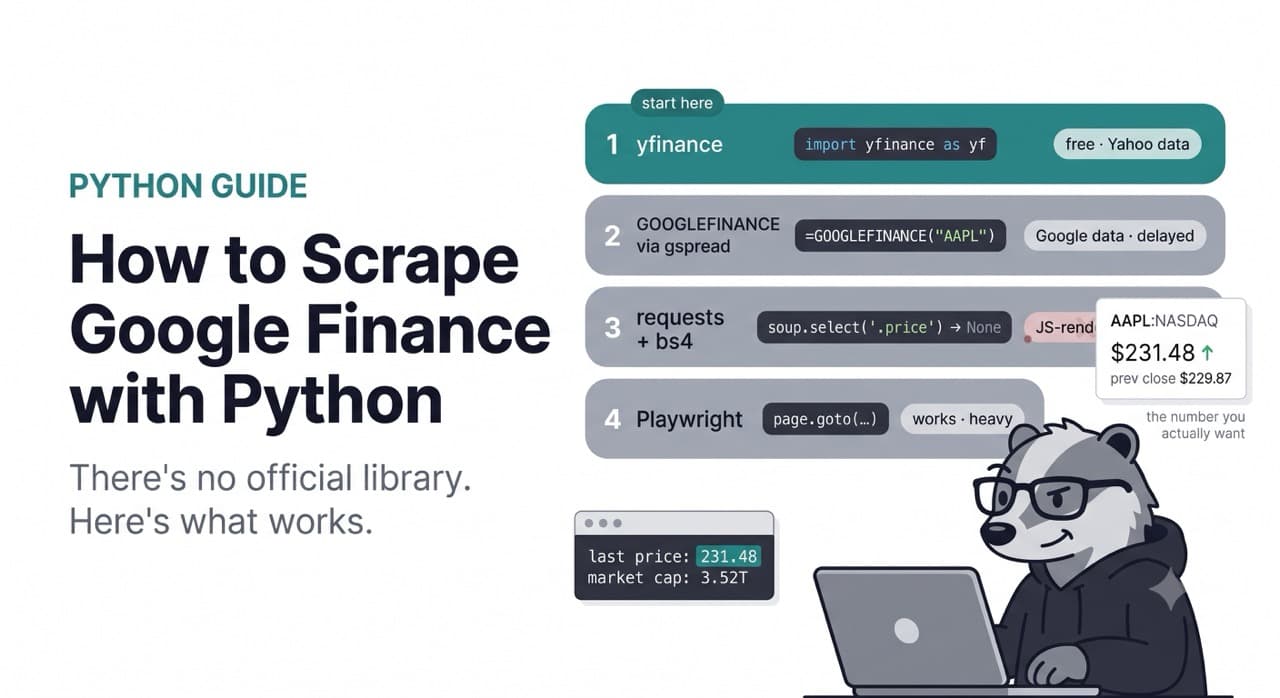
There is no pip install google-finance that works. There is no official Google Finance Python client. If you came here looking for the Google equivalent of yfinance, it does not exist, because Google shut its Finance API down in 2012 and never replaced it. (Full story in what happened to the Google Finance API if you want it — one paragraph is enough for this post.)
So the real question is not "which official library do I import." It is "what actually returns Google Finance data in Python today." That has a few answers depending on what you need, and the honest first answer is that for a lot of people reading this, you do not need Google Finance specifically at all — you need stock data, and there is a free library that gets it in three lines.
This post covers all of it. The free routes first, with working code. Then scraping google.com/finance directly, what breaks and why. Then the browser route that works. Then, only if you actually need it, the maintained option.
One line on terms before the code: financial data carries usage terms, and automated pulling from any source — Yahoo, Google, anywhere — should respect that source's ToS and licensing, especially for anything commercial or redistributed.
AI Overview
There is no official Google Finance Python library; Google shut its Finance API in 2012. To get quote data in Python today: use yfinance (Yahoo Finance) for most US stock needs, free but rate-limited; GOOGLEFINANCE() in Google Sheets pulled via gspread for delayed data; or scrape google.com/finance directly, which is JavaScript-rendered, so plain requests fails and you need Playwright or a maintained API. For most 'google finance api python' searches, yfinance is what you actually want.
Start here: you probably want yfinance
Let me save some of you the rest of the article.
If you searched "google finance api python" but what you actually need is a stock price, some history, and a few fundamentals for US-listed tickers, you do not want Google Finance. You want yfinance, and it is free.
bash
pip install yfinancepython
import yfinance as yf

aapl = yf.Ticker("AAPL")

# Latest price and quote fields
info = aapl.fast_info
print("last price:", info.last_price)
print("prev close:", info.previous_close)
print("market cap:", info.market_cap)

# Historical daily bars
hist = aapl.history(period="6mo", interval="1d")
print(hist[["Open", "High", "Low", "Close", "Volume"]].tail())
last price: 231.48
prev close: 229.87
market cap: 3521000000000
Open High Low Close Volume
Date
2026-07-21 00:00:00-04:00 228.41 231.90 227.98 231.02 41235600
2026-07-22 00:00:00-04:00 230.88 232.55 229.61 231.48 38771200
...That is it. Multiple tickers, dividends, splits, financials, options chains — all there:
python
data = yf.download(["AAPL", "MSFT", "GOOGL"], period="1mo", interval="1d")
print(data["Close"].tail())
yfinance is actively maintained — the maintainer ships fixes regularly, and it now uses curl_cffi under the hood to impersonate a browser's TLS fingerprint, which is how it survives Yahoo's blocking better than it used to. For most "I need stock data in Python" jobs, this is the correct answer and you should stop here.
Two honest caveats, because they matter.
It is not official and it is not stable in the way a paid API is. yfinance scrapes Yahoo's endpoints. It has no credential, no quota, no contract. When Yahoo tightens its defences — which it does periodically — yfinance breaks, someone files an issue, the maintainer ships a workaround, and you upgrade. If you check the open issues at any given moment you will find rate-limit and blocking reports. At volume you will hit 429 Too Many Requests, and the only levers you have are slowing down or adding proxies.
It is Yahoo data, not Google data. The numbers are close but not identical, the coverage differs, and Yahoo's terms state the data is for personal use. If your requirement is specifically "the figures as Google Finance shows them" — because you are reconciling against Google, or you need Google's particular international coverage — yfinance does not give you that, and no amount of configuration makes Yahoo return Google's numbers. That is the case where you keep reading.
For completeness, the other free-tier APIs worth knowing: Alpha Vantage (free key, equities/forex/crypto, rate-limited free tier) and Finnhub (free tier, real-time US quotes). Both are licensed data products rather than scrapers, both are more stable than yfinance, and both are also not Google Finance. Same trade-off.
The Google Sheets route: GOOGLEFINANCE via gspread
Here is the one route that pulls genuinely Google-sourced data without scraping a page: the GOOGLEFINANCE() function, driven from Python through Google Sheets.
The function only exists inside Sheets. But you can write a formula into a cell from Python, let Google compute it, and read the value back. The bridge is gspread plus a Google service account.
bash
pip install gspread google-authSet up a service account in Google Cloud, enable the Sheets API, download the JSON key, and share a sheet with the service account's email. Then:
python
import gspread
import time

gc = gspread.service_account(filename="service_account.json")
sheet = gc.open("finance-scratch").sheet1


def google_finance_quote(ticker: str, attribute: str = "price"):
    """Pull a GOOGLEFINANCE value by writing the formula and reading it back."""
    sheet.update_acell("A1", f'=GOOGLEFINANCE("{ticker}", "{attribute}")')
    time.sleep(2)  # let Google recompute the cell
    return sheet.acell("A1").value


print("AAPL price:", google_finance_quote("NASDAQ:AAPL", "price"))
print("AAPL P/E:  ", google_finance_quote("NASDAQ:AAPL", "pe"))
Historical series work too, because GOOGLEFINANCE spills a date/close range across cells:
python
def google_finance_history(ticker: str, days: int = 30):
    formula = (
        f'=GOOGLEFINANCE("{ticker}", "close", '
        f'TODAY()-{days}, TODAY(), "DAILY")'
    )
    sheet.update_acell("A1", formula)
    time.sleep(3)
    return sheet.get("A1:B100")   # header row + [date, close] pairs


for row in google_finance_history("NASDAQ:AAPL", days=10):
    print(row)
This works, and the data is Google's. But know the limits before you build on it, because they are real:
The data is delayed, commonly by around 15–20 minutes, not real-time. The fields are limited — price, volume, high/low, market cap, P/E and a handful of others, nothing like a full fundamentals set. It is a consumer spreadsheet feature with no SLA; Google can change or throttle it and owes you no notice. And you are routing everything through a Sheets round trip, so it is slow and there is a per-user Sheets API quota you will feel if you loop over many tickers.
Use it for a slow personal tracker where you specifically want Google's numbers. Do not build a real-time system on a spreadsheet acting as a middleman.
Scraping google.com/finance directly
Say you actually need the Google Finance page itself — the quote as Google renders it, Google's exchange and currency handling, its international coverage. Now you are scraping google.com/finance, and it is worth seeing exactly what happens when you try the obvious thing.
python
import requests
from bs4 import BeautifulSoup

url = "https://www.google.com/finance/quote/AAPL:NASDAQ"
headers = {"User-Agent": "Mozilla/5.0 (Windows NT 10.0; Win64; x64) AppleWebKit/537.36 "
                         "(KHTML, like Gecko) Chrome/131.0.0.0 Safari/537.36"}

r = requests.get(url, headers=headers, timeout=20)
soup = BeautifulSoup(r.text, "lxml")

print("status:", r.status_code)
print("title:", soup.title.string if soup.title else None)

# Try to find the price the obvious way
price = soup.select_one('[data-last-price]')
print("price via data attr:", price)
status: 200
title: AAPL: Apple Inc - Google Finance
price via data attr: NoneA 200 and a real title, so you did reach the page. But the price is not sitting in a clean element you can select. Two problems are stacked here.
The page is JavaScript-rendered. The quote you see in a browser is populated by client-side JS after load. The initial HTML that requests receives has the shell and the data, but not laid out as rendered elements — so selecting .price or a tidy data attribute gets you nothing, because that element does not exist yet at the point requests sees the document.
The data is embedded, and it is not friendly. The numbers are in the page, but buried in embedded script data — the same internal structure Google's own front end reads to render the quote. It is not clean JSON with {"price": 231.48}. It is a positional, nested array structure with no meaningful keys, the same shape family anyone who has scraped a Google property will recognise. You can pull a current price out of it with a targeted regex:
python
import re

# The price appears in the embedded data near the exchange-qualified symbol.
# This is deliberately narrow — broad patterns match the wrong number.
m = re.search(r'\["AAPL","NASDAQ".*?,(\d+\.\d+),', r.text)
print("price via regex:", m.group(1) if m else "not found")
Sometimes that returns 231.48. Sometimes Google shifts the surrounding structure and it returns the previous close, or nothing. Which is the whole problem with this approach: it is not a stable interface. There is no contract. The positional data can move, the regex silently starts matching the wrong field, and you are now recording previous-close as last-price into whatever depends on it, with no error to tell you.
That is why naive scraping of Google Finance "works" in a demo and rots in production. The data is public and it is right there. It is just not exposed as anything you are supposed to parse, so every extraction you write is a guess against an undocumented structure that Google can rearrange whenever it likes.
The browser route that actually works
If you need the rendered page reliably, render it. A real browser executes the JavaScript, so the quote lands in actual DOM elements you can read, instead of you reverse-engineering an embedded array.
bash
pip install playwright
playwright install chromium
python
from playwright.sync_api import sync_playwright


def google_finance_quote(symbol: str, exchange: str) -> dict:
    """Read a rendered Google Finance quote. symbol/exchange like ('AAPL','NASDAQ')."""
    url = f"https://www.google.com/finance/quote/{symbol}:{exchange}"

    with sync_playwright() as p:
        browser = p.chromium.launch(headless=False)   # headful is safer on Google
        page = browser.new_page(locale="en-US")
        page.goto(url, wait_until="domcontentloaded")

        # The main price renders into a stable-ish container class.
        # Google rotates these, so treat the selector as a maintenance point.
        page.wait_for_selector("div[class*='YMlKec fxKbKc']", timeout=8000)

        price = page.locator("div[class*='YMlKec fxKbKc']").first.inner_text()

        # Previous close sits in a labelled row; read by its label, not position.
        prev_close = page.locator(
            "text=Previous close"
        ).locator("xpath=../following-sibling::div").first.inner_text()

        browser.close()

        return {
            "symbol": symbol,
            "exchange": exchange,
            "price": price,
            "previous_close": prev_close,
        }


print(google_finance_quote("AAPL", "NASDAQ"))
{'symbol': 'AAPL', 'exchange': 'NASDAQ', 'price': '$231.48', 'previous_close': '$229.87'}That works, and it is honest data straight off the rendered page. But look at what it costs for a single quote: a full Chromium process, a page load, JavaScript execution, a selector wait. Hundreds of megabytes of RAM and a couple of seconds to read one number that an HTTP request could theoretically return in milliseconds. For a quote. That imbalance is the whole story of browser-scraping simple data — it works, and it is wildly heavy for what you get.
Two things worth noting in that code. Run it headful; headless Chromium is challenged faster on Google properties, and on a server you want xvfb rather than a switch to headless. And that selector — YMlKec fxKbKc — is a Google class name, which means it is not a promise. Google reskins, the class changes, your scraper returns empty, and reading a price by its visible label ("Previous close") is more durable than reading it by a class, which is why the previous-close line above navigates from the label instead. See the Playwright docs for the launch and selector options.
What breaks when you run this at scale
Everything above collects a quote. Running it as a system that many quotes depend on is a different job, and this is where DIY Google Finance scraping gets expensive.
Rate limiting comes for you. A handful of requests from your laptop is fine. A schedule hammering google.com/finance from one IP gets rate-limited and then blocked, and now you need residential proxies, rotation, and the bill and complexity that come with them. This is the same wall yfinance users hit with Yahoo, for the same reason: you are unauthenticated automated traffic against a property that does not want it at volume.
Browser automation multiplies the cost. One Chromium per quote is fine occasionally and ruinous concurrently. Fifty tickers refreshing on a schedule means fifty browser processes or a queue that makes them slow, and either way you are now operating rendering infrastructure to read numbers.
The layout changes without warning. Class names rotate, the embedded structure shifts, and there is no changelog and no deprecation window because none of this is a supported interface. The failure is usually silent — a selector matches nothing, a regex grabs the wrong field — so unless you assert on your output you ship bad or empty data until a human notices.
Assert on it. Cheap insurance:
python
def sane_quote(q: dict) -> dict:
    price = q.get("price", "").replace("$", "").replace(",", "")
    try:
        val = float(price)
    except ValueError:
        raise RuntimeError(f"Non-numeric price for {q.get('symbol')}: {q.get('price')!r} "
                           f"— selector or pattern likely broke.")
    if not (0 < val < 1_000_000):
        raise RuntimeError(f"Implausible price for {q.get('symbol')}: {val}")
    return q
That turns a silent multi-day failure into an exception the moment extraction drifts.
The maintained option
If you need a few US quotes, go back to the top and use yfinance. I mean that — it is free, it is three lines, and paying for a quote you can get from yf.Ticker is a waste. The managed option is not for that person.
It is for the person who specifically needs Google Finance's data — Google's figures, Google's international and cross-exchange coverage, the quote as Google presents it — and needs it reliably, at volume, without owning a browser farm and a proxy pool and a regex that breaks on Google's schedule. That is what ScrapeBadger's Google Finance API is for.
python
from scrapebadger import ScrapeBadger

client = ScrapeBadger(api_key="your_key")

quote = client.google.finance_quote(q="AAPL:NASDAQ")

print(quote["price"], quote["currency"])
print("prev close:", quote["previous_close"])
print("after hours:", quote.get("after_hours"))
print("exchange:", quote["exchange"], quote["market_state"])
It reads Google Finance's own internal data endpoint rather than parsing rendered HTML, so there are no rotating CSS classes to chase, and it handles the proxying and the request shape. One call returns price, change, previous close, after-hours, market state, currency and exchange, across stocks, indices, crypto and forex. It sits under the same key as the rest of the Google endpoints if you are already pulling SERP or news alongside quotes.
The honest framing, same as always: this trades an engineering problem for a line item, and that trade is right at volume and wrong for a hobby script. Match the tool to the job.
FAQ
Is there a Google Finance API for Python?
No official one. Google discontinued its Finance API in 2012 and never shipped a replacement, so there is no official Google package to pip install. In Python you either use a different data source (yfinance for Yahoo data, Alpha Vantage or Finnhub for licensed feeds), pull Google's own numbers through the GOOGLEFINANCE Sheets function via gspread, or scrape/serve the Google Finance page through a browser or a maintained API.
Is Google Finance data free?
To look at, yes. To pull programmatically, it depends how. The GOOGLEFINANCE Sheets function is free but delayed and limited. Scraping the page yourself is "free" except for the proxy and maintenance costs that show up at any real volume. yfinance is free but returns Yahoo's data, not Google's. There is no free, official, real-time Google Finance API, because there is no official Google Finance API at all.
What's the best free way to get stock data in Python?
For US equities and general use, yfinance, hands down — three lines, no key, actively maintained. For a licensed free tier that is more stable under load, Alpha Vantage or Finnhub. Reach for Google Finance specifically only when you need Google's particular figures or coverage; for plain stock data, yfinance is what most "google finance api python" searches are actually looking for.
Why does my requests + BeautifulSoup scraper return no price?
Because google.com/finance is JavaScript-rendered. The initial HTML that requests receives does not contain the price as a selectable element — it is populated by client-side JS after load, and the underlying numbers are buried in a positional embedded data structure rather than clean JSON. You either regex the embedded data (fragile) or render the page with Playwright/Selenium (works, heavy).
Is yfinance still working in 2026?
Yes, it is actively maintained and shipping releases, and it now uses curl_cffi to impersonate a browser's TLS fingerprint, which helps it survive Yahoo's blocking. But it is a scraper, not an official API, so it breaks when Yahoo changes things and you fix it by upgrading. Expect occasional 429 rate limits at volume; the fixes are slowing down or using proxies.
Can I get real-time quotes from Google Finance in Python?
Not cleanly through the free routes. GOOGLEFINANCE is delayed 15–20 minutes. Scraping the rendered page gets you close to real-time but is heavy and fragile. If you need genuinely current Google Finance quotes at volume, a maintained API that reads Google's own data endpoint is the reliable route; if near-real-time Yahoo data is acceptable, yfinance is simpler.
How do I avoid getting blocked scraping Google Finance?
Slow down, use residential proxies with rotation, run browsers headful rather than headless, and reuse sessions. But be realistic: you are running unauthenticated automated traffic against a Google property, and past a certain volume, keeping that alive is a maintenance job in itself. That is the point where a managed API or an official-style data provider stops being optional.

Written by
Thomas Shultz
Thomas Shultz is the Head of Data at ScrapeBadger, working on public web data, scraping infrastructure, and data reliability. He writes about real-world scraping, data pipelines, and turning unstructured web data into usable signals. ScrapeBadger is a web scraping API platform specialising in Twitter/X, Reddit and Google data, with dedicated scrapers also covering TikTok, YouTube, LinkedIn, Amazon, eBay, Zillow and 40+ more: with built-in anti-bot bypass and an MCP server for AI agents.
Ready to get started?
Join thousands of developers using ScrapeBadger for their data needs.