How to Scrape Google Images with Python in 2026
 Thomas Shultz
AI Summary: Google Images img tags contain base64-encoded thumbnails, not source images. The full-resolution URLs sit in a JSON blob inside the page's AF_initDataCallback script tags. Extract them by regex pattern rather than fixed array indices, which break whenever Google changes the structure. Google's Custom Search JSON API is closed to new customers and shuts down on January 1, 2027. For pagination and reliability at volume, use Playwright with scrolling or a maintained API.
You ran the tutorial code. It looked like this:
python
import requests
from bs4 import BeautifulSoup

params = {"q": "golden retriever puppy", "tbm": "isch", "hl": "en", "gl": "us"}
headers = {"User-Agent": "Mozilla/5.0 (Windows NT 10.0; Win64; x64) AppleWebKit/537.36 "
                         "(KHTML, like Gecko) Chrome/131.0.0.0 Safari/537.36"}

html = requests.get("https://www.google.com/search", params=params, headers=headers, timeout=30)
soup = BeautifulSoup(html.text, "lxml")

urls = [img["src"] for img in soup.select("img")]
print(urls[:3])
And you got back this:
['data:image/gif;base64,R0lGODlhAQABAIAAAP///////yH5BAEAAAEALAAAAAABAAEAAAICTAEAOw==',
 'data:image/jpeg;base64,/9j/4AAQSkZJRgABAQAAAQABAAD/2wCEAAkGBxITEhUTExMVFhUXGBgYGBcYGB...',
 'data:image/jpeg;base64,/9j/4AAQSkZJRgABAQAAAQABAAD/2wCEAAkGBxITEhUTExMVFhUXGBcYFxcYGB...']
No URLs. Base64 strings. You decoded one out of curiosity and got a blurry image about 90 pixels wide.
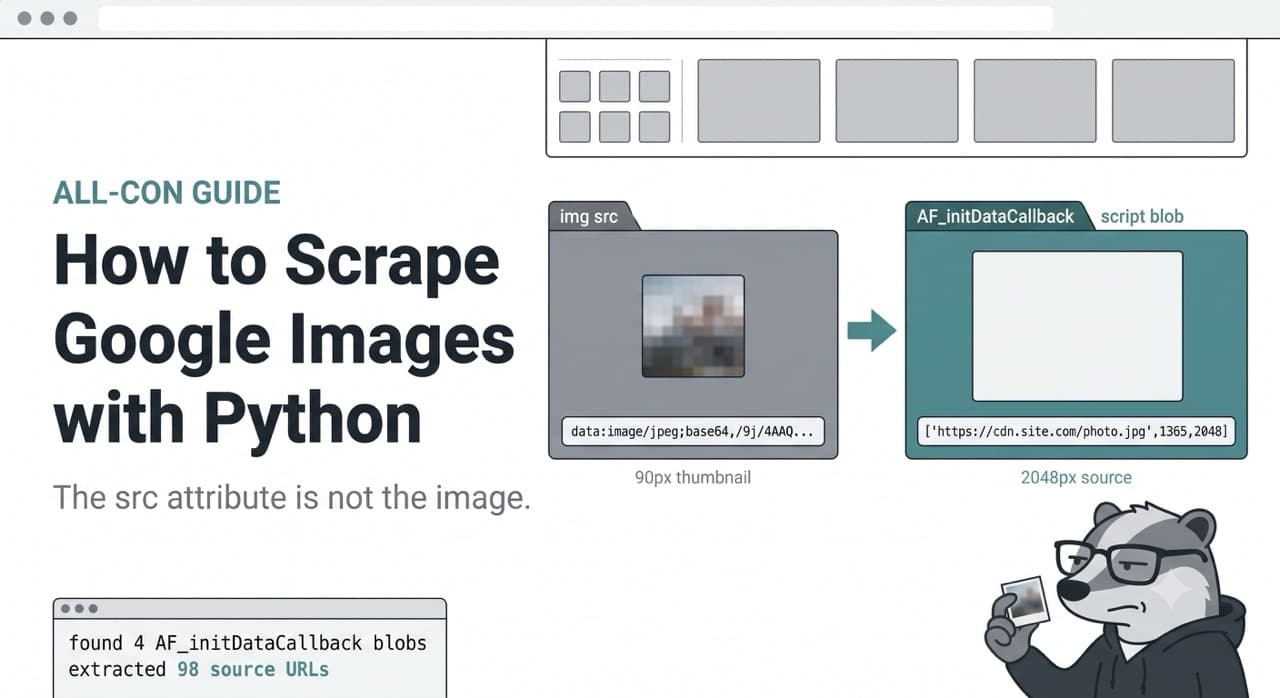
That is the thing nobody explains. The img tags on a Google Images results page do not contain the images you want. They contain placeholder thumbnails, inlined as data URIs. The actual source URLs — the full-resolution ones pointing at the sites that host the images — are somewhere else entirely.
This post is about where they are, how to get them, and what it costs to do it reliably.
AI Overview
Google Images img tags contain base64-encoded thumbnails, not source images. The full-resolution URLs sit in a JSON blob inside the page's AF_initDataCallback script tags. Extract them by regex pattern rather than fixed array indices, which break whenever Google changes the structure. Google's Custom Search JSON API is closed to new customers and shuts down on January 1, 2027. For pagination and reliability at volume, use Playwright with scrolling or a maintained API.
First: isn't there an official API?
There was. You cannot have it.
Google's Custom Search JSON API does support image search, and every tutorial older than about a year tells you to use it. Go read Google's own documentation and you will find this at the top:
The Custom Search JSON API is closed to new customers.
And further down:
Existing Custom Search JSON API customers have until January 1, 2027 to transition to an alternative solution.
So if you do not already have a key, you cannot get one. And if you do have one, it stops working in a few months. Google points existing users at Vertex AI Search, which is scoped to searching up to 50 domains, or tells you to contact them about full web search.
Even when it was open, it was a poor fit for this specific job, and it is worth understanding why because the reason is structural rather than commercial.
The Custom Search JSON API does not search google.com. It searches a Programmable Search Engine that you configure. You define which sites are in scope, and the API returns results from that index. There is a whole-web configuration, but the results still do not match what you see at google.com/imghp, because it is a different product with a different index and different ranking. People discover this after wiring everything up, when their image results are visibly not the image results.
The quotas were the other problem. A hundred free queries per day, then $5 per 1,000, hard-capped at 10,000 per day. Ten results per request, up to 100 per query via the start parameter. For a hundred-image dataset that is fine. For anything real it is expensive and capped.
So: official API is closed, dying, and was never returning the page you were looking at anyway. That is why everyone scrapes.
What actually breaks with requests and BeautifulSoup
Run the script at the top of this post and three separate things go wrong. Worth separating them, because people conflate them and then fix the wrong one.
The consent redirect. From most of Europe, and increasingly elsewhere, your first request gets bounced to a consent interstitial instead of results. You get a page, it parses fine, it contains no images. Setting gl=us and hl=en helps. A CONSENT cookie helps more:
python
session = requests.Session()
session.cookies.set("CONSENT", "YES+cb", domain=".google.com")
If your scrape returns a small page with no image data at all, check this before anything else. It is the cheapest fix on the list.
Lazy loading. Google Images does not put every result in the initial HTML. It loads a first batch and streams the rest as you scroll. A plain HTTP request gets you whatever is in that first payload and nothing after it. No amount of parsing recovers data that was never sent.
The base64 thumbnails. This is the one that wastes the most time, because everything appears to be working. You get a 200. You get HTML. You get img tags. You get src attributes. They are just useless.
The base64 problem, properly
Here is what is actually happening.
When Google Images renders a result grid, it inlines a low-resolution preview of each image directly into the HTML as a data URI. That is what lands in img.src. It is a genuine image — you can decode it and look at it — it is just tiny. Typically around 90 to 150 pixels on the long edge, heavily compressed, sometimes literally a 1×1 transparent GIF placeholder that gets swapped in by JavaScript later.
Google does this for a good reason that has nothing to do with stopping scrapers: it makes the grid paint instantly. The browser does not need a round trip per thumbnail, because the thumbnails are already in the document.
The consequence for you is that img.src is a dead end. Decoding those base64 strings gives you thumbnails, and if what you needed was full-resolution source images, you now have a folder full of blurry 90-pixel squares and no idea why.
The full-resolution URLs are in the page. They are just not in the img tags. They are in a JSON blob inside a <script> tag, passed to a function called AF_initDataCallback.
Look for it yourself:
python
import re
import requests

params = {"q": "golden retriever puppy", "tbm": "isch", "hl": "en", "gl": "us"}
headers = {"User-Agent": "Mozilla/5.0 (Windows NT 10.0; Win64; x64) AppleWebKit/537.36 "
                         "(KHTML, like Gecko) Chrome/131.0.0.0 Safari/537.36"}

session = requests.Session()
session.cookies.set("CONSENT", "YES+cb", domain=".google.com")
html = session.get("https://www.google.com/search", params=params, headers=headers, timeout=30).text

blobs = re.findall(r"AF_initDataCallback\((\{.*?\})\);</script>", html, re.DOTALL)
print(f"found {len(blobs)} AF_initDataCallback blobs")
for b in blobs:
    print(len(b), b[:80])
You will get several. Each looks roughly like this, abbreviated:
{key: 'ds:1', hash: '2', data: [[null,[[...deeply nested arrays...]]]], sideChannel: {}}Two things to notice immediately.
First, the keys are unquoted. key: not "key":. That is a JavaScript object literal, not JSON, so json.loads() throws Expecting property name enclosed in double quotes. This is the error that sends people to Stack Overflow, and the usual answer is to reach for json5, which parses it fine.
Second, the data value is a deeply nested array structure with no meaningful keys. Just arrays inside arrays, positional. Somewhere in there are your image URLs.
Extracting the real URLs
There are two ways to get the URLs out of that blob, and picking the wrong one is why most tutorials on this topic are broken.
The fragile way is to parse the blob and walk to a fixed position. You will find plenty of code doing exactly this — data[31][0][12][2], or data[56][1][0], or whatever the indices happened to be the week that tutorial was written. It works. It works right up until Google adds a field somewhere upstream in that structure, every index shifts, and your extractor either crashes or silently returns the wrong branch. That is precisely why every Google Images tutorial older than a few months is dead.
The robust way is to ignore the structure and pattern-match the content.
Inside the blob, image entries appear as a very consistent triple: the URL, then the height, then the width.
["https://cdn.example.com/photos/retriever-large.jpg",1365,2048]That shape is far more stable than any index path, because it reflects how the data is shaped rather than where it happens to sit. Match on it:
python
import re
import requests


def google_image_urls(query: str, page: int = 0) -> list[dict]:
    """Extract full-resolution image URLs from a Google Images results page."""
    params = {
        "q": query,
        "tbm": "isch",     # image search
        "hl": "en",
        "gl": "us",
        "ijn": str(page),  # page index for pagination
    }
    headers = {
        "User-Agent": (
            "Mozilla/5.0 (Windows NT 10.0; Win64; x64) AppleWebKit/537.36 "
            "(KHTML, like Gecko) Chrome/131.0.0.0 Safari/537.36"
        ),
        "Accept-Language": "en-US,en;q=0.9",
    }

    session = requests.Session()
    session.cookies.set("CONSENT", "YES+cb", domain=".google.com")
    html = session.get(
        "https://www.google.com/search", params=params, headers=headers, timeout=30
    ).text

    # URL, height, width triples inside the embedded data blobs.
    pattern = r'\["(https?://[^"\[\]]+?)",(\d+),(\d+)\]'

    results, seen = [], set()
    for url, height, width in re.findall(pattern, html):
        # Skip Google's own thumbnail CDN and static assets.
        if "encrypted-tbn" in url or "gstatic.com" in url or "google.com" in url:
            continue
        if url in seen:
            continue
        seen.add(url)
        results.append({"url": url, "width": int(width), "height": int(height)})

    return results


for img in google_image_urls("golden retriever puppy")[:5]:
    print(f"{img['width']}x{img['height']}  {img['url']}")
Output looks like this:
2048x1365  https://cdn.example-photos.com/retriever-01.jpg
1920x1280  https://images.somesite.org/puppies/golden-04.jpg
1600x1067  https://static.anothersite.net/media/gr-puppy.jpg
1200x800   https://blog.example.com/wp-content/uploads/retriever.jpg
1024x683   https://cdn.stockimages.example/gr_2048.jpeg
Real URLs, real dimensions, no base64.
Three details in that code that matter more than they look.
The encrypted-tbn filter is doing the heavy lifting. Google's thumbnail CDN URLs match the same triple pattern, so without that filter roughly half your results are thumbnails wearing a URL's clothes — which puts you right back where you started, just less obviously.
The ijn parameter is the page index. ijn=0 is the first batch, ijn=1 the second, and so on. It is the closest thing to pagination you get without a browser, and it works for the first several pages before results start thinning out.
The dimensions come free. Since the pattern captures height and width, you can filter for usable images before downloading anything:
python
large = [i for i in google_image_urls("golden retriever puppy")
         if i["width"] >= 1000 and i["height"] >= 1000]
Downloading a thousand images to discover 600 are too small is a slow way to learn this.
You can also push the filtering upstream with tbs. tbs=isz:l restricts to large images, tbs=isz:m to medium, tbs=ic:trans to transparent PNGs. Cheaper than filtering after the fact.
The honest caveat: this approach works right now. The triple pattern has been stable for a long time because it reflects the data's meaning rather than its position, which is why I would bet on it over index traversal. But it is still an undocumented internal structure that Google changes without notice or changelog. If this stops working, the first thing to check is whether the shape changed — dump a blob and look at it before you start rewriting the regex.
When you need more than a few pages: Playwright
The HTTP approach caps out fast. Beyond the first handful of ijn pages, Google wants a real browser doing real scrolling. If you need a few hundred images per query rather than a few dozen, you need browser automation.
bash
pip install playwright
playwright install chromium
python
import re
import time
from playwright.sync_api import sync_playwright

PATTERN = r'\["(https?://[^"\[\]]+?)",(\d+),(\d+)\]'


def scrape_with_scroll(query: str, target: int = 200) -> list[dict]:
    results, seen = [], set()

    with sync_playwright() as p:
        browser = p.chromium.launch(headless=False)   # headful is safer here
        page = browser.new_page(
            viewport={"width": 1440, "height": 900},
            locale="en-US",
        )

        page.goto(
            f"https://www.google.com/search?q={query}&tbm=isch&hl=en&gl=us",
            wait_until="domcontentloaded",
        )

        # Dismiss the consent dialog if it appears.
        try:
            page.click("button:has-text('Accept all')", timeout=3000)
        except Exception:
            pass

        stalls = 0
        while len(results) < target and stalls < 3:
            before = len(results)

            html = page.content()
            for url, h, w in re.findall(PATTERN, html):
                if "encrypted-tbn" in url or "gstatic.com" in url or "google.com" in url:
                    continue
                if url in seen:
                    continue
                seen.add(url)
                results.append({"url": url, "width": int(w), "height": int(h)})

            # Scroll and let the next batch load.
            page.mouse.wheel(0, 5000)
            time.sleep(2)

            # Click "Show more results" when it appears.
            try:
                page.click("input[value='Show more results']", timeout=1500)
                time.sleep(2)
            except Exception:
                pass

            # Track whether scrolling is still producing new images.
            stalls = stalls + 1 if len(results) == before else 0

        browser.close()

    return results[:target]


images = scrape_with_scroll("golden retriever puppy", target=200)
print(f"collected {len(images)} image URLs")
The stall counter is the part worth copying. Google's image grid ends eventually, and without a termination condition you get a script that scrolls an exhausted page forever. Three consecutive scrolls with no new URLs means you have hit the bottom.
Run headful where you can. Headless Chromium is detectable through several independent signals and gets challenged noticeably faster on Google properties. On a server, run headful under xvfb rather than switching to headless. The Playwright documentation covers the launch options if you need to tune this.
Downloading the images once you have URLs is the easy part, though do not skip the timeout and the content-type check:
python
import requests
from pathlib import Path

def download(images: list[dict], folder: str = "images") -> int:
    Path(folder).mkdir(exist_ok=True)
    saved = 0
    for i, img in enumerate(images):
        try:
            r = requests.get(img["url"], timeout=15, stream=True)
            if r.status_code != 200:
                continue
            if not r.headers.get("content-type", "").startswith("image/"):
                continue
            ext = img["url"].split(".")[-1].split("?")[0][:4] or "jpg"
            Path(f"{folder}/{i:04d}.{ext}").write_bytes(r.content)
            saved += 1
        except Exception as e:
            print(f"skip {img['url'][:60]}: {e}")
    return saved
Source URLs point at third-party servers, and plenty of them are dead, rate-limited, or serving an HTML error page with a 200 status. Expect to lose 10 to 20 percent of any batch. The content-type check catches the ones that lie.
What this costs to keep running
Everything above works. The question is what it costs over time, and this is where DIY gets misjudged.
Browser automation is expensive in the literal sense. Each Playwright instance is a real Chromium process — a few hundred megabytes of RAM, real CPU for rendering. Scraping one query at a time is fine on a laptop. Running fifty concurrent browsers means real infrastructure, and you are now operating a browser farm to collect images.
Rate limiting arrives faster than you expect. Image search is more aggressively protected than web search. From a single IP you will see CAPTCHAs within a few dozen queries, sometimes sooner. That means residential proxies, which means a proxy bill and a rotation strategy, which means more moving parts.
And the structure shifts. Not often, but without warning. The failure mode is the nasty one: your regex matches nothing, your script returns an empty list, and unless you specifically assert on result counts, you ship empty batches quietly for however long it takes someone to notice.
Assert on it:
python
def assert_sane(results: list[dict], query: str, minimum: int = 10) -> None:
    if len(results) < minimum:
        raise RuntimeError(
            f"Only {len(results)} images for '{query}' — extraction pattern "
            f"likely broke. Dump the page and inspect the data blob."
        )
Cheap to write, and it turns a silent multi-week failure into an alert on day one.
The managed option
If the above is a weekend project, stop reading and go build it. Genuinely. If you need 50 images for a side project, a one-off dataset, or a demo, the requests version at the top of this post takes twenty minutes and costs nothing. Do not pay for a solution to a problem you do not have.
It changes when image collection becomes something other people depend on. A training dataset that refreshes weekly. A product feature. A pipeline someone else is downstream of. At that point you are maintaining browser infrastructure, proxy rotation, and a regex against an undocumented internal structure, and the cost is not the code — it is the Tuesday where it breaks and you are the one who has to fix it.
That is what ScrapeBadger's Google Images API is for. Structured JSON with source URLs, dimensions, titles and source pages, pagination handled, no base64 to decode:
python
from scrapebadger import ScrapeBadger

client = ScrapeBadger(api_key="your_key")

results = client.google.images_search(
    q="golden retriever puppy",
    gl="us",
    hl="en",
)

for img in results["images_results"]:
    print(f"{img['original_width']}x{img['original_height']}  {img['original']}")
If reverse image search is what you actually need — finding where an image appears rather than finding images for a query — that is a different endpoint and a different problem. The Google Lens API handles that case.
One note on copyright
Images returned by Google Images are hosted by third parties and are almost always somebody's copyrighted work. Google indexes them; it does not license them to you. Collecting URLs and metadata for research, analysis, indexing or model training sits in a different legal position from downloading those files and republishing them, and the second one is where people get into trouble. Google's tbs=sur: parameter filters by usage rights if you need images you can actually use. Worth knowing which of those two things you are doing before you run a job at scale.
FAQ
Why are Google Images src attributes base64 instead of URLs?
Because Google inlines low-resolution thumbnails directly into the HTML as data URIs so the results grid paints without a round trip per image. Those are genuine images, just around 90 to 150 pixels wide. The full-resolution source URLs are not in the img tags at all — they are in a JSON blob passed to AF_initDataCallback inside a script tag.
How do I get full-resolution images instead of thumbnails?
Regex the AF_initDataCallback blobs out of the page HTML and pattern-match the URL/height/width triples inside them, filtering out encrypted-tbn and gstatic.com URLs, which are Google's own thumbnail CDN. Do not traverse the blob by fixed array indices — those shift whenever Google changes the structure, which is why most older tutorials no longer work.
Is there a Google Images API?
Not a usable one. Google's Custom Search JSON API supported image search but is closed to new customers and shuts down on January 1, 2027. Even when it was open it searched a Programmable Search Engine you configured rather than google.com, so its results never matched the actual Images page. Third-party APIs fill the gap.
Can I scrape Google Images without a browser?
For the first few pages, yes — plain requests plus regex extraction works if you set a CONSENT cookie and use the ijn parameter for paging. Beyond that Google expects real scrolling behaviour, and you need Playwright or Selenium to keep loading results.
How do I paginate Google Images results?
Two mechanisms. Over HTTP, the ijn parameter is the page index — ijn=0, ijn=1, and so on — good for the first several batches. In a browser, scroll and click "Show more results", tracking whether new URLs appear so you can stop when the grid is exhausted rather than scrolling an empty page forever.
Why does my scraper return no images all of a sudden?
Usually one of three things. A consent redirect, if you dropped the CONSENT cookie or changed region. A CAPTCHA, if you have been hitting Google too hard from one IP. Or Google changed the embedded data structure and your extraction pattern no longer matches. Dump the raw HTML and check for AF_initDataCallback before touching the regex — that tells you which of the three you are dealing with.
How do I do reverse image search programmatically?
That is a different product. Reverse image search — uploading an image to find where it appears — runs through Google Lens rather than the Images results page, and needs a Lens endpoint rather than the scraping approach in this post.
Can I filter for large images only?
Yes, and do it upstream. tbs=isz:l limits results to large images before they reach you. You also get width and height captured in the extraction triples, so you can filter locally with something like width >= 1000 before downloading anything.

Written by
Thomas Shultz
Thomas Shultz is the Head of Data at ScrapeBadger, working on public web data, scraping infrastructure, and data reliability. He writes about real-world scraping, data pipelines, and turning unstructured web data into usable signals. ScrapeBadger is a web scraping API platform specialising in Twitter/X, Reddit and Google data, with dedicated scrapers also covering TikTok, YouTube, LinkedIn, Amazon, eBay, Zillow and 40+ more: with built-in anti-bot bypass and an MCP server for AI agents.
Ready to get started?
Join thousands of developers using ScrapeBadger for their data needs.