How to Scrape Google Images Using Python
 Domas Sakavickas
AI Summary: Python scrapers get a JavaScript challenge instead of Google Images results, so this guide uses ScrapeBadger's API to get image URLs, dimensions and licenses as JSON, then builds a dataset that checks each image's license and AI opt-outs.
A Python script that scrapes Google Images can get HTTP 200 and still save zero images. In our tests, plain HTTP requests got a JavaScript challenge page instead of results, and older open-source scrapers returned nothing. Google's Custom Search JSON API also ends on January 1, 2027.
Scraping Google Images means collecting each result's original image URL, source page URL, dimensions, and any published license as structured data. Machine learning teams use these results to build training datasets.
This guide shows how to scrape Google Images with Python through ScrapeBadger’s Google Scraper API and build an openly licensed image dataset.
TL;DR
Chrome TLS impersonation still got Google's JavaScript challenge. The challenge needed a client that runs JavaScript, which an HTTP library doesn't do.
Google's Creative Commons filter includes restrictive licenses. Of 100 results, 12 were NonCommercial or NoDerivatives. The dataset script checks each image's license and AI opt-outs.
A zero-shot classifier flagged all 26 mislabeled photos in our run. Of 71 saved "snowy owl" photos, 26 showed other owls or a collage.
ScrapeBadger's Google Images API handles the challenge and returns JSON. For license data, ScrapeBadger's Google search endpoint returns the results page as raw HTML.
Why Google Images scrapers return no images
Google Images responded to plain HTTP clients with a JavaScript challenge page or an "Update your browser" page, not with results. We tested 4 Python clients from a residential IP address in India. Each client requested the udm=2 Images URL, the older tbm=isch URL, and the gbv=1 URL for the basic HTML version:
Client | What Google returned |
|---|---|
| HTTP 200, about 92 KB, a JavaScript challenge page with no image results |
| The same challenge page |
| The same challenge page |
| The same challenge page |
All 4 clients with | A 2.5 KB "Update your browser" page |
Each of these responses was a soft block, a page with no results served with HTTP status 200. So check each response body for image records, the JSON entries that contain the results.
Older open-source scrapers also returned no images. The icrawler library, version 0.6.10, raised TypeError: 'NoneType' object is not iterable. Other open-source parsers look for AF_initDataCallback scripts, but the results pages that we loaded in a browser had none.
Google's and Microsoft's official image search APIs don't replace scraping. Google's Custom Search JSON API is closed to new customers and ends on January 1, 2027. Its suggested replacement, Vertex AI Search, searches only the sites that you list. Microsoft retired the Bing Image Search API on August 11, 2025.
How Google checks a request before it shows images
The JavaScript challenge is Google's SearchGuard system, which launched in January 2025. The challenge page contained encrypted bytecode for a JavaScript virtual machine, and the bytecode changed on each of the 9 challenge pages that we compared. A client without JavaScript got no results, and a browser that ran the bytecode got the results page or Google's CAPTCHA page:
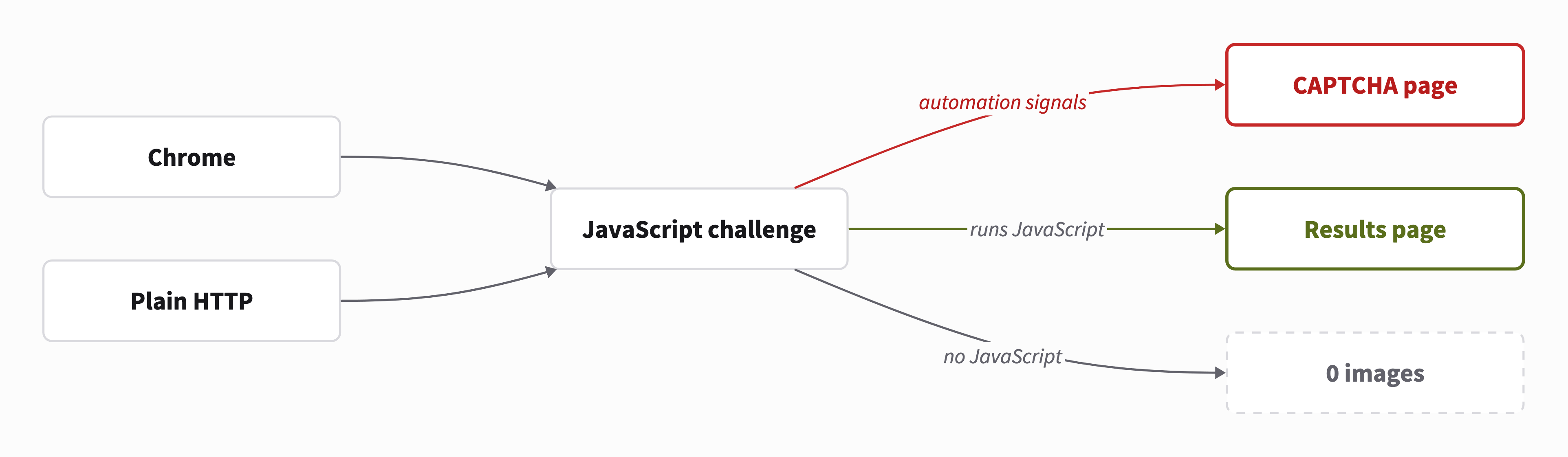
Chrome driven by Playwright got the CAPTCHA page, a reCAPTCHA Enterprise challenge served with HTTP 429, whenever it showed automation signals. The table below compares 3 ways to request the results page:
Option | Result | What you run and maintain |
|---|---|---|
Plain HTTP | A challenge page with no image results | An HTTP client and a parser |
Self-hosted Chrome | The results page without automation signals, and a CAPTCHA page with them | A browser for each session, 17.6 MB of traffic for each results page scrolled for about 20 seconds (3.1 MB with image requests blocked), and fixes whenever Google updates its bot detection |
ScrapeBadger's API | JSON results, or the results page as raw HTML, with license URLs | An HTTP request from your Python code |
Self-hosted Chrome works for a few searches that you run manually. For scheduled or large runs, use ScrapeBadger's API, so you don't run the browsers, pay for their traffic, or make the fixes yourself.
Scrape Google Images as JSON with ScrapeBadger's API
ScrapeBadger runs each search on its own infrastructure, which handles Google's JavaScript challenge, and returns the results to your Python code. Choose the endpoint for your task:
Task | Endpoint | What it returns |
|---|---|---|
Get structured results | Google Images API | JSON with each image's original URL, dimensions, and source page URL |
Read license data | Google search endpoint with | The raw HTML of Google's results page, with license URLs |
To call either endpoint, you need a ScrapeBadger account, and new accounts start with free credits for API requests. Copy your API key from the API Keys page of the dashboard:
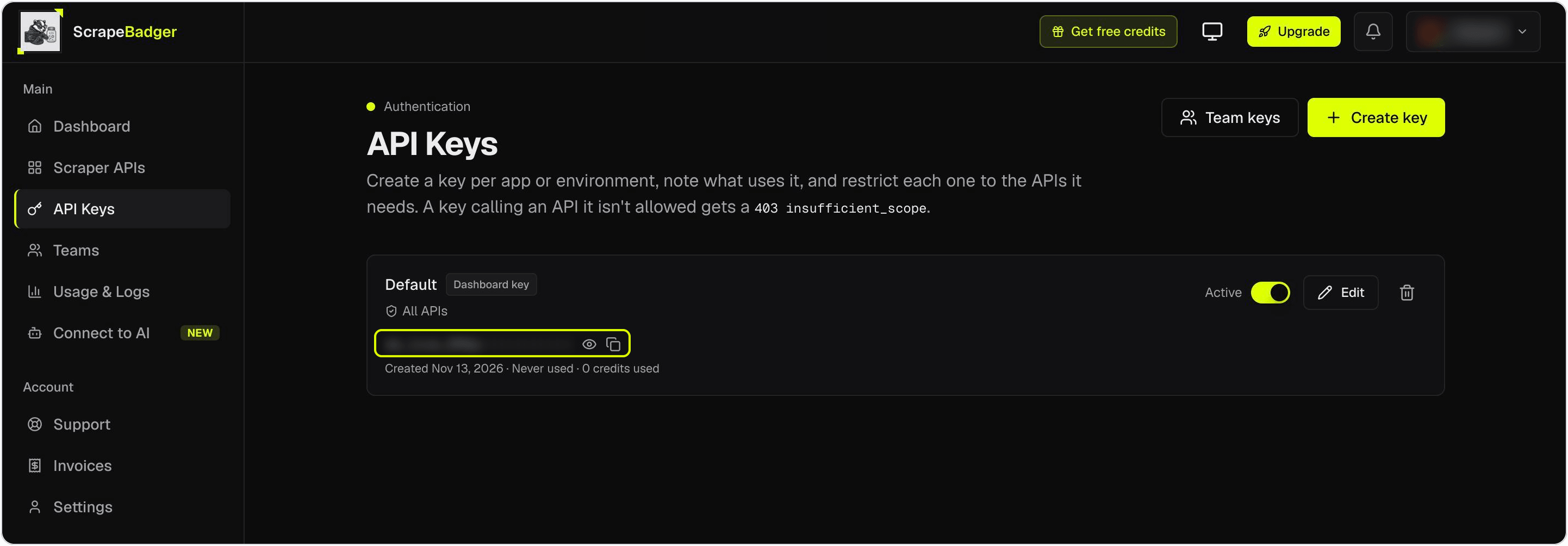
Install ScrapeBadger's official Python SDK and the libraries that the later scripts use, then set your API key as an environment variable:
python -m pip install scrapebadger httpx pillow imagehash
export SCRAPEBADGER_API_KEY="your_api_key"
# Windows PowerShell: $env:SCRAPEBADGER_API_KEY = "your_api_key"
The script below searches for large photos of snowy owls and prints the first 5 results. Save it as google_images_api.py:
import asyncio
import os

from scrapebadger import ScrapeBadger


async def main():
    api_key = os.environ["SCRAPEBADGER_API_KEY"]
    async with ScrapeBadger(api_key) as client:
        page = await client.google.images.search(
            "snowy owl", gl="us", imgsz="l", imgtype="photo", safe="active"
        )
    for item in page["results"][:5]:
        short_side = min(item["original_width"], item["original_height"])
        print(
            f"{item['rank']:>2} {short_side:>5} px {item['original_size']:>6}  "
            f"{item['source']:<24.24} {item['original'][:44]}"
        )


if __name__ == "__main__":
    asyncio.run(main())
The output lists the rank, the shorter side in pixels, the file size, the source page's domain, and the start of the original image URL:
 1   800 px   76KB  canadiangeographic.ca    https://canadiangeographic.ca/wp-content/upl
 2  1545 px  2.2MB  en.wikipedia.org         https://upload.wikimedia.org/wikipedia/commo
 3   800 px  100KB  senecaparkzoo.org        https://senecaparkzoo.org/wp-content/uploads
 4  1284 px  240KB  www.facebook.com         https://lookaside.fbsbx.com/lookaside/crawle
 5  1075 px  224KB  www.birdlife.org         https://www.birdlife.org/wp-content/uploads/
Each result also includes the page title, the source page URL, and Google's thumbnail URL.
imgsz="l" and imgtype="photo" apply Google's Large size and Photo type filters, and safe="active" enables SafeSearch. For the snowy owl query, both filters together raised the median shorter side of the 100 results from 800 to about 1,200 pixels. They also removed every result with a shorter side under 512 pixels. The Google Images API reference lists the other size, type, and color filters.
Both the Google Images API and the Google search endpoint charge only for responses that contain data. The pricing page lists the current rates.
Locate the image data inside Google's HTML
With udm=2 and output=html, ScrapeBadger's Google search endpoint returns Google's Images results page as raw HTML, including the license URLs that source sites publish. The image data is in JSON embedded in the HTML, not in the <img> tags. Each image result is one record that starts with [1,[0,", and its fields are in record[1], which the parser below calls tile:
Field | What it contains |
|---|---|
| Google's thumbnail on |
| The original image, as |
| The image's domain and file size, such as |
| The source page URL, the page title, and the site name |
| License details when the source site publishes them, and other data for shopping and video results |
| The license array, with the license URL at |
Google stored the height before the width for 322 of the 323 non-square images that we checked. For example, a file that Google listed as [url, 1707, 2560] measured 2,560 × 1,707 pixels after download. So read the width from tile[3][2] and the height from tile[3][1]. Because the dataset script reads each saved image's dimensions from the file itself, the one exception doesn't affect it.
These field positions match the pages that we tested. Google can change them at any time, so check them first when the parser finds no records.
Filter for Creative Commons, then read each image's license
Google's Usage rights menu added tbs=sur:cl to the URL for Creative Commons licenses and tbs=sur:ol for commercial and other licenses. Some guides use il:cl instead, but in our test, il:cl had almost no effect. For a snowy owl search, the results with il:cl had a 98 percent overlap with the unfiltered results.
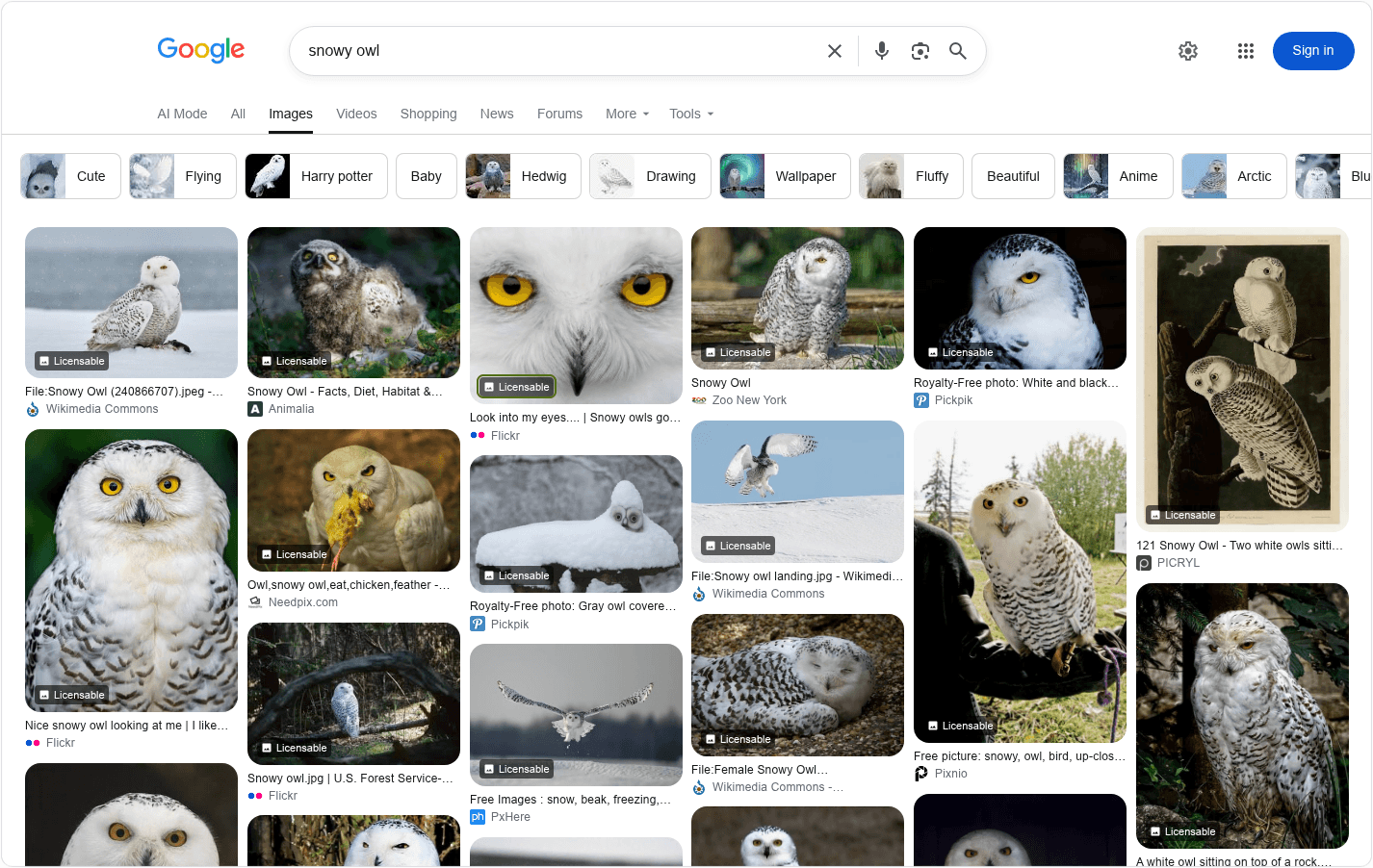
With tbs=sur:cl, Google labeled every visible snowy owl result Licensable. In the screenshot below, a yellow box marks that label on an owl whose Flickr page listed CC BY-NC-ND 2.0, which allows no commercial use. So check the license URL, not only the Licensable label. ScrapeBadger's screenshot endpoint captured this filtered page:
The script below calls ScrapeBadger's Google search endpoint with httpx, so the same request works from any HTTP client or language. It parses the image records and counts the licenses. Save it as google_images_raw.py, because the dataset script imports functions from this file:
import asyncio
import json
import os
import re
from collections import Counter

import httpx

SEARCH_URL = "https://scrapebadger.com/v1/google/search"
RECORD = re.compile(r'\[1,\[0,"')  # the start of one image record
DECODER = json.JSONDecoder()


async def fetch_page(query: str, tbs: str = "") -> str:
    """Return the raw HTML of Google's Images results page for one query."""
    params = {"q": query, "udm": "2", "output": "html", "gl": "us", "hl": "en"}
    params["safe"] = "active"  # SafeSearch on, for a training set
    if tbs:
        params["tbs"] = tbs
    headers = {"x-api-key": os.environ["SCRAPEBADGER_API_KEY"]}
    async with httpx.AsyncClient(timeout=120) as http:
        resp = await http.get(SEARCH_URL, params=params, headers=headers)
        # Wait for the time in the Retry-After header, then try once more
        if resp.status_code == 429:
            await asyncio.sleep(int(resp.headers.get("Retry-After", "60")))
            resp = await http.get(SEARCH_URL, params=params, headers=headers)
        resp.raise_for_status()
        return resp.text


def parse_records(text: str) -> list[list]:
    """Return every image record in a results page."""
    records = []
    for match in RECORD.finditer(text):
        try:
            record, _ = DECODER.raw_decode(text, match.start())
        except ValueError:  # the pattern matched text that isn't a record
            continue
        records.append(record)
    return records


def to_row(record: list) -> dict | None:
    tile = record[1]
    if not isinstance(tile, list) or len(tile) < 10 or not tile[3]:
        return None
    thumb, original, meta = tile[2], tile[3], tile[9] or {}
    page = meta.get("2003") or []
    host = meta.get("2000") or []
    extra = meta.get("2006") or []
    license_info = extra[11] if len(extra) > 11 and extra[11] else [None] * 8
    return {
        "original": original[0],
        "width": original[2],  # Google stores height first, then width
        "height": original[1],
        "file_size": host[2] if len(host) > 2 else None,
        "page_url": page[2] if len(page) > 2 else None,
        "title": page[3] if len(page) > 3 else None,
        "site": page[12] if len(page) > 12 else None,
        "thumbnail": thumb[0],
        "license": license_info[1],
        "credit": license_info[6],
    }


def license_family(url: str | None) -> str:
    path = (url or "").lower()
    if "publicdomain" in path:
        return "public domain or CC0"
    match = re.search(r"/licenses/([a-z-]+)/", path + "/")
    return f"CC {match.group(1).upper()}" if match else "no license URL"


async def main():
    # tbs="sur:cl" is Google's filter for Creative Commons licenses
    html = await fetch_page("snowy owl", tbs="sur:cl")
    rows = [row for record in parse_records(html) if (row := to_row(record))]
    print(f"{len(rows)} images under Google's Creative Commons filter")
    for family, count in Counter(
        license_family(r["license"]) for r in rows
    ).most_common():
        print(f"  {family:<22} {count}")
    # NonCommercial (by-nc) and NoDerivatives (by-nd) licenses
    restricted = [r for r in rows if "/by-n" in (r["license"] or "")]
    if restricted:
        print("example:", restricted[0]["site"], restricted[0]["license"])


if __name__ == "__main__":
    asyncio.run(main())
The script printed:
100 images under Google's Creative Commons filter
  public domain or CC0   64
  CC BY                  16
  CC BY-SA               8
  CC BY-NC-ND            6
  CC BY-ND               4
  CC BY-NC-SA            2
example: Flickr https://creativecommons.org/licenses/by-nc-nd/2.0/
Every result had a license URL, but 12 of the 100 had NonCommercial or NoDerivatives terms, which restrict commercial use or adaptations. A dataset for a commercial model therefore needs a license check for each image, not only a filtered search.
Build an openly licensed image dataset from Google Images
The dataset script sends the class name, such as "snowy owl", and 3 query variants to ScrapeBadger's Google search endpoint. Query variants, such as "snowy owl in snow", add images that the class name alone misses. The script saves an image only when it passes these checks, in this order:
License. The license is in
ALLOWED, which contains public domain or CC0, CC BY, and CC BY-SA by default.AI training opt-out. The robots.txt file on the source page's host doesn't say
ai-train=no.robots.txt rules. The robots.txt files on the source page's host and the image's host allow your bot. A 4xx response means no rules, and a 5xx response or a network error means a complete disallow.
Page opt-out. The source page has no
noaiornoimageaiin a robots meta tag or X-Robots-Tag header.Download. The image host returns HTTP 200 with no AI opt-out in its X-Robots-Tag header. The file decodes as an image, not an HTML page that some hosts send to scripts.
Size. The shorter side is at least
MIN_SHORT_SIDE, which is 512 pixels by default.Duplicate. Its perceptual hash, a fingerprint that stays almost the same when an image is resized, matches no saved image. The script checks larger copies first, so each photo keeps its largest copy.
The script records every allowed image in a manifest with its license, source page URL, and status. For each image, it also records the AI crawlers that the site's robots.txt disallows and the licenses that the page links to. Of the allowed licenses, CC BY-SA requires the same license on adaptations, so ask your legal team whether a trained model is an adaptation.
Only the dataset script needs a recent Python. Use Python 3.14.5 or newer, or 3.13.14 or newer on the 3.13 line. Older versions ignore wildcard rules in robots.txt, so the script could download images that a site disallows.
Replace the example contact in USER_AGENT with yours before your first run. Each host gets at most 2 concurrent requests, the limit that Wikimedia's robot policy sets for media files. The same policy limits media downloads to 25 Mbps, so on a fast connection, add a pause after each request in the get function.
If Google changes its record layout and the parser finds no license URLs, the script stops after the first search and downloads nothing. Save it as build_image_dataset.py:
# Needs Python 3.14.5 or newer, or 3.13.14 or newer, for robots.txt wildcards
import asyncio
import csv
import hashlib
import io
import re
from collections import Counter, defaultdict
from datetime import datetime, timezone
from pathlib import Path
from urllib.parse import urlparse
from urllib.robotparser import RobotFileParser

import httpx
import imagehash
from PIL import Image

from google_images_raw import fetch_page, license_family, parse_records, to_row

LABEL = "snowy_owl"
QUERIES = [
    "snowy owl",
    "snowy owl flying",
    "snowy owl in snow",
    "snowy owl close up",
]
TBS = "sur:cl,isz:l,itp:photo"  # Creative Commons licenses, large photos
# Licenses that allow commercial use and adaptations. Edit this for your use.
ALLOWED = {"public domain or CC0", "CC BY", "CC BY-SA"}
MIN_SHORT_SIDE = 512  # pixels, the smallest side your training crop needs
OUT = Path("dataset") / LABEL
MANIFEST = OUT / "manifest.csv"
# Name your bot and a contact, as Wikimedia's robot policy requests
USER_AGENT = "owl-dataset/1.0 (dataset-owner@example.com) httpx"
PER_HOST = defaultdict(lambda: asyncio.Semaphore(2))  # Wikimedia: at most 2
TOTAL = asyncio.Semaphore(16)
ROBOTS_META = re.compile(r"<meta[^>]+name=[\"']robots[\"'][^>]*>", re.I)
OPT_OUT = re.compile(r"\bno(image)?ai\b", re.I)  # noai and noimageai
# A robots.txt line such as "Content-Signal: search=yes,ai-train=no"
AI_TRAIN_NO = re.compile(
    r"^\s*content-signal\s*:.*\bai-train\s*=\s*no", re.I | re.M
)
# Other companies' AI crawlers. The script records their rules for your policy.
AI_BOTS = ("GPTBot", "CCBot", "ClaudeBot", "Google-Extended")
CC_LINK = re.compile(
    r"creativecommons\.org/(?:licenses|publicdomain)/[a-z-]+(?:/[0-9.]+)?",
    re.I,
)
ROBOTS = {}  # one robots.txt request per host, shared by all its URLs
# IPTC's AI source types, also used by C2PA Content Credentials
AI_SOURCE = re.compile(rb"trainedAlgorithmicMedia", re.I)
EXTENSIONS = {
    "JPEG": ".jpg",
    "MPO": ".jpg",
    "PNG": ".png",
    "WEBP": ".webp",
    "AVIF": ".avif",
}


async def collect() -> list[dict]:
    rows, seen = [], set()
    for query in QUERIES:
        html = await fetch_page(query, tbs=TBS)
        fetched_at = datetime.now(timezone.utc).isoformat(timespec="seconds")
        found = [row for rec in parse_records(html) if (row := to_row(rec))]
        # The filter returns licensed images. No license URL in any row means
        # that Google changed its record layout, so stop instead of saving.
        if not any(row["license"] for row in found):
            raise RuntimeError(f"no licensed rows for {query!r}, check parser")
        for row in found:
            # One URL can rank for several queries, so keep only its first row
            if row["original"] not in seen:
                seen.add(row["original"])
                rows.append(
                    dict(
                        row,
                        query=query,
                        fetched_at=fetched_at,
                        family=license_family(row["license"]),
                    )
                )
    return rows


async def get(client, url):
    # Wait for the host's slot first, so one busy host can't block the rest
    async with PER_HOST[urlparse(url).netloc], TOTAL:
        return await client.get(url)


async def load_robots(client, host) -> tuple:
    """Return the host's rules and its robots.txt text, or None for the text
    when the file didn't load. The rules follow RFC 9309."""
    rules = RobotFileParser()
    try:
        resp = await get(client, f"https://{host}/robots.txt")
    except httpx.HTTPError:
        resp = None
    if resp is None or resp.status_code >= 500:
        rules.disallow_all = True  # an unreachable file means disallow all
        return rules, None
    text = resp.text if resp.status_code == 200 else ""
    rules.parse(text.splitlines())  # a 404 or any 4xx response means no rules
    return rules, text if resp.status_code in (200, 404) else None


async def site_robots(client, url) -> tuple:
    host = urlparse(url).netloc
    if host not in ROBOTS:  # store the task, so each host is asked only once
        ROBOTS[host] = asyncio.create_task(load_robots(client, host))
    return await ROBOTS[host]


async def check_page(client, row):
    """Record the page's AI opt-out tag and the licenses that it links to."""
    try:
        page = await get(client, row["page_url"])
    except httpx.HTTPError:
        return
    if page.status_code != 200:
        return
    tags = " ".join(ROBOTS_META.findall(page.text))
    signals = tags + page.headers.get("x-robots-tag", "")
    row["page_opt_out"] = bool(OPT_OUT.search(signals))
    links = {link.lower().rstrip("/") for link in CC_LINK.findall(page.text)}
    row["page_licenses"] = " ".join(sorted(links))


async def fetch(client, row):
    page_url, image_url = row["page_url"], row["original"]
    rules, text = await site_robots(client, page_url)
    if text is not None:
        row["site_opt_out"] = bool(AI_TRAIN_NO.search(text))
        row["ai_bots_blocked"] = " ".join(
            bot for bot in AI_BOTS if not rules.can_fetch(bot, page_url)
        )
        if row["site_opt_out"]:
            return row, None, None, "AI opt-out in robots.txt"
    # Follow robots.txt for your own bot, on the page's host and the image's
    for url in (page_url, image_url):
        rules, _ = await site_robots(client, url)
        if not rules.can_fetch(USER_AGENT, url):
            return row, None, None, "disallowed by robots.txt"
    # Rows read back from the manifest hold "False" as text, which is truthy
    row.pop("page_opt_out", None)
    await check_page(client, row)
    if row.get("page_opt_out"):
        return row, None, None, "AI opt-out in page"
    try:
        resp = await get(client, image_url)
        if resp.status_code != 200:
            return row, None, None, f"failed: HTTP {resp.status_code}"
        if OPT_OUT.search(resp.headers.get("x-robots-tag", "")):
            return row, None, None, "AI opt-out in headers"
        # Both calls raise when the bytes aren't a complete image
        image = Image.open(io.BytesIO(resp.content))
        image.load()
    except Exception as error:
        return row, None, None, f"failed: {type(error).__name__}"
    # Keep the file's bytes, size, format, and hash, not the decoded pixels
    info = {
        "width": image.width,
        "height": image.height,
        "format": image.format,
        "phash": imagehash.phash(image.convert("RGB")),
        # IPTC's label for AI-generated media, when the file contains it
        "ai_label": bool(AI_SOURCE.search(resp.content)),
    }
    return row, resp.content, info, "ok"


def save(results, kept) -> list[dict]:
    """kept lists (perceptual hash, file name) for each file already saved."""
    OUT.mkdir(parents=True, exist_ok=True)
    manifest = []
    # Largest images first, so each photo keeps its biggest copy in this run
    results = sorted(
        results,
        key=lambda r: r[2]["width"] * r[2]["height"] if r[2] else 0,
        reverse=True,
    )
    for row, data, info, outcome in results:
        entry = {"label": LABEL, **row}
        if outcome != "ok":
            manifest.append(dict(entry, status=outcome))
            continue
        width, height = info["width"], info["height"]  # from the file itself
        phash = info["phash"]
        same = next((name for h, name in kept if phash - h <= 8), None)
        if min(width, height) < MIN_SHORT_SIDE:
            status, name = "too small", ""
        elif same:
            status, name = f"same photo as {same}", ""
        else:
            name = hashlib.sha256(data).hexdigest()[:16] + EXTENSIONS.get(
                info["format"], ".img"
            )
            # Save the original bytes, not a re-encoded copy
            (OUT / name).write_bytes(data)
            kept.append((phash, name))
            status = "saved"
        manifest.append(
            dict(
                entry,
                status=status,
                file=name,
                format=info["format"],
                width=width,
                height=height,
                phash=str(phash),
                ai_label=info["ai_label"],
            )
        )
    return manifest


def read_manifest() -> list[dict]:
    if not MANIFEST.exists():
        return []
    with open(MANIFEST, encoding="utf-8") as f:
        return list(csv.DictReader(f))


async def main():
    # Keep the rows of earlier runs, and try their failed downloads again
    earlier = read_manifest()
    old = [m for m in earlier if not m["status"].startswith("failed")]
    retry = [m for m in earlier if m["status"].startswith("failed")]
    known = {m["original"] for m in earlier}
    rows = [r for r in await collect() if r["original"] not in known]
    allowed = [r for r in rows if r["family"] in ALLOWED]
    print(f"{len(rows)} new images, {len(allowed)} with an allowed license")
    headers = {"User-Agent": USER_AGENT}
    async with httpx.AsyncClient(
        headers=headers, timeout=30, follow_redirects=True
    ) as client:
        todo = allowed + retry
        results = await asyncio.gather(*(fetch(client, r) for r in todo))
    kept = [
        (imagehash.hex_to_hash(m["phash"]), m["file"])
        for m in old
        if m.get("file")
    ]
    new = save(results, kept)
    manifest = old + new
    with open(MANIFEST, "w", newline="", encoding="utf-8") as f:
        writer = csv.DictWriter(
            f, fieldnames=list(dict.fromkeys(k for m in manifest for k in m))
        )
        writer.writeheader()
        writer.writerows(manifest)
    print(
        "skipped licenses:",
        dict(Counter(r["family"] for r in rows if r["family"] not in ALLOWED)),
    )
    for status, count in Counter(
        m["status"].split(" as ")[0] for m in new
    ).most_common():
        print(f"  {status:<30} {count}")
    labeled = sum(1 for m in new if m.get("ai_label"))
    print("files with an IPTC AI label:", labeled)
    print(
        "saved formats:",
        dict(Counter(m["format"] for m in new if m["status"] == "saved")),
    )


if __name__ == "__main__":
    asyncio.run(main())
The run printed:
252 new images, 221 with an allowed license
skipped licenses: {'CC BY-NC-ND': 14, 'CC BY-ND': 9, 'CC BY-NC-SA': 5, 'CC BY-NC': 2, 'no license URL': 1}
  saved                          71
  failed: HTTP 403               62
  AI opt-out in robots.txt       62
  AI opt-out in page             11
  disallowed by robots.txt       9
  same photo                     6
files with an IPTC AI label: 0
saved formats: {'JPEG': 69, 'PNG': 2}
Across the 4 searches, the script skipped 30 images with NonCommercial or NoDerivatives licenses and 1 image with no license URL. The table shows why the remaining 221 became 71:
Step | Images | Reason |
|---|---|---|
Allowed license | 221 | The license is in |
AI opt-out in robots.txt | −62 | 4 sites said |
AI opt-out in the page | −11 | DeviantArt's |
Disallowed by robots.txt | −9 | Flickr and Facebook allowed only crawlers that they named |
HTTP 403 from the image host | −62 | 46 from Wikimedia's image server, 16 from a Cloudflare challenge |
Near-duplicate | −6 | The perceptual hash matched a saved copy |
Saved | 71 |
Five lessons from this run also apply to other image classes, because they are about licenses and sites, not the subject of the images.
Check each site's AI opt-out, not only the license. All 62 robots.txt opt-outs came from 4 image archives that Google listed as public domain or CC0. Each archive served Cloudflare's managed robots.txt, whose Content-Signal line said ai-train=no.
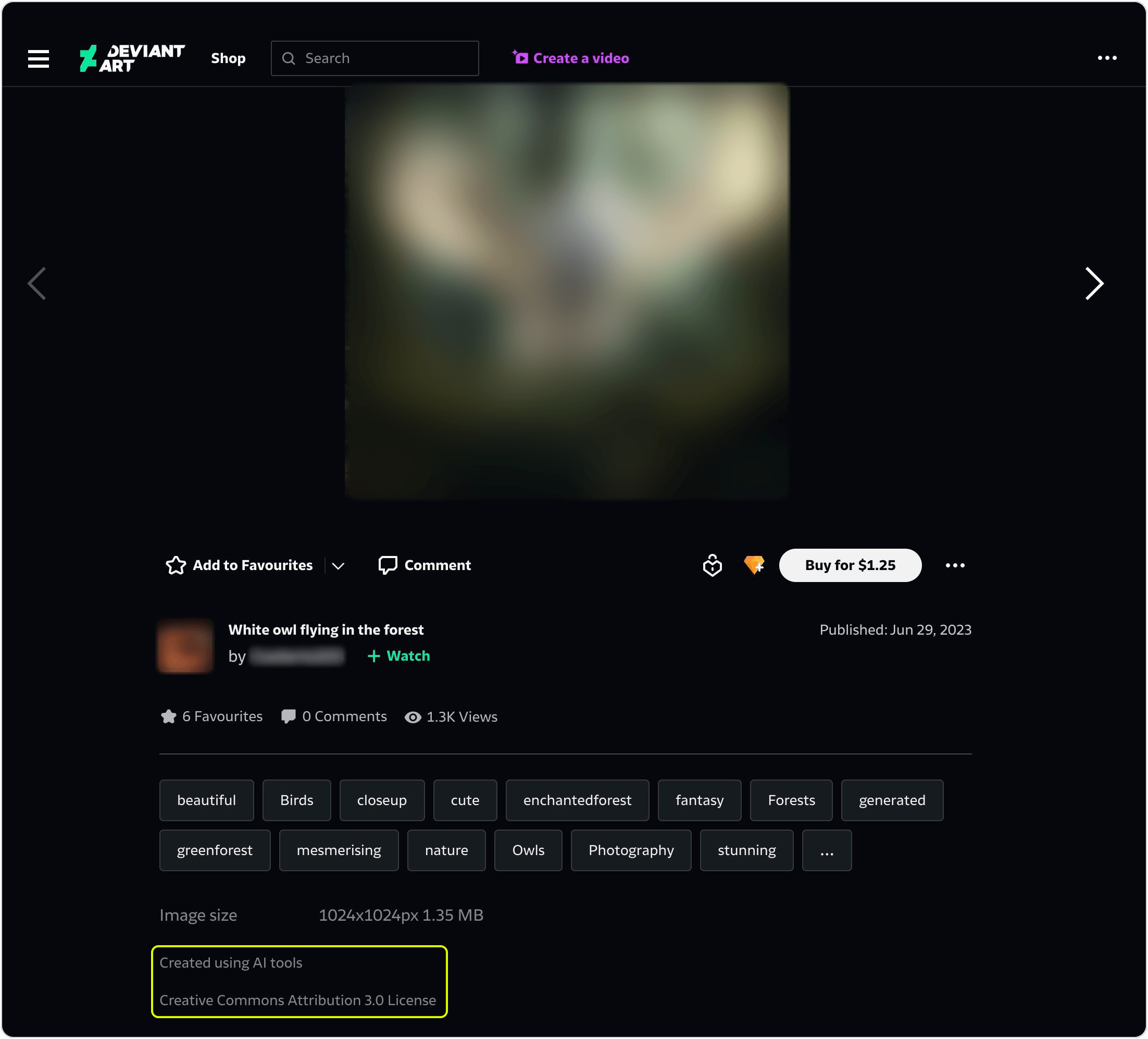
AI-generated images can pass the Creative Commons filter. The 11 page-level opt-outs were DeviantArt images that Google listed as CC BY 3.0, and DeviantArt labeled 10 of them "Created using AI tools." We opened those 10 files only to read their metadata. None contained a C2PA (Coalition for Content Provenance and Authenticity) manifest or IPTC metadata that marks AI-generated media. So a file without an AI label in its metadata isn't proof that a photo is real.
One of those DeviantArt pages shows the AI label and the CC BY 3.0 license together. Its creator opted out of AI use, so the artwork and the creator's name are blurred here:
Some opt-outs need a policy decision. Of the 71 saved images, 38 came from sites whose robots.txt disallowed AI crawlers by name, such as GPTBot. Under RFC 9309, those rules apply only to the crawlers that they name, so the script keeps the images. It records those crawlers in the ai_bots_blocked column, where you can filter the rows by your own policy.
Each source sets its own limits. Because the script downloads each image from its host under your own User-Agent, as robot policies ask, each host's limits apply to you. Wikimedia's image server blocked our test IP address during development, before the script used its current limit of 2 concurrent requests per host. Before that block, 4 runs each saved 43 or 44 Wikimedia images, so a run from an unblocked IP can save most of the 46.
Google's license URLs mostly match the source pages. Of the 150 source pages that the script checked, 134 loaded. Of those, 122 linked the license that Google listed, and none linked a different one. The other 12 linked no Creative Commons license, so manually check the saved rows that have an empty page_licenses column.
Catch mislabeled images with a zero-shot classifier
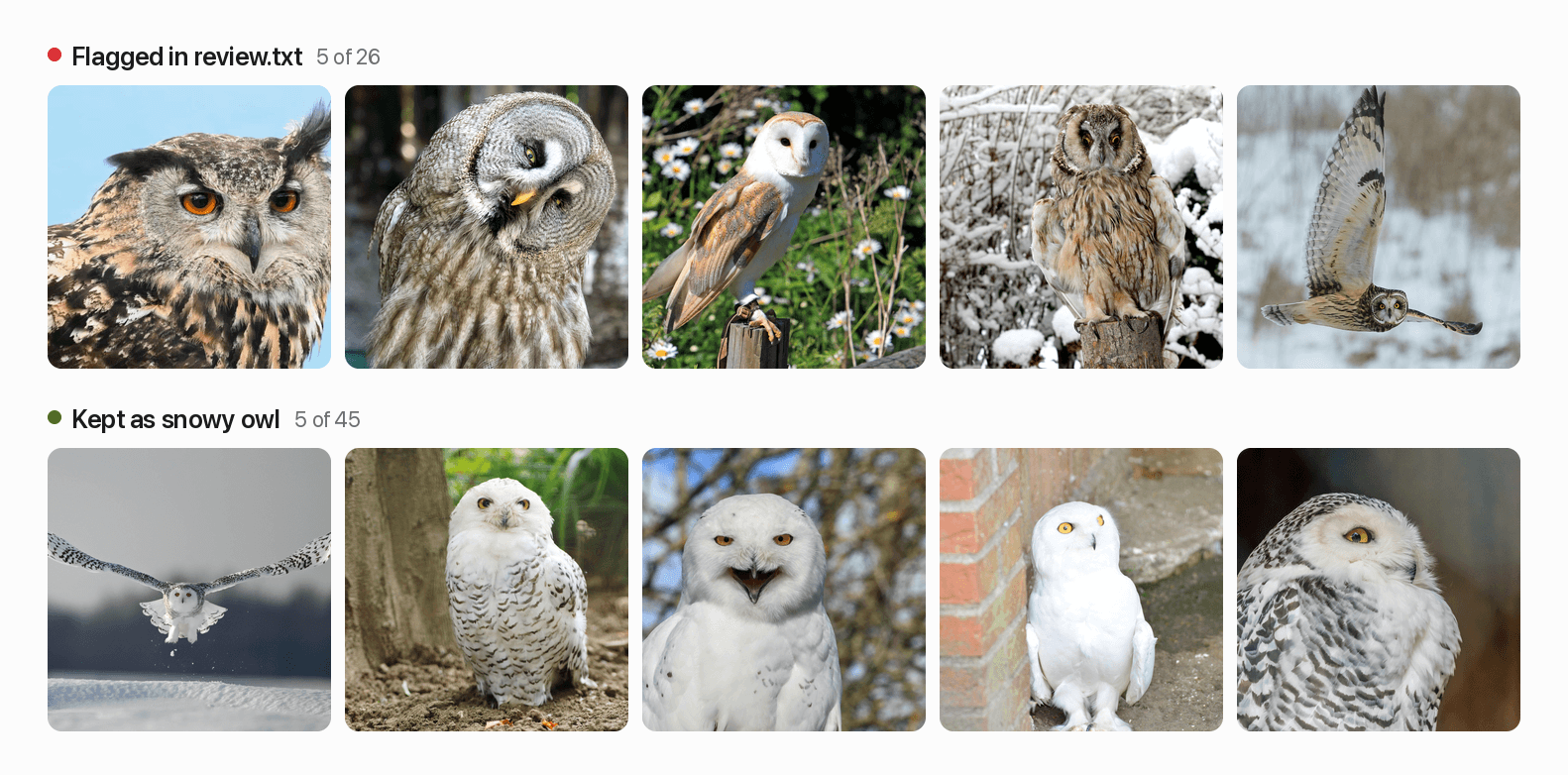
Google's results included other owls among the snowy owls. When we manually labeled the 71 saved images, 45 showed a snowy owl. The remaining 26 showed other owls, such as barn owls and eagle owls, or a collage. The 3 query variants added 18 of the 45 snowy owls, but also 22 of the 26 mislabeled images.
A short script runs zero-shot classification with Meta's Perception Encoder, a CLIP-style vision-language model, through the open_clip library. It compares each saved image's embedding with 3 text prompts for a snowy owl, a different kind of owl, and a different kind of bird. It flags the image when the snowy owl prompt isn't the closest. It needs 1 more library, and its first run downloads 2.7 GB of model weights from Hugging Face:
python -m pip install open_clip_torchSave the script as check_labels.py in the same folder as the dataset script:
import csv

import open_clip
import torch
from PIL import Image

from build_image_dataset import MANIFEST, OUT

MODEL = "PE-Core-L-14-336"  # Meta's Perception Encoder
# The first prompt names the class, and the others name similar classes
PROMPTS = [
    "a photo of a snowy owl",
    "a photo of a different kind of owl",
    "a photo of a different kind of bird",
]


def main():
    model, _, preprocess = open_clip.create_model_and_transforms(
        MODEL, pretrained="meta"
    )
    model.eval()
    with open(MANIFEST, encoding="utf-8") as f:
        saved = [row for row in csv.DictReader(f) if row["status"] == "saved"]
    flagged = []
    with torch.no_grad():
        text = model.encode_text(open_clip.get_tokenizer(MODEL)(PROMPTS))
        text /= text.norm(dim=-1, keepdim=True)
        for row in saved:
            image = preprocess(Image.open(OUT / row["file"]).convert("RGB"))
            features = model.encode_image(image.unsqueeze(0))
            features /= features.norm(dim=-1, keepdim=True)
            if (features @ text.T).argmax() != 0:  # closer to a similar class
                flagged.append(row["file"])
    (OUT / "review.txt").write_text("\n".join(flagged) + "\n")
    print(f"{len(flagged)} of {len(saved)} saved images flagged in review.txt")


if __name__ == "__main__":
    main()
The script printed:
26 of 71 saved images flagged in review.txtIn this run, the model flagged all 26 mislabeled images, with no false positives among the 45 snowy owls:
On the same images and prompts, Google's SigLIP 2 base model missed 2 other owls in snow, so Perception Encoder was the better choice here. The bird prompt also matters, because later runs can return birds that aren't owls. Without it, the check missed a white bird in one of those runs. As with any automated check, manually review a random sample before you train.
With this check, query variants are worth adding. The check flags their 22 mislabeled images for review, and their 18 snowy owls add to the dataset.
Grow the dataset with later runs and more classes
Google's results change over time and by country. When we ran the dataset's 4 searches again 2 days later, 50 of the 221 allowed images were no longer in the results. In a snowy owl search, 26 percent of India's image URLs and 29 percent of the UK's were not in the US results.
So run the script again on later days. To add other countries, change the gl country code that fetch_page in google_images_raw.py sends to ScrapeBadger.
Each later run keeps the manifest's rows, retries failed downloads, and skips both URLs that the manifest already lists and near-duplicates of saved photos. For more classes, change LABEL and QUERIES in build_image_dataset.py and PROMPTS in check_labels.py, then run both scripts once per class. One photo can appear in the results for 2 classes, so compare perceptual hashes across class folders before the train-test split.
Respect image licenses and AI opt-outs
An image's license and its site's AI opt-outs don't change with the tool that collects it. In the EU, the Copyright Directive lets rights holders opt out of text and data mining with a machine-readable signal. The robots.txt files of the 4 image archives in the dataset run stated that their ai-train=no line was such an opt-out.
Collect with the Creative Commons filter and a license allowlist, and keep the manifest that records each image's license, credit line, and source page URL.
Follow robots.txt for your own bot, respect
ai-train=noandnoaiopt-outs, and review theai_bots_blockedcolumn with your legal team.Exclude images of identifiable people unless you have a lawful basis to process them.
Get legal advice before you train a commercial model on collected images.
Final thoughts
When a Google Images scraper saves zero images, fix how it sends requests first, then how it parses pages. Use ScrapeBadger's Google Images API for image URLs and dimensions as JSON, and ScrapeBadger's Google search endpoint when you need license data.
For a dataset, check each image's license and AI opt-outs, because results under the Creative Commons filter included restrictive licenses and opted-out sites. Run the dataset script for one image class on ScrapeBadger's free credits, and review the manifest's licenses before you add more classes. Google's results also include mislabeled photos, so run check_labels.py and review a random sample before you train.
FAQ
Can you scrape Google Images with Python?
Yes. ScrapeBadger's Google Images API handles Google's JavaScript challenge and returns the results as JSON from one Python call. In our tests, plain HTTP requests got that challenge page instead of images, even from clients that impersonate Chrome's TLS fingerprint.
Is there a free Google Images API?
Not from Google for new users. Google's Custom Search JSON API is closed to new customers and ends on January 1, 2027. Google's Vertex AI Search searches only the sites that you list. New ScrapeBadger accounts get free credits, and ScrapeBadger's Google Images API charges only for responses with data.
How do I download full-size images from Google Images?
Download the image from the original image URL, not the thumbnail URL. ScrapeBadger's Google Images API returns that original URL for each result. Name your bot in the User-Agent, send at most 2 concurrent requests per host, and check that each response body decodes as an image.
Is it legal to scrape Google Images?
It depends on how you collect and use the images. An image's license and its site's AI opt-outs don't change with the tool that collects it. Check each image's license, respect ai-train=no and noai opt-outs, and get legal advice before you train a commercial model.

Written by
Domas Sakavickas
Dom Sakavickas is Co-founder of ScrapeBadger, building web scraping infrastructure for developers and data teams. He writes about the web data market, tool comparisons, and business use cases for scraping. ScrapeBadger is a web scraping API platform specialising in Twitter/X, Reddit and Google data, with dedicated scrapers also covering TikTok, YouTube, LinkedIn, Amazon, eBay, Zillow and 40+ more: with built-in anti-bot bypass and an MCP server for AI agents.
Ready to get started?
Join thousands of developers using ScrapeBadger for their data needs.