
Naver discontinued its Shopping search API on July 31, 2026, and did not offer a replacement for its product data. Price, rank, and seller-offer data is still on Naver's public pages.
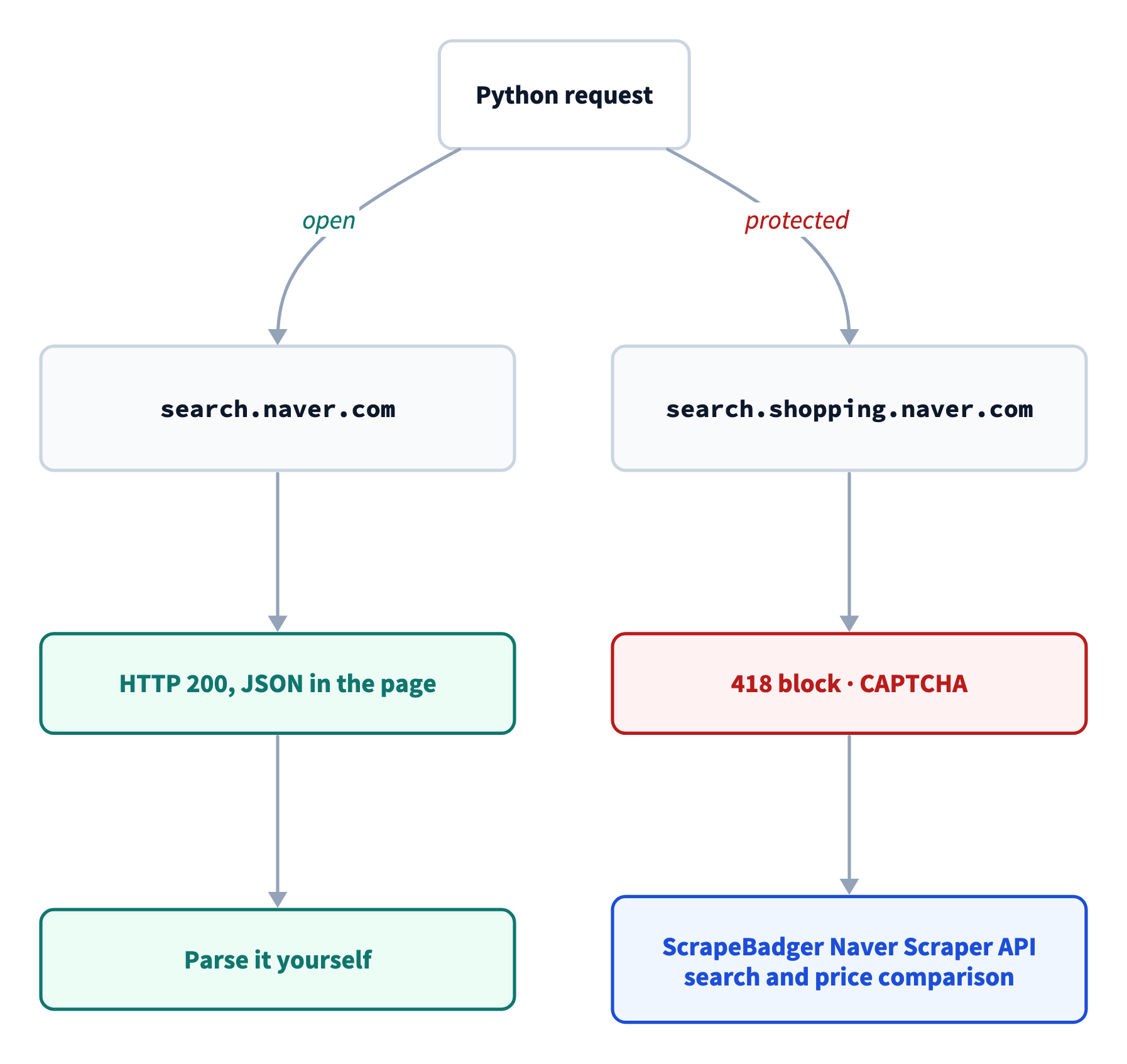
In my tests, Naver's search page served shopping cards to a plain Python script. The shopping pages with sorted lists and seller offers blocked all 3 Python clients I tried. The search page also listed rentals and carrier contracts next to the product itself.
This guide shows how to scrape Naver Shopping with Python and check each price before you store it.
TL;DR
Top product cards are free. requests got 55 to 90 cards per keyword from Naver's mobile search page, for 18 of 20 test keywords.
Naver protected sorted results and seller offers. search.shopping.naver.com returned 418 blocks or CAPTCHAs, even to a client impersonating Chrome's TLS fingerprint.
The lowest price for all 3 tested products was a rental or a carrier contract, down to 1 KRW. Store discounted_price, not price, and check rows against the catalog product's price.
ScrapeBadger's Naver Scraper API returns sorted Naver Shopping results and seller offers as JSON. Its prices matched Naver's search page in a side-by-side test.
Where Naver Shopping data comes from after the API shutdown
Naver moved its remaining search and DataLab APIs to NAVER API HUB and did not add a shopping endpoint. The closest remaining service is DataLab Shopping Insight, which reports relative click trends by category and keyword, without prices or product IDs. The Naver Shopping API alternatives below collect prices, rankings, and seller offers from Naver's public pages, either with your own code or through ScrapeBadger's Naver Scraper API. If your old feed used the Shopping API, each of its jobs now has a new source:
What your old feed did | Where to get it now |
Keyword search sorted by price (sort=asc) | The catalog search endpoint with sort="LOW_PRICE" |
Lowest price and sellers for each product (lprice, mallName) | The price-comparison endpoint |
Results in relevance order (sort=sim, the old default) | The free parser on Naver's search page, or the API's product search endpoint |
How Naver responds to Python requests
In testing, the result depended on the subdomain, not on the Python client. Switching clients changed only the type of block.
I tested 3 Python clients from one residential IP in India against each Naver subdomain, including SmartStore, the platform that hosts sellers' storefronts. They were requests with its default User-Agent, requests with a Chrome User-Agent, and curl_cffi impersonating Chrome. The tests did not include headless browsers or Korean proxies.
The 3 clients got these responses:
Naver subdomain | What the Python clients got |
Search (search.naver.com, m.search.naver.com) | The full results page, about 1.5 MB, with the shopping data embedded as JSON |
Shopping search (search.shopping.naver.com) | An HTTP 418 block page, or a 405 CAPTCHA page, or a 307 redirect to the login page |
SmartStore (smartstore.naver.com) | HTTP 429 titled 시스템오류 ("system error"), or a redirect to the login page |
One type of block looks like a success. curl_cffi follows redirects by default. When SmartStore blocked it, the redirects ended on Naver's login page at nid.naver.com with an HTTP 200. A check on the status code alone would store that login page as data.
The parser in the next section checks the final URL and the content instead, and raises an error on a blocked page rather than returning an empty result. Do not detect a block by searching for "captcha", because normal Naver pages also contain that word in their scripts.
Naver's block page says it reacts to request bursts and VPN traffic, but a single request from a residential IP was enough to trigger it. The type of block also changed between runs on the same URL, so code written for one block type can fail when the next run returns another.
A practical approach is to scrape the open search page yourself and send shopping search and price comparison to ScrapeBadger's Naver Scraper API, which handles the maintenance a DIY scraper needs for you:
Scrape the shopping cards on Naver's search page
When you search for a product on Naver's integrated search page, the page usually shows two shopping blocks. One is price comparison, and the other lists products from Naver Plus Store, Naver's shopping service. Both come as JSON inside the HTML, so you can scrape the page without a headless browser. Reading that JSON directly avoids CSS selectors, though Naver can still rename the JSON keys.
In this screenshot of the live page, the two blocks are outlined and labeled with the block names the code reads. The 광고 tag marks the ads that is_ad flags. The cards change between fetches, so your results will differ:
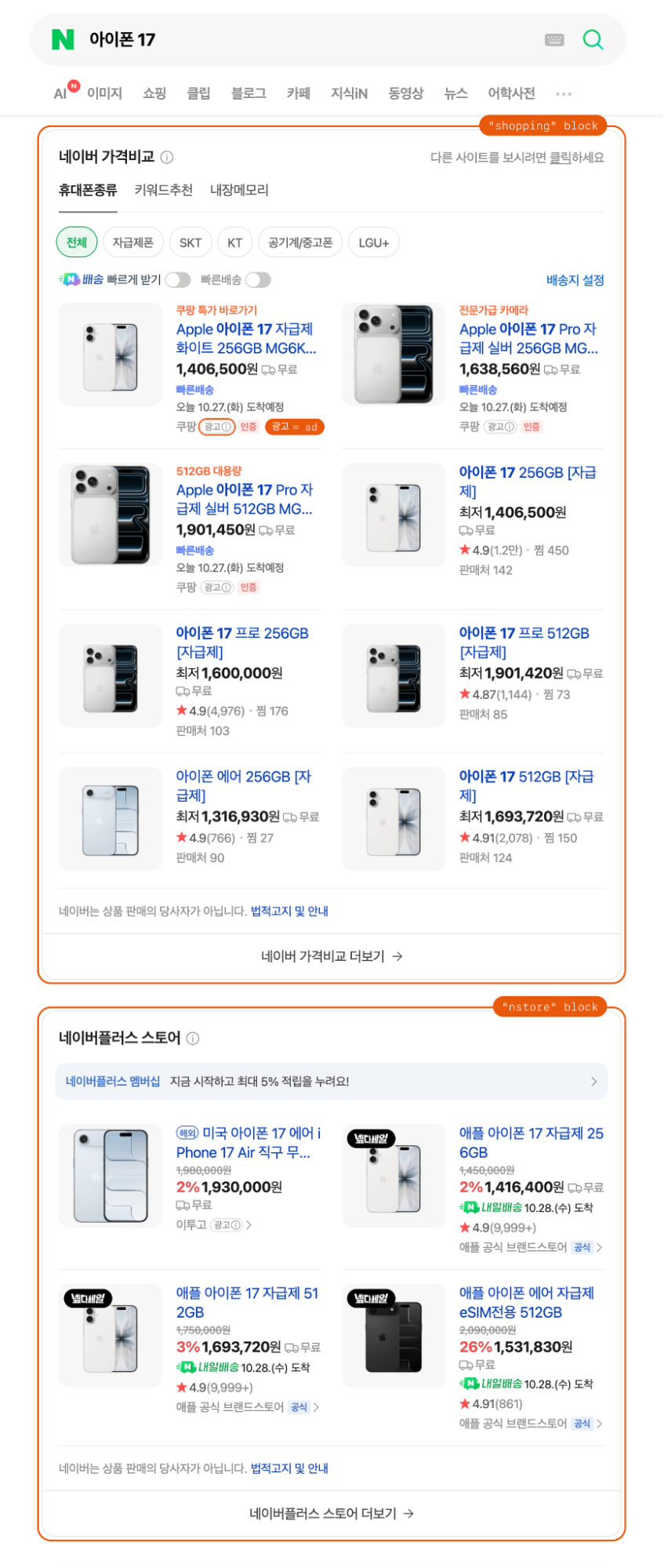
The page stores each block's data in a global JavaScript variable named naver.search.ext.newshopping[...]._INITIAL_STATE. The function below needs only requests (python -m pip install requests). Save it as naver_serp_diy.py:
import json
import re
from urllib.parse import quote

import requests

STATE = re.compile(r'naver\.search\.ext\.newshopping\["(\w+)"\]\._INITIAL_STATE\s*=\s*')


def naver_serp_shopping(query: str, mobile: bool = False) -> list[dict]:
    # The mobile page embeds more price-comparison cards than the desktop page
    host, where = (
        ("m.search.naver.com", "m") if mobile else ("search.naver.com", "nexearch")
    )
    url = f"https://{host}/search.naver?where={where}&query={quote(query)}"
    resp = requests.get(url, headers={"Accept-Language": "ko-KR,ko;q=0.9"}, timeout=30)
    # A blocked request can end on the login host with HTTP 200, so check the data too
    if "nid.naver.com" in resp.url or "_INITIAL_STATE" not in resp.text:
        raise RuntimeError(f"no Naver search data for {query!r} ({resp.status_code})")
    html = resp.text
    decoder = json.JSONDecoder()
    rows = []
    for match in STATE.finditer(html):
        block = match.group(1)  # "shopping" = price comparison, "nstore" = Plus Store
        state, _ = decoder.raw_decode(html, match.end())
        props = state["initProps"]
        if block == "shopping":
            items = [
                slot["data"] for page in props["pagedSlot"] for slot in page["slots"]
            ]
        elif "products" in props:
            items = props["products"]
        else:
            continue  # another block, such as a single-product answer
        for pos, item in enumerate(items, 1):
            # prefer discountedSalePrice, the price shoppers see, then salePrice
            sale = item.get("discountedSalePrice") or item.get("salePrice")
            rows.append(
                {
                    "block": block,
                    "position": pos,
                    "nv_mid": str(item.get("nvMid") or ""),  # same ID as the API
                    "is_ad": item.get("sourceType") == "AD",
                    "name": re.sub(r"<[^>]+>", "", item.get("productName", "")),
                    "sale_price": sale,
                    "mall": item.get("mallName") or "(catalog)",
                }
            )
    return rows


if __name__ == "__main__":
    for row in naver_serp_shopping("아이폰 17"):
        tag = "ad" if row["is_ad"] else "  "
        print(
            f'{row["block"]:<8} {row["position"]} {tag} '
            f'{row["sale_price"] or 0:>10,} KRW  {row["mall"]:<14} {row["name"][:26]}'
        )
For 아이폰 17 (iPhone 17), the parser printed this, with prices in Korean won (KRW):
shopping 1 ad  1,406,500 KRW  쿠팡             Apple 아이폰 17 자급제  화이트  256
shopping 2 ad  1,638,560 KRW  쿠팡             Apple 아이폰 17 Pro 자급제  실버
shopping 3 ad  1,901,450 KRW  쿠팡             Apple 아이폰 17 Pro 자급제  실버
shopping 4     1,406,500 KRW  (catalog)      아이폰 17 256GB [자급제]
shopping 5     1,600,000 KRW  (catalog)      아이폰 17 프로 256GB [자급제]
shopping 6     1,901,420 KRW  (catalog)      아이폰 17 프로 512GB [자급제]
shopping 7     1,316,930 KRW  (catalog)      아이폰 에어 256GB [자급제]
shopping 8     1,693,720 KRW  (catalog)      아이폰 17 512GB [자급제]
nstore   1 ad  1,930,000 KRW  이투고            미국 아이폰 17 에어 iPhone 17 Air
nstore   2     1,416,400 KRW  애플 공식 브랜드스토어   애플 아이폰 17 자급제
nstore   3     1,693,720 KRW  애플 공식 브랜드스토어   애플 아이폰 17 자급제
nstore   4     1,531,830 KRW  애플 공식 브랜드스토어   애플 아이폰 에어 자급제 eSIM전용
The first 3 price-comparison cards were ads, all from 쿠팡 (Coupang), so keep is_ad on every row before you compare rankings. 자급제 in a title marks an unlocked phone. (catalog) marks a catalog product, which points to Naver's price-comparison page rather than one store.
The free parser also worked without a Korean IP. The page returned the same 12 cards, prices, and ads for this query whether it was fetched from India or from Korea.
Get more cards from the mobile page
In testing, the mobile search page embedded 5 pages of price-comparison cards, while the desktop page embedded 1. The same function reads all of them when you pass mobile=True. Add these two lines to the end of naver_serp_diy.py:
rows = naver_serp_shopping("아이폰 17", mobile=True)
print(len(rows), "cards,", sum(r["is_ad"] for r in rows), "ads")
The mobile page returned this for the same query:
60 cards, 25 adsFetch the desktop page too if you report Plus Store placement, because the Plus Store block appeared only there.
The mobile page also stayed stable in a test that simulated a daily feed. The test sent 200 requests, 10 rounds of 20 product keywords at about 2.5-second intervals, and every request returned a page.
For 18 of those keywords, the card count did not change between rounds. Each of these keywords returned 55 to 90 cards, and the catalog products kept their IDs. Log the card count on every run, because a sudden drop is an early sign that Naver changed the page.
The other 2 keywords returned a different block instead of a card list. 닌텐도 스위치 2 (Nintendo Switch 2) got a single-product answer, and 나이키 운동화 (Nike sneakers) got a fashion panel. The function skips blocks it does not recognize, so it returned no rows for them. For keywords like these, fetch the desktop page or use the Naver Scraper API, whose catalog search returned a full page of products for both.
Combine the free parser with the API
Key the combined dataset on nv_mid, Naver's product ID, which both sources return. For iPhone 17 and the Dyson Airwrap, Naver's search page and the API's product search were fetched seconds apart. They reported the same sale price for every product ID that appeared in both.
Beyond these top cards, ScrapeBadger's Naver Scraper API adds sorted results, deeper pages, and per-seller offers from Naver's shopping subdomain. Its product search also returns the top cards as JSON, so you can skip maintaining a parser.
Set up the Naver Scraper API
To call the Naver Scraper API, you need:
A free ScrapeBadger account and the API key from its dashboard. Signing up needs no credit card.
A Python version that still gets security updates.
ScrapeBadger's official async SDK.
Every request goes to https://scrapebadger.com/v1/naver/ with your key in the X-API-Key header. The service manages proxies, so your code needs no proxy setup. Each script sets which errors the SDK retries, and you pay only for the request that succeeds, because ScrapeBadger does not charge for failed requests. Every plan, including the free one, gets the full API, so you can test every endpoint below before you pay.
The Naver Scraper API docs list each endpoint's parameters and fields. The API also covers other Naver search types, such as web, news, blog, and local search. When you plan a daily run, multiply the number of keywords by the pages per keyword and by the price per request listed on the pricing page.
After you sign up, the dashboard shows your key:
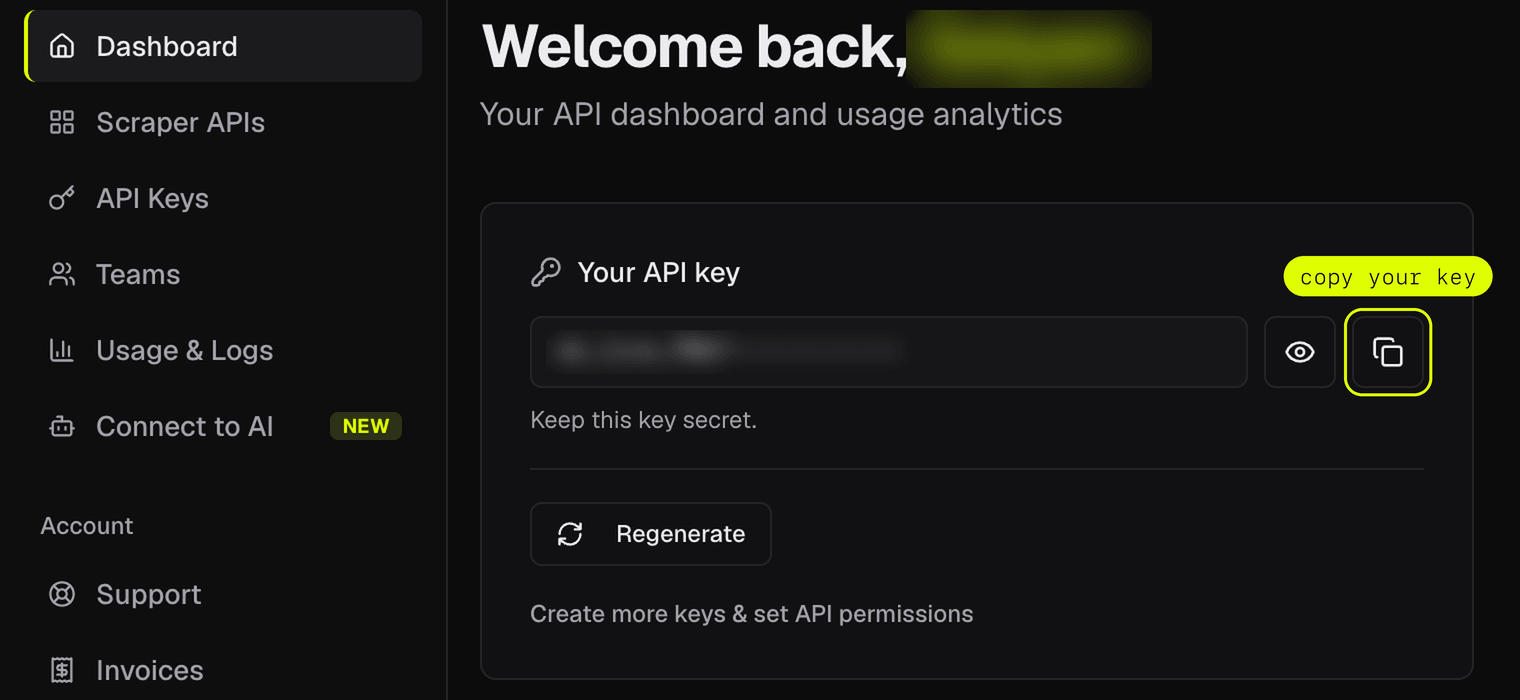
Install the SDK and set your key as an environment variable, which every API script below reads:
python -m pip install scrapebadger
export SCRAPEBADGER_API_KEY="your_api_key"
# Windows PowerShell: $env:SCRAPEBADGER_API_KEY = "your_api_key"
Search Naver's shopping catalog by keyword
The catalog search endpoint runs a full keyword search on search.shopping.naver.com and returns paged results in the sort you choose. In testing, this subdomain blocked all 3 Python clients. Save the script below as naver_catalog_search.py:
import asyncio
import os

from scrapebadger import ClientConfig, ScrapeBadger

CONFIG = ClientConfig(
    api_key=os.environ["SCRAPEBADGER_API_KEY"],
    max_retries=3,
    retry_on_status=(429, 500, 502, 503, 504, 524),
)


async def main():
    async with ScrapeBadger(config=CONFIG) as client:
        page = await client.naver.shopping.search_catalog("캠핑의자", sort="LOW_PRICE")
        for p in page.products[:5]:
            store_type = (
                "brand store"
                if p["is_brand_store"]
                else "SmartStore"
                if p["is_smart_store_product"]
                else "other store"
            )
            sale = p["discounted_price"] or p["price"]  # price is the list price
            print(
                f'{p["rank"]:>2} {sale:>7,} KRW (list {p["price"]:>7,})  '
                f'{store_type:<11} {p["mall_name"]:<10} {p["title"][:16]}'
            )
        print(f"{len(page.products)} products on page 1, has_more: {page.has_more}")


if __name__ == "__main__":
    asyncio.run(main())
For 캠핑의자 (camping chair), the script printed this:
 1   6,100 KRW (list   8,900)  other store 디자인살림      놀이동산의자 휴대용 접이식 의
 2   6,490 KRW (list  12,890)  other store 브리즈피크      파우치형 의자 초경량 미니 접
 3   6,700 KRW (list   9,000)  other store 잇츠레저       듀랄루민 등산 의자 휴대용 접
 4   6,800 KRW (list  10,800)  brand store BreezeMoon 브리즈문 파우치형 초경량 휴대
 5   6,900 KRW (list   7,900)  other store 셀러 박스비     캠핑 휴대용 의자 접이식 경량
47 products on page 1, has_more: True
The rows were sorted by sale price, so the list prices beside them look out of order. For deeper results, pass page=2, page=3, and so on while has_more is true.
price is the list price, and discounted_price is the sale price, the amount a shopper pays. Store discounted_price, so your feed records what shoppers actually pay. The shipping cost is a separate field, delivery_fee. Each row also includes review_count, review_score, and flags for brand stores and SmartStore sellers, so ratings and seller type arrive with the price.
If your old feed stored the Shopping API's fields, map them like this:
Shopping API field | Closest field in catalog search rows |
productId | nv_mid |
title | title |
link | product_url |
image | image_url |
lprice | discounted_price, which is the lowest price on a catalog product row, or best_price from price comparison |
mallName | mall_name |
category1 to category4 | lcat_id, mcat_id, scat_id, sscat_id (category IDs, not names) |
productType | product_type, which read NORMAL even for rentals in testing |
The old API paged by row offset, while catalog search results follow Naver's own pages. So set how deep you go for each keyword as a number of pages, not rows.
Naver's lowest-price sort can rank an item from another category first. For 아이폰 17, the first row was an imitation phone at 89,100 KRW. Run catalog search rows through the price check below before you report the lowest price.
The total field reports Naver's own count. For 캠핑의자, the default RECOMMEND sort reported hundreds of thousands of matches, and LOW_PRICE reported 120, because Naver limited the length of its sorted lists. To cover a whole category, split it into narrower queries, such as brand or model terms. Each query then gets its own sorted list.
In testing, sorted lists contained no sponsored slots. The default RECOMMEND sort mixed ads into page 1 and set is_ad to true on them. Keep the is_ad value on those rows before you compare rankings.
Track the lowest seller prices for a product
Naver's price-comparison page ranks the sellers of each catalog product from the lowest price to the highest. The price-comparison endpoint returns one entry for each matching catalog product. Each entry has the offer count, the lowest offer, and the offers from the cheapest sellers.
Price-comparison results come as typed objects, so you read fields as attributes such as entry.offer_count. Save the script below as naver_price_compare.py:
import asyncio
import os

from scrapebadger import ClientConfig, ScrapeBadger

CONFIG = ClientConfig(
    api_key=os.environ["SCRAPEBADGER_API_KEY"],
    max_retries=3,
    retry_on_status=(429, 500, 502, 503, 504, 524),
)


async def main():
    async with ScrapeBadger(config=CONFIG) as client:
        result = await client.naver.shopping.price_compare("다이슨 에어랩")
        print(f"{len(result.entries)} entries, the first 2:")
        for entry in result.entries[:2]:
            print(
                f"{entry.catalog_name[:30]}  "
                f"{entry.offer_count:,} offers, lowest {entry.best_price:,} KRW"
            )
            for offer in entry.offers:
                pay = "NaverPay" if offer.naver_pay else ""
                print(f"    {offer.price:>8,} KRW  {offer.mall_name:<10} {pay}")


if __name__ == "__main__":
    asyncio.run(main())
For 다이슨 에어랩 (Dyson Airwrap), Naver ranked an Airstrait straightener first and the Airwrap itself second:
12 entries, the first 2:
2023년형 에어스트레이트 스트레이트너  332 offers, lowest 366,970 KRW
     366,970 KRW  11번가
     366,980 KRW  옥션
     366,990 KRW  G마켓
     428,000 KRW  에이든-마켓     NaverPay
     440,860 KRW  쿠팡
다이슨 에어랩 오리진 멀티 스타일러 앤 드라이어  241 offers, lowest 383,830 KRW
     383,830 KRW  신세계라이브쇼핑   NaverPay
     390,010 KRW  11번가
     393,800 KRW  에이든-마켓     NaverPay
     396,980 KRW  지티제이       NaverPay
     396,990 KRW  파란고래       NaverPay
The offer rows included listings on Coupang (쿠팡), 11st (11번가), Gmarket (G마켓), and Auction (옥션), so one request also shows which sellers on those marketplaces have the lowest prices. offer_count is the number of sellers that list the product. Store it with the lowest price to track both over time.
A query returns the product you meant and other products that Naver treats as close matches. Match each entry to your product once and store its catalog_id next to the product's nv_mid, because the two IDs can differ. Track the catalog_id on every later run rather than picking the first entry.
Check each Naver listing before you store its price
Naver's shopping results mix many listing types, from rentals and resale listings to carrier-contract phones. Another variant of the product can also rank beside the one you track. These listings pass a typical schema check, because each price is a positive integer.
The old API's productType field marked used goods. Its replacement, product_type, read NORMAL even for rentals and resale listings in testing, so the check reads the title and category instead.
On Naver's mobile search page for 갤럭시 S25 (Galaxy S25), the same S25 FE model appeared twice:
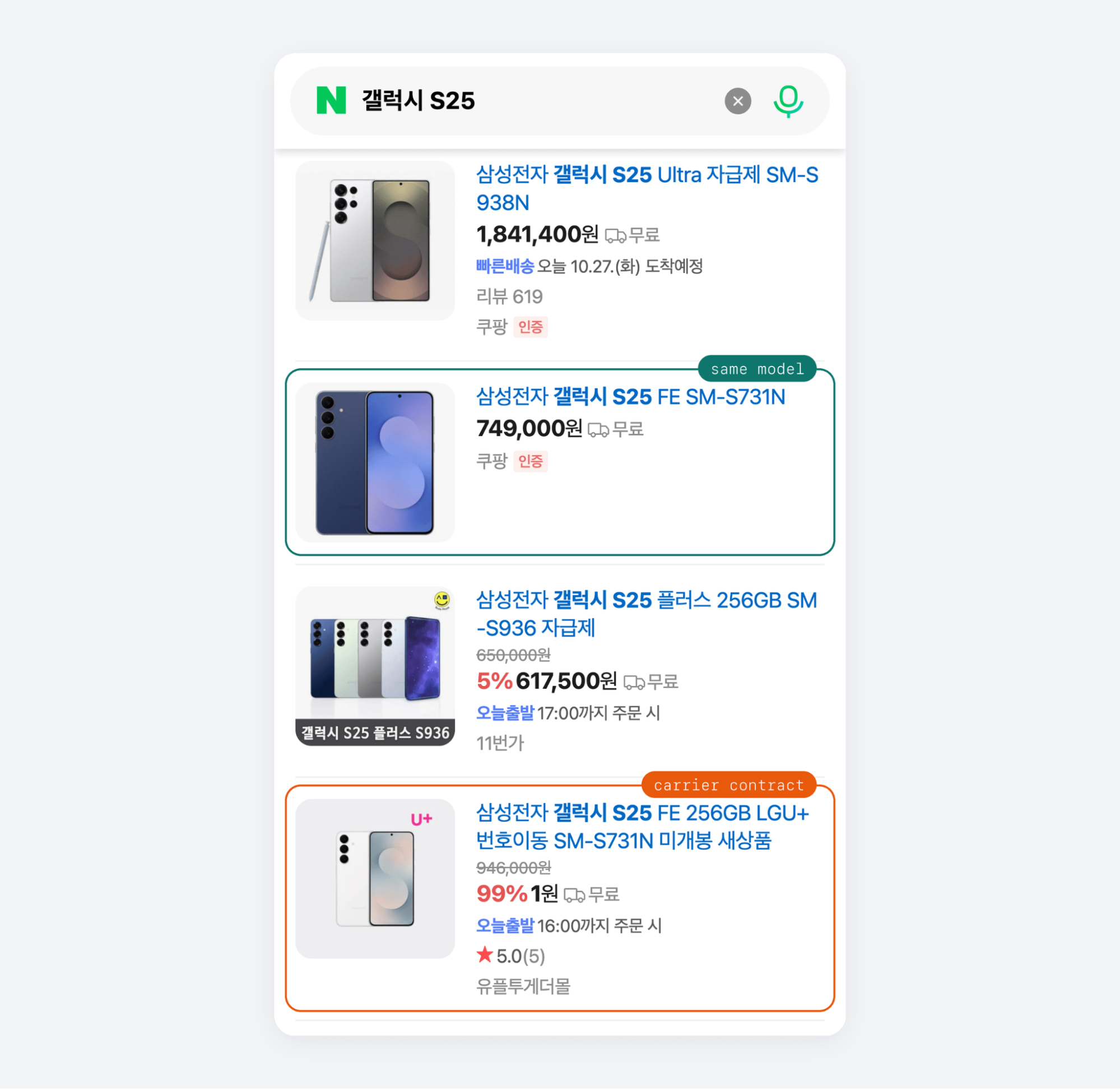
The check compares every row with one reference price for each product. Each product's reference price comes from its Naver catalog product, because a keyword returns a whole product family, and even the cheapest row that passes every check can be another variant. Your feed stores the reference price as the product's price. The script also stores every listing row with a flag column, and only rows with an empty flag count as that product's listings.
Find the catalog product to track
A catalog product is a row with mall_count above 0, because it compares many sellers. Find the catalog product once with the API's product search endpoint, which returns the search page's shopping cards as JSON. The price check uses the same endpoint, because one request returns the catalog product with its seller count next to every listing. Save this script as naver_find_catalog_product.py:
import asyncio
import os

from scrapebadger import ClientConfig, ScrapeBadger

CONFIG = ClientConfig(
    api_key=os.environ["SCRAPEBADGER_API_KEY"],
    max_retries=3,
    retry_on_status=(429, 500, 502, 503, 504, 524),
)


async def main():
    async with ScrapeBadger(config=CONFIG) as client:
        page = await client.naver.shopping.search_products("갤럭시 S25")
        for p in page.products:
            if p.get("mall_count"):  # catalog products compare many sellers
                print(
                    p["nv_mid"],
                    p["scat_id"],
                    f'{p["mall_count"]:>4} sellers',
                    f'{p.get("discounted_price") or p["price"]:>10,} KRW',
                    p["title"][:22],
                )


if __name__ == "__main__":
    asyncio.run(main())
For 갤럭시 S25, the search returned the whole product family, each model and storage size with its own catalog product:
52628743819 50001519   88 sellers  1,200,000 KRW 삼성전자 갤럭시 S25 5G 256GB
52628756975 50001519  120 sellers    937,990 KRW 삼성전자 갤럭시 S25 울트라 5G 25
56798840381 50001519   52 sellers    802,860 KRW 삼성전자 갤럭시 S25 FE 256GB
54743810036 50001519   98 sellers  1,159,800 KRW 삼성전자 갤럭시 S25 엣지 5G 256
52628743959 50001519   80 sellers  1,298,000 KRW 삼성전자 갤럭시 S25 5G 512GB
52628744095 50001519   66 sellers  1,339,000 KRW 삼성전자 갤럭시 S25 플러스 5G 25
52628834304 50001519  110 sellers  1,890,000 KRW 삼성전자 갤럭시 S25 울트라 5G 51
54743904289 50001519   89 sellers  1,359,890 KRW 삼성전자 갤럭시 S25 엣지 5G 512
52628744197 50001519   71 sellers  1,753,000 KRW 삼성전자 갤럭시 S25 플러스 5G 51
52628835214 50001519   69 sellers  2,127,400 KRW 삼성전자 갤럭시 S25 울트라 5G 1T
Run the same search once for each product you track. Store the catalog product's nv_mid (Naver's product ID) and scat_id (its category) in TRACKED. For the base 256GB model, that is the first row. The catalog product's ID stayed the same in every round of the 200-request test, and the iPhone 17 catalog product kept its ID from one day to the next.
Run the price check
The script below reads each product's reference price from its catalog product, then flags any other row that:
names another listing type in its title, such as 대여 (rental) or 번호이동 (number porting)
belongs to another category
is an outlier far below the reference price
Before the script stores anything, it also compares each reference price with the last one stored. If the reference price changes by more than 50 percent, the script skips that product and prints the change. So if Naver's catalog product ever starts showing a different variant, the change stays out of your feed. Because nothing is stored, the last stored price stays the same, so the script keeps skipping the product on later runs.
To accept a change you have reviewed, update reference_price in that product's last row of the CSV. If the catalog product is missing from a run's results, the script also skips that product, and your feed keeps its last stored price.
The script marks each row as sponsored or organic. The product search endpoint returns Naver's SUPER_POINT promotion slots, and in testing those slots had is_ad set to false. So the script counts a row as sponsored when source_type is AD or SUPER_POINT. Check any new source_type value before you count a row as organic.
The script uses asyncio to check several products at once through ScrapeBadger's official async SDK, which retries failed requests. It appends every row, flagged or not, to a CSV file. Save it as naver_price_check.py:
import asyncio
import csv
import os
import re
from collections import Counter
from datetime import datetime, timezone

from scrapebadger import ClientConfig, ScrapeBadger

# Listing types a price feed reports apart from the new, unlocked product.
# 대여, 렌탈, 렌트, 임대 = rental · 중고 = used · 리퍼 = refurbished
# 자체검수, 신품급 = inspected like-new resale
# 기기변경, 번호이동, 신규가입 = carrier contract
LISTING = {
    "rental": r"대여|렌탈|렌트|임대",
    "used": r"중고|리퍼|자체검수|신품급",
    "carrier": r"기기변경|번호이동|신규가입",
}
# source_type values Naver used for paid slots in testing. Add any new ones
SPONSORED = {"AD", "SUPER_POINT"}
# Store these once per product: its catalog product's nv_mid and its category
TRACKED = {
    "아이폰 17": ("56666632837", "50001519"),
    "다이슨 에어랩": ("56784783518", "50015561"),
    "갤럭시 S25": ("52628743819", "50001519"),
}
CONFIG = ClientConfig(
    api_key=os.environ["SCRAPEBADGER_API_KEY"],
    max_retries=3,
    retry_on_status=(429, 500, 502, 503, 504, 524),
)


def price_row(p: dict, keyword: str, category: str, reference: int) -> dict | None:
    sale = p.get("discounted_price") or p.get("price")  # price is the list price
    if not isinstance(sale, int) or sale <= 0:
        return None  # store only rows with a positive price
    title = p.get("title") or ""
    listing = next((k for k, rx in LISTING.items() if re.search(rx, title)), "new")
    if listing == "new" and p.get("is_oversea_product"):
        listing = "import"  # Naver flags overseas listings in a field, not the title
    # Flag a row for review: another listing type, another category, or an
    # outlier far below the product's reference price
    if listing != "new":
        flag = listing
    elif p.get("scat_id") != category:
        flag = "category"
    elif sale < 0.6 * reference:  # tune 0.6 per category
        flag = "outlier"
    else:
        flag = None
    sponsored = p.get("is_ad") or p.get("source_type") in SPONSORED
    return {
        "nv_mid": p.get("nv_mid"),
        "keyword": keyword,
        "title": title,
        "sale_price": sale,
        "placement": "sponsored" if sponsored else "organic",
        "listing": listing,
        "flag": flag,
        "fetched_at": datetime.now(timezone.utc).isoformat(timespec="seconds"),
    }


async def check(client, sem, keyword, last):
    product_id, category = TRACKED[keyword]
    async with sem:  # the semaphore in main() sets how many run at once
        page = await client.naver.shopping.search_products(keyword)
    tracked = next((p for p in page.products if p.get("nv_mid") == product_id), None)
    if tracked is None:
        print(f"{keyword}: catalog product not in results, keep its last stored price")
        return []
    reference = tracked.get("discounted_price") or tracked.get("price")
    if last and abs(reference - last) > 0.5 * last:  # tune 0.5 per category
        print(
            f"{keyword}: reference price moved from {last:,} to {reference:,} KRW,",
            "so review it before storing",
        )
        return []
    rows = [
        r for p in page.products if (r := price_row(p, keyword, category, reference))
    ]
    lowest = min(rows, key=lambda r: r["sale_price"])
    sellers = tracked["mall_count"]
    print(f"{keyword}: reference price {reference:,} KRW across {sellers} sellers")
    flagged = Counter(r["flag"] for r in rows if r["flag"])
    counts = ", ".join(f"{k} {n}" for k, n in flagged.items())
    print(f"  {len(rows)} rows, flagged: {counts}")
    print(
        f"  lowest price before the check: {lowest['sale_price']:,} KRW,",
        lowest["title"][:22],
    )
    return [dict(r, reference_price=reference) for r in rows]


async def main():
    path = "naver_prices.csv"
    last = {}  # the last stored reference price for each keyword
    if os.path.exists(path):
        with open(path, encoding="utf-8-sig") as f:
            last = {r["keyword"]: int(r["reference_price"]) for r in csv.DictReader(f)}
    sem = asyncio.Semaphore(2)  # raise this to match your plan's rate limit
    async with ScrapeBadger(config=CONFIG) as client:
        checks = (check(client, sem, k, last.get(k)) for k in TRACKED)
        batches = await asyncio.gather(*checks)
    rows = [r for batch in batches for r in batch]
    new_file = not os.path.exists(path)
    if rows:
        # Append, so each run adds to the price history. utf-8-sig on a new file
        # keeps Korean titles readable when it opens in Excel
        with open(
            path, "a", newline="", encoding="utf-8-sig" if new_file else "utf-8"
        ) as f:
            writer = csv.DictWriter(f, fieldnames=list(rows[0]))
            if new_file:
                writer.writeheader()
            writer.writerows(rows)
    print(f"added {len(rows)} rows to {path}")


if __name__ == "__main__":
    asyncio.run(main())
What the price check flagged
The products print in the order their calls finish:
다이슨 에어랩: reference price 383,830 KRW across 243 sellers
  69 rows, flagged: rental 23
  lowest price before the check: 2,900 KRW, [대여]110V 다이슨 에어랩 일본/미국
아이폰 17: reference price 1,345,400 KRW across 142 sellers
  60 rows, flagged: carrier 12, outlier 4, rental 2, import 1, used 1
  lowest price before the check: 19,800 KRW, [대여] 아이폰17 프로 대여 1일 단기
갤럭시 S25: reference price 1,200,000 KRW across 88 sellers
  69 rows, flagged: category 7, carrier 5, outlier 14, rental 15, import 1
  lowest price before the check: 1 KRW, 삼성전자 갤럭시 S25 FE 256GB
added 198 rows to naver_prices.csv
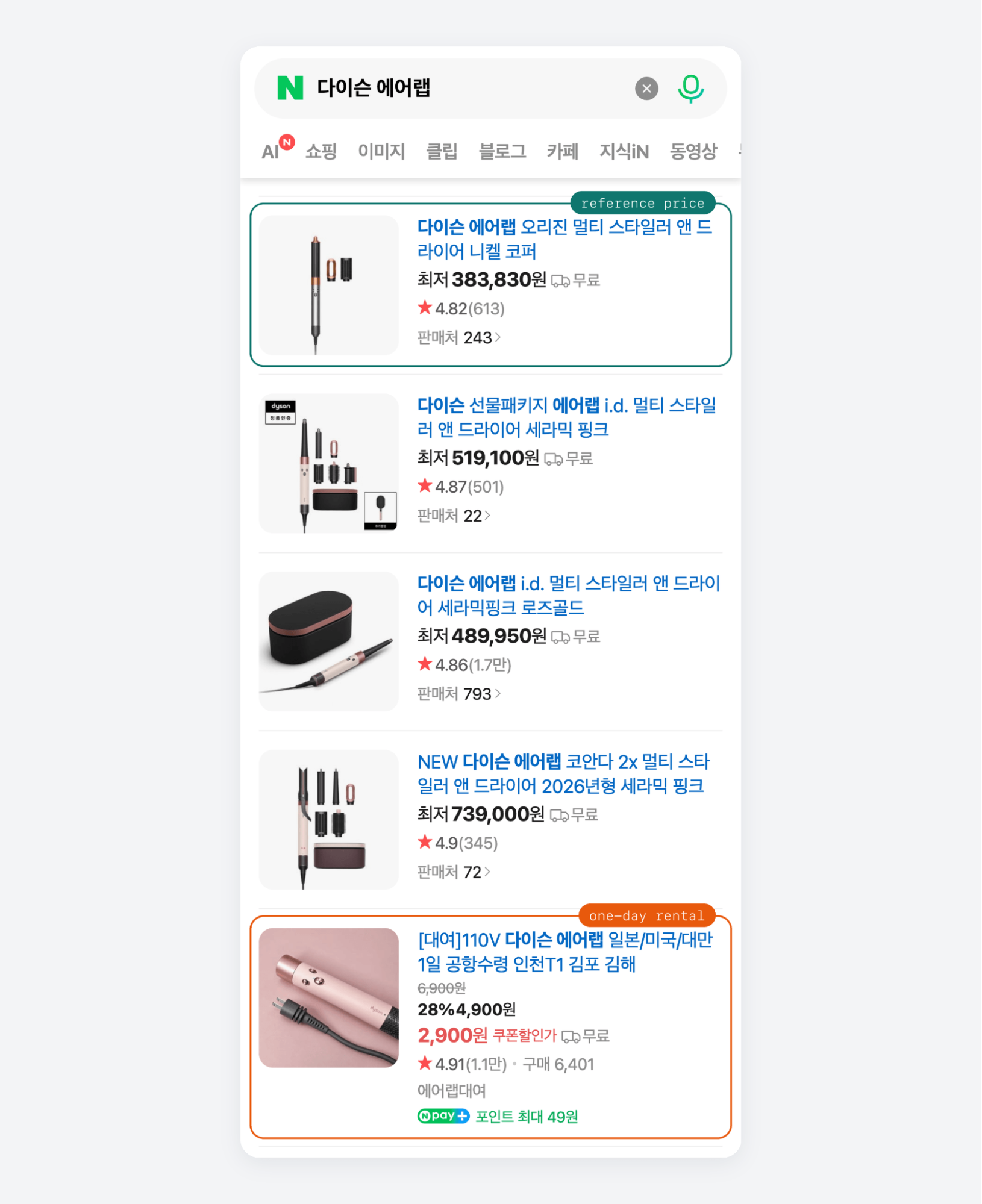
Without the check, a one-day rental would have set the stored price for iPhone 17 and the Airwrap. For the Galaxy S25, the stored price would have been 1 KRW, from the carrier contract in the screenshot above. Of the 69 S25 rows, the check flagged 42 as rentals, carrier contracts, imports, listings from other categories such as a phone case, or outliers far below the reference price. The outlier threshold also flags cheap listings whose titles have none of the rental, used, or carrier words.
The Airwrap rental also appeared on Naver's own mobile search page, a few cards below the catalog product:
Each run appends one row per listing to naver_prices.csv. Two Airwrap rows from a live run show a kept row and a flagged one:
nv_mid,keyword,title,sale_price,placement,listing,flag,fetched_at,reference_price
56784783518,다이슨 에어랩,다이슨 에어랩 오리진 멀티 스타일러 앤 드라이어 니켈 코퍼,383830,organic,new,,2026-10-27T10:59:29+00:00,383830
91287150745,다이슨 에어랩,[대여]110V 다이슨 에어랩 일본/미국/대만 1일 공항수령 인천T1 김포 김해,2900,organic,rental,rental,2026-10-27T10:59:29+00:00,383830
The fetched_at time and the flag reason let you trace every stored price to the run and the decision behind it. For the seller offers behind each price, run the price-comparison call and match the catalog_id you stored for that product.
Follow Naver's rules for data collection
Naver's rules apply to the data you collect and how you use it, whichever tool collects the data. Naver's robots.txt files for the shopping, SmartStore, and search subdomains disallowed general crawlers when I checked them, and they prohibited bot access for AI training and retrieval-augmented generation. Check each subdomain's robots.txt before you collect, because these files can change without notice.
Naver's terms of service ban automated collection without permission. Korean courts have also enforced database rights over public listings. In December 2025, a court ordered a company that crawled Naver's real-estate listings to pay damages and delete the data. Two practices lower your risk:
Collect only public pages that load without a login. Data behind a login is out of scope, because collecting it means automating a user account.
Collect only the fields you need, and remove personal data such as reviewer names or a seller's personal contact details before you store anything.
For commercial collection at scale, or data used in an AI product, get local legal advice before you start, because Korean courts have ruled both for and against data collectors in these cases.
Final thoughts
Naver Shopping data is still available after the API shutdown, and a plain Python script got the top product cards from Naver's search page for most of the keywords tested. A product's price is the reference price from its catalog product, because Naver mixes rentals, carrier contracts, and related models into the same results. The price check flags those rows and skips any product whose reference price changes by more than 50 percent, so bad rows stay out of your stored prices. The free parser covers the top cards in Naver's default order, so send the keywords that need sorted results or seller offers to ScrapeBadger's Naver Scraper API. Start with the 5 keywords you monitor most closely on the free plan, which needs no credit card, and compare the results with what your old feed stored.
FAQ
Why does Naver Shopping return a 418 error?
HTTP 418 is the status code of Naver Shopping's temporary block page, which request bursts and VPN IPs can trigger. In testing, a plain Python client got it on its first request to search.shopping.naver.com, and a client with a Chrome User-Agent got a 405 CAPTCHA. ScrapeBadger's Naver Scraper API returns search results and seller prices as JSON.
Does Naver have a shopping API after the shutdown?
No replacement. Naver ended it on July 31, 2026, and moved no product data to NAVER API HUB. Use Naver's mobile search page for top product cards and ScrapeBadger's Naver Scraper API for sorted results and seller offers. The old fields productId, lprice, and mallName are closest to nv_mid, discounted_price, and mall_name.
How much does it cost to scrape Naver?
Naver's open search page is free, apart from your own server costs. ScrapeBadger's Naver Scraper API bills catalog search, product search, and price comparison per request, and its pricing page lists the current price of each. You can start on the free plan, with no credit card, and test your own keywords before you pay.
Is it legal to scrape Naver?
It depends on what you collect and how you use it, not on which tool you pick. Naver's terms ban automated collection without permission, and Korean courts have enforced database rights over public listings. Scrape only public pages without a login, store only the fields you need, remove personal data, and get legal advice.

Written by
Domas Sakavickas
Dom Sakavickas is Co-founder of ScrapeBadger, building web scraping infrastructure for developers and data teams. He writes about the web data market, tool comparisons, and business use cases for scraping. ScrapeBadger is a web scraping API platform specialising in Twitter/X, Reddit and Google data, with dedicated scrapers also covering TikTok, YouTube, LinkedIn, Amazon, eBay, Zillow and 40+ more: with built-in anti-bot bypass and an MCP server for AI agents.
Ready to get started?
Join thousands of developers using ScrapeBadger for their data needs.