How to Scrape Google News Using Python
 Domas Sakavickas
AI Summary: The free GNews library can scrape Google News with Python, but it took 230 seconds for 100 articles and was rate-limited by Google without reporting it. ScrapeBadger's Google News API returned the same 100 articles in 6.7 seconds as structured JSON from one call, with zero requests from your IP to Google.

Scraping Google News with Python looks easy, but the free tools are slow and limited. In our tests, the popular GNews library took 230 seconds for 100 articles, and Google’s News web app answered plain HTTP requests with HTTP 429 and a CAPTCHA page.
This guide tries the free approach first, the open-source GNews library, and shows where it falls short. Then it shows how to scrape Google News reliably with Python through ScrapeBadger’s API, which returns up to 100 articles as structured JSON from one call, without a single request from your IP address to Google.
TL;DR
GNews is slow. It sends an extra request to Google for every article, one at a time. It took 230.0 seconds for 100 articles.
GNews is limited. Related stories are merged into one string, and headlines keep the publisher’s name appended.
ScrapeBadger’s Google News API returned 100 articles in 6.7 seconds from one Python call. Each has the headline, publisher, publisher website, date, and related stories, and your IP address never touches Google.
At scale, Google pushes back on GNews. In a 20-query test, Google rate-limited 34 GNews requests, and GNews didn’t report it. ScrapeBadger answered all 20 queries one at a time in 43.2 seconds of request time, against 457.9 seconds for GNews running 8 threads.
Where Google News data comes fromWe tested Google News’ 3 public surfaces from a residential IP address in India in November 2026:
Surface
URL
What Google returned
The RSS feed
news.google.com/rss/search?q=...HTTP 200 and up to 100 articles as XML
The Google News web app
news.google.com/search?q=...HTTP 429 and Google’s
/sorry/CAPTCHA pageGoogle Search’s News tab
google.com/search?q=...&tbm=nwsA JavaScript challenge page, which Google calls SearchGuard, with 0 results
The RSS feed is the only surface that answers plain HTTP clients, so the free method below starts from it.
Method 1: Scrape Google News with the GNews library
GNews is a popular open-source Google News library for Python. It wraps the RSS feed and returns each article as a dictionary
python -m pip install gnewsSave this script as method1_method1_gnews:
import sys
import time

from gnews import GNews


def main():
    query = " ".join(sys.argv[1:]) or "nvidia earnings"
    google_news = GNews(language="en", country="US", max_results=100)
    start = time.perf_counter()
    articles = google_news.get_news(query)
    elapsed = time.perf_counter() - start
    print(f"{len(articles)} articles in{elapsed:.1f} s")
    for i, a in enumerate(articles, 1):
        print(f"{i:>3}.{a['title']}")
        print(f"{a['publisher']['title']} |{a['published date']}")
        print(f"{a['url']}\n")


if __name__ == "__main__":
    sys.stdout.reconfigure(encoding="utf-8")
    main()
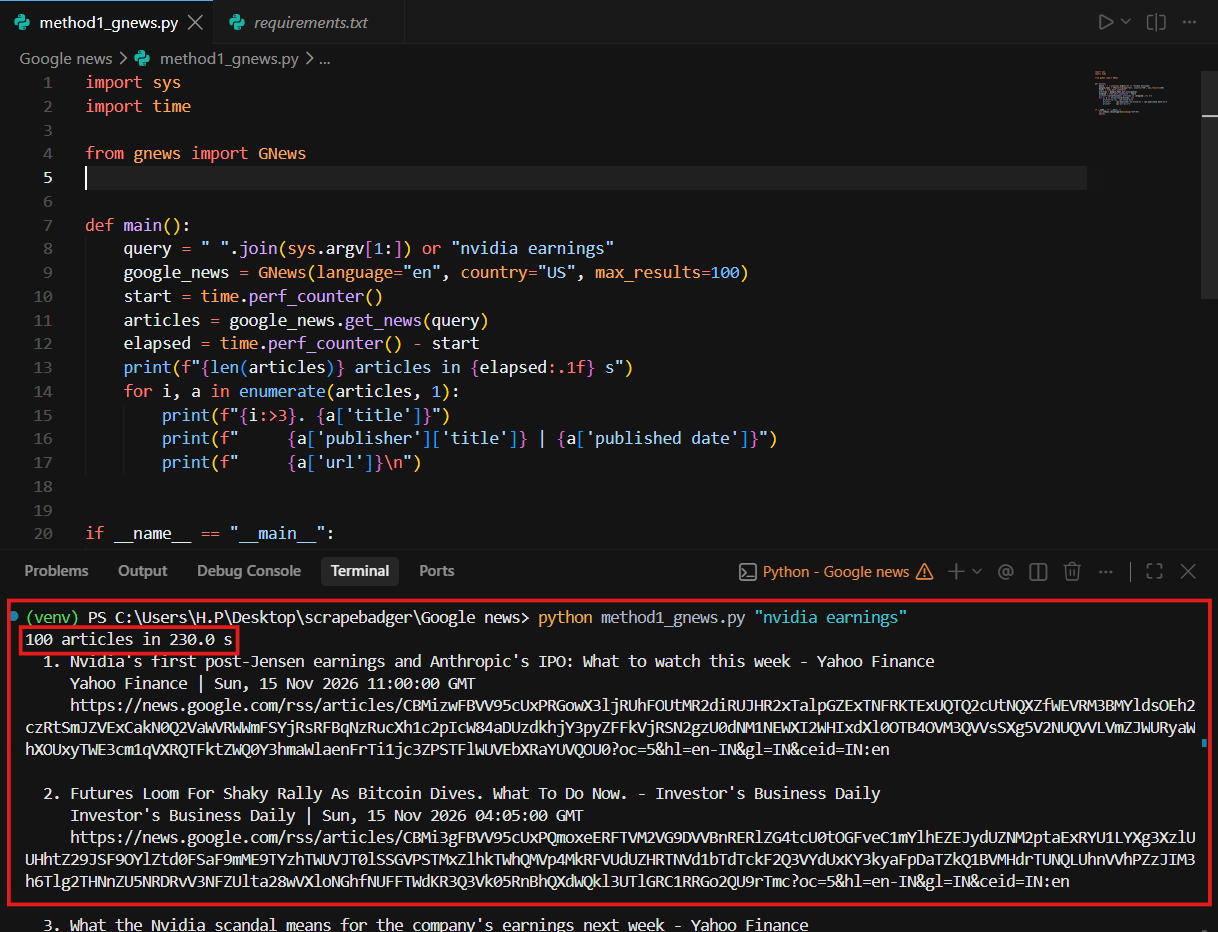
The script printed 100 articles in 230.0 s, followed by every article:
Terminal output of method1_gnews.py: 100 articles in 230.0 seconds, followed by a numbered list of the articles, each with its headline, publisher, publish date, and link.
The problem with GNews
GNews is slow. After it downloads the RSS feed, GNews 0.8.3 with a default install (no Playwright) sends a separate HTTP HEAD request to Google for every article, one at a time. Those 100 requests took most of the 230.0 seconds. The articles still came from the US feed, but the redirects rewrote every link to India (hl=en-IN&gl=IN), although we asked for US results.
GNews has other limits too. Related stories are merged into one description string, and every headline keeps the publisher’s name appended, such as ” - Yahoo Finance”.
Every one of those requests also comes from your IP address, so 100 articles means 101 requests to Google. We sent all 100 article links back to back with no delay, and Google returned HTTP 200 for every one in 157.6 seconds. At this scale, the requests are slow, not blocked. But larger or scheduled runs are what Google’s rate limits exist to catch. For those runs, an API saves you from sending the requests and handling retries and fixes yourself.
Method 2: Scrape Google News with ScrapeBadger’s API
ScrapeBadger runs each Google News request on its own infrastructure and returns clean JSON. When Google answers with HTTP 429 or a CAPTCHA page, ScrapeBadger rotates to a new residential IP address and retries, so you don’t have to handle rate limits yourself. Besides keyword search, it covers Google News topics and trending stories.
Each article in the response has these fields:
Field | What it contains |
|---|---|
| The headline, without the publisher’s name appended |
| The article link |
| Google’s summary text, usually the headline and publisher |
| The publisher’s |
| The publish date |
| Every article in Google’s story cluster, including this one, as separate records with their own |
That covers what Method 1 missed. The API takes 1 request instead of 101, returns 100 articles in seconds instead of minutes, related_stories returns each article in the cluster as a separate record instead of one merged description string, and title drops the ” - Yahoo Finance”-style suffix GNews leaves on every headline.
Get your API key
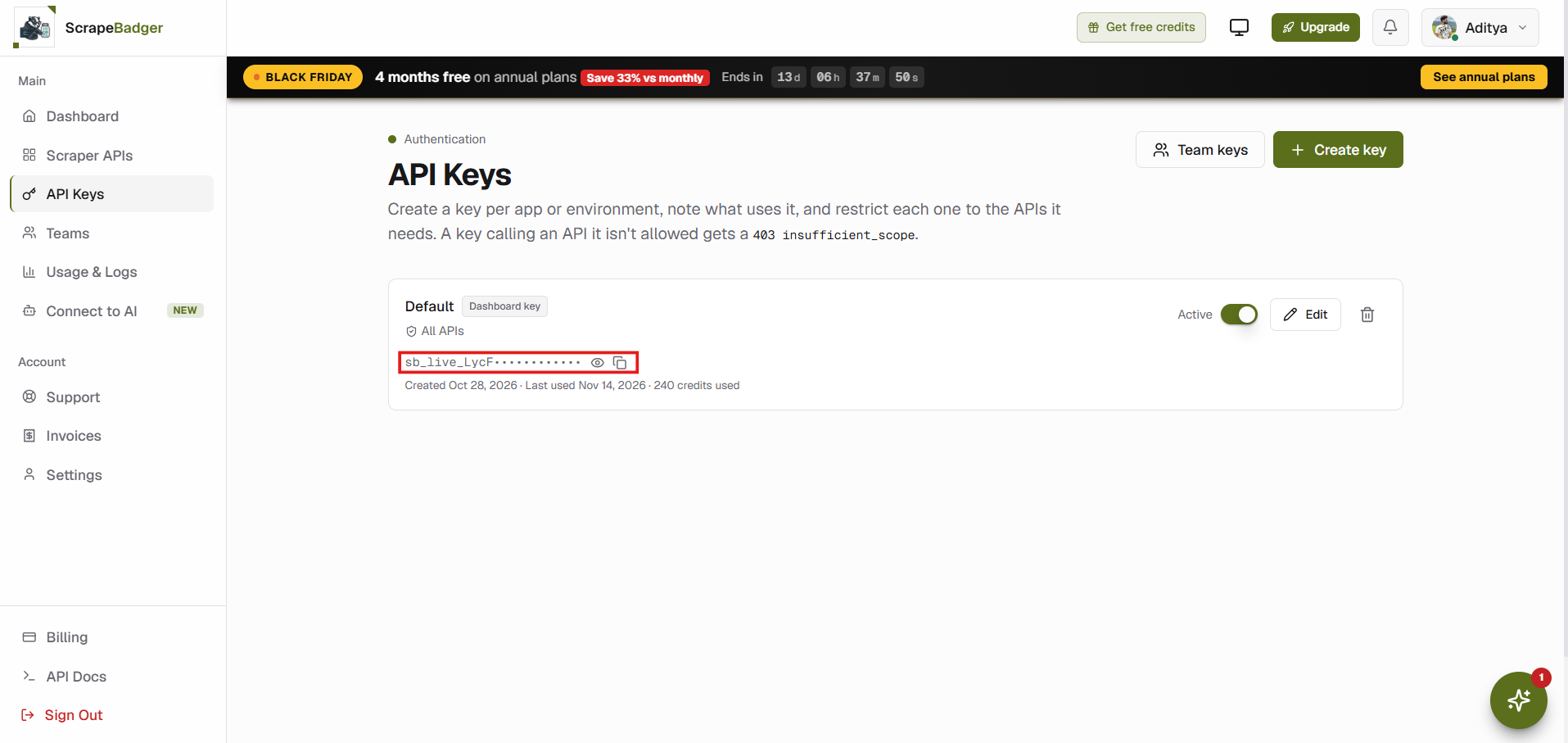
Create a free ScrapeBadger account, which comes with 1,000 free credits and needs no credit card, and copy your API key from the API Keys page:
The API Keys page of the ScrapeBadger dashboard, with the copy button next to the default key. The key and the account name are blurred.
Install the official Python SDK and set your key as an environment variable:
python -m pip install scrapebadger
export SCRAPEBADGER_API_KEY="your_api_key"
# Windows PowerShell: $env:SCRAPEBADGER_API_KEY = "your_api_key"
Search Google News and save the results to CSV
The script below searches Google News, prints every article, and saves them to google_news.csv. Save it as method2_scrapebadger.py:
import asyncio
import csv
import os
import sys
import time

from scrapebadger import ScrapeBadger

FIELDS = ["title", "source", "source_url", "published_at", "link", "snippet",
          "related_stories"]


def to_row(article: dict) -> dict:
    return {
        "title": article["title"],
        "source": article["source"]["name"],
        "source_url": article["source"].get("url"),
        "published_at": article.get("published_at"),
        "link": article["link"],
        "snippet": article.get("snippet"),
        "related_stories": len(article.get("related_stories") or []),
    }


async def main():
    query = " ".join(sys.argv[1:]) or "nvidia earnings"
    start = time.perf_counter()
    async with ScrapeBadger(os.environ["SCRAPEBADGER_API_KEY"]) as client:
        page = await client.google.news.search(query, gl="US", hl="en", max_results=100)
    elapsed = time.perf_counter() - start
    rows = [to_row(a) for a in page["articles"]]
    print(f"{len(rows)} articles in{elapsed:.1f} s")
    for i, row in enumerate(rows, 1):
        print(f"{i:>3}.{row['title']}")
        print(f"{row['source']} ({row['source_url']}) |{row['published_at']}")
        print(f"{row['link']}")
        print(f"     Related stories:{row['related_stories']}\n")
    print(f"{len(rows)} articles for{page['query']!r}, saved to google_news.csv")
    with open("google_news.csv", "w", newline="", encoding="utf-8") as f:
        writer = csv.DictWriter(f, fieldnames=FIELDS)
        writer.writeheader()
        writer.writerows(rows)


if __name__ == "__main__":
    sys.stdout.reconfigure(encoding="utf-8")
    asyncio.run(main())
Run it with a query:
python method2_scrapebadger.py "nvidia earnings"It returned all 100 articles in 6.7 seconds from 1 request. Each one has the headline, the publisher and its website, the publish date, the article link, and the number of stories in its cluster:
Terminal output of method2_scrapebadger.py. Each article shows its headline, the publisher and its website, the publish date, the article link, and the number of related stories.
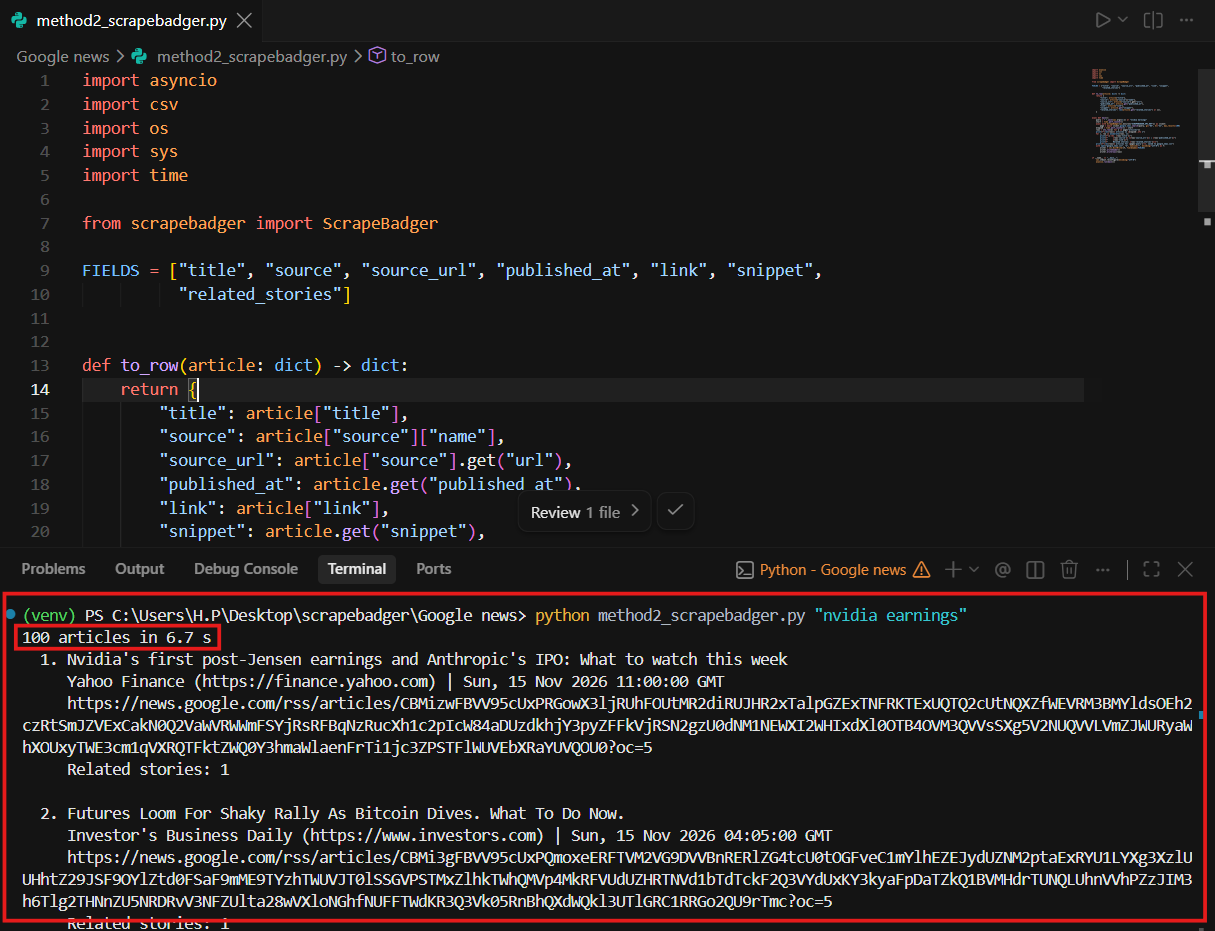
No IP blocks or CAPTCHAs to handle on your side. The links keep the country we asked for, with no gl=IN rewrite. Use gl for the country, hl for the language, and max_results for up to 100 articles. For a news section or trending stories instead of a keyword, call client.google.news.topics("TECHNOLOGY") or client.google.news.trending(). The Google News API reference lists every parameter.
Each request costs 20 credits, for search, topics, and trending alike, and returns up to 100 articles, so the 1,000 free credits cover 50 requests. Failed requests are free. See the pricing page for current rates.
Test both methods at production scale
One query is a demo. A news-monitoring job runs many queries on a schedule, so we tested that too. We ran the same 20 company queries (Nvidia, Microsoft, Apple, Tesla, OpenAI, and 15 more) through both methods on November 18, 2026. To give GNews every advantage, we ran it in 8 parallel threads. ScrapeBadger ran one request at a time.
GNews doesn’t show the status codes Google returns for its per-article requests, so the script wraps requests.head to log every one. Save it as test_production.py:
import argparse
import asyncio
import os
import sys
import threading
import time
from collections import Counter
from concurrent.futures import ThreadPoolExecutor

QUERIES = [
    "nvidia earnings", "microsoft earnings", "apple earnings", "amazon earnings",
    "alphabet earnings", "meta earnings", "tesla earnings", "amd earnings",
    "intel earnings", "netflix earnings", "openai", "anthropic",
    "salesforce", "oracle", "ibm", "broadcom", "qualcomm", "adobe",
    "palantir", "snowflake",
]


def run_gnews(workers: int) -> None:
    import requests
    from gnews import GNews

    statuses, errors, lock = Counter(), Counter(), threading.Lock()
    original_head = requests.head

    def logged_head(*args, **kwargs):
        try:
            resp = original_head(*args, **kwargs)
        except requests.RequestException as e:
            with lock:
                statuses[type(e).__name__] += 1
            raise
        with lock:
            statuses["sorry page" if "/sorry/" in resp.url else f"HTTP{resp.status_code}"] += 1
        return resp

    requests.head = logged_head

    def fetch(query: str) -> int:
        try:
            return len(GNews(language="en", country="US", max_results=100).get_news(query))
        except Exception as e:
            with lock:
                errors[type(e).__name__] += 1
            return 0

    start = time.perf_counter()
    with ThreadPoolExecutor(max_workers=workers) as pool:
        counts = list(pool.map(fetch, QUERIES))
    elapsed = time.perf_counter() - start

    print(f"GNews:{len(QUERIES)} queries,{workers} threads,{elapsed:.1f} s")
    print(f"  articles returned:{sum(counts)}")
    print(f"  queries that failed outright:{sum(errors.values())}{dict(errors)}")
    print(f"  article HEAD requests to Google:{sum(statuses.values())}")
    for status, n in statuses.most_common():
        print(f"{status:<22}{n}")


async def run_scrapebadger(pace: float) -> None:
    from scrapebadger import ScrapeBadger

    counts, errors, latencies = [], Counter(), []
    start = time.perf_counter()
    async with ScrapeBadger(os.environ["SCRAPEBADGER_API_KEY"]) as client:
        for i, query in enumerate(QUERIES):
            if i:
                await asyncio.sleep(pace)
            t = time.perf_counter()
            try:
                page = await client.google.news.search(query, gl="US", hl="en", max_results=100)
                counts.append(len(page["articles"]))
            except Exception as e:
                errors[type(e).__name__] += 1
            latencies.append(time.perf_counter() - t)
            print(f"{i + 1:>2}.{query:<20}{latencies[-1]:.1f} s")
    elapsed = time.perf_counter() - start

    print(f"ScrapeBadger:{len(QUERIES)} queries,{elapsed:.1f} s wall time "
          f"(paced{pace:.0f} s apart for the free tier's 5 requests/minute)")
    print(f"  articles returned:{sum(counts)}")
    print(f"  queries that failed:{sum(errors.values())}{dict(errors)}")
    print(f"  API time:{sum(latencies):.1f} s total,{max(latencies):.1f} s slowest request")
    print("  requests from your IP to Google: 0")


def main():
    parser = argparse.ArgumentParser()
    parser.add_argument("method", choices=["gnews", "scrapebadger"])
    parser.add_argument("--workers", type=int, default=8)
    parser.add_argument("--pace", type=float, default=12.5)
    args = parser.parse_args()
    if args.method == "gnews":
        run_gnews(args.workers)
    else:
        asyncio.run(run_scrapebadger(args.pace))


if __name__ == "__main__":
    sys.stdout.reconfigure(encoding="utf-8")
    main()
Run each side:
python test_production.py gnews --workers 8
python test_production.py scrapebadger
The ScrapeBadger side waits 12.5 seconds between requests to stay within the free tier’s 5 requests per minute. On a paid plan, lower the wait with --pace, for example --pace 1 on pay-as-you-go. Running the GNews side sends over 1,500 requests from your IP address to Google, so Google may rate-limit or show CAPTCHAs to your connection for a while afterwards.
Terminal output of the GNews scale test: 20 queries in 8 threads took 457.9 seconds and returned 1,573 articles, and Google answered 34 article requests with HTTP 429.

Terminal output of the ScrapeBadger scale test: 20 queries one at a time, each answered in 1.4 to 5.8 seconds, 1,572 articles, 0 failures, and 0 requests from our IP to Google.

GNews (8 parallel threads) | ScrapeBadger (1 request at a time) | |
|---|---|---|
Queries | 20 | 20 |
Articles returned | 1,573 | 1,572 |
Failed queries | 0 | 0 |
Requests from your IP to Google | 1,593 | 0 |
HTTP 429 rate-limit responses from Google | 34 | 0 |
Request time | 457.9 s | 43.2 s |
ScrapeBadger was 10.6× faster with one-eighth of the parallelism. GNews needed 8 threads and 457.9 seconds. ScrapeBadger answered all 20 queries one after another in 43.2 seconds of request time, an average of 2.2 seconds per query of up to 100 articles.
The free tier held back ScrapeBadger’s full run time. We tested on a free account, which allows 5 requests per minute, so the script waited 12.5 seconds between queries and the run took 281.5 seconds from start to finish. The requests themselves took 43.2 seconds. On pay-as-you-go, the limit is 60 requests per minute, so all 20 fit in one minute without any waiting. Starter and Growth plans allow 300 requests per minute, enough to send all 20 in parallel instead of one at a time. See the rate limits for every plan.
Google started rate-limiting GNews, and GNews didn’t say so. Google answered 34 of the 1,573 article requests with HTTP 429, about 1 in 46, and this was from a home connection, not the cloud server most scheduled jobs run on. GNews raised no error and printed no warning, because it doesn’t check the status of its per-article requests. We only saw the 429s because our script logged every response. A scheduled job built on GNews would keep running while Google throttled it.
Blocks are ScrapeBadger’s problem, not yours. When Google answers ScrapeBadger with HTTP 429 or a CAPTCHA, ScrapeBadger rotates to a new residential IP address and retries, up to 3 times per request, as its Google docs describe. With GNews, every 429 lands on your IP address, and slowing down, retrying, or adding proxies is code you write and maintain.
Same data, low cost. Both methods returned the same articles, 1,573 and 1,572, so the speed doesn't come from returning less. The 20 ScrapeBadger requests used 400 credits, 20 per request with no per-article charge, for 1,572 articles, and failed requests aren't charged. See the pricing page for what credits cost on each plan.
These are results from one run from one residential IP address, so your numbers will vary with the queries, the time of day, and your network.
Compare the 2 methods
GNews | ScrapeBadger’s API | |
|---|---|---|
Requests from your IP to Google for 100 articles | 101, sequential | 0 |
Time for 100 articles | 230.0 s | 6.7 s |
Request time for 20 queries | 457.9 s with 8 threads | 43.2 s, 1 request at a time |
Requests from your IP to Google for 20 queries | 1,593 | 0 |
Google rate-limit responses in the 20-query test | 34, not reported by GNews | 0 |
Rate limits and CAPTCHAs if Google blocks your IP | Your problem | Handled for you, with up to 3 IP rotations per request |
Related stories as separate records | No, merged into one string | Yes |
Headlines without the publisher suffix | No | Yes |
Links keep the requested country | No, rewritten to | Yes |
Best for | Small, occasional runs | Scheduled and large runs |
Final thoughts
Google News looks easy to scrape because its RSS feed answers any HTTP client. The trouble starts when you scrape it regularly: in our tests, GNews took 230.0 seconds for 100 articles, Google rate-limited 34 of its requests in a 20-query run without GNews reporting it, and Google’s web app and Search News tab block plain HTTP clients.
ScrapeBadger’s Google News API returns headlines, publishers, publisher websites, dates, and related stories as JSON from one call, without sending a single request from your IP address to Google. Try the search script on ScrapeBadger’s free credits. Store headlines and links, and link to the publisher for the full article, since article text is copyrighted.
Explore more Google APIs
The same ScrapeBadger API key and credit balance work across its other Google endpoints, so you can add more data to a news-monitoring workflow:
Google SERP API: full search results, including news blocks, featured snippets, People Also Ask and AI Overviews.
Google Trends API: shows what people are searching for, to set beside what publishers are covering.
Google Videos API: interviews, broadcasts and video reports that articles miss.
Google Finance API: stock, crypto and currency quotes to pair with business headlines.
Additional Resources
How to Scrape Google Images Using Python
How to Scrape Google Search Results with Python
How to Scrape Naver Shopping Using Python
How to Scrape Brand Mentions in Google AI Overviews
FAQ
Can you scrape Google News with Python?
Yes. Google News’ RSS feed answers plain Python HTTP clients, but scrapers built on it run into slow requests and, at higher volumes, Google’s rate limits. ScrapeBadger’s Google News API returns up to 100 articles as JSON from one Python call and handles Google’s rate limits for you.
Is there an official Google News API?
No. Google doesn’t offer a public Google News API. The RSS feed is public, but it returns raw XML with at most 100 articles per query. ScrapeBadger’s Google News API returns the same articles as structured JSON, and it also has endpoints for the 7 topic categories and trending stories.
How do I get more than 100 results from Google News?
Split your query into date ranges with after: and before:, such as nvidia earnings after:2026-09-01 before:2026-09-08, and send one request per range. In our test, when:1d limited a query to the last day’s articles.
Is it legal to scrape Google News?
It depends on what you collect and how you use it. Headlines and links are usually lower risk to store, but article text belongs to the publisher. Check each publisher’s terms, and get legal advice before you republish article text or train a model on it.

Written by
Domas Sakavickas
Dom Sakavickas is Co-founder of ScrapeBadger, building web scraping infrastructure for developers and data teams. He writes about the web data market, tool comparisons, and business use cases for scraping. ScrapeBadger is a web scraping API platform specialising in Twitter/X, Reddit and Google data, with dedicated scrapers also covering TikTok, YouTube, LinkedIn, Amazon, eBay, Zillow and 40+ more: with built-in anti-bot bypass and an MCP server for AI agents.
Ready to get started?
Join thousands of developers using ScrapeBadger for their data needs.