How to Scrape Google Scholar Using Python (All 5 Endpoints)
 Domas Sakavickas
Google Scholar doesn’t have an official API, so scraping it from Python means working through a few awkward options. In our tests, plain requests calls got HTTP 429 on every Scholar URL, the scholarly2 library returned no papers for a search, and Playwright only worked in a visible Chrome window after we removed one of its default flags.
We’ll go through three approaches in order: the scholarly2 library, a Playwright script, and ScrapeBadger’s API. The first two show where free tooling breaks. After that, we’ll walk through all 5 Scholar endpoints in ScrapeBadger’s API: paper search, author search, author profiles, citations per year, and citation formats. Each one comes with a script you can run.
TL;DR
Plain HTTP mostly fails. With the default
requestsUser-Agent, all 3 Scholar URLs we tried returned HTTP 429. With a Chrome User-Agent, only the author profile page returned real data.scholarly2found no papers.search_pubscame back empty after 21.4 seconds, and the title lookup and BibTeX export raisedIndexError. Only the author profile worked, in 24.0 seconds.Playwright works, but only in a visible window. It returned 10 papers in 10.4 seconds and an author profile in 5.1 seconds, with
-enable-automationremoved. Headless mode got a CAPTCHA on paper search.ScrapeBadger has 5 Scholar endpoints, all returning JSON. Each call costs 20 credits and took between 0.8 and 5.2 seconds in our script runs.
The 5 Google Scholar endpoints
All five sit under /v1/google/scholar/ and take the same x-api-key header:
Endpoint | Path | SDK method | What it returns |
|---|---|---|---|
Search papers |
|
| Papers with authors, citation counts, versions, and PDF links |
Search author profiles |
|
| Author names, profile links, and |
Author profile |
|
| Affiliation, interests, h-index, publication list, co-authors |
Author citation chart |
|
| Citations per year and a total |
Citation formats |
|
| MLA, APA, Chicago, Harvard, Vancouver, plus export links |
The endpoints feed each other. A paper search gives you author IDs and a paper id. The author ID goes into the profile and chart endpoints, and the paper id goes into the citation endpoint.
Method 1: Scrape Google Scholar with scholarly2
We ran everything from a residential IP address in India in November 2026. Before trying a library, we sent plain requests calls to see what Scholar gives a basic HTTP client, since libraries like scholarly use a plain httpx client. We tried 3 URLs (a paper search, an author profile, and an author search), each with the default requests User-Agent and then with a Chrome one:
URL | Default User-Agent | Chrome User-Agent |
|---|---|---|
| HTTP 429 | HTTP 200, but a “Verifying…” page with no results |
| HTTP 429 | HTTP 200 with the full profile |
| HTTP 429 | HTTP 200, but a redirect to Google’s sign-in page |
Only the author profile page worked, and only with a browser-like User-Agent. Search sits behind a verification page, and author search needs a login.
A well-known library for this is scholarly, but its last PyPI release (1.7.11) came out in January 2023. scholarly2 is a newer fork maintained separately, and version 2.0.0 was released in March 2026. Its README says anonymous author-name search is no longer part of the workflow, so you start from a known Scholar ID:
python -m pip install scholarly2Importing it failed in a clean Python 3.12 environment. pip installed bibtexparser 2.1.0, but the library expects 1.x:
ModuleNotFoundError: No module named 'bibtexparser.bibdatabase'Pinning the older version fixes it:
python -m pip install "bibtexparser<2"This script tries the four things the library is for. Save it as method1_scholarly2.py:
import sys
import time
from itertools import islice

from scholarly2 import scholarly


def step(label, fn):
    start = time.perf_counter()
    try:
        result = fn()
        print(f"[OK]{label} in{time.perf_counter() - start:.1f} s\n{result}")
    except Exception as e:
        print(f"[FAIL]{label} in{time.perf_counter() - start:.1f} s\n{type(e).__name__}:{e}")


def search_papers():
    papers = list(islice(scholarly.search_pubs("transformer neural networks"), 10))
    return f"{len(papers)} papers" + (f", first:{papers[0]['bib']['title']}" if papers else "")


def single_paper():
    paper = scholarly.search_single_pub("Attention is all you need Vaswani")
    return f"{paper['bib']['title']} ({paper['num_citations']} citations)"


def author_profile():
    author = scholarly.search_author_id("JicYPdAAAAAJ")
    author = scholarly.fill(author, sections=["basics", "indices", "counts", "publications"])
    return (f"{author['name']}:{author['citedby']:,} citations, h-index{author['hindex']}, "
            f"{len(author['cites_per_year'])} years of citations,{len(author['publications'])} papers")


def citation_export():
    paper = scholarly.search_single_pub("Attention is all you need Vaswani")
    return scholarly.bibtex(paper).splitlines()[0]


if __name__ == "__main__":
    sys.stdout.reconfigure(encoding="utf-8")
    step("Search papers", search_papers)
    step("Find one paper by title", single_paper)
    step("Author profile and citations per year", author_profile)
    step("BibTeX citation", citation_export)
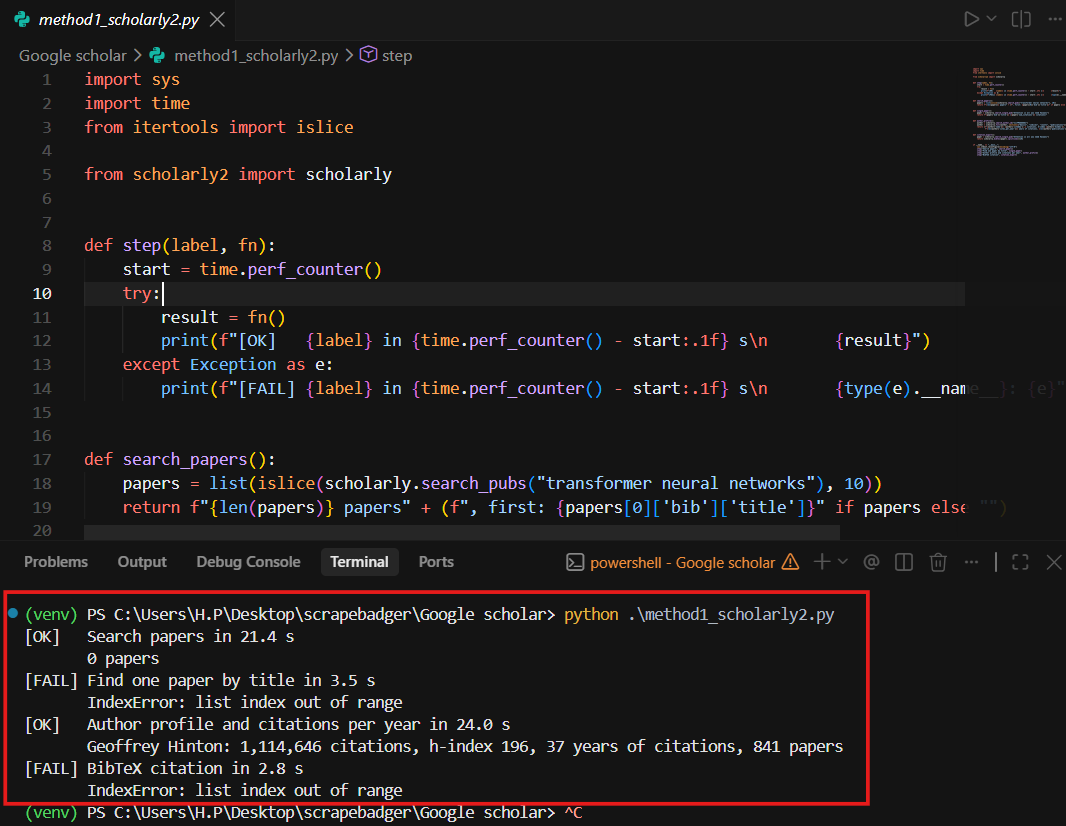
Terminal output of method1_scholarly2.py: paper search returns 0 papers after 21.4 seconds, the title lookup and BibTeX export fail with IndexError, and only the author profile succeeds.
What went wrong with scholarly2
The paper search shows [OK] only because it didn’t raise an error. It returned an empty list after 21.4 seconds, so a script that doesn’t check the count would save nothing and still report success. The title lookup and BibTeX export failed with a bare IndexError and no hint of why.
Only the author profile worked, and it took 24.0 seconds for 841 papers.
None of this is a surprise given the README, which says Scholar “rate-limits aggressively” and recommends SOCKS5 residential proxies. We didn’t test it with one, so these results come from a plain home connection. The original scholarly does worse: author search returns nothing, and its FreeProxies() helper crashes against current httpx with TypeError: Client.__init__() got an unexpected keyword argument 'proxies'.
The library sends plain HTTP requests, and our requests test above got a 429 or a verification page on every search URL. A real browser is the next thing to try.
Can you rely on scholarly2?
Apart from the failed calls, a few other things make scholarly2 risky for a real project:
- Proxies. The README tells you to use residential proxies for anything non-trivial. That’s an ongoing cost and setup, and it doesn’t fix author search, which Google now puts behind a login.
- Maintenance. PyPI has a single release, 2.0.0 from 6 March 2026. The GitHub repository was last pushed to that same day, and it has 2 stars, 0 forks, and no open issues. Scholar changes its pages often, and there’s no sign of fixes since.
- Installation. The dependency list doesn’t pin bibtexparser, so a fresh install pulls version 2 and the import fails. You have to find the "bibtexparser<2" pin yourself.
- Dependencies. It installs selenium, free-proxy, fake_useragent, and even the sphinx_rtd_theme documentation theme, when all you want is a few pages of results.
- Deprecations. According to the README, the older proxy helpers ScraperAPI(), Luminati(), FreeProxies(), SingleProxy(), and the Tor options) are deprecated and will be removed.
- Usage terms. The README says the fork is maintained “strictly for academic and nonprofit purposes”. If you’re building something commercial, read that wording first.
The original scholarly doesn’t do better: its last PyPI release was in January 2023, and its FreeProxies() helper crashes on current httpx. Each problem has a fix, but together they mean maintaining the library on top of your own scraper.
Method 2: Scrape Google Scholar with Playwright
Plenty of open-source Scholar tools use a real browser for exactly this reason. PyPaperBot added an optional Selenium mode in October 2024 to avoid bot detection on Scholar searches, and AcadIndex has a Chrome backend built on nodriver. We’ll use Playwright, which drives your installed Chrome from your own IP address, and parse the rendered HTML with BeautifulSoup:
python -m pip install playwright beautifulsoup4We launch with channel="chrome", which uses the Chrome you already have, so there’s no browser download. Login matters here too, but less than you might expect. Paper search and opening a profile by ID both worked in a fresh, logged-out Chrome window. Searching for authors by name is what needs a login: since April 2025, Google Scholar has required a Google login for it, as the Publish or Perish manual documents. Our script doesn’t call it, so it covers paper search and profiles by ID only. A visible window also lets you clear a CAPTCHA by hand if one shows up.
We tried four launch setups before settling on the script. The results explain its launch options:
Launch options | Paper search | Author profile |
|---|---|---|
Headless, default flags | CAPTCHA | Worked |
Visible window, default flags | CAPTCHA | Worked |
Visible window, | 10 results | Worked |
Headless, | CAPTCHA | Worked |
Only a visible window with --enable-automation removed got search results. The script below, saved as method2_playwright.py, searches for papers from 2020 to 2024, waits a random 4 to 9 seconds, then loads an author profile:
import json
import random
import re
import sys
import time

from bs4 import BeautifulSoup
from playwright.sync_api import sync_playwright


def text(el):
    return el.get_text(" ", strip=True) if el else None


def count(link):
    m = re.search(r"\d+", link.get_text()) if link else None
    return int(m.group()) if m else None


def parse_search(html: str) -> list[dict]:
    soup = BeautifulSoup(html, "html.parser")
    papers = []
    for rank, box in enumerate(soup.select("div.gs_r.gs_or"), start=1):
        title = box.select_one("h3.gs_rt a") or box.select_one("h3.gs_rt")
        cited = box.find("a", string=re.compile(r"Cited by"))
        pdf = box.select_one("div.gs_or_ggsm a")
        papers.append({
            "position": rank,
            "title": text(title),
            "link": title.get("href") if title else None,
            "publication_info": text(box.select_one("div.gs_a")),
            "snippet": text(box.select_one("div.gs_rs")),
            "cited_by_count": count(cited),
            "pdf_link": pdf.get("href") if pdf else None,
        })
    return papers


def parse_profile(html: str) -> dict:
    soup = BeautifulSoup(html, "html.parser")
    stats = [td.get_text() for td in soup.select("#gsc_rsb_st td.gsc_rsb_std")]
    years = [t.get_text() for t in soup.select(".gsc_g_t")]
    cites = [t.get_text() for t in soup.select(".gsc_g_al")]
    return {
        "name": text(soup.select_one("#gsc_prf_in")),
        "affiliation": text(soup.select_one(".gsc_prf_il")),
        "citations_all": int(stats[0]) if stats else None,
        "h_index_all": int(stats[2]) if stats else None,
        "i10_index_all": int(stats[4]) if stats else None,
        "citations_by_year": dict(zip(years, map(int, cites))),
        "papers_on_page": [
            {"title": text(r.select_one("a.gsc_a_at")), "cited_by": text(r.select_one("a.gsc_a_ac")),
             "year": text(r.select_one("span.gsc_a_h"))}
            for r in soup.select("tr.gsc_a_tr")
        ],
    }


def load(page, url: str, ready: str) -> str:
    page.goto(url)
    for _ in range(20):
        page.wait_for_timeout(1000)
        html = page.content()
        if "/sorry/" in page.url or "unusual traffic" in html:
            raise RuntimeError("Google served a CAPTCHA. Solve it in the window, then rerun.")
        if re.search(ready, html):
            return html
    raise RuntimeError("No results: blocked, a login wall, or the layout changed")


def main():
    query = " ".join(sys.argv[1:]) or "transformer neural networks"
    start = time.perf_counter()
    with sync_playwright() as p:
        # Headless Chrome gets a CAPTCHA from Scholar, so run a visible window
        browser = p.chromium.launch(
            headless=False,
            channel="chrome",
            ignore_default_args=["--enable-automation"],
            args=["--disable-blink-features=AutomationControlled"],
        )
        page = browser.new_page()
        try:
            url = f"https://scholar.google.com/scholar?q={query.replace(' ', '+')}&hl=en&as_ylo=2020&as_yhi=2024"
            papers = parse_search(load(page, url, r'class="gs_r gs_or'))
            print(f"{len(papers)} papers in{time.perf_counter() - start:.1f} s")
            for p_ in papers[:3]:
                print(f"{p_['position']:>2}.{p_['title']}\n{p_['publication_info']}\n    Cited by{p_['cited_by_count']}")

            page.wait_for_timeout(random.uniform(4, 9) * 1000)
            t = time.perf_counter()
            profile = parse_profile(load(page, "https://scholar.google.com/citations?user=JicYPdAAAAAJ&hl=en", r"gsc_prf_in"))
            print(f"\nProfile in{time.perf_counter() - t:.1f} s:{profile['name']} |{profile['affiliation']}")
            print(f"Citations{profile['citations_all']:,} | h-index{profile['h_index_all']} | "
                  f"i10-index{profile['i10_index_all']} |{len(profile['papers_on_page'])} papers on page 1")
            print(json.dumps(dict(list(profile["citations_by_year"].items())[-3:])))
        finally:
            browser.close()


if __name__ == "__main__":
    sys.stdout.reconfigure(encoding="utf-8")
    try:
        main()
    except RuntimeError as e:
        sys.exit(f"Error:{e}")
Run it:
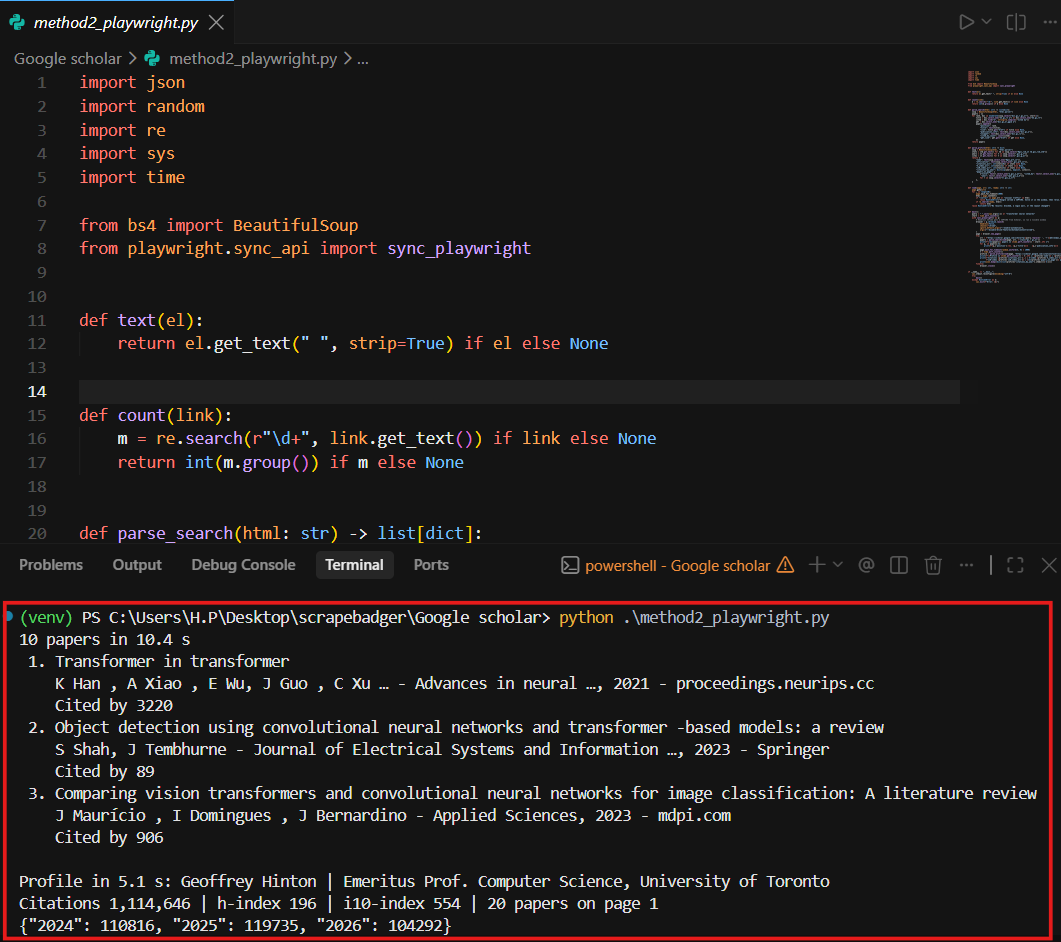
python method2_playwright.py "transformer neural networks"This is what it printed from a visible Chrome window on a residential IP:
Terminal output of method2_playwright.py: 10 papers in 10.4 seconds, each with its title, authors and publication line, and citation count, followed by Geoffrey Hinton’s profile statistics.
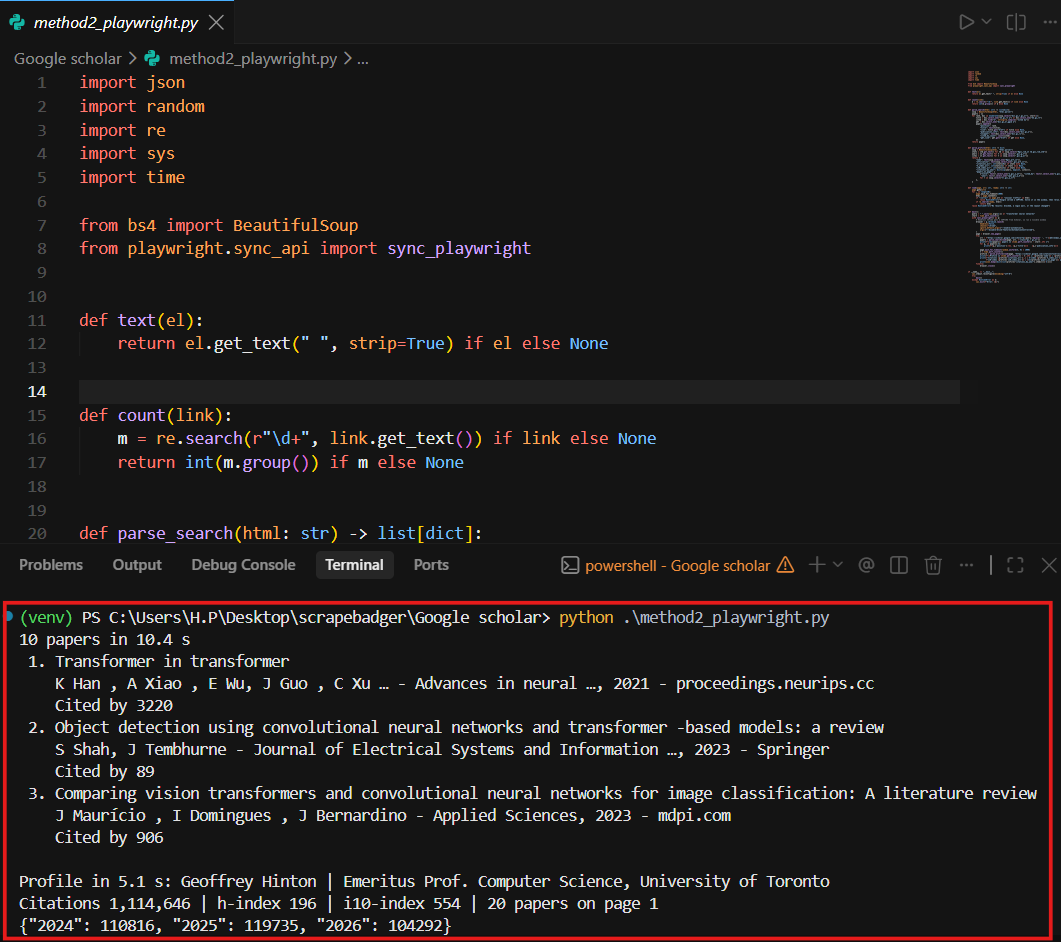
The profile numbers match what ScrapeBadger’s author endpoint returned the same day: 1,114,646 citations and an h-index of 196. This is also the profile scholarly2 took 24.0 seconds to fill, though here we only parsed the first 20 papers.
What’s wrong with Playwright
It works, with a few catches:
- A visible window and patched flags. Default Playwright got a CAPTCHA on paper search, and headless mode did too, even with the patch. That rules out servers and CI unless you have a display.
- The verification page. If your wait condition matches any Scholar markup, you can read the interstitial instead of the results and save an empty list without an error. The first page we received was a “Google Scholar” verification page, and the results only appeared after it, so the ready check has to match an actual result element.
- Speed. 10 papers took 10.4 seconds, including starting Chrome and getting past the verification step, and every page is a full browser load.
- Your IP. Every request comes from your own address. The random delay helps, but Scholar’s limits aren’t published, and you’d likely see CAPTCHAs come back once you loop over a few hundred queries. There are no proxies to rotate unless you add them.
- Selectors. Classes like gs_r, gs_or, gs_rs, and gsc_a_tr are Scholar’s markup, and when Google changes the page, the parser breaks. We also got one wrong ourselves: a bad gs_fl selector gave Cited by None on our first run.
- Author search. Searching by name needs a login. Playwright opens a fresh, logged-out browser on every run, so you’d need a saved browser profile and a manual Google sign-in.
For a handful of lookups you can watch, this is a fine free option. It got the data scholarly2 couldn’t.
Where the free methods fall short
scholarly2 returned no papers. Playwright returned 10 in 10.4 seconds, but only with a person watching a visible Chrome window. Take the person away and four problems show up:
- CAPTCHAs. Headless mode hit one on the first search, so a scheduled job on a server fails straight away.
- Volume. One query gives you 10 papers. A monitor with dozens of queries means dozens of browser sessions, each starting Chrome and loading a page from your IP.
- Author lookup. Both free methods need a Google login to find an author by name, so you can’t go from a name to an author ID.
- Citations. scholarly2’s BibTeX export raised an IndexError, and the Playwright script doesn’t do citations at all.
A visible browser can read Scholar fine. What a scheduled job needs is someone else running the browser, dealing with the blocks, and returning clean fields. That’s what ScrapeBadger’s API does.
Method 3: Scrape Google Scholar with ScrapeBadger’s API
ScrapeBadger runs each Scholar request on its own infrastructure and returns JSON, so you don’t deal with verification pages, proxies, or HTML selectors. If Google answers with a 429 or a CAPTCHA, ScrapeBadger switches to a new residential IP address and retries, up to 3 times per request, according to its Google docs.
Take the search from Method 2. With the same 2020 to 2024 filter, one API call returned 20 papers in 5.2 seconds, with no browser and nobody at the keyboard. Author lookup, citation charts, and citation formats each have their own endpoint. The sections below cover all five, limits included.
Get your API key
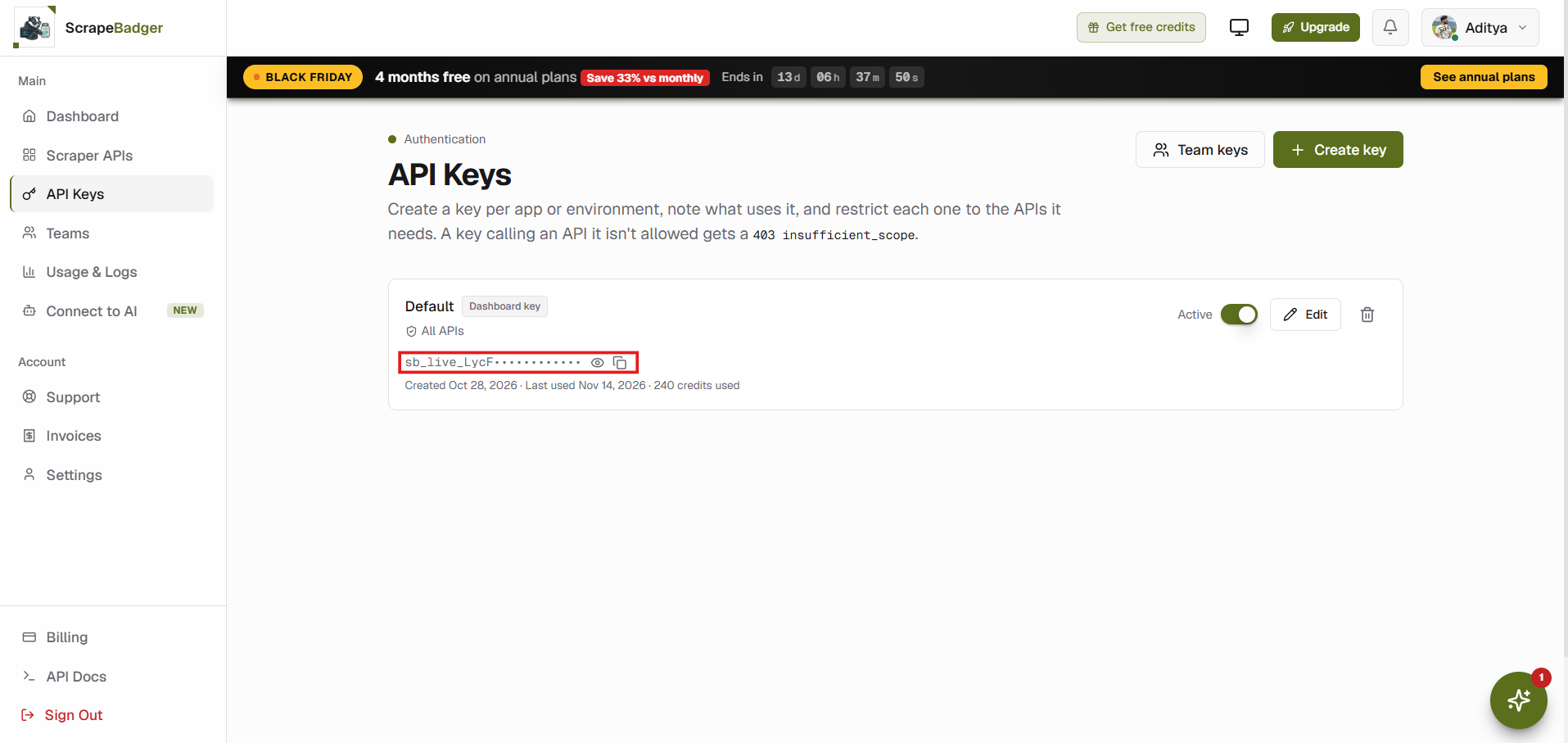
Create a free ScrapeBadger account, which comes with 1,000 free credits and needs no credit card, and copy your key from the API Keys page:
The API Keys page of the ScrapeBadger dashboard, with the copy button next to the default key. The key and the account name are blurred.
Install the official Python SDK and set your key as an environment variable:
python -m pip install scrapebadger
export SCRAPEBADGER_API_KEY="your_api_key"
# Windows PowerShell: $env:SCRAPEBADGER_API_KEY = "your_api_key"
Every Scholar request costs 20 credits, whichever endpoint you call, and failed requests are free, so the 1,000 free credits cover 50 requests. The free tier allows 5 requests per minute, which is why the scripts below pause 12.5 seconds between back-to-back calls. The rate limits page lists the limit for each plan.
Endpoint 1: Search papers
scholar.search() takes a query and returns scholarly articles. Its parameters:
Parameter | What it does |
|---|---|
| The search query (required) |
| Lower and upper publication year |
|
|
| Page number, starting at 0 |
| Results per page, 1 to 20 |
| Interface language, |
This script searches for papers from 2020 to 2024, prints them, and saves them to CSV. Save it as scholar_search.py:
import asyncio
import csv
import os
import sys
import time

from scrapebadger import ScrapeBadger

FIELDS = ["position", "id", "title", "authors", "publication_info", "cited_by_count",
          "versions_count", "pdf_link", "link"]


def to_row(paper: dict) -> dict:
    return {
        "position": paper["position"],
        "id": paper["id"],
        "title": paper["title"],
        "authors": ", ".join(a["name"] for a in paper["authors"]),
        "publication_info": paper["publication_info"],
        "cited_by_count": paper["cited_by_count"],
        "versions_count": paper["versions_count"],
        "pdf_link": paper["pdf_link"],
        "link": paper["link"],
    }


async def main():
    query = " ".join(sys.argv[1:]) or "transformer neural networks"
    start = time.perf_counter()
    async with ScrapeBadger(os.environ["SCRAPEBADGER_API_KEY"]) as client:
        page = await client.google.scholar.search(query, as_ylo=2020, as_yhi=2024, num=20)
    elapsed = time.perf_counter() - start
    rows = [to_row(p) for p in page["results"]]
    print(f"{len(rows)} papers for{page['query']!r} in{elapsed:.1f} s\n")
    for row in rows:
        print(f"{row['position']:>2}.{row['title']}")
        print(f"{row['publication_info']}")
        print(f"    Cited by{row['cited_by_count']} |{row['versions_count']} versions | "
              f"PDF:{row['pdf_link'] or 'none'}\n")
    with open("scholar_results.csv", "w", newline="", encoding="utf-8") as f:
        writer = csv.DictWriter(f, fieldnames=FIELDS)
        writer.writeheader()
        writer.writerows(rows)
    print("Saved to scholar_results.csv")


if __name__ == "__main__":
    sys.stdout.reconfigure(encoding="utf-8")
    asyncio.run(main())
Run it:
python method2_playwright.py "transformer neural networks"It returned 20 papers in 5.2 seconds:
Terminal output of scholar_search.py: 20 papers found in 5.2 seconds, with the first results showing title, publication info, citation count, version count, and PDF link.
The output is long, so it isn’t practical to paste all 20 papers here. This is the start and the end of it:
20 papers for 'transformer neural networks' in 5.2 s

 1. Transformer in transformer
    Advances in neural …, 2021 - proceedings.neurips.cc
    Cited by 3220 | 6 versions | PDF: https://proceedings.neurips.cc/paper_files/paper/2021/file/854d9fca60b4bd07f9bb215d59ef5561-Paper.pdf

 2. Object detection using convolutional neural networks and transformer -based models: a review
    Journal of Electrical Systems and Information …, 2023 - Springer
    Cited by 89 | 5 versions | PDF: https://link.springer.com/content/pdf/10.1186/s43067-023-00123-z.pdf

 3. Are convolutional neural networks or transformers more like human vision?
    arXiv preprint arXiv:2105.07197, 2021 - arxiv.org
    Cited by 362 | 5 versions | PDF: https://arxiv.org/pdf/2105.07197

 ... papers 4 to 19 omitted ...

20. … artificial neural networks in microorganism image analysis: a comprehensive review from conventional multilayer perceptron to popular convolutional neural network …
    Artificial Intelligence Review, 2023 - Springer
    Cited by 331 | 13 versions | PDF: https://link.springer.com/content/pdf/10.1007/s10462-022-10192-7.pdf

Saved to scholar_results.csv
Each paper in results has these fields:
Field | What it contains |
|---|---|
| The rank on the page and Scholar’s result ID, which the citation endpoint takes |
| The title and the link to the paper |
| The text excerpt, and the line with journal, year, and site |
| A list of |
| Citation count and the link to the citing papers |
| Number of versions, and the link to related papers |
| A PDF link when Scholar shows one, and the full list of resource links |
| A badge such as |
A few things to know about the response. Many fields are nullable, because the API only returns what Scholar shows for each result: one result had no versions_count, and 1 of the 20 papers had no PDF link. total_results also came back None for our queries, so don’t use it to count pages.
To get more than 20 papers, increase page. With as_ylo=2020, as_yhi=2024, num=20 and page=1, we got 20 more papers, all from 2020 to 2024. Pass as_sdt="7" to include patents. The Google Scholar API reference lists every parameter.
Endpoint 2: Search author profiles
scholar.profiles() takes a name in the mauthors parameter. It does less than the name suggests, so it helps to know how it works.
Google puts its own author search page behind a login, the same sign-in redirect we saw in Method 1. So ScrapeBadger runs a regular Scholar search for the name and collects the unique author profile links from the bylines of the results. For “Geoffrey Hinton”, we got this:
Y LeCun, Y Bengio, G Hinton, RR Salakhutdinov, S Osindero, YW Teh, I Sutskever, P Dayan, BJ Frey, RM Neal, RS Zemel
That has three consequences:
- Names are abbreviated. Bylines use initials, so Hinton shows up as “G Hinton”.
- Co-authors show up too. You get the authors on the matching papers, so we got 11 authors, and the one we wanted was third.
- Most fields are empty. affiliation, email_domain, cited_by, interests, and thumbnail come back null or empty. You get name, author_id, and link.
The after_author and before_author pagination parameters are accepted but ignored. In our run both came back None.
Treat it as an ID finder: match the name, take the author_id, and pass it to the profile endpoint.
Endpoint 3: Author profile
scholar.author() turns an author_id into a full profile. The script below chains three endpoints: it finds the ID with profile search, fetches the profile, then fetches the citation chart (Endpoint 4). Save it as scholar_author.py:
import asyncio
import os
import sys
import time

from scrapebadger import ScrapeBadger

FREE_TIER_PAUSE = 12.5  # seconds, for the free tier's 5 requests per minute


def initials_match(byline: str, full_name: str) -> bool:
    """Match a Scholar byline such as 'G Hinton' against 'Geoffrey Hinton'."""
    *b_first, b_last = byline.split()
    *f_first, f_last = full_name.split()
    if b_last.lower() != f_last.lower():
        return False
    b_initials = "".join(b_first).upper()
    f_initials = "".join(w[0] for w in f_first).upper()
    return b_initials.startswith(f_initials) or f_initials.startswith(b_initials)


async def main():
    name = " ".join(sys.argv[1:]) or "Geoffrey Hinton"
    async with ScrapeBadger(os.environ["SCRAPEBADGER_API_KEY"]) as client:
        t = time.perf_counter()
        found = await client.google.scholar.profiles(name)
        print(f"Profile search returned{len(found['profiles'])} authors in{time.perf_counter() - t:.1f} s:")
        print("  " + ", ".join(p["name"] for p in found["profiles"]))
        match = next((p for p in found["profiles"] if initials_match(p["name"], name)), None)
        if not match:
            sys.exit(f"No profile matched{name!r}")
        print(f"Matched{match['name']!r} -> author_id{match['author_id']}\n")

        await asyncio.sleep(FREE_TIER_PAUSE)
        t = time.perf_counter()
        profile = await client.google.scholar.author(match["author_id"], pagesize=100)
        profile_time = time.perf_counter() - t
        await asyncio.sleep(FREE_TIER_PAUSE)
        t = time.perf_counter()
        chart = await client.google.scholar.author_citation(match["author_id"])
        chart_time = time.perf_counter() - t

    print(f"Author profile took{profile_time:.1f} s, citation chart took{chart_time:.1f} s\n")
    author, stats = profile["author"], profile["stats"]
    print(f"{author['name']} |{', '.join(author['affiliations'])} |{author['email_domain']}")
    print(f"Interests:{', '.join(author['interests'])}")
    print(f"Citations{stats['citations_all']:,} | h-index{stats['h_index_all']} | "
          f"i10-index{stats['i10_index_all']}")
    print(f"Since-year columns:{stats['citations_since_year']:,} citations, "
          f"h-index{stats['h_index_since_year']}\n")

    print(f"Top{min(5, len(profile['articles']))} of{len(profile['articles'])} papers on this page:")
    for a in profile["articles"][:5]:
        print(f"{a['cited_by_count']:>7,}{a['year']}{a['title']}")

    print(f"\nCo-authors ({len(profile['co_authors'])}): "
          + ", ".join(c["name"] for c in profile["co_authors"]))

    years = chart["citations_by_year"]
    print(f"\nCitations per year,{years[0]['year']}-{years[-1]['year']} "
          f"(chart total{chart['total_citations']:,}):")
    for point in years[-6:]:
        print(f"{point['year']}{point['citations']:>7,}{'#' * (point['citations'] // 5000)}")


if __name__ == "__main__":
    sys.stdout.reconfigure(encoding="utf-8")
    asyncio.run(main())
Run it:
python scholar_author.py "Geoffrey Hinton"The output covers Endpoints 2, 3, and 4 together:
Terminal output of scholar_author.py: the profile search with its timing, the matched author ID, the author profile and citation chart timings, Geoffrey Hinton’s affiliation, interests, citation statistics, and the first of his top papers.
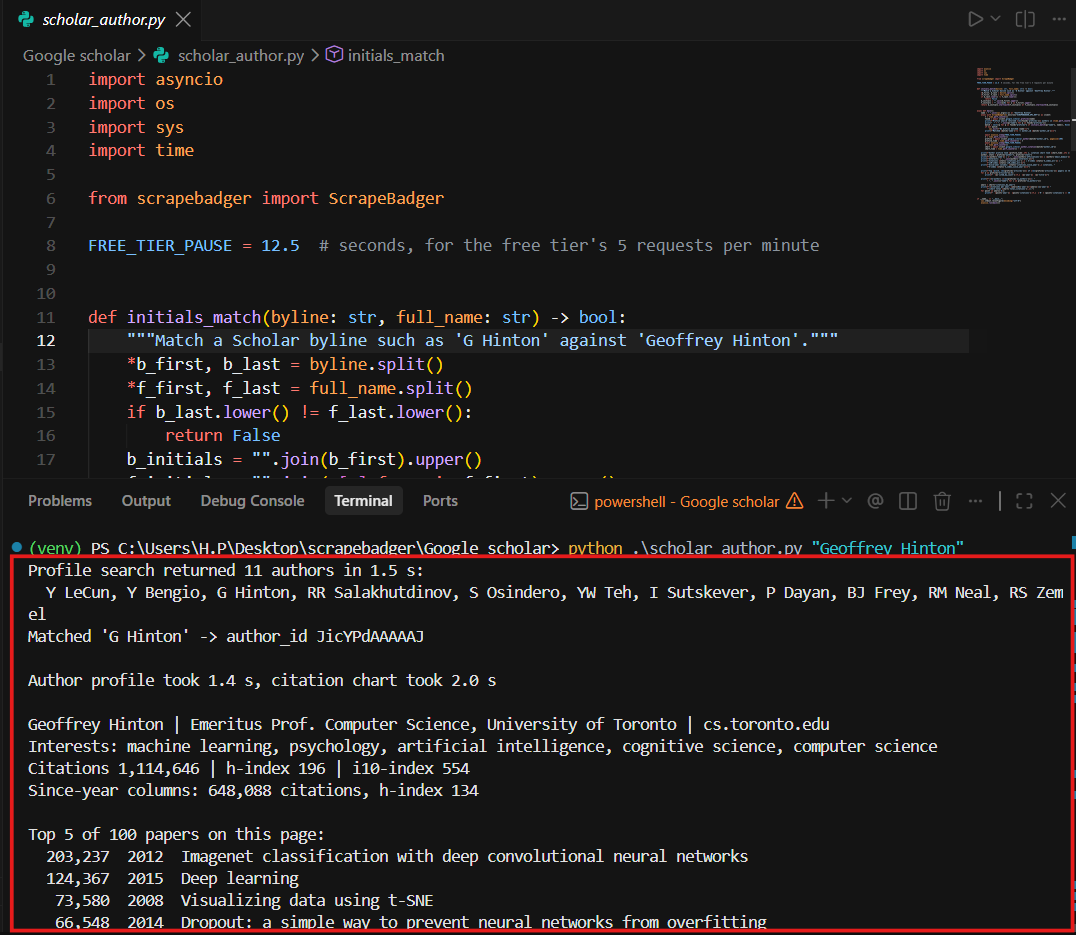
The screenshot cuts off the end of the output, so here is the full text:
Profile search returned 11 authors in 1.5 s:
  Y LeCun, Y Bengio, G Hinton, RR Salakhutdinov, S Osindero, YW Teh, I Sutskever, P Dayan, BJ Frey, RM Neal, RS Zemel
Matched 'G Hinton' -> author_id JicYPdAAAAAJ

Author profile took 1.4 s, citation chart took 2.0 s

Geoffrey Hinton | Emeritus Prof. Computer Science, University of Toronto | cs.toronto.edu
Interests: machine learning, psychology, artificial intelligence, cognitive science, computer science
Citations 1,114,646 | h-index 196 | i10-index 554
Since-year columns: 648,088 citations, h-index 134

Top 5 of 100 papers on this page:
  203,237  2012  Imagenet classification with deep convolutional neural networks
  124,367  2015  Deep learning
   73,580  2008  Visualizing data using t-SNE
   66,548  2014  Dropout: a simple way to prevent neural networks from overfitting
   62,858  1986  Learning internal representations by error-propagation

Co-authors (11): Terrence Sejnowski, George E. Dahl, Vinod Nair, Abdelrahman Mohamed, Radford Neal, David C. Plaut, Sidney Fels, Chris Williams, Demetri Terzopoulos, Robert Tibshirani, Steven L. Small

Citations per year, 1990-2026 (chart total 1,092,679):
  2021  101,867  ####################
  2022  104,132  ####################
  2023  107,144  #####################
  2024  110,816  ######################
  2025  119,735  #######################
  2026  104,292  ####################
The profile comes back in four parts:
Key | What it contains |
|---|---|
|
|
|
|
|
|
|
|
pagesize goes up to 100 papers per call, and cstart is the offset for the next page, so a profile with several hundred papers takes several calls. The 100-paper profile call took 1.4 seconds.
Two things to watch in the output. since_year came back null, so the API doesn’t say which year the “since” columns start from. Scholar’s own page labels it (“Since 2021” when we looked), so check there before you quote those numbers. And citation counts change as Scholar updates its index, so timestamp whatever you store.
Endpoint 4: Author citation chart
scholar.author_citation() returns the citations-per-year series that Scholar draws as a bar chart on the profile:
chart = await client.google.scholar.author_citation("JicYPdAAAAAJ")
for point in chart["citations_by_year"]:
    print(point["year"], point["citations"])
For Hinton, it returned 37 yearly points from 1990 to 2026, plus total_citations. Citations went from 3,493 in 1990 to 119,735 in 2025, and the call took 2.0 seconds.
The chart total and the profile’s citations_all don’t match. In the run above, the chart total was 1,092,679 and the profile said 1,114,646, about 2 percent more. The chart total is the sum of the yearly bars, and the profile figure is Scholar’s own all-time count. We don’t know why they differ, so pick one source per metric and don’t mix them. Also don’t treat a missing value as 0, because either source can return null.
If you want citation history, call this endpoint on a schedule and store each result with a timestamp and the author_id. That gives you a time series.
What the 5 calls cost
Every endpoint costs 20 credits. The times below are what our scripts printed. The search time covers the whole script, including connecting to the API, and the others time just the API call:
Endpoint | Request | Time | Credits |
|---|---|---|---|
Search papers | 20 papers, 2020 to 2024 | 5.2 s | 20 |
Search author profiles | “Geoffrey Hinton” | 1.5 s | 20 |
Author profile | 100 papers | 1.4 s | 20 |
Author citation chart | 37 years | 2.0 s | 20 |
Citation formats | 1 paper | 0.8 s | 20 |
Those 5 calls cost 100 credits in total. The price is flat per request and doesn’t change with how many papers come back, so it makes sense to always ask for num=20 on searches and pagesize=100 on profiles. When we checked, the Starter pack was $20 for 100,000 credits, so a 20-credit call costs $0.004, or about $0.04 for 10 requests. The pricing page has current rates.
To put that in perspective, 50 saved searches a day use 1,000 credits a day, and refreshing the profile and chart for 100 authors uses 4,000 credits per refresh.
Compare the 3 methods
| Playwright | ScrapeBadger’s API | |
|---|---|---|---|
Paper search | 0 papers after 21.4 s | 10 papers in 10.4 s | 20 papers in 5.2 s |
Author search | Not supported, needs a Google login | Needs a Google login | 11 authors in 1.5 s, IDs only |
Author profile | 24.0 s for 841 papers | 5.1 s for the first 20 papers | 100 papers per call in 1.4 s |
Citations per year | Yes, in the profile fill | Parsed from the profile page | Separate endpoint, 37 years in 2.0 s |
Citation formats | BibTeX failed ( | Not built | 5 styles and 4 export links |
Runs on a server | README says you need proxies | No, headless got a CAPTCHA | Yes |
Blocks, CAPTCHAs, and proxies | Your problem | Your problem | Handled for you |
Maintenance | Pin | Your CSS selectors | Handled by ScrapeBadger |
Best for | One-off author lookups | A few lookups you watch | Scheduled and larger runs |
Final thoughts
Scholar is hard to scrape for free. Plain requests get a 429 or a verification page, author search needs a login, scholarly2 returned no papers in our tests, and the Playwright route only runs in a visible window.
ScrapeBadger’s 5 Scholar endpoints cover the whole workflow as JSON: finding papers, collecting author IDs, pulling profiles, charting citations over time, and formatting references. You can try the search script with the free credits.
Additional Resources
How to Scrape Google News Using Python
How to Scrape Google Images Using Python
How to Scrape Google Search Results with Python
How to Scrape Naver Shopping Using Python
How to Scrape Brand Mentions in Google AI Overviews
FAQ
Can you scrape Google Scholar with Python?
Yes, but free tools are unreliable. In our tests, plain requests calls got HTTP 429 or a verification page, scholarly2 returned no results for paper search, and Playwright worked only in a visible Chrome window. ScrapeBadger’s API returns Scholar data as JSON from one Python call and handles Google’s blocks.
Is there an official Google Scholar API?
No. Google doesn’t offer a public Scholar API, which the CRAN scholar package docs also point out. OpenAlex and Semantic Scholar have their own APIs, but their citation counts and author profiles are separate datasets from Scholar’s. If you need Scholar’s own numbers, such as a researcher’s h-index as Scholar reports it, you have to get them from Scholar.
How do I get more than 20 results from Google Scholar?
Increase page, which starts at 0, and keep num at its maximum of 20. Each page is a separate 20-credit request. For an author’s papers, use cstart with a pagesize of up to 100.
How do I find a researcher’s Scholar ID?
Call the profile search with the name, then match the result. Names come back as initials, such as “G Hinton”, so match on surname and initials, and check the ID with the author profile endpoint before storing it. You can also get author IDs from a paper search, where authors[].author_id is present for authors with a profile.
Is it legal to scrape Google Scholar?
It depends on what you collect and how you use it. Titles, citation counts, and author metrics are usually lower risk to store, but linked PDFs and full texts belong to their publishers. Check the terms of each source, and get legal advice before you republish content or train a model on it.

Written by
Domas Sakavickas
Dom Sakavickas is Co-founder of ScrapeBadger, building web scraping infrastructure for developers and data teams. He writes about the web data market, tool comparisons, and business use cases for scraping. ScrapeBadger is a web scraping API platform specialising in Twitter/X, Reddit and Google data, with dedicated scrapers also covering TikTok, YouTube, LinkedIn, Amazon, eBay, Zillow and 40+ more: with built-in anti-bot bypass and an MCP server for AI agents.
Ready to get started?
Join thousands of developers using ScrapeBadger for their data needs.